
1. Ro-ràdh
This manual provides detailed instructions for the proper use and maintenance of your Oakcastle HIFI500 Remote Control. This remote is designed as a replacement or spare for the Oakcastle HIFI500 audio system, ensuring seamless control over its functions. Please read this manual thoroughly before use to ensure optimal performance and longevity of your remote control.
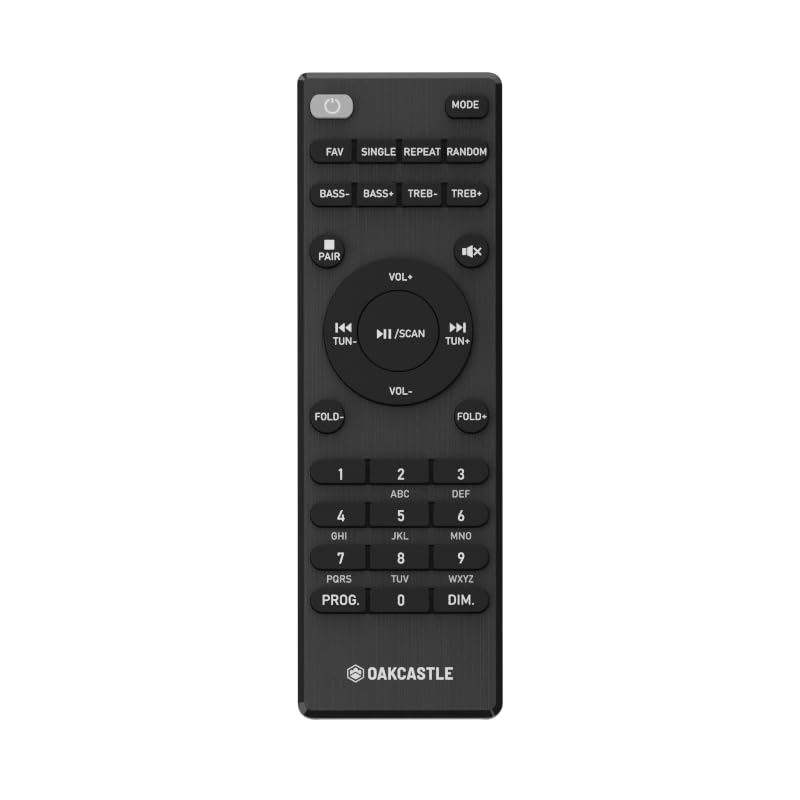
Figear 1.1: Aghaidh view of the Oakcastle HIFI500 Remote Control. This image displays the compact design and button layout, including power, volume, source selection, and playback controls, typical for operating the HIFI500 audio system.
2. Suidhich
2.1. Stàladh bataraidh
The Oakcastle HIFI500 Remote Control requires two AAA batteries (not included) for operation. Follow these steps to install the batteries:
- Lorg an roinn bataraidh air cùl an smachd iomallach.
- Brùth sìos air an taba agus sleamhnaich còmhdach a’ bhataraidh sìos gus a fhosgladh.
- Cuir a-steach dà bataraidh AAA, a’ dèanamh cinnteach gu bheil na cinn-uidhe adhartach (+) agus àicheil (-) a’ freagairt gu ceart ris na comharran taobh a-staigh an roinn.
- Sleamhnachadh còmhdach a’ bhataraidh air ais na àite gus an cliog e gu tèarainte.
Thoir an aire: Always use new batteries and dispose of old batteries responsibly. Do not mix old and new batteries, or different types of batteries.
2.2. Cleachdadh Tòiseachaidh
Once batteries are installed, the remote control is ready for use with your Oakcastle HIFI500 audio system. Point the remote directly at the infrared (IR) receiver on your HIFI500 system. No additional pairing is typically required for this replacement remote.
3. Ag obrachadh an Remote Control
The Oakcastle HIFI500 Remote Control provides full functionality for your HIFI500 audio system. Below is a general guide to common button functions:
- Putan Cumhachd (⏻): Turns the HIFI500 system on or off.
- Tomhais Suas/Sìos (Vol+ / Vol-): Atharraich an ìre toraidh claisneachd.
- Balbh (🔇): Cuiridh seo stad air an toradh claisneachd airson ùine.
- Source/Input (Stòr): Cycles through available audio inputs (e.g., CD, FM, Bluetooth, AUX).
- Smachdan Ath-chluich (▶ / ⏸ / ⏹ / ⏪ / ⏩): Controls media playback (Play, Pause, Stop, Rewind, Fast Forward) for compatible sources like CD or USB.
- Putanan seòlaidh (▲ / ▼ / ◀ / ▶): Used to navigate menus and selections on the HIFI500 system display.
- Putan Ceart gu leòr/Cuir a-steach: A’ dearbhadh taghaidhean.
- Meur-chlàr àireamhach (0-9): For direct input of radio frequencies, track numbers, or other numerical data.
Refer to your Oakcastle HIFI500 audio system's main user manual for specific functions and advanced operations.
4. Cumail suas
4.1. Glanadh
To clean your remote control, gently wipe the surface with a soft, dry cloth. For stubborn dirt, slightly dampnigh an clò le uisge no le inneal-glanaidh tlàth, neo-sgrìobach. Seachain ceimigean cruaidh, fuasglaidhean no stuthan sgrìobach a chleachdadh, oir faodaidh iad sin crìoch no pàirtean a-staigh an smachd iomallach a mhilleadh.
4.2. Ath-nuadhachadh bataraidh
Replace batteries when the remote's response becomes sluggish or stops working. Follow the battery installation steps outlined in Section 2.1. Always replace both batteries simultaneously with new ones.
4.3. Stòradh
Nuair nach eilear ga chleachdadh airson ùine mhòr, thathar a’ moladh na bataraidhean a thoirt a-mach às an smachd iomallach gus casg a chur air aodion, a dh’ fhaodadh milleadh adhbhrachadh. Stòraich an smachd iomallach ann an àite fionnar, tioram air falbh bho sholas dìreach na grèine agus teòthachd anabarrach.
5. A ’dèanamh trioblaid
If you encounter issues with your Oakcastle HIFI500 Remote Control, please refer to the following common problems and solutions:
- Chan eil an inneal-iomallach a’ freagairt:
- Thoir sùil a bheil na bataraidhean air an cur a-steach gu ceart leis a’ phòlaireachd cheart.
- Cuir feadhainn ùra an àite na bataraidhean.
- Ensure there are no obstructions between the remote control and the HIFI500 system's IR receiver.
- Make sure you are within the effective range and pointing the remote directly at the HIFI500 system.
- Gnìomh eadar-amail:
- Bidh seo gu tric a’ comharrachadh gu bheil cumhachd a’ bhataraidh ìosal. Cuir na bataraidhean ùra nan àite.
- Ensure the remote's IR emitter is clean and free from dirt or smudges.
If the problem persists after trying these solutions, please contact Oakcastle customer support.
6. Sònrachaidhean
| Feart | Sònrachadh |
|---|---|
| Modail | HIFI500 Remote Control |
| Brand | Caisteal Oak |
| Teicneòlas ceangail | In-dhearg (IR) |
| Stòr cumhachd | 2 x Bataraidh AAA (gun a thoirt a-steach) |
| An àireamh as motha de dh’ innealan le taic | 1 (Oakcastle HIFI500 Audio System) |
| Feart sònraichte | Aotrom |
| Cuideam nì | 2.82 unnsa (mu 80 gram) |
| Meud pacaid | 8 x 3.2 x 2.5 òirleach (timcheall air 20.3 x 8.1 x 6.3 cm) |
| Dèanadair | MARBHRANN |
7. Barantas agus Taic
7.1. Fiosrachadh Barantais
This Oakcastle HIFI500 Remote Control is covered by a manufacturer's warranty. Please refer to the warranty card included with your original Oakcastle HIFI500 audio system or visit the official Oakcastle weblàrach-lìn airson teirmichean is cumhaichean barantais mionaideach. Cùm do dhearbhadh ceannach airson tagraidhean barantais.
7.2. Taic teachdaiche
For technical assistance, troubleshooting beyond this manual, or warranty inquiries, please contact Oakcastle customer support. You can typically find contact information, including phone numbers, email addresses, and support portals, on the official Oakcastle weblàrach.
Please have your product model (HIFI500 Remote Control) and purchase details ready when contacting support.