
1. Ro-ràdh
This manual provides detailed instructions for the installation, operation, and maintenance of your Acouto 7-Inch TFT LCD VGA Monitor. Please read this manual thoroughly before using the product to ensure proper function and to prevent damage. Keep this manual for future reference.
2. Fiosrachadh Sàbhailteachd
- Dèan cinnteach gu bheil an solar cumhachd a’ coinneachadh ris an ìre ainmichte voltage (12V) and current (greater than 1A) requirements.
- If using a car power supply, a regulator must be added to prevent interference and voltage caochlaidhean.
- Seachain a bhith a’ nochdadh an monitor gu fìor theodhachd, taiseachd, no solas dìreach.
- Na feuch ri an aonad a thoirt às a chèile no a chàradh thu fhèin. Thoir aire do luchd-obrach teisteanasach airson a h-uile seirbheis.
- Keep the monitor away from water or other liquids to prevent electric shock.
3. Pasgan-susbaint
Dèan cinnteach gu bheil na nithean gu lèir a tha air an liostadh gu h-ìosal air an toirt a-steach don phacaid agad:
- 1 x 7-Inch LCD Display Screen (1024x600)
- 1 x Driver Board (Control Kit)
- 1 x Flat Cable (for connecting LCD to driver board)
- 1 x Càball Cumhachd USB
- 1 x Smachd Iomallach

Image 3.1: Complete package contents including the LCD screen, driver board, various cables, and a remote control.
4. Toradh thallview
The Acouto 7-Inch TFT LCD VGA Monitor is a versatile display solution featuring a 1024x600 resolution. It is designed for various applications, including use with Raspberry Pi 3/2 or as a general computer display. The monitor supports multiple input types and offers image adjustment capabilities.
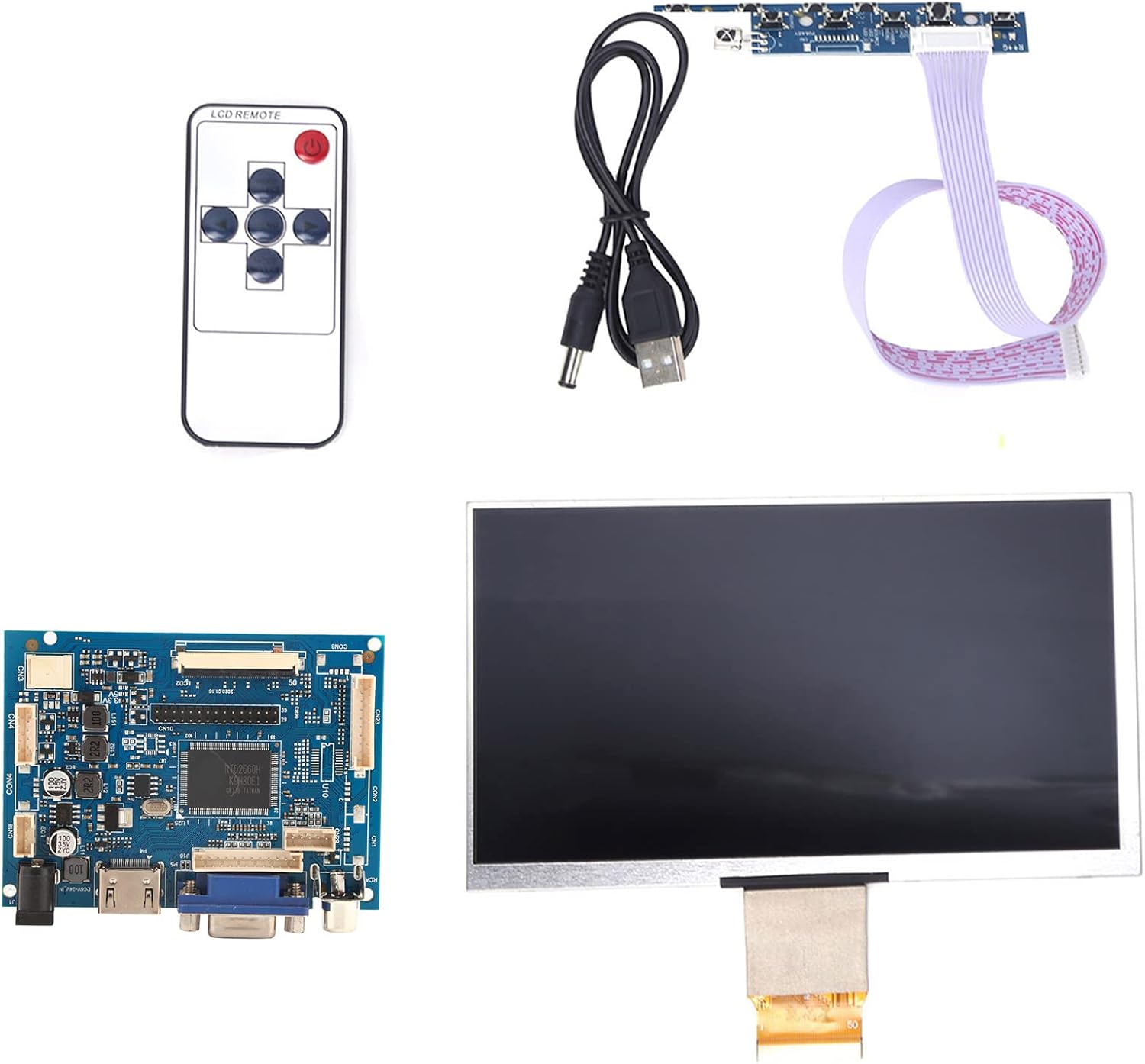
Dealbh 4.1: Thairisview of the Acouto 7-inch TFT LCD VGA Monitor kit components.
4.1. Taisbeanadh LCD
The 7-inch TFT LCD panel provides a clear display with a physical resolution of 1024x600 pixels. It supports various resolutions from 640x480 to 1600x1200 through arbitrary adjustment.

Image 4.2: The 7-inch TFT LCD display screen.
4.2. Driver Board
The driver board serves as the control unit for the LCD, featuring multiple input interfaces including 2 x AV channels, VGA, and 1 x HD input (version 1.2). It also includes buttons for menu navigation and settings adjustment.

Image 4.3: The driver control board with input ports.
4.3. Smachd Iomallach
A remote control is included for convenient adjustment of settings and input selection.

Image 4.4: The included remote control.
5. Suidhich
Follow these steps to set up your Acouto 7-Inch TFT LCD VGA Monitor:
- Connect the LCD to the Driver Board: Carefully connect the flat cable from the LCD display to the corresponding connector on the driver board. Ensure the connection is secure and correctly oriented.
- Cuir a-steach bhidio ceangail: Choose your desired video input (VGA, HD, AV1, or AV2) and connect the appropriate cable from your source device (e.g., Raspberry Pi, computer, DVD player) to the driver board.
- Ceangal cumhachd: Connect the USB power cord to the driver board's power input, and then connect it to a 12V power source (greater than 1A). If using a car power supply, ensure a regulator is in place.
- Cumhachd air: Once all connections are secure, power on the monitor and your source device.

Image 5.1: LCD screen connected to the driver board.
6. Stiùireadh Obrachaidh
6.1. Cumhachd air / dheth
Press the power button on the driver board or the remote control to turn the monitor on or off.
6.2. Taghadh a-steach
Use the 'Input' button on the driver board or remote control to cycle through available video inputs (AV1, AV2, VGA, HD).
6.3. Seòladh clàr-taice
Access the On-Screen Display (OSD) menu by pressing the 'Menu' button. Use the arrow buttons to navigate and the 'OK' or 'Enter' button to select options. Adjust settings such as brightness, contrast, color, and aspect ratio.
6.4. Image Flip and Convert
The monitor supports image flipping (up/down, left/right) and display format conversion (4:3 / 16:9). These functions can be accessed through the OSD menu or dedicated buttons on the remote control, providing a customizable viewann an eòlas.
Note: AV2 video input is designed for automatic camera screen display, typically used in automotive applications for reverse cameras.
7. Cumail suas
Gus dèanamh cinnteach gum mair an monitor agad fad-beatha agus gum bi e ag obair gu h-iomchaidh, lean na stiùiridhean cumail suas seo:
- Glanadh an sgrion: Sguab an sgrion gu socair le clò bog, gun lint. Airson comharran stòlda, sguab beaganampnigh an clò le uisge no le inneal-glanaidh sgrion neo-sgrìobach. Na spraeadh leaghan gu dìreach air an sgrion.
- A’ glanadh an Casing: Cleachd clò bog, tioram gus c an monitor a ghlanadhasing. Seachain innealan-glanaidh no fuasglaidhean làidir a chleachdadh.
- Stòradh: When not in use for extended periods, store the monitor in a cool, dry place, away from direct sunlight and dust.
8. A ’dèanamh trioblaid
If you encounter any issues with your monitor, refer to the following troubleshooting guide:
| Trioblaid | Adhbhar a dh’fhaodadh a bhith ann | Fuasgladh |
|---|---|---|
| No display / Black screen |
|
|
| Image distorted / Poor quality |
|
|
| Chan eil smachd iomallach ag obair |
|
|
9. Sònrachaidhean
Detailed technical specifications for the Acouto 7-Inch TFT LCD VGA Monitor:
| Feart | Sònrachadh |
|---|---|
| Brand | Acuto |
| Ainm Modail | Acouto536ocyn8e0 |
| Meud sgrion | 7 òirlich |
| Seòrsa Taisbeanaidh | TFT LCD |
| Fuasgladh Corporra | 1024 x 600 |
| Rùintean le taic | 640x480 gu 1600x1200 |
| Co-mheas taobh | 4:3 (convertible to 16:9) |
| Eadar-aghaidh bathar-cruaidh | VGA, HD (version 1.2), 2 x AV channels |
| Cur a-steach eadar-aghaidh daonna | Buttons, Remote Control |
| Vol Obrachaidhtage | 12V (Power supply > 1A required) |
| Cumhachd Rangaichte | 6-7 W |
| Meudan toraidh | 30 x 19 x 4 cm |
| Cuideam toraidh | 323 g |
10. Barantas agus Taic
For warranty information and technical support, please refer to the documentation provided at the time of purchase or contact your retailer. Keep your purchase receipt as proof of purchase for any warranty claims.