
1. Ro-ràdh
This user manual provides essential information for the safe and efficient operation of your iFFALCON 65U85 4K Mini LED Google TV. Please read this manual thoroughly before using the product and retain it for future reference.
2. Fiosrachadh Sàbhailteachd
Lean ceumannan sàbhailteachd bunaiteach an-còmhnaidh nuair a bhios tu a’ cleachdadh an telebhisean seo gus cunnart teine, clisgeadh dealain agus leòn a lùghdachadh.
- Na nochd an telebhisean gu uisge no taiseachd.
- Na fosgail an telebhisean casing; cuir a h-uile seirbheiseachadh gu luchd-obrach teisteanasach.
- Ensure proper ventilation and do not block ventilation openings.
- Use only the power cord and accessories specified by the manufacturer.
- Cùm an telebhisean air falbh bho stòran teas agus solas dìreach na grèine.
3. Pasgan-susbaint
Dèan cinnteach gu bheil a h-uile nì anns a’ phacaid:
- iFFALCON 65U85 4K Mini LED Google TV
- Smachd Iomallach
- Càball cumhachd
- Leabhar-làimhe cleachdaiche (an sgrìobhainn seo)
- Cairt Barantais
- Wall Bracket (if included)
4. Suidhich
4.1 Dì-phapadh agus suidheachadh
Carefully remove the TV from its packaging. Place the TV on a stable, flat surface or mount it on a wall using a VESA-compatible bracket. Ensure adequate space around the TV for ventilation.
4.2 A’ ceangal cumhachd agus innealan
- Ceangail an càball cumhachd ris an telebhisean agus an uair sin ri socaid cumhachd.
- Connect external devices (e.g., gaming consoles, Blu-ray players) to the HDMI 2.1 ports.
- For internet access, connect an Ethernet cable to the LAN port or prepare for Wi-Fi setup.
4.3 Suidheachadh Tùsail agus Paidhreachadh Iomallach
Upon first power-on, the TV will guide you through the initial setup process. This includes language selection, network connection, and Google account login.
To pair the Bluetooth remote control:
- Suidhich an smachd iomallach a dh’ ionnsaigh an Tbh.
- Brùth agus cùm an Suidhichidhean putan agus an Dhachaigh putan aig an aon àm airson 4 diogan.
- The TV will display a pairing confirmation message once successful.
4.4 Ceangal lìonra
Connect your TV to the internet via Wi-Fi or Ethernet to access Google TV features and streaming services.
- Wi-Fi: Select your network from the list and enter the password.
- Ethernet: Connect an Ethernet cable from your router to the TV's LAN port.
5. Obrachadh an Tbh agad
5.1 Eadar-aghaidh Google TV
Your iFFALCON 65U85 features Google TV, providing a personalized experience with access to a vast library of content and apps.

5.2 Smachd Gutha le Neach-cuideachaidh Google
Use the built-in Google Assistant for hands-free control. Press the Google Assistant button on your remote and speak your commands.
- Lorg airson filmichean agus taisbeanaidhean.
- Smachd a chumail air innealan dachaigh snasail.
- Faigh freagairtean do cheistean.

5.3 Casting Content (AirPlay2 & Chromecast)
Easily share content from your smartphone or tablet to the TV screen.
- AirPlay2: For Apple devices, use AirPlay2 to stream videos, photos, and music.
- Chromecast: For Android devices and Chrome browser, use Chromecast built-in to cast content.

6. Prìomh fheartan
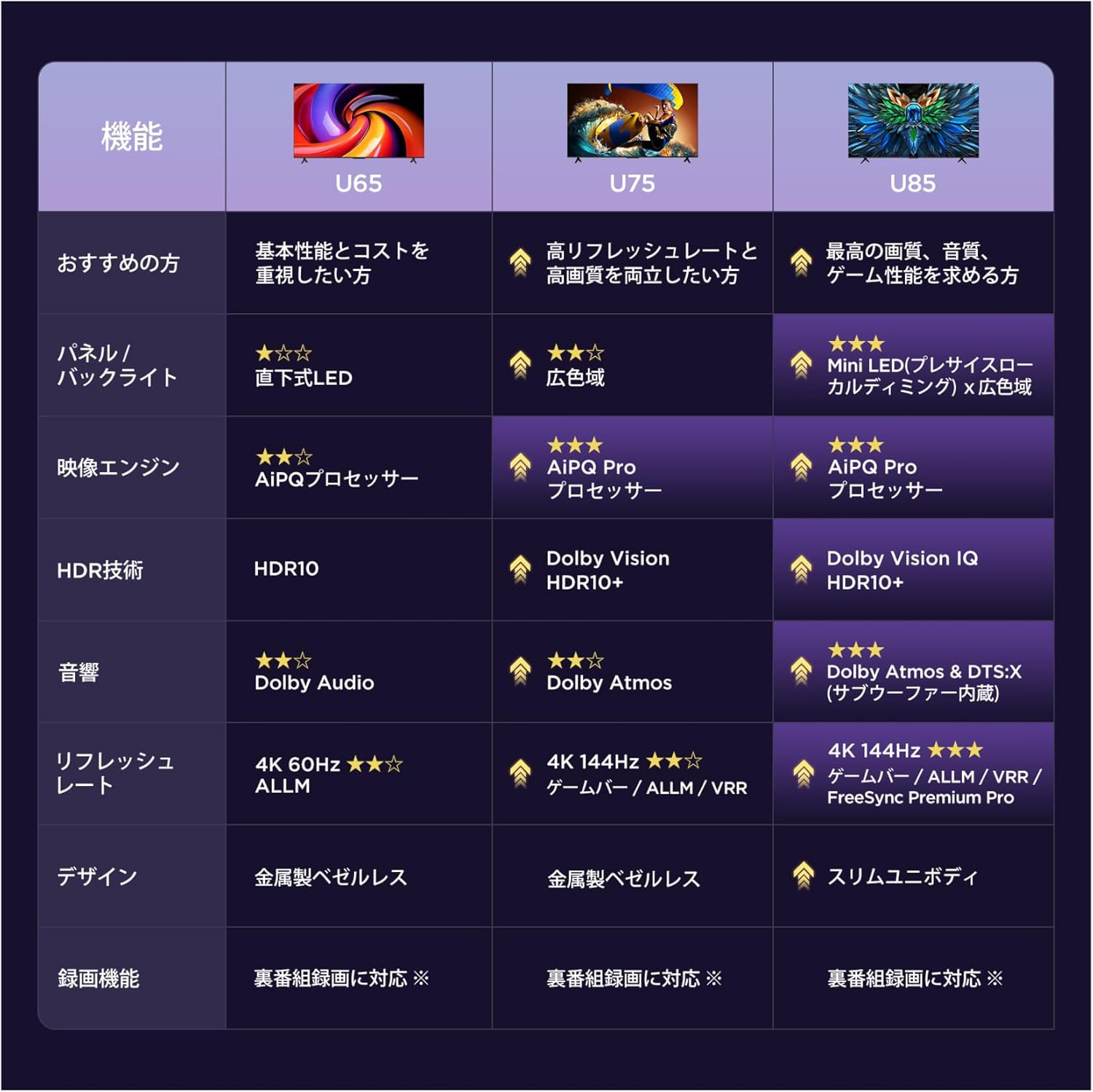
6.1 Display Technology: Mini LED & 4K HDR
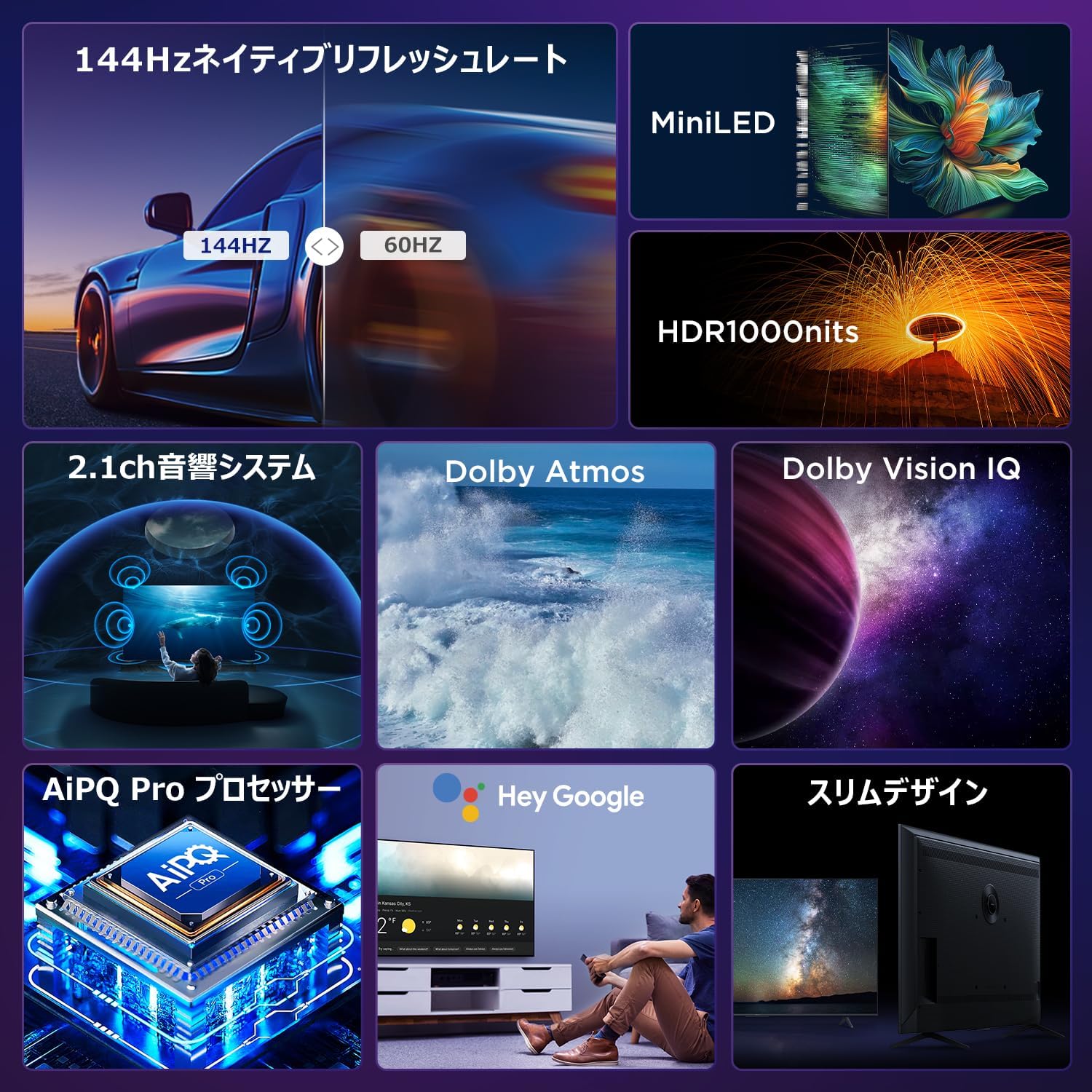
Experience stunning visuals with Mini LED backlight technology, delivering 1000 nits peak brightness and enhanced contrast. Combined with 4K resolution, Dolby Vision IQ, and HDR10+, you get precise brightness, vibrant colors, and deep blacks.


6.2 Immersive Audio: Dolby Atmos & DTS Virtual:X
Enjoy a captivating audio experience with Dolby Atmos and DTS Virtual:X, delivering multi-dimensional sound that fills your room. The 2.1ch speaker system provides powerful bass and clear audio.


6.3 Gaming Features: 144Hz VRR & Game Master
Designed for gamers, the 65U85 offers a native 144Hz refresh rate, Variable Refresh Rate (VRR), Auto Low Latency Mode (ALLM), and FreeSync Premium Pro for smooth, tear-free gameplay.


Pròiseasar 6.4 AiPQ Pro
The AiPQ Pro processor intelligently optimizes color, contrast, and motion for every scene, delivering a visually stunning and immersive viewann an eòlas.

6.5 Slim Metal Bezel-less Design
The TV features a sleek, metal bezel-less design that blends seamlessly into any living space, offering a premium aesthetic.

7. Sònrachaidhean
| Feart | Tuairisgeul |
|---|---|
| Meud sgrion | 65 òirlich |
| Seòrsa Taisbeanaidh | VA Panel, Mini LED |
| Fuasgladh | 4K (3840 x 2160) |
| Ìre Ath-nuadhachaidh | 144 Hz (Dùthchasach) |
| Taic HDR | Dolby Vision IQ, HDR10+ |
| Fuaim | 2.1ch Speaker System, Dolby Atmos, DTS Virtual:X |
| Àrd-ùrlar Smart TV | Tbh Google |
| Neach-taic Guth | Neach-taic Google |
| Ceangalachd | 3x HDMI 2.1, 2x USB, Wi-Fi, Bluetooth |
| Meudan (W x D x H) | 144.8 x 32.4 x 89.5 cm (leis an t-seasamh) |
| Cuideam | 19 kg |
| Co-fhreagarrachd VESA | Tha |

8. A ’dèanamh trioblaid
Ma thachras duilgheadasan leis an telebhisean agad, thoir sùil air na fuasglaidhean cumanta a leanas:
- Gun chumhachd: Dèan cinnteach gu bheil an càball cumhachd ceangailte gu tèarainte agus gu bheil an t-socaid cumhachd ag obair.
- Gun Dealbh/Fuaim: Check all cable connections (HDMI, audio). Verify the correct input source is selected.
- Iomallach gun a bhith ag obair: Replace batteries. Re-pair the remote control as described in Section 4.3.
- Gun cheangal eadar-lìn: Thoir sùil air an router agus am modem agad. Ath-cheangail ris an lìonra Wi-Fi no dèan cinnteach gu bheil an càball Ethernet ceangailte gu ceart.
- Cùisean Càileachd Dealbh: Adjust picture settings (brightness, contrast, color). Ensure content source is high quality.
Airson cùisean leantainneach, cuir fios gu taic luchd-cleachdaidh.
9. Cumail suas
Proper maintenance ensures the longevity of your iFFALCON TV:
- Glanadh an sgrion: Gently wipe the screen with a soft, dry, lint-free cloth. Do not use harsh chemicals or abrasive cleaners.
- A’ glanadh an Casing: Cleachd bog, damp cloth to wipe the TV casing.
- Fionnarachadh: Cùm na fosglaidhean fionnarachaidh saor bho dhuslach agus bhacaidhean.
- Cumhachd dheth: Tarraing am pluga den telebhisean a-mach às an t-socaid cumhachd rè stoirmean dealanaich no nuair a thèid fhàgail gun neach sam bith ga fhaicinn airson ùine mhòr.
10. Barantas agus Taic
Your iFFALCON 65U85 TV comes with a manufacturer's warranty. Please refer to the included warranty card for details on coverage, terms, and conditions.
For technical support, service inquiries, or further assistance, please visit the official iFFALCON website or contact their customer service hotline. Contact information can be found on the warranty card or the official product page.
11. Bhideothan Bathar
11.1 Mini LED Quantum Dot 144Hz 65-inch TV
This video showcases the Mini LED and Quantum Dot display technology of the 65-inch iFFALCON TV, highlighting its 144Hz refresh rate for smooth visuals.