
1. Ro-ràdh
The HAYDEN HY-A4 is a professional 4-channel audio mixing console designed for a wide range of applications including recording, podcasting, DJing, live streaming, and performances. It features XLR and 6.3mm balanced inputs, built-in Bluetooth, a USB sound card, 48V phantom power, 3-band EQ, and digital reverb. This manual provides essential information for the safe and effective use of your HY-A4 mixer.
2. Fiosrachadh Sàbhailteachd
- Leugh a h-uile stiùireadh mus obraich thu an inneal.
- Keep the mixer away from water or moisture to prevent electric shock.
- Na fosgail an casing; cuir a h-uile seirbheiseachadh gu luchd-obrach teisteanasach.
- Use only the provided power adapter or a compatible 5V 2.5A power supply.
- Dèan cinnteach gu bheil fionnarachadh ceart timcheall an aonaid gus casg a chuir air cus teasachadh.
- Avoid placing heavy objects on the mixer.
3. Suidhich
3.1 Ceangal cumhachd
Connect the provided 5V 2.5A power adapter to the mixer's power input and then to a suitable power outlet. The mixer can also be powered via USB 5V for outdoor use with a power bank.

Figure 3.1: Connecting the 5V power adapter to the HY-A4 mixer.
3.2 Ceanglaichean a-steach
The HY-A4 mixer offers various input options:
- Channels 1 & 2 (XLR/6.3mm Combo Jacks): Connect microphones (dynamic or condenser) or instruments. For condenser microphones, activate 48V phantom power.
- Channels 3/4 (6.3mm L/Mono & R Jacks): Connect stereo line-level devices such as electronic keyboards or other audio players.
- Fuaim USB: Connect the mixer to a computer via a USB cable (not included) to use it as a USB sound card for recording or playback.
- Bluetooth: Pair your mobile device wirelessly for audio streaming.

Figure 3.2: Connection diagram illustrating various input and output options for the HY-A4 mixer, including guitars, microphones, electronic keyboards, and laptops.
3.3 Ceanglaichean Toraidh
- Main Output (RCA L/R): Ceangail ri cumhachd amplifier, active speakers, or a recording device.
- Phones Output (3.5mm & 6.5mm): Connect headphones for monitoring.
- REC Output (RCA L/R): Dedicated output for recording devices.
4. Stiùireadh Obrachaidh
4.1 Pannal Smachd Os a chionnview
Familiarize yourself with the mixer's controls:
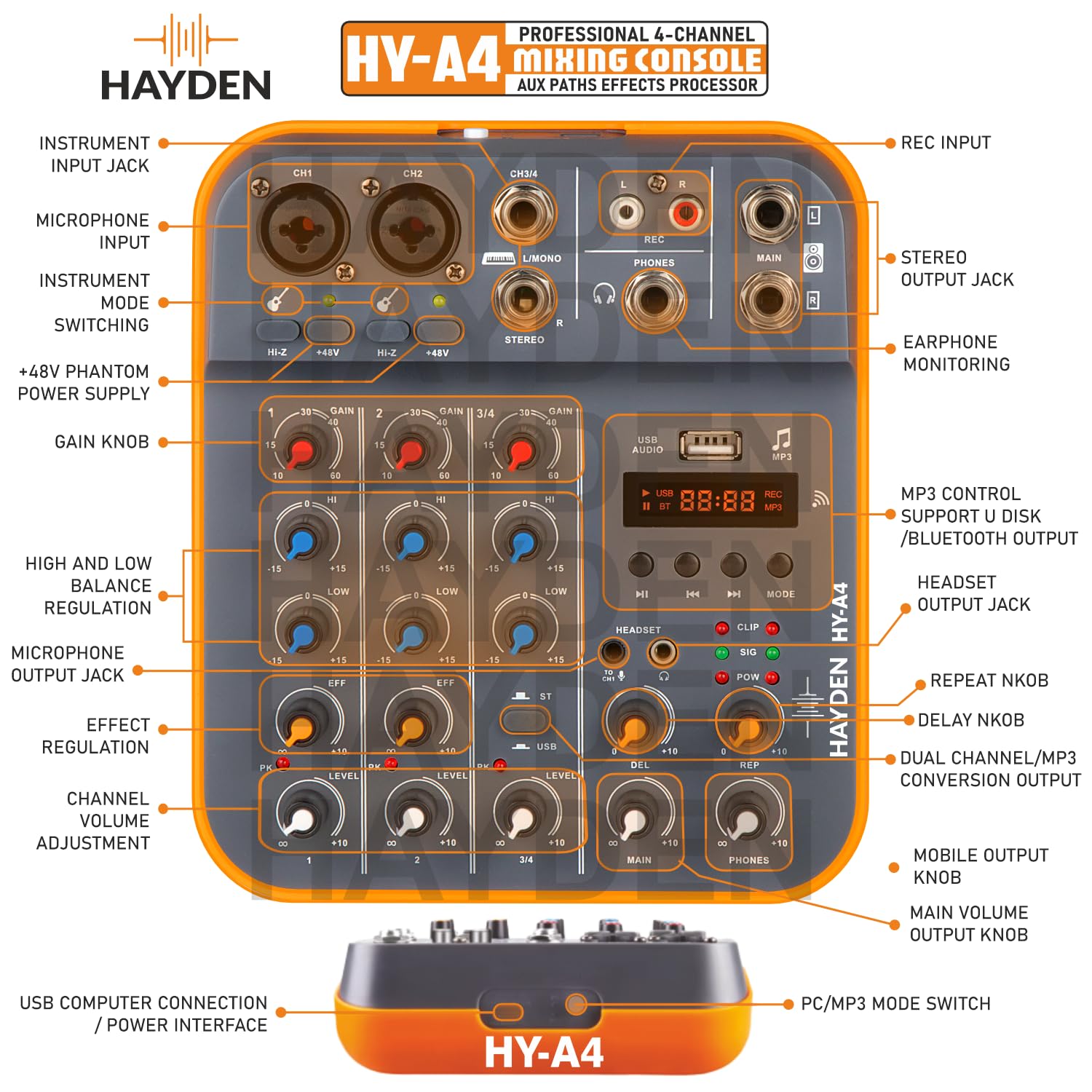
Figear 4.1: Mionaideach view of the HY-A4 mixer's control panel, showing input jacks, gain knobs, EQ controls, effect regulation, channel volume adjustments, and USB/MP3 controls.
- Cnapan Buannachd: Adjust the input sensitivity for each channel. Start with low gain and increase as needed.
- HI-Z Switch: Activates high impedance input for instruments like guitars on channels 1 and 2.
- +48V Phantom Power Switch: Supplies 48V power to condenser microphones. Activate only when using condenser microphones.
- HI/LOW EQ Knobs: Adjust the high (12KHz) and low (80Hz) frequencies for each channel by +/-15dB.
- EFF Knobs: Control the amount of effect (reverb) applied to each channel.
- Snàthadan ìre: Adjust the output volume for each individual channel.
- PK (Peak) LED: Illuminates when the input signal is too high, indicating potential clipping. Reduce gain if this LED lights up frequently.
- USB/MP3 Section: Features a digital display, playback controls (play/pause, next/previous), mode selection (USB, Bluetooth, MP3), and dedicated volume controls (DEL, REP, MAIN, PHONES).
- DEL (Delay) Knob: Adjusts the delay effect.
- REP (Repeat) Knob: Adjusts the repeat of the delay effect.
- Prìomh Chnap: Controls the overall main output volume.
- Fònaichean Knob: Atharraichidh seo meud toraidh nam fònaichean-cluaise.
4.2 Pairing Bluetooth
- Press the 'MODE' button in the USB/MP3 section until 'BT' appears on the digital display.
- On your mobile device, search for Bluetooth devices and select 'HY-A4'.
- Once paired, you can stream audio wirelessly to the mixer.
4.3 Gnìomhachd Eadar-aghaidh Fuaime USB
When connected to a computer via USB, the HY-A4 acts as an external sound card. You can use it for:
- Clàradh: Capture audio from the mixer's inputs directly to your computer using recording software.
- Ath-chluich: Play audio from your computer through the mixer's main outputs.
4.4 A' cumail sùil
Use the dual headphone outputs (3.5mm and 6.5mm) to monitor your mix in real-time. Adjust the 'PHONES' knob to control the monitoring volume.

Figure 4.2: A user monitoring audio feedback in real-time using headphones connected to the HY-A4 mixer, allowing for immediate sound adjustments.
5. Cumail suas
- Glanadh: Use a soft, dry cloth to clean the mixer's surface. Do not use liquid cleaners or solvents.
- Stòradh: Stòraich am measgaiche ann an àite fionnar, tioram air falbh bho sholas dìreach na grèine agus teòthachd anabarrach.
- Cùram càball: Seachain cus lùbadh no crùbadh nan càbaill. Dì-cheangail na càbaill le bhith a’ tarraing a’ phluga, chan e a’ chàball fhèin.
6. A ’dèanamh trioblaid
| Trioblaid | Adhbhar a dh’fhaodadh a bhith ann | Fuasgladh |
|---|---|---|
| Gun toradh fuaim | Main volume too low; incorrect cable connection; amplifier/speaker off. | Increase MAIN volume; check all cable connections; ensure connected devices are powered on. |
| Gun chomharradh cuir a-steach | Channel gain too low; incorrect input selected; microphone/instrument issue. | Increase channel GAIN; ensure correct input (XLR/6.3mm) is used; test microphone/instrument separately. |
| Condenser mic not working | 48V Phantom Power not activated. | Press the +48V switch to activate phantom power. |
| Distorted audio (PK LED on) | Input signal is too strong. | Reduce the GAIN knob for the affected channel until the PK LED no longer illuminates. |
| Bluetooth nach eil a 'ceangal | Mixer not in Bluetooth mode; device not discoverable. | Press MODE button until 'BT' is displayed; ensure your device's Bluetooth is on and discoverable. |
| Poor USB recording quality | Incorrect software settings; driver issues; interference. | Check recording software input settings; ensure correct drivers are installed (if required); try a different USB port or cable. |
7. Sònrachaidhean
| Feart | Mion-fhiosrachadh |
|---|---|
| Modail | HY-A4 |
| Àireamh nan Sianalan | 4 |
| Cur a-steach | XLR, 1/4" (TRS), USB, Bluetooth |
| Cumhachd Taibhse | 48V (switchable) |
| EQ | 3-Band (High 12KHz, Low 80Hz ±15dB) |
| Buaidhean | Digital Reverb, Delay |
| Toraidhean headphone | 3.5mm & 6.5mm (300mW output) |
| Gnìomhachd USB | USB Sound Card, MP3 Playback |
| Solar cumhachd | 5V DC, 2.5A (Corded Electric or USB 5V) |
| Meudan toraidh | 18 x 16 x 5 cm |
| Cuideam nì | 700 g |
8. Barantas agus Taic
For warranty information and technical support, please refer to the documentation included with your purchase or contact HAYDEN customer service. Keep your proof of purchase for warranty claims.