
1. Ro-ràdh
Tapadh leibh airson ceannachasing the Urageuxy Wireless Indoor/Outdoor Thermometer with 3 Sensors. This device provides accurate, real-time temperature and humidity readings for up to four locations simultaneously (one indoor, three outdoor/remote). It features a clear LCD display with backlight, comfort indicators, and records of daily maximum and minimum values. This manual will guide you through the setup, operation, and maintenance of your new thermometer.
2. Fiosrachadh Sàbhailteachd
- Do not expose the main unit or sensors to extreme force, shock, dust, temperature, or humidity.
- Do not immerse the main unit in water. The remote sensors are splash-proof but should not be submerged.
- Do not attempt to open the main unit or sensors. This will void the warranty.
- Use only fresh batteries of the specified type. Do not mix old and new batteries.
- Cuir às do bataraidhean cleachdte gu ciallach, a’ leantainn riaghailtean ionadail.
- Cùm a-mach à ruigsinn chloinne.
3. Pasgan-susbaint
Thoir sùil air susbaint a’ phacaid gus dèanamh cinnteach gu bheil a h-uile rud ann:
- 1 x Main Display Unit (Indoor Console)
- 3 x mothachairean iomallach gun uèir
- 1 x Leabhar-làimhe Stiùiridh
4. Toradh thallview
Prìomh aonad taisbeanaidh
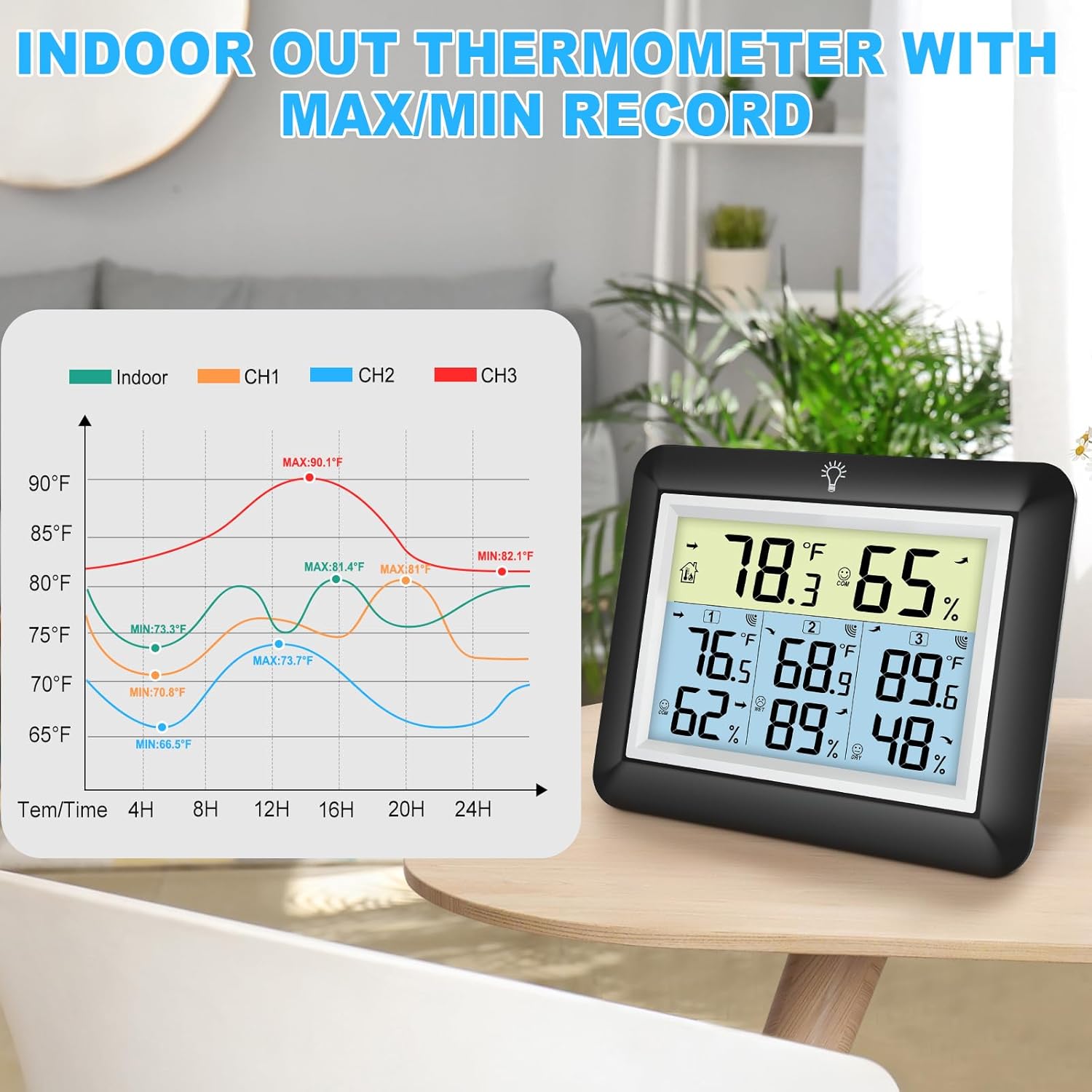
The main display unit shows indoor temperature and humidity, along with readings from up to three remote sensors. It features a large LCD screen with a backlight for easy viewing.


Wireless Remote Sensors
Each remote sensor measures temperature and humidity and transmits data wirelessly to the main unit. They are designed for outdoor use but should be placed in a sheltered location to avoid direct rain or prolonged sun exposure.
5. Suidhich
5.1 Stàladh bataraidh
Airson a’ Phrìomh Aonad Taisbeanaidh:
- Fosgail còmhdach roinn a’ bhataraidh air cùl a’ phrìomh aonaid.
- Insert 3 AAA batteries (not included) according to the polarity markings (+ and -).
- Dùin an còmhdach roinn bataraidh.
For the Wireless Remote Sensors:
- Open the battery compartment cover on the back of each sensor.
- Insert 2 AAA batteries (not included) according to the polarity markings (+ and -).
- Dùin an còmhdach roinn bataraidh.

5.2 Paidhreachadh mothachairean
The main unit will automatically search for and connect to the remote sensors once batteries are installed. Ensure both the main unit and sensors are within range during initial setup.
- Place the main unit and sensors close to each other during the initial pairing process.
- The main unit will display readings for each connected sensor (CH1, CH2, CH3).
- If a sensor does not connect, press the 'CHANNEL' button on the main unit to cycle through channels or press the 'RESET' button on the sensor to re-initiate pairing.
5.3 Sensor Placement Guidelines
Airson coileanadh as fheàrr agus leughaidhean ceart, smaoinich air na leanas:
- Raon Tar-chuir: The wireless sensors have a transmission range of up to 328 feet (100 meters) in open areas. Walls, metal structures, and other electronic devices can reduce this range.
- Suidheachadh a-muigh: While splash-proof, place outdoor sensors under a roof or in a sheltered area to protect them from direct rain and prolonged direct sunlight.
- Seachain stòran teas: Do not place sensors near heat sources (e.g., vents, appliances) or in direct sunlight, as this can lead to inaccurate temperature readings.
- Ioma àite: Utilize the three sensors to monitor different areas such as a greenhouse, baby room, wine cellar, kitchen, or garage.


6. Stiùireadh Obrachaidh
6.1 Leughaidhean Taisbeanaidh
Tha an scrion LCD a ’taisbeanadh an fhiosrachaidh a leanas:
- Teòthachd is Taiseachd a-staigh: Shown at the top of the display.
- Remote Sensor Readings: Temperature and humidity for each connected sensor (CH1, CH2, CH3) are displayed below the indoor readings.
- Comfort Icons: Indicates the current humidity level (DRY, COMFORT, WET).
- Comharran Trend: Arrows next to temperature and humidity values show if they are rising, falling, or stable.
6.2 °C/°F Switcher
To switch between Celsius (°C) and Fahrenheit (°F), press the '°C/°F' button located on the back of the main unit.
6.3 MAX/MIN Records
The device automatically records the daily maximum and minimum temperature and humidity values for both indoor and all remote sensors. These records reset every 24 hours.
- Press the 'MIN/MAX' button on the back of the main unit to view the maximum recorded values.
- Press the 'MIN/MAX' button again to view the minimum recorded values.
- Brùth an treas uair gus tilleadh gu na leughaidhean làithreach.

6.4 Obrachadh backlight
The main unit features an adjustable backlight for improved visibility in low-light conditions.
- Touch the light bulb icon on the top of the main unit to activate the backlight for 5 seconds.
- Press and hold the light bulb icon for more than 5 seconds to keep the backlight on for 30 minutes.


6.5 Comharra Comhfhurtachd
The comfort indicator provides a quick visual reference for the current humidity level, helping you maintain an ideal environment.
- TIRIM: Taiseachd < 45%
- COMFORT: 45% ≤ Taiseachd ≤ 65%
- WET: Taiseachd > 65%


7. Cumail suas
7.1 Glanadh
Sguab am prìomh aonad agus na mothachairean le clò bog, tioram.amp cloth. Do not use abrasive cleaners or solvents, as they may damage the plastic components and electronic circuits.
7.2 Ath-nuadhachadh bataraidh
Replace batteries when the low battery indicator appears on the display. Always replace all batteries in a unit at the same time with new ones of the same type.
7.3 Stòradh
If the device will not be used for an extended period, remove the batteries from both the main unit and sensors to prevent leakage and damage.
8. A ’dèanamh trioblaid
| Trioblaid | Adhbhar a dh’fhaodadh a bhith ann | Fuasgladh |
|---|---|---|
| Gun taisbeanadh air a’ phrìomh aonad. | Tha bataraidhean marbh no air an stàladh gu ceàrr. | Cuir bataraidhean ùra an àite, a’ dèanamh cinnteach à polarity ceart. |
| Remote sensor not displaying readings or showing '---'. | 1. Sensor out of range. 2. Batteries are dead. 3. Eadar-theachd. 4. Sensor not paired. | 1. Move sensor closer to the main unit. 2. Replace sensor batteries. 3. Move away from other electronic devices. 4. Press the 'RESET' button on the sensor and then cycle channels on the main unit. |
| Leughaidhean neo-mhearachdach. | 1. Sensor exposed to direct sunlight or heat source. 2. Poor ventilation around sensor. | 1. Relocate sensor to a shaded, well-ventilated area. 2. Ensure proper airflow around the sensor. |
| Chan eil an solas-cùil ag obair. | Bataraidh ìosal no mearachd. | Replace main unit batteries. If issue persists, contact support. |
9. Sònrachaidhean
- Brand: Urageuxy
- Modail: WS0170BKY
- Raon Teothachd a-staigh: 32°F gu 140°F (0°C gu 60°C)
- Raon Teòthachd a-muigh: -40°F gu 140°F (-40°C gu 60°C)
- Cruinneas teòthachd: ± 2 ° F / ± 1 ° C
- Raon taiseachd: 10% gu 99% RH
- Cruinneas Taiseachd: ±5% RH
- Raon Tar-chuir Gun Uèir: Up to 328 feet (100 meters) in open areas
- Stòr Cumhachd (Prìomh Aonad): 3 x bataraidh AAA (gun a thoirt a-steach)
- Stòr Cumhachd (Brathadair Iomallach): 2 x bataraidh AAA (gun a thoirt a-steach)
- Feartan sònraichte: Backlit LCD, Comfort Indicator, Min/Max Record, Fast Refresh
- Stuth: Styrene acrylonitrile butadiene (ABS)
- Meudan Bathar (Prìomh Aonad): 0.78"D x 4.33"L x 0.78"À (timcheall air)
- Cuideam nì: 9.9 unnsa (0.28 cileagram)
10. Barantas & Taic
10.1 Fiosrachadh Barantais
Urageuxy products are manufactured to high-quality standards. This product is covered by a limited warranty against defects in materials and workmanship for a period of one year from the original purchase date. This warranty does not cover damage caused by misuse, accident, unauthorized modification, or improper installation.
10.2 Taic teachdaiche
If you encounter any issues or have questions regarding your Urageuxy Wireless Indoor/Outdoor Thermometer, please contact our customer support team. For the quickest assistance, please refer to the contact information provided on the product packaging or the official Urageuxy weblàrach.
Taic air-loidhne: Tadhail air an Urageuxy Store on Amazon airson Ceistean Cumanta agus fiosrachadh mu thoraidhean.
Tha am bhidio seo a’ toirt sealladh farsaingview of the Urageuxy Indoor Outdoor Thermometer with 3 Remote Sensors, demonstrating its features and functionality.