
CHESONA iPad Pro 11 (M4) 2024 Keyboard Case
Còmhdach Meur-chlàir Garbh CHESONA airson iPad Pro 11 (M4) 2024 Leabhar-làimhe Cleachdaiche
Model: iPad Pro 11 (M4) 2024 Keyboard Case

Image: The CHESONA Rugged Keyboard Case for iPad Pro 11 (M4) 2024, shown with an iPad inserted, highlighting its keyboard, trackpad, and adjustable stand features.
1. Co-fhreagarrachd
This keyboard case is specifically designed for the iPad Pro 11-inch (M4) 2024. To ensure proper fit, verify your iPad's model numbers. Compatible model numbers include A2836, A2837, agus A3006. This case is neo-fhreagarrach with the iPad Air 11-inch (M2) 2024 or any other iPad models.

Image: A visual guide illustrating the compatible iPad Pro 11 (M4) 2024 model and its corresponding model numbers (A2836, A2837, A3006), alongside an incompatible iPad Air 11 (M2) 2024 model.
2. Dè tha sa bhogsa
Nuair a dh’fhosglas tu am pasgan agad, dèan cinnteach gu bheil na nithean a leanas uile an làthair:
- 1 x CHESONA Rugged Case for iPad Pro 11 (M4) (Tablet NOT included)
- 1 x Meur-chlàr gun uèir
- 1 x USB Charging Cable (No Charger)
- 1 x Leabhar-làimhe Cleachdaiche

Ìomhaigh: Os cionn-cinn view displaying the CHESONA keyboard, magnetic case, USB charging cable, user manual, and product packaging box.
3. Stiùirich rèiteachaidh
Follow these steps to set up your CHESONA Rugged Keyboard Case:
3.1. Step 1: Adjust the Kickstand
Bend the integrated kickstand to achieve your desired viewing angle. The stand is designed to be adjustable from 15° to 180° for optimal comfort.
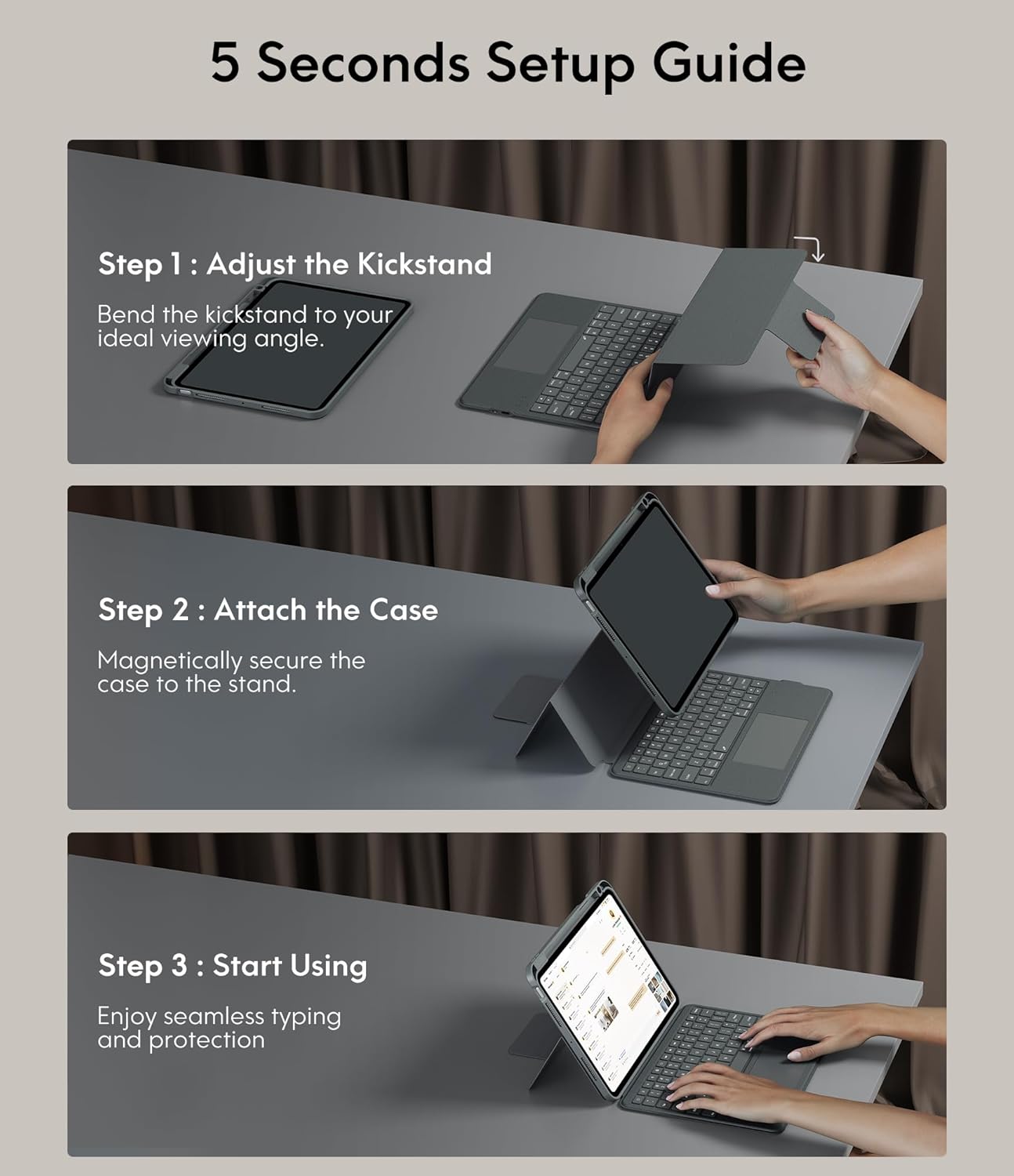
Image: A three-step visual guide showing how to adjust the kickstand, attach the iPad to the magnetic case, and begin using the keyboard.
3.2. Step 2: Attach the Case
Securely place your iPad into the protective case. The case features strong magnets that will hold the iPad firmly in place on the stand.
3.3. Step 3: Start Using
Once the iPad is securely attached and the kickstand is adjusted, you can begin using your keyboard case for typing and protection.
3.4. Càraid Bluetooth
- Dèan cinnteach gu bheil am meur-chlàr air a luchdadh.
- Tionndaidh air a 'mheur-chlàr a' cleachdadh an tionndadh cumhachd.
- Air an iPad agad, rach gu Roghainnean> Bluetooth agus tionndaidh Bluetooth air.
- Select the keyboard from the list of available devices (it may appear as 'CHESONA Keyboard' or similar).
- Confirm the pairing code if prompted. The keyboard will now be connected.
4. Stiùireadh Obrachaidh
4.1. Magnetic Detachable Keyboard
The keyboard is magnetically attached to the case, allowing for easy detachment. This feature enables you to switch between a laptop-like setup and a standalone tablet experience. Simply pull the keyboard away from the case when not needed, or reattach it when typing is required.

Image: A hand detaching the magnetic keyboard from the iPad case, illustrating the strong magnetic connection.
4.2. Adjustable Stand and Viewing Modan
The case offers a wide range of adjustable angles (15°-180°) and supports multiple placement modes for various activities:
- Modh Clò-sgrìobhaidh: Use with the keyboard for productivity.
- Modh Tarraing: Lay the iPad flat or at a low angle for creative tasks.
- Modh Leughaidh: Detach the keyboard and hold the iPad comfortably.
- ViewModh: Adjust the stand for watching videos or video calls.

Image: A visual representation of five different usage modes: Video Call, Draw, To Read, Writing Documents, and Watch Movies, demonstrating the case's versatility.
4.3. Smachd air cùl-sholais a’ mheur-chlàir
The keyboard features 7-color backlighting and 3 levels of brightness, enhancing visibility in various lighting conditions.
- To change backlight color: Press Shift + Return.
- Gus soilleireachd atharrachadh: Brùth Shift + Shift (or dedicated brightness keys if available).

Image: The keyboard illuminated with various backlight colors, demonstrating the 7-color options and the keys used to adjust brightness and color.
4.4. Trackpad Functionality
The integrated multi-touch trackpad provides precise navigation and supports various gestures for enhanced productivity:
- Slaod: Tap and hold an item, then drag to move it.
- Swipe: Use two fingers to scroll up/down or left/right.
- Gluais a-steach / a-mach: Pinch with two fingers to zoom.
- App Publication (App Switcher): Swipe up with three fingers to reveal open applications.
- Swipe between full screen apps: Swipe left or right with three fingers to switch between full-screen applications.

Image: A close-up of the trackpad with illustrations of common multi-touch gestures like drag, swipe, zoom in/out, app publication, and switching between full-screen apps.
4.5. Function Keys and Shortcuts
The keyboard includes a dedicated row of function keys for quick access to common iPad features:
- Dachaigh: Gabh air ais chun sgrion dachaigh.
- Lorg: Cuir an gnìomh rannsachadh iPad.
- Smachd soilleireachd: Atharraich soilleireachd an sgrion.
- Smachdan meadhanan: Cluich/stad, an trac roimhe, an ath thrac.
- Smachd tomhas-lìonaidh: Balbh, meud sìos, meud suas.
- Sgrion Lock: Lock your iPad.

Ìomhaigh: Mion-fhiosrachadh view of the keyboard's top row, highlighting the function keys for media control, volume, brightness, and other shortcuts.
5. Feartan dìon
The CHESONA Rugged Keyboard Case provides comprehensive protection for your iPad Pro 11 (M4) 2024:
- Hard-Shell Design: The premium hard-shell design protects all sides of your tablet.
- Dìon 360 °: The included compatible camera case ensures 360° protection against accidental drops, scratches, and dust.
- Pen Slot: A dedicated pen slot securely holds your Apple Pencil, preventing loss and allowing for convenient charging.
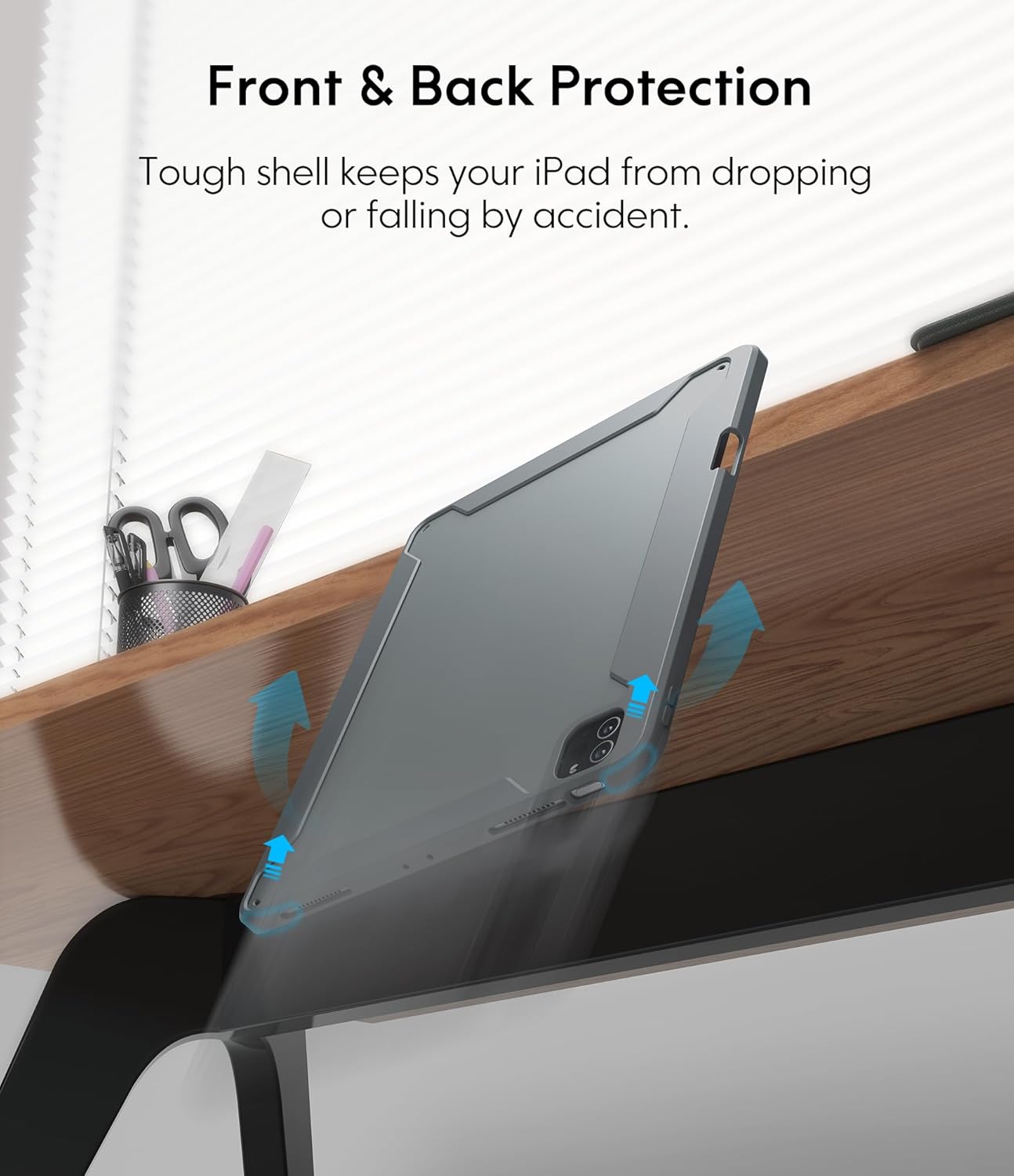
Image: An illustration showing the iPad case protecting the device from a fall, emphasizing its tough shell and front and back protection.
6. Battery and Power Management
The keyboard features a built-in rechargeable battery designed for extended use:
- Beatha bataraidh: A full charge provides over 50 hours of working time.
- Ùine cosgais: Approximately 2-3 hours for a full charge using the provided USB charging cable.
- Modh cadail: If the keyboard is inactive for 10 minutes, it will enter sleep mode and disconnect from your iPad to conserve power. Press any key to wake it up and automatically reconnect.
7. Cumail suas
To ensure the longevity and optimal performance of your keyboard case, follow these maintenance guidelines:
- Glanadh: Cleachd bog, damp clò airson taobh a-muigh a’ chùis agus a’ mheur-chlàir a sguabadh. Seachain ceimigean cruaidh no stuthan sgrìobach.
- Stòradh: Nuair nach eilear ga chleachdadh airson ùine mhòr, stòraich còmhdach a’ mheur-chlàir ann an àite fionnar, tioram.
- Seachain Liquids: Keep the keyboard away from liquids to prevent damage to electronic components.
8. A ’dèanamh trioblaid
If you encounter any issues, refer to the following troubleshooting tips:
- Meur-chlàr gun cheangal:
- Dèan cinnteach gu bheil am meur-chlàr air a luchdadh agus air a chumhachdachadh.
- Dèan cinnteach gu bheil Bluetooth air a chomasachadh air an iPad agad.
- Dìochuimhnich an inneal ann an roghainnean Bluetooth an iPad agad agus feuch ri ath-chàraideachadh.
- Ath-thòisich an dà chuid an iPad agad agus am meur-chlàr.
- Trackpad Not Responding:
- Dèan cinnteach gu bheil am meur-chlàr ceangailte tro Bluetooth.
- Check if the trackpad is enabled in your iPad's settings (Settings > Accessibility > Touch > AssistiveTouch).
- Clean the trackpad surface for any debris.
- Backlight nach eil ag obair:
- Dèan cinnteach gu bheil bataraidh gu leòr aig a’ mheur-chlàr.
- Press the backlight adjustment keys (Shift + Shift or dedicated keys) to cycle through brightness levels.
- Iuchraichean gun fhreagairt:
- Thoir sùil air a’ cheangal Bluetooth.
- Ensure the keyboard is not in sleep mode.
- Luchdaich a-nuas am meur-chlàr.
9. Sònrachaidhean Bathar
| Meudan toraidh | 10.04 x 7.68 x 0.83 òirleach |
| Cuideam nì | 1.72 not |
| Brand | CHESONA |
| Innealan co-fhreagarrach | iPad Pro 11 (M4) 2024 |
| Teicneòlas ceangail | Wireless (Bluetooth) |
| Tuairisgeul meur-chlàr | Ioma-ghnìomhach |
| Feart sònraichte | Solais air a chùlaibh, Trackpad |
| Dath | Glas |
| Stòr cumhachd | Cumhachd bataraidh |
| Bataraidhean | 1 P76 battery (included) |
10. Barantas agus Taic
CHESONA products are designed for durability and performance. For information regarding warranty coverage, product support, or to report any issues, please refer to the contact information provided with your purchase or visit the official CHESONA weblàrach. Cùm dearbhadh ceannach airson tagraidhean barantais.
Ask a question about this manual
Ask about setup, troubleshooting, compatibility, parts, safety, or missing instructions. Manuals+ will review the question and use this page’s manual context to help answer it.