
Ro-ràdh
This manual provides detailed instructions for the setup, operation, and maintenance of your Geevon Wireless Digital Refrigerator Thermometer. This device is designed to monitor temperatures in your refrigerator, freezer, or other environments using two wireless sensors, ensuring optimal storage conditions for your items.
Please read this manual thoroughly before using the product to ensure correct operation and to maximize its lifespan.
Susbaint pacaid
Nuair a dh’fhosglas tu am bogsa, dèan cinnteach gu bheil na pàirtean uile an làthair agus ann an deagh staid:
- 1 x Prìomh Aonad Taisbeanaidh
- 2 x Wireless Sensors
- 6 x AAA Batteries (for main unit)
- 2 x CR2032 Batteries (pre-installed in sensors or included separately)
- 1 x Leabhar-làimhe Cleachdaiche (an sgrìobhainn seo)
- 2 x Suction Cups (for sensor mounting)

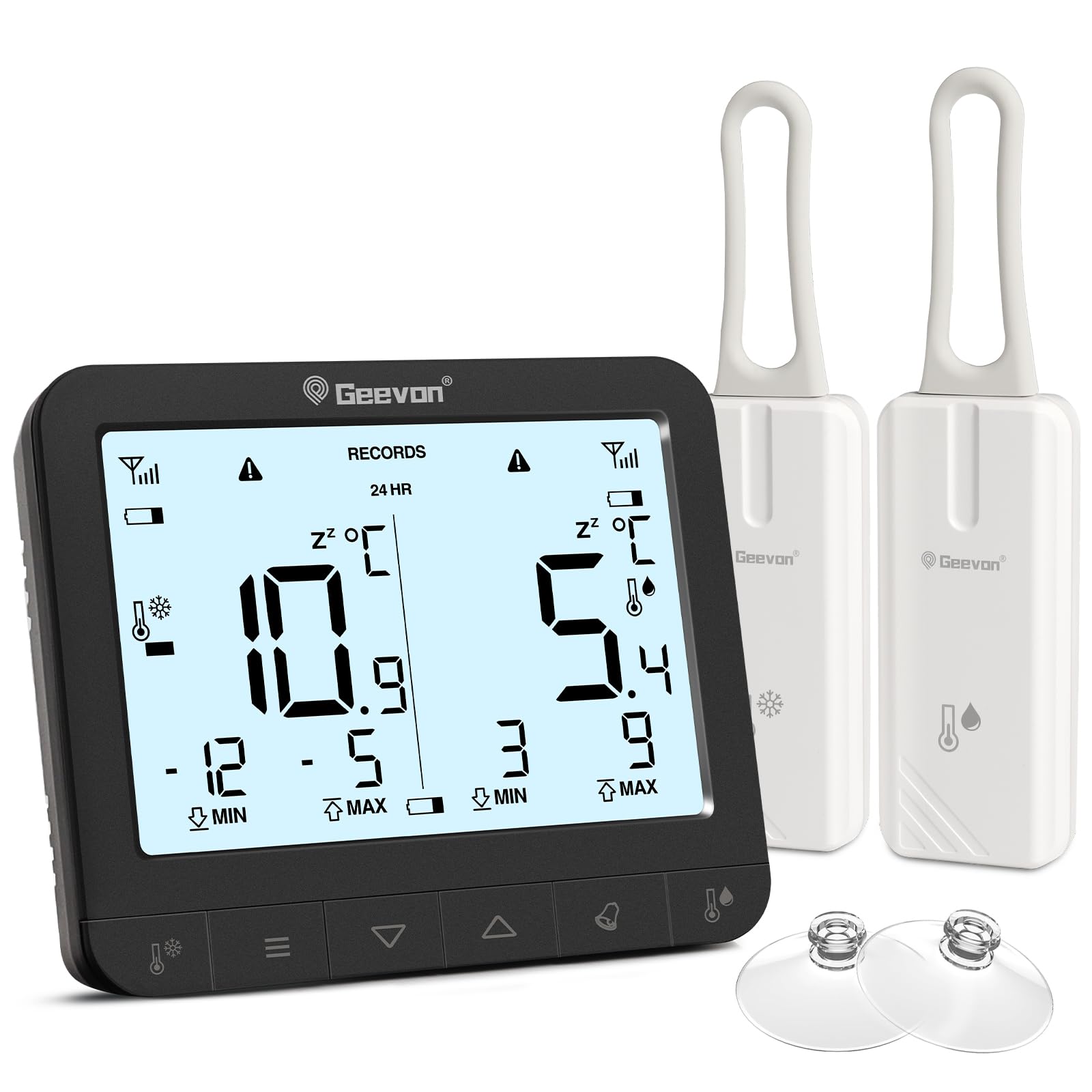
The image displays the main unit, two sensors, and accessories including suction cups for installation.
Stiùiridhean rèiteachaidh
1. Stàladh bataraidh
Airson a’ Phrìomh Aonad Taisbeanaidh:
- Lorg an roinn bataraidh air cùl a’ phrìomh aonad.
- Fosgail an còmhdach bataraidh.
- Cuir a-steach 6 bataraidh AAA, a’ cumail sùil air a’ phòlaireachd cheart (+/-).
- Dùin an còmhdach bataraidh gu tèarainte.
For the Wireless Sensors:
- Locate the battery compartment on the back of each sensor.
- Fosgail an còmhdach bataraidh.
- Insert 1 CR2032 battery into each sensor, observing the correct polarity (+/-).
- Dùin an còmhdach bataraidh gu tèarainte.
The image illustrates the battery compartments for both the main unit and the wireless sensors.
2. Suidheachadh Sensor
The wireless sensors can be placed inside your refrigerator, freezer, or any other area where temperature monitoring is desired. Ensure the sensors are not submerged in liquid and are placed in a location where they can transmit signals to the main unit.
- Crochadh: Use the integrated loop to hang the sensor from a shelf or rack.
- Ceangal magnetach: The sensors have built-in magnets for attachment to metallic surfaces.
- Cupan suidse: Attach the provided suction cups to the sensor for mounting on smooth surfaces like glass or plastic.

This image demonstrates different ways to position the wireless sensors within a refrigerator or freezer.
The main display unit can be placed on a countertop using its integrated stand or mounted on a metallic surface using its rear magnets.
Stiùireadh Obrachaidh
Taisbeanadh thallview

The main display unit shows current temperatures for two channels, along with max/min records and status icons.
The display shows temperatures for two channels (CH1 and CH2), along with their respective maximum (MAX) and minimum (MIN) recorded temperatures. Signal strength indicators for each sensor and battery level indicators are also present.
1. Temperature Unit Selection (℃/℉)
On the back of the main display unit, locate the small "C/F" button. Press this button to toggle between Celsius (℃) and Fahrenheit (℉) temperature units.

This image highlights the C/F switch on the back of the main unit and other key features.
2. Max/Min Temperature Records
The display shows the maximum and minimum temperatures recorded over a 24-hour period. To view historical max/min records (since the last reset or power cycle), briefly press the "UP" or "DOWN" buttons on the main unit. To reset the max/min records, press and hold the "CLEAR" button (usually indicated by a trash can icon or similar) for a few seconds.
3. 2-Channel Alarm Setting
The thermometer allows you to set high and low temperature alarms for each channel.
- Briefly press the channel button (e.g., "CH1" or "CH2" button, or a general "Channel" button) to enter alarm setting mode for that channel.
- Use the "UP" and "DOWN" buttons to adjust the desired high and low temperature thresholds.
- Press and hold the "Alarm" button (often indicated by a bell icon) to toggle the alarm function ON or OFF for the selected channel.
- An audible alarm will sound if the temperature exceeds the set high threshold or falls below the set low threshold.

This image illustrates the alarm function, showing how to set upper and lower temperature limits for alerts.
4. Gnìomh an t-Solais Chùil
To illuminate the display for easier reading in low-light conditions, touch the light bulb icon on the top of the main unit. The backlight will activate for approximately 10 seconds.
Prìomh fheartan
- Braitearan gun uèir dùbailte: Monitor two separate locations simultaneously.
- Raon Teòthachd farsaing: Measures temperatures from -40°C to 37°C (-40°F to 98.6°F).
- Clàr as àirde/as ìsle: Tracks the highest and lowest temperatures recorded over 24 hours or historically.
- Alarms Audible: Alerts you when temperatures exceed or fall below preset thresholds.
- Comharra bataraidh ìosal: Displays icons for low battery on both the main unit and sensors.
- Cùl-solais: Provides temporary illumination for clear reading in dim environments.
- Suidheachadh ioma-chruthach: Main unit features a stand and magnets; sensors can be hung, magnetically attached, or secured with suction cups.
The thermometer is suitable for various applications, including refrigerators, freezers, and wine coolers.
Cumail suas
- Glanadh: Sguab am prìomh aonad agus na mothachairean le clò bog, tioram.amp cloth. Do not use abrasive cleaners or immerse the devices in water.
- Ath-nuadhachadh bataraidh: Replace batteries promptly when the low battery indicator appears on the display. Refer to the "Battery Installation" section for instructions.
- Stòradh: Ma bhios tu a’ stòradh an inneil airson ùine mhòr, thoir air falbh na bataraidhean uile gus casg a chur air aodion. Stòraich ann an àite fionnar, tioram.
Comharra Bataraidh Ìosal
The display unit features separate low battery indicators for the main unit and each sensor. When a battery icon appears, it indicates that the corresponding battery needs replacement.

This image highlights the low battery indicators for the sensors and the main display unit.
Fuasgladh thrioblaidean
| Trioblaid | Adhbhar a dh’fhaodadh a bhith ann | Fuasgladh |
|---|---|---|
| Gun taisbeanadh air a’ phrìomh aonad. | Tha bataraidhean marbh no air an stàladh gu ceàrr. | Thoir sùil air polarachd a’ bhataraidh agus cuir bataraidhean AAA ùra nan àite. |
| Sensor reading "---" or inaccurate. | Sensor batteries are dead, sensor is out of range, or interference. | Replace sensor CR2032 batteries. Move sensor closer to the main unit. Avoid placing near large metal objects or electronics that may cause interference. |
| Alarm gun fhuaim. | Alarm function is off or thresholds are set too wide. | Ensure the alarm is enabled for the desired channel. Adjust alarm thresholds to appropriate levels. |
| Chan eil an solas-cùil ag obair. | Main unit batteries are low or depleted. | Replace main unit AAA batteries. |
Sònrachaidhean
| Brand | Geevon |
| Modail Àireamh | 86218 |
| Meudan Bathar (Prìomh Aonad) | 16 x 4.8 x 17.5 cm (6.3 x 1.9 x 6.9 òirleach) |
| Cuideam | 310 gram (0.68 lbs) |
| Prìomh aonad cumhachd | 6 x Bataraidh AAA (air a ghabhail a-steach) |
| Cumhachd sensor | 1 x CR2032 Battery per sensor (included) |
| Raon Teòthachd | -40 ° C gu 37 ° C (-40 ° F gu 98.6 ° F) |
| Cruinneas Tomhais | ± 0.1 ℉/℃ |
| Seòrsa Taisbeanaidh | LCD didseatach |
| Feartan sònraichte | Low Battery Indicator, Backlit Display, Max/Min Record, 2-Channel Alarm |
| Stuth | Styrene acrylonitrile butadiene (ABS) |
Barantas agus Taic
Geevon is committed to providing high-quality products. For any questions, issues, or support needs regarding your Geevon Refrigerator Thermometer, please contact our customer service. We offer lifetime consultation service for our products.
Please refer to your purchase documentation or the official Geevon weblàrach-lìn airson teirmichean barantais sònraichte agus fiosrachadh conaltraidh.
Taic air-loidhne: Contact Seller (GEEVON UK)