
Ro-ràdh
The MiLi LiTag Duo is a versatile Bluetooth object locator designed to help you keep track of your valuable items. Compatible with both Apple and Android devices, it leverages the extensive "Find My" networks to provide real-time location tracking and assist in finding misplaced belongings. Its compact, lightweight, and durable design makes it ideal for attaching to keys, wallets, bags, luggage, and more.

Four MiLi LiTag Duo trackers, each with a keyring, highlighting the compact design and readiness for attachment to various items.
Susbaint pacaid
- MiLi LiTag Duo (quantity as per pack purchased)
- CR2032 Coin Cell Battery (pre-installed)
- Keyring(s)
- Leabhar-làimhe cleachdaiche (an sgrìobhainn seo)
Stiùireadh rèiteachaidh
1. Powering On Your LiTag Duo
The MiLi LiTag Duo comes with a pre-installed CR2032 battery. To activate the device:
- Gently twist the two halves of the LiTag Duo counter-clockwise to open it.
- Remove the small plastic tab if present, which prevents battery contact during shipping.
- Press the button on the device once to power it on.
- Align the two halves and twist clockwise to securely close the device.

This diagram provides a clear visual guide on how to open the MiLi LiTag Duo by rotating, replace the internal CR2032 coin cell battery, and then securely close the device.
2. A’ paidhreachadh leis an fhòn-smart agad
The MiLi LiTag Duo is compatible with both Apple's "Find My" network (iOS 14.5 or later) and Google's "Find My Device" network (Android 9.0 or later). You can pair it with either system, but it can only be connected to one device at a time.
Airson innealan Apple iOS:
- Dèan cinnteach gu bheil Bluetooth air a chomasachadh air an iPhone agad.
- Fosgail an aplacaid “Lorg Mo”.
- Rach don taba "Nithean".
- Tap air an ìomhaigh "+" agus tagh "Cuir Rud Eile ris".
- Follow the on-screen instructions to connect your LiTag Duo.
Airson innealan Android:
- Ensure Bluetooth is enabled on your Android smartphone.
- Download and open the Google "Find My Device" app from the Google Play Store.
- Follow the in-app instructions to add a new device. The LiTag Duo should appear as a discoverable item.

This image illustrates the MiLi LiTag Duo's compatibility with both Apple and Android ecosystems, showing how the device appears within the respective 'Find My' applications on smartphone screens.
Stiùireadh Obrachaidh
A' lorg do nì
Once paired, you can use your smartphone's "Find My" or "Find My Device" app to locate your LiTag Duo.
- Àite a' Mhapa: The app will display the last known location of your LiTag Duo on a map, leveraging the global network of Apple and Android devices.
- Cluich Cluich: If your item is nearby (within Bluetooth range), you can tap the "Play Sound" option in the app to make the LiTag Duo emit an audible signal, helping you pinpoint its exact location.
- Seòladh: For items located further away, the app can provide navigation directions to the LiTag Duo's last known location.
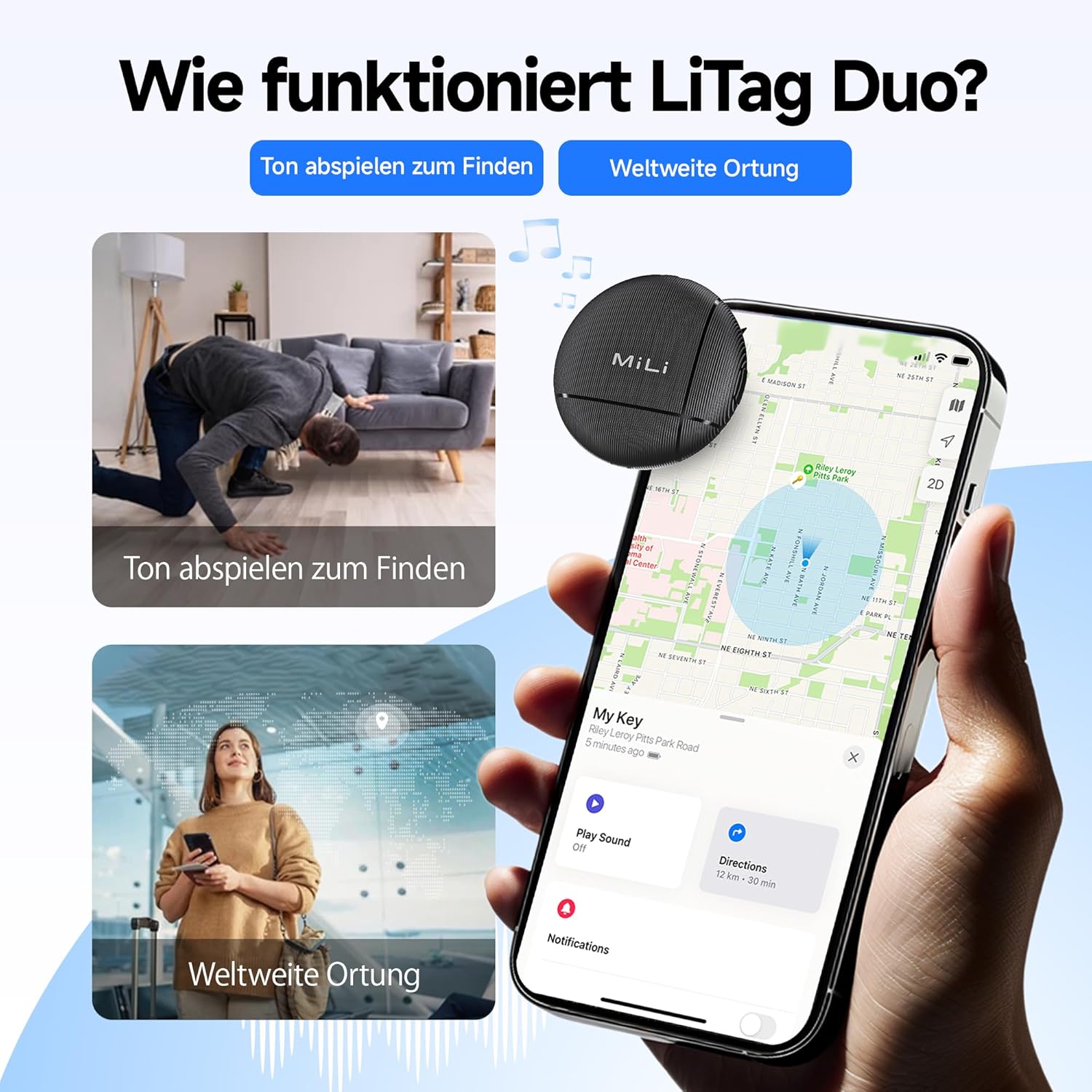
This visual explains the two primary functions of the LiTag Duo: using an audible signal to locate nearby items and leveraging global networks for wider location tracking on a map.

This image highlights the 'Play Sound' feature, allowing users to make the LiTag Duo emit an audible signal to easily locate misplaced items, even if hidden.
Sharing Your LiTag Duo
You can share access to your LiTag Duo's location with family or friends through the respective "Find My" applications. This allows multiple trusted individuals to track the same item.

This image explains the device sharing capability, allowing users to share a link so family or friends can also view the tracker's location.
Prìobhaideachd agus tèarainteachd
The MiLi LiTag Duo is designed with your privacy in mind. Location data transmitted through the Apple "Find My" and Google "Find My Device" networks is end-to-end encrypted. This means only you (and those you share access with) can view the location of your LiTag Duo, ensuring your personal information remains protected.

This image underscores the privacy features of the LiTag Duo, explaining that location data is end-to-end encrypted to protect user privacy on both Apple and Google networks.
Cumail suas
Ath-nuadhachadh bataraidh
The MiLi LiTag Duo uses a standard CR2032 coin cell battery, which typically lasts up to 12 months. You can check the battery status within your "Find My" or "Find My Device" app. When the battery is low, replace it as follows:
- Gently twist the two halves of the LiTag Duo counter-clockwise to open it.
- Thoir air falbh an seann bataraidh CR2032 gu faiceallach.
- Cuir a-steach bataraidh CR2032 ùr leis an taobh adhartach (+) a’ coimhead suas.
- Align the two halves and twist clockwise to securely close the device.

This image details the internal structure of the LiTag Duo, emphasizing its replaceable CR2032 battery which offers an 8 to 12 month lifespan, with battery status viewable via the Find My apps.
Glanadh agus cùram
The MiLi LiTag Duo has an IP67 rating, meaning it is resistant to dust and can withstand immersion in water up to 1 meter for 30 minutes. To clean your device:
- Sguab an inneal le bog, damp aodach.
- Seachain a bhith a 'cleachdadh cheimigean cruaidh no innealan-glanaidh sgudail.
- Ensure the device is securely closed after battery replacement to maintain its water and dust resistance.

This image visually demonstrates the IP67 water and dust resistance of the LiTag Duo, showing scenarios where the device can withstand exposure to elements like sand and water.
Fuasgladh thrioblaidean
| Trioblaid | Adhbhar a dh’fhaodadh a bhith ann | Fuasgladh |
|---|---|---|
| LiTag Duo not discoverable during pairing. | Device not powered on, battery low, or too far from phone. | Ensure the device is powered on (press the button once). Check battery level and replace if necessary. Bring the LiTag Duo closer to your smartphone. |
| Cannot hear the sound from LiTag Duo. | Device out of Bluetooth range, sound muted in app, or battery low. | Move closer to the LiTag Duo. Ensure the "Play Sound" feature is activated and not muted in the app. Check and replace battery. |
| Location not updating on map. | Device out of range of "Find My" network devices, or battery low. | Dèan cinnteach gu bheil LiTag Duo is in an area where other Apple or Android devices (part of the network) are present. Check battery level. |
| LiTag Duo disconnects frequently. | Interference, outdated app/OS, or low battery. | Avoid strong electromagnetic interference. Update your smartphone's OS and "Find My" app. Replace battery. |
Sònrachaidhean
- Modail: HD-P16-6
- Brand: MiLi
- Meudan: 32 x 32 x 8 mm (1.26 x 1.26 x 0.31 òirleach)
- Cuideam: 7 gram (0.25 oz)
- Dath: Dubh
- Stuth: Styrene acrylonitrile butadiene (ABS)
- Seòrsa bataraidh: CR2032 Coin Cell (replaceable)
- Beatha bataraidh: Suas gu 12 mìosan
- Seasmhachd Uisge is Duslach: IP67 (suas gu 1 meatair airson 30 mionaid)
- Ceangal: Bluetooth
- Co-chòrdalachd: iOS 14.5 or later (Apple Find My network), Android 9.0 or later (Google Find My Device network)
- Modh smachd: Iarrtas fòn 'smart'
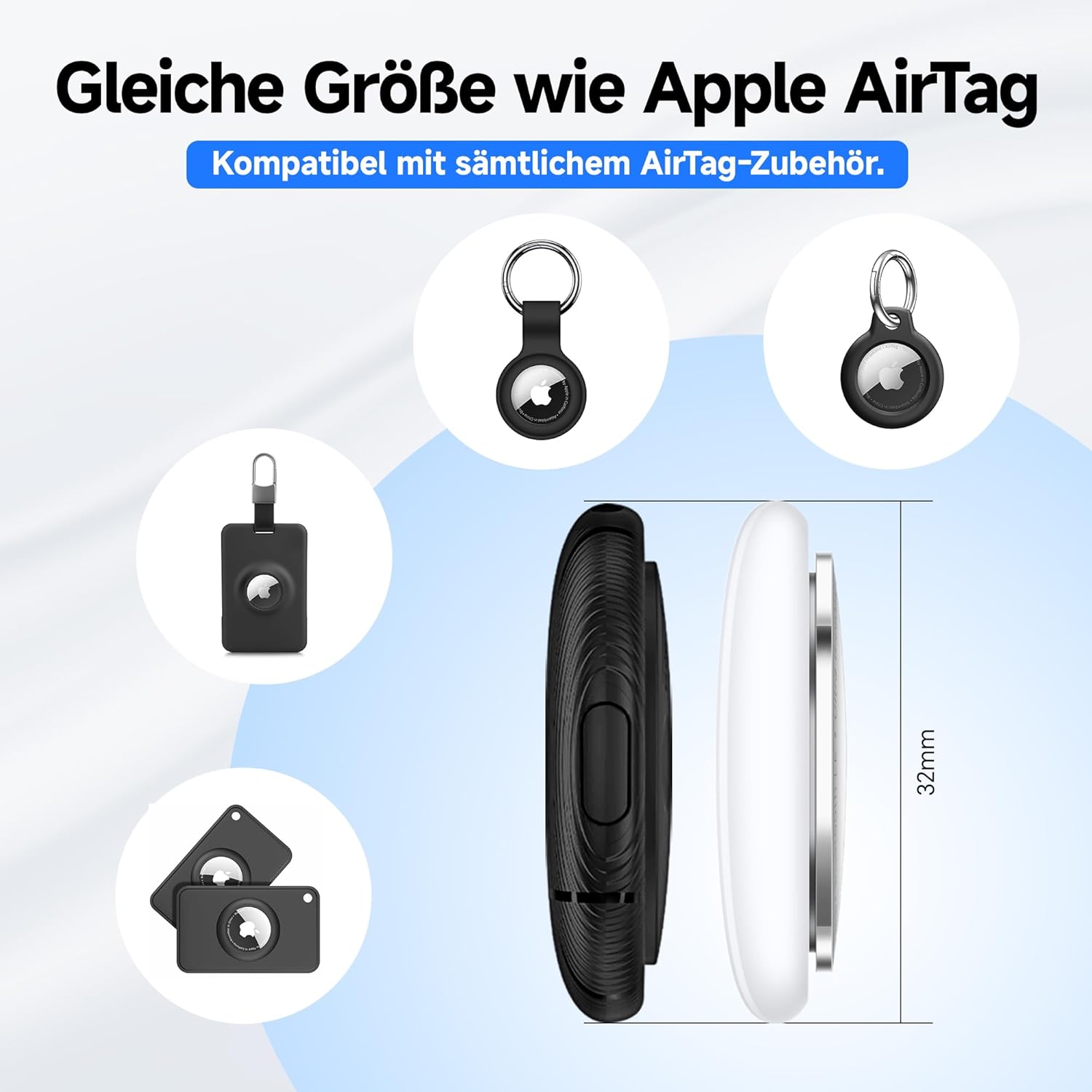
The MiLi LiTag Duo is designed to be compact and lightweight, with dimensions similar to an Apple AirTag, ensuring compatibility with many existing accessories.
Barantas agus Taic
Barantas an Neach-dèanamh
The MiLi LiTag Duo comes with a Barantas an neach-dèanamh 1-bliadhna bho cheann-latha a’ cheannaich. Tha am barantas seo a’ còmhdach lochdan ann an stuthan agus obair-ciùird fo chleachdadh àbhaisteach. Chan eil e a’ còmhdach milleadh air adhbhrachadh le droch chleachdadh, tubaistean, atharrachaidhean gun chead, no caitheamh is deòir àbhaisteach.
Feuch an glèidh thu an dearbhadh ceannach agad airson tagraidhean barantais.
Taic Luchd-cleachdaidh
For technical assistance, troubleshooting, or warranty inquiries, please contact MiLi customer support. Refer to the contact information provided on the product packaging or the official MiLi weblàrach.
Goireasan air-loidhne: For the latest FAQs, software updates, and additional support, please visit the official MiLi weblàrach.
Fiosrachadh Sàbhailteachd Cudromach
- Do not attempt to disassemble or modify the LiTag Duo beyond battery replacement.
- Cùm bataraidhean a-mach à ruigsinn chloinne. Ma thèid a shlugadh, iarr aire mheidigeach sa bhad.
- Cuir às do bataraidhean cleachdte a rèir riaghailtean ionadail.
- Seachain an inneal a nochdadh gu fìor theodhachd no solas dìreach airson amannan fada.