
Ro-ràdh
Thank you for choosing the Phomemo M221 Bluetooth Thermal Label Printer. This manual provides essential information for the safe and efficient operation of your device. Please read it thoroughly before use and retain it for future reference. The Phomemo M221 is designed for fast, clear, and smart label printing, supporting various label types and applications for small businesses, home, and school use.
Fiosrachadh Sàbhailteachd
Gus dèanamh cinnteach à obrachadh sàbhailte agus gus casg a chur air milleadh, lean na ceumannan dìon a leanas:
- Do not disassemble, repair, or modify the printer.
- Keep the printer away from water, moisture, and direct sunlight.
- Use only Phomemo-approved power adapters and accessories.
- Seachain a bhith a’ beantainn ris a’ cheann-chlò dìreach an dèidh clò-bhualadh, oir dh’ fhaodadh e a bhith teth.
- Store the printer and labels in a cool, dry place.
Susbaint pacaid
Dèan cinnteach gu bheil a h-uile rud anns a’ phacaid agad:
- Clò-bhualadair leubail Phomemo M221
- Càball Cìsean USB Type-C
- 1 roll of 40 x 30 mm thermal labels
- 1 roll of 50 x 80 mm thermal labels
- 1 roll of 70 x 80 mm thermal labels
- Cùis giùlain gluasadach
- Leabhar-làimhe cleachdaiche (an sgrìobhainn seo)
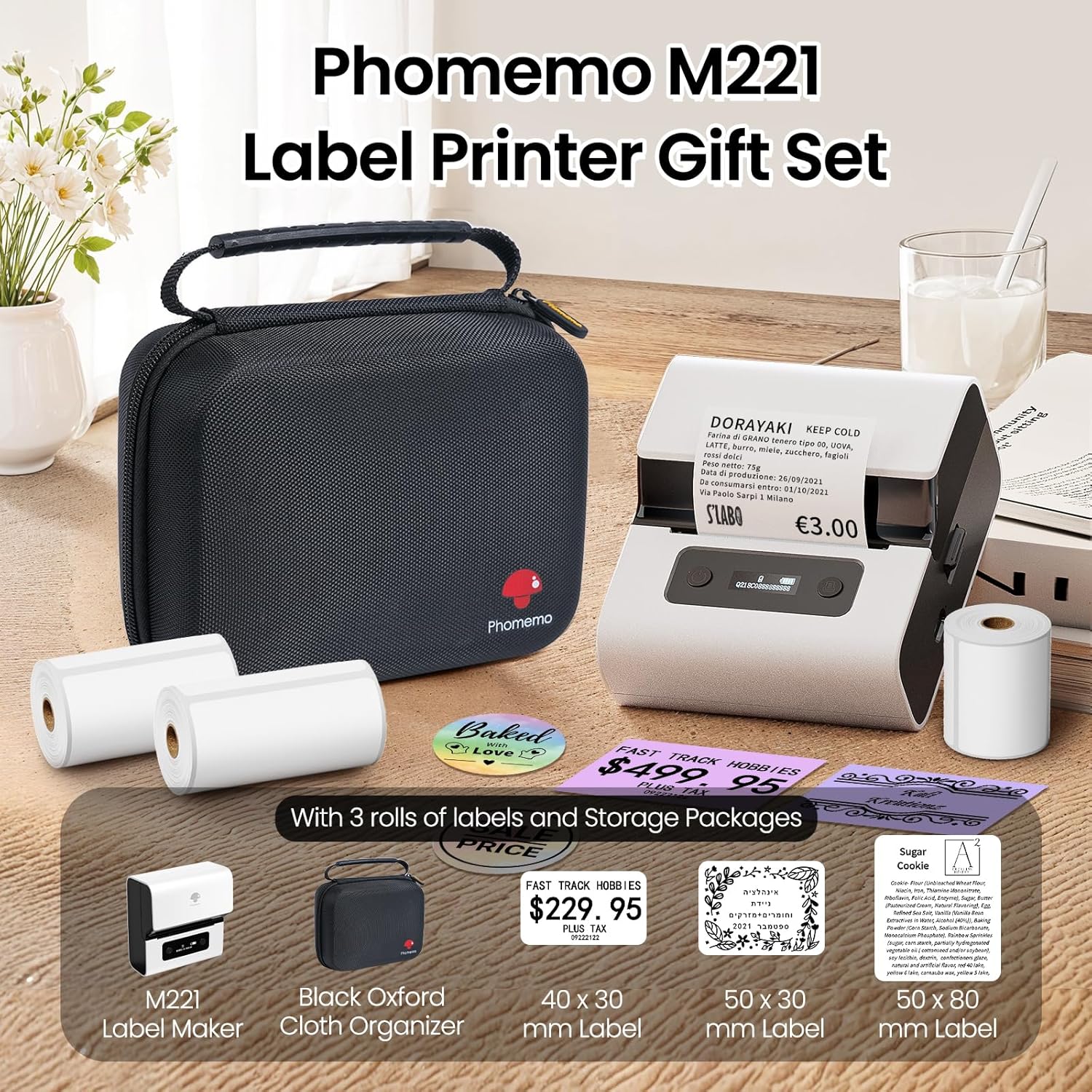
Image: Phomemo M221 Label Printer Gift Set, showing the printer, a black carrying case, and three rolls of white thermal labels.
Bathar seachadview
The Phomemo M221 is a compact and efficient thermal label printer. Key features include:
- Teicneòlas clò-bhualaidh teirmeach: No ink or toner required.
- Co-fhreagarrachd farsaing leubail: Supports labels from 20mm to 80mm (0.78" to 3.14") wide, including rectangular, round, transparent, and colored types.
- Ceangal: Bluetooth for iOS/Android smartphones and tablets, USB for Windows PCs.
- Bataraidh àrd-chomas: 2200 mAh battery with Type-C fast charging.
- Fast and Quiet Operation: Prints at 50 mm/s with reduced noise.
- Dealbhadh càirdeil don neach-cleachdaidh: Easy label loading and automatic gap detection.

Image: Phomemo M221 Label Maker Set, illustrating its features such as no ink requirement, large battery capacity, Bluetooth wireless printing, and its suitability as a gift.
Suidhich
1. A 'cur cosgais air a' chlò-bhualadair
Before first use, fully charge the Phomemo M221 printer.
- Ceangail an càball USB Type-C a tha air a thoirt seachad ri port cosgais a’ chlò-bhualadair.
- Ceangail ceann eile a’ chàball ri inneal-atharrachaidh cumhachd USB 5V (nach eil air a ghabhail a-steach) no ri port USB coimpiutair.
- The indicator light will show charging status. A full charge typically takes several hours. The 2200 mAh battery supports extended use.
2. A 'luchdachadh Labels
The M221 features an integrated label fixing structure for easy loading.
- Fosgail còmhdach a’ chlò-bhualadair.
- Insert the label roll into the compartment, ensuring the printing side faces upwards and the labels feed smoothly.
- Adjust the side guide plates to secure the label roll in place.
- Close the printer cover. The printer will automatically detect and calibrate the label gap.
3. A 'ceangal ris an inneal agad
The Phomemo M221 supports both Bluetooth and USB connections.
Bluetooth Connection (Smartphones/Tablets)
- Dèan cinnteach gu bheil Bluetooth air a chomasachadh air an inneal iOS no Android agad.
- Download and install the "Print Master" application from your device's app store.
- Open the "Print Master" app and follow the on-screen instructions to search for and connect to your M221 printer.

Image: Phomemo M221 printer demonstrating Bluetooth wireless connection with a tablet and a smartphone.
USB Connection (Windows PC)
- Connect the USB Type-C cable from the printer to an available USB port on your Windows PC.
- Download and install the "Labelife" software and printer drivers from the official Phomemo weblàrach.
- Follow the software installation prompts. Once installed, you can select the M221 as your printer.

Image: Phomemo M221 printer connected to a laptop using a USB cable, indicating wired connectivity.
Stiùireadh Obrachaidh
1. Basic Printing with "Print Master" App (Mobile)
- Ensure your M221 printer is connected via Bluetooth to your mobile device.
- Open the "Print Master" app.
- Select a template or create a new label design. The app offers various templates for text, images, barcodes, QR codes, and more.
- Customize your label content.
- Tap the print icon. Confirm print settings such as quantity.
- The printer will begin printing your labels.
2. Printing with "Labelife" Software (PC)
- Ensure your M221 printer is connected via USB to your Windows PC.
- Open the "Labelife" software.
- Design your label using the software's features, including text, images, barcodes, and QR codes.
- Rach gu "File" > "Print" or click the print icon.
- Select the Phomemo M221 from the list of available printers and adjust any necessary print settings.
- Click "Print" to start printing.
3. Batch Printing
Both "Print Master" and "Labelife" support batch printing for efficiency.
- In the print dialogue, specify the desired number of copies.
- The printer will automatically print multiple labels consecutively.

Image: Phomemo M221 printer demonstrating its versatility with examples of address labels, price tags, ingredient labels, and gift tags.

Image: Phomemo M221 printer showcasing its compatibility with over 50 types of thermal labels, including various shapes and designs.
Cumail suas
1. Glanadh Ceann a’ Chlò-bhualaidh
Nì glanadh cunbhalach ceann a’ chlò-bhualaidh cinnteach à càileachd clò-bhualaidh as fheàrr.
- Cuir dheth an clò-bhualadair agus dì-cheangail an càball cumhachd.
- Fosgail còmhdach a’ chlò-bhualadair.
- Sguab ceann a’ chlò-bhualaidh gu socair le swab cotain.ampair a dhèanamh le deoch-làidir isopropyl.
- Leig leis a’ cheann clò-bhualaidh tiormachadh gu tur mus dùin thu an còmhdach agus mus cuir thu air a’ chlò-bhualadair.
2. Stòradh
Store the printer in a clean, dry environment, away from extreme temperatures and direct sunlight. When not in use for extended periods, ensure the printer is fully charged and then powered off.

Image: A man holding the Phomemo M221 printer's carrying case, illustrating its portable design.
Fuasgladh thrioblaidean
Printer Does Not Turn On or Charge
- Thoir sùil air Ceangal Cumhachd: Ensure the USB Type-C cable is securely connected to both the printer and a working power source (5V adapter or PC USB port).
- Dearbhaich an Adaptor Cumhachd: Use a reliable 5V USB power adapter.
- Ùine cosgais: Allow sufficient time for charging. The battery indicator should show charging status.
No Printing or Blank Output
- Check Label Orientation: Ensure the thermal labels are loaded correctly with the printing side facing upwards.
- Seòrsa leubail: Confirm you are using thermal labels. The M221 does not use ink.
- Print Head Cleanliness: A dirty print head can cause blank lines or poor print quality. Refer to the Maintenance section for cleaning instructions.
- Co-thaobhadh Leubail: Ensure the label roll is properly seated and aligned by the side guide plates to prevent misalignment errors.
Cùisean Ceangal Bluetooth
- Printer On: Dèan cinnteach gu bheil am clò-bhualadair air agus taobh a-staigh raon Bluetooth an inneil agad.
- Bluetooth air a chomasachadh: Verify Bluetooth is active on your smartphone or tablet.
- Ceangal App: Connect through the "Print Master" app, not directly through your device's Bluetooth settings.
- Ath-thòiseachadh innealan: Try restarting both the printer and your mobile device.
Càileachd clò dona
- Print Head Cleanliness: Glan ceann a’ chlò-bhualaidh mar a tha air a mhìneachadh san earrann Cumail suas.
- Càileachd an leubail: Use high-quality thermal labels.
- Print Density Settings: Adjust print density settings within the "Print Master" app or "Labelife" software if available.
Sònrachaidhean
| Feart | Mion-fhiosrachadh |
|---|---|
| Modail Àireamh | M221 |
| Brand | Phomemo |
| Teicneòlas ceangail | Bluetooth, USB Seòrsa C |
| Teicneòlas clò-bhualaidh | Teirmeach |
| Toradh Clò-bhualaidh | Monochrome |
| Astar Clò-bhualaidh as Motha (Moncromach) | 15.0 pages per minute (50 mm/s) |
| Fuasgladh Clò-bhualaidh as Motha (Moncromach) | 203 dpi |
| Leud Label le taic | 20mm - 80mm (0.78" - 3.14") |
| Bataraidh | 2200 mAh (1 D - included) |
| Cuideam nì | 820 gram |
| Meudan toraidh (L x W x H) | 12.9 x 6.7 x 11.9 ceudameatairean |
| Control Device Type | Smartphone/PC |
| Seòrsa Meadhanan | Bileagan |
Barantas agus Taic
Airson fiosrachadh barantais agus taic theicnigeach, thoir sùil air làrach-lìn oifigeil Phomemo weblàrach-lìn no cuir fios chun t-seirbheis teachdaiche aca gu dìreach. Cùm do chuidhteas ceannach mar dhearbhadh ceannach.
Goireasan air-loidhne: Tadhail air an Bùth Phomemo air Amazon for product updates and FAQs.