
1. Ro-ràdh
Thank you for choosing the MESWAO 15.6 inch Android 14 Tablet Pro. This tablet is designed to provide a superior visual and performance experience with its large Full HD display, powerful octa-core processor, and extended battery life. This manual will guide you through the setup, operation, maintenance, and troubleshooting of your new device, ensuring you get the most out of its advanced features.
2. Dè tha sa bhogsa
Thoir sùil air susbaint a’ phacaid agad. Ma tha rud sam bith a dhìth no millte, cuir fios gu taic luchd-cleachdaidh.
- 1 x MESWAO 15.6 inch Android Tablet
- 1 x Adaptor Cumhachd
- 1 x càball Type-C
- 1 x Leabhar-làimhe Cleachdaiche
- 1 x Type-C gu inneal-atharrachaidh USB
- 1 x Stuck pin (SIM ejector tool)

Image: Visual representation of the MESWAO tablet and its included accessories.
3. Toradh thallview
3.1 Prìomh fheartan
- 15.6-inch 1080P FHD IPS Display: Large screen with 1920x1080p resolution, 16:9 aspect ratio, 85% screen-to-body ratio, and 350 nits adjustable brightness for clear visuals.
- Android 14 OS: Latest Android version for faster app launches, intuitive user interface, split-screen multitasking, and GMS certification for Google Play access.
- MediaTek Helio G99 CPU: Octa-core processor (6nm, up to 2.2GHz) and ARM Mali-G57 GPU for smooth performance in multitasking, streaming, and gaming.
- 12,000mAh Mega Battery & 30W Fast Charging: Provides up to 15 hours of video playback and 12+ hours of daily use, with 90% charge in 3 hours.
- 6GB RAM + 128GB ROM (Expandable to 1TB): Ample storage for apps, photos, and videos, with expandable memory via microSD card (FAT32 format).
- Dual-band Wi-Fi & Bluetooth 5.0: High-speed 2.4G/5G Wi-Fi and efficient Bluetooth connectivity for peripherals.
- 5MP Front + 32MP Rear Cameras: Capture moments and conduct clear video calls.
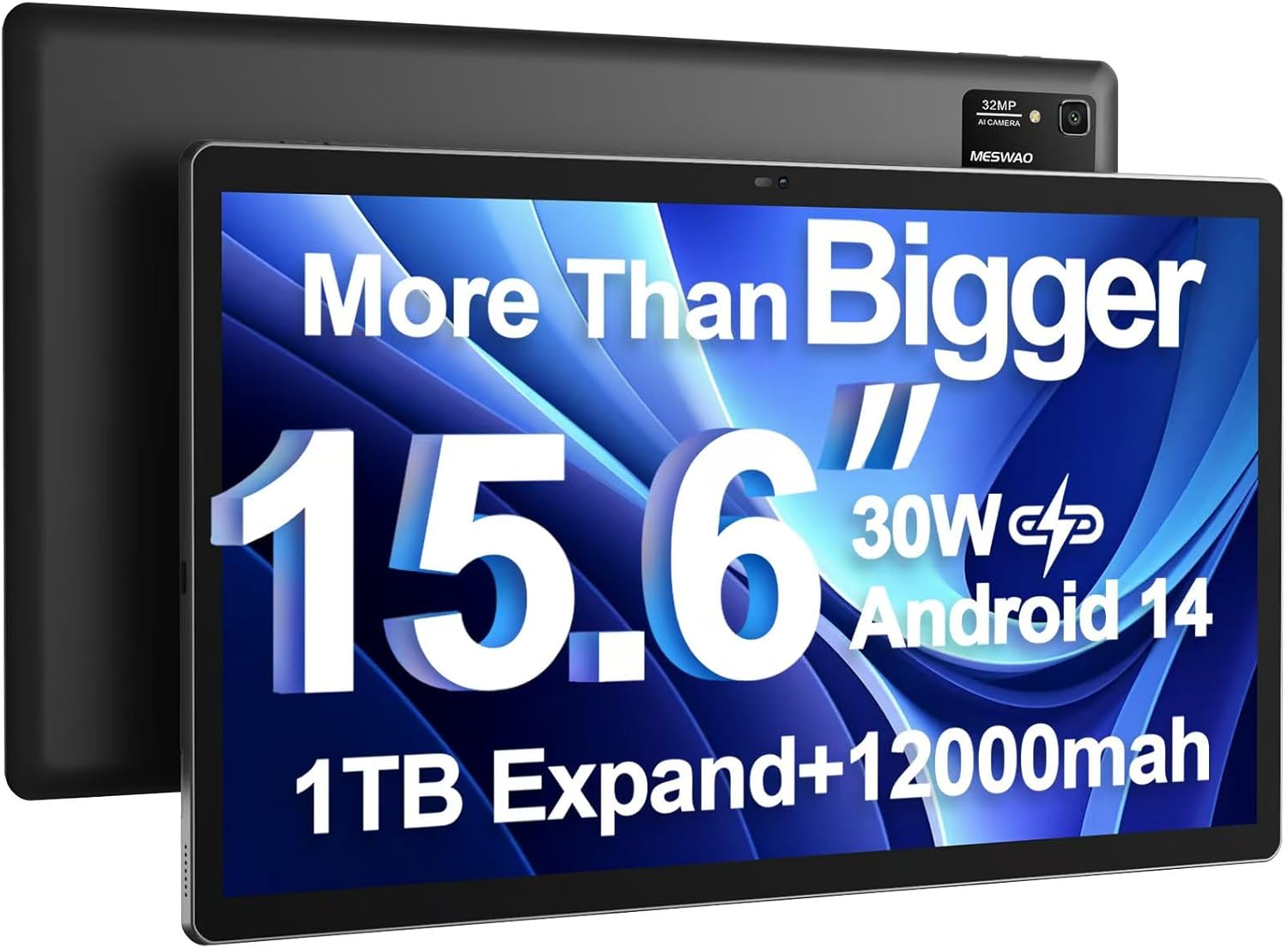
Image: The MESWAO 15.6 inch Android 14 Tablet Pro, showcasing its large display and rear camera module.

Image: Visual comparison highlighting the significantly larger screen area of the 15.6-inch tablet compared to a standard 10-inch tablet.

Image: Illustration of the tablet's 12,000mAh ultra-large capacity battery and 30W fast charging, indicating quick charge times and extended usage.
3.2 Co-phàirtean a’ Chlàir
Familiarize yourself with the physical components of your MESWAO tablet:
- Putan Cumhachd: Located on the side, used to turn the tablet on/off or wake/sleep the screen.
- Putanan tomhas-lìonaidh: Atharraich ìrean toraidh claisneachd.
- Camara aghaidh: Camara 5MP airson gairmean bhidio agus selfies.
- Camara cùil: 32MP camera with flash for high-resolution photos and videos.
- Port Seòrsa C: Airson cosgais agus gluasad dàta.
- Slot cairt TF: For expanding storage with a microSD card.
- Luchd-labhairt Stereo: Quad speakers for enhanced audio experience.
- Jack headset 3.5mm: For wired audio connection (requires included Type-C to 3.5mm adapter).
4. Suidhich
4.1 Cumhachd Tòiseachaidh Air adhart
- Brùth agus cùm an Putan Cumhachd until the MESWAO logo appears on the screen.
- Lean na stiùiridhean air an sgrion gus do chànan agus roinn a thaghadh, agus ceangal ri lìonra Wi-Fi.
- Sign in with your Google account or create a new one to access Google Play Store and other services.
4.2 A’ cur cosgais air an tablaid
Before first use, fully charge the tablet. Use the provided power adapter and Type-C cable.
- Connect the Type-C cable to the tablet's Type-C port.
- Plug an adapter cumhachd a-steach do bhalla a-muigh.
- The charging indicator will appear on the screen. A full charge takes approximately 3 hours with the 30W fast charger.
4.3 A’ cur a-steach cairt MicroSD
To expand storage, insert a microSD card (FAT32 format, up to 1TB, sold separately).
- Lorg an t-sliotan cairt TF air taobh a’ chlàir-bhùird.
- Use the provided stuck pin to gently press into the small hole next to the slot to eject the tray.
- Place the microSD card into the tray with the gold contacts facing down.
- Cuir an treidhe air ais dhan t-slot gu faiceallach gus an cliog e na àite.
5. Stiùireadh Obrachaidh
5.1 Seòladh Bunaiteach
- Sgrion Dachaigh: Sguab clì no deas gus gluasad eadar scrionaichean dachaigh.
- Drathair an aplacaid: Access all installed applications (if using a launcher with an app drawer, otherwise apps are on home screens).
- Fiosan & Roghainnean Luath: Swipe down from the top of the screen to access notifications and quick settings toggles (Wi-Fi, Bluetooth, Brightness, etc.).
- Aplacaidean o chionn ghoirid: Tap air an ìomhaigh cheàrnagach (no swipe suas is cum bhon bhonn ma chleachdas tu seòladh gluasadan-bodhaig) gus view agus gluais eadar aplacaidean a chaidh a chleachdadh o chionn ghoirid.
5.2 Multitasking with Split Screen
The Android 14 OS supports split-screen functionality for enhanced productivity.
- Fosgail a’ chiad aplacaid a tha thu airson a chleachdadh.
- Go to the Recent Apps view.
- Tap the app icon at the top of the first app's card and select 'Split screen'.
- Choose the second app from your recent apps or app drawer to open it in the other half of the screen.
- Adjust the size of each app by dragging the divider in the middle.

Ìomhaigh: Tharview of key features of the Android 14 operating system on the tablet, including multitasking capabilities.
5.3 Ceangalachd
- Wi-Fi: Rach gu Roghainnean > Lìonra is eadar-lìon > Wi-Fi to connect to available networks. Supports 2.4Ghz and 5Ghz bands.
- Bluetooth: Rach gu Suidhichidhean> Innealan ceangailte> Roghainnean ceangail> Bluetooth to pair with Bluetooth headphones, keyboards, or other devices.
- Tilgeadh Sgrion: The tablet supports wireless screen casting to compatible displays. Access this feature from Quick Settings or Settings > Connected devices > Connection preferences > Cast.

Image: Depiction of the tablet's stable dual-band Wi-Fi and Bluetooth 5.0 capabilities, enabling seamless wireless connections.
6. Cumail suas
6.1 Cùram Bataraidh
- Seachain teòthachd anabarrach (teas no fuar) oir faodaidh iad beatha bataraidh a mhilleadh.
- Na leig leis a’ bhataraidh drèanadh gu tur gu tric. Cuir cosgais air mus ruig e 0%.
- Use only the provided charger or a certified 30W PD fast charger.
6.2 Glanadh
- Cleachd clò bog, gun lint gus an sgrion agus a’ bhodhaig a ghlanadh.
- Airson smùid stòlda, beagan dampnigh an clò le uisge no inneal-glanaidh sgrion. Seachain ceimigean làidir.
- Na spraeadh lionntan gu dìreach air a’ chlàr.
6.3 Ùrachaidhean bathar-bog
Thoir sùil gu cunbhalach airson ùrachaidhean siostaim agus stàlaich iad gus dèanamh cinnteach à coileanadh agus tèarainteachd as fheàrr.
- Connect your tablet to a stable Wi-Fi network.
- Rach gu Roghainnean > Siostam > Ùrachadh siostaim.
- Lean an stiùireadh air an sgrion gus ùrachaidhean sam bith a tha rim faighinn a luchdachadh sìos agus a stàladh.
7. A ’dèanamh trioblaid
Ma thachras tu ri duilgheadasan leis an tablet agad, thoir sùil air na fuasglaidhean cumanta a leanas:
| Trioblaid | Adhbhar a dh’fhaodadh a bhith ann | Fuasgladh |
|---|---|---|
| Cha tionndaidh an tablet air | Bataraidh ìosal; Tubaist siostaim | Cuir cosgais air an tablet airson co-dhiù 30 mionaid. Brùth is cum sìos am putan Cumhachd airson 10-15 diogan gus ath-thòiseachadh a dhèanamh. |
| Slow performance/Lag | Cus aplacaidean a’ ruith; Stòradh gann; Bathar-bog seann-fhasanta | Close background apps. Clear cache. Free up storage. Check for system updates. |
| Duilgheadasan le ceangal Wi-Fi | Incorrect password; Router issue; Tablet Wi-Fi off | Ensure Wi-Fi is on. Re-enter password. Restart router. Forget and reconnect to network. |
| Bidh bataraidh a’ drèanadh gu sgiobalta | High screen brightness; Background apps; Heavy usage | Reduce screen brightness. Close unused apps. Limit background data. Check battery usage in settings. |
| Touchscreen unresponsive/Phantom touches | Temporary software glitch; Defective unit | Restart the tablet. If the issue persists, contact MESWAO customer support for assistance. |
If the problem persists after trying these solutions, please contact MESWAO customer support for further assistance.
8. Sònrachaidhean
| Feart | Mion-fhiosrachadh |
|---|---|
| Ainm Modail | MES-B3 Pro |
| Siostam-obrachaidh | Android 14 |
| Meud sgrion | 15.6 òirlich |
| Fuasgladh sgrion | 1920 x 1080 piogsail (IPS làn HD) |
| Pròiseasar | MediaTek Helio G99 Ochd-cridhe (suas ri 2.2GHz) |
| Grafaigeachd coprocessor | ARM Mali-G57 |
| RAM | 6 GB |
| Stòradh a-staigh (ROM) | 128 GB |
| Stòradh a ghabhas leudachadh | Up to 1TB via MicroSD card (FAT32 format) |
| Comas Bataraidh | 12,000 mAh |
| Beatha Bataraidh (Cuibheasach) | 13 Uairean (suas ri 15 uairean de chluich bhidio) |
| A 'cur cosgais | Cosgais Luath 30W PD |
| Ceangal gun uèir | 802.11a/b/ac/ax (2.4G/5G Dual-band Wi-Fi), Bluetooth 5.0 |
| Camara aghaidh | 5MP |
| Camara cùil | 32MP |
| Cuideam nì | 4.42 notaichean (timcheall air 2 kg) |
| Meudan toraidh | 14.49 x 8.66 x 0.39 òirleach (36.8 x 22 x 1 cm) |
9. Barantas agus Taic
MESWAO products come with a standard manufacturer's warranty. Please refer to the warranty card included in your package for specific terms and conditions. For technical support, troubleshooting assistance, or warranty claims, please contact MESWAO customer service through the contact information provided on the official MESWAO weblàrach no an àrd-ùrlar ceannach agad.
Fiosrachadh conaltraidh: Please visit the official MESWAO website or refer to the support card included in your product packaging for the most up-to-date contact details.