
1. Ro-ràdh
This manual provides essential information for the safe and efficient operation of your Meizu mblu 21 smartphone. Please read it thoroughly before using the device.
The Meizu mblu 21 features a Prism Edge Design with a radiant gradient and a large immersive 6.79-inch HD display. It is equipped with a 13MP main camera and an 8MP front camera, powered by Android 14. The device includes a 4900mAh battery for extended use and supports 4G LTE connectivity, Dual-Band Wi-Fi, and Bluetooth 5.0.
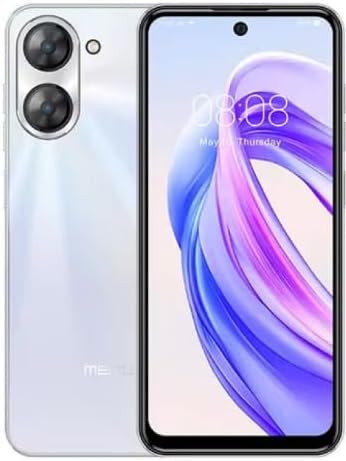
Figear 1.1: Aghaidh is cùl view of the Meizu mblu 21 smartphone in White Diamond color.
2. Dè tha sa bhogsa
Dèan cinnteach gu bheil a h-uile nì anns a’ phacaid:
- Meizu mblu 21 Smartphone
- Adapter cumhachd
- Càball USB
- Inneal SIM Ejector
- Stiùireadh tòiseachaidh luath

Figure 2.1: Meizu mblu 21 smartphone alongside its power adapter.
3. Suidhich
3.1. A’ cur a-steach Cairtean SIM agus Cairt MicroSD
The Meizu mblu 21 supports Dual Nano SIM cards and a MicroSD card for expandable storage. Locate the SIM tray on the side of the device.
- Power off the device before inserting or removing SIM/MicroSD cards.
- Use the provided SIM ejector tool to open the SIM tray.
- Carefully place the Nano SIM cards and/or MicroSD card into the designated slots on the tray, ensuring correct orientation.
- Brùth an treidhe air ais dhan inneal gu socair gus am bi e rèidh.
3.2. Draoidh Cumhachd is Suidheachaidh Tùsail
- Press and hold the Power button until the Meizu logo appears.
- Follow the on-screen instructions to complete the initial setup, including selecting your language, connecting to a Wi-Fi network, and setting up your Google account.
4. Ag obrachadh an inneal agad
4.1. Taisbeanadh agus Seòladh
The 6.79-inch HD display features a 90Hz adaptive refresh rate for smooth visuals. Navigate the interface using touch gestures: tap, swipe, pinch-to-zoom.
4.2. Gnìomhan a’ Chamara
The device is equipped with a 13MP main camera and an 8MP front camera. Open the Camera application to capture photos and videos.
- Camara snasail 13MP: Ideal for capturing everyday moments with sharpness and true-to-life colors.
- Camara aghaidh 8MP: Designed for clear selfies and video calls.
4.3. Feartan tèarainteachd
- Side Unlock: A fast and secure fingerprint sensor integrated into the side power button for instant access.
- Smart Face Unlock: Use the front camera to unlock your device quickly and conveniently.
4.4. Ceangalachd
Your mblu 21 supports various connectivity options:
- 4G LTE: For mobile data connectivity. In the USA, this device is compatible with T-Mobile. Outside the USA, it works with any carrier worldwide.
- Wi-Fi dà-chòmhlan: Supports both 2.4GHz and 5GHz bands for seamless internet access.
- Bluetooth 5.0: For connecting wireless accessories with improved energy efficiency.
- VoLTE HD Calls: Enjoy sharper, clearer voice calls over LTE networks.

Figure 4.1: Key technology features of the Meizu mblu 21, including Android 14, Dual-Band Wi-Fi, Bluetooth 5.0, and VoLTE.
5. Cumail suas
5.1. Cùram Bataraidh
The mblu 21 is equipped with a 4900mAh battery. To maximize battery lifespan:
- Seachain teòthachd anabarrach.
- Use only the provided power adapter or certified compatible chargers.
- Seachain a bhith a’ leigeil às a’ bhataraidh gu tur gu tric.

Figear 5.1: Taobh a-staigh view of the Meizu mblu 21, showcasing the 4900mAh battery and internal components.
5.2. Glanadh an inneil agad
Cleachd clò bog, gun lint airson scrion agus corp a’ fòn a ghlanadh. Seachain ceimigean cruaidh no stuthan sgrìobach a chleachdadh.
5.3. Ùrachaidhean bathar-bog
Regularly check for and install software updates to ensure optimal performance and security. Updates can be found in the device's settings menu.
6. A ’dèanamh trioblaid
If you encounter issues with your Meizu mblu 21, try the following solutions:
- Inneal nach eil a’ freagairt: Brùth is cum sìos am putan Cumhachd airson timcheall air 10-15 diogan gus ath-thòiseachadh a sparradh.
- Cùisean Ceangail Lìonra:
- Dèan cinnteach gu bheil a’ chairt SIM air a cur a-steach gu ceart.
- Tionndaidh Modh Plèana air agus dheth.
- Check network settings (APN, preferred network type).
- Bataraidh a’ drèanadh gu sgiobalta:
- Dùin aplacaidean nach eil air an cleachdadh a tha a' ruith air a' chùl.
- Lùghdaich soilleireachd sgrion.
- Cuir dheth feartan neo-riatanach leithid GPS no Bluetooth nuair nach eilear gan cleachdadh.
- Cùisean Coileanaidh:
- Clear cache and data of problematic apps.
- Saoraich àite stòraidh.
- Consider a factory reset (Note: This will erase all data on your device. Back up important data first.).
7. Sònrachaidhean
| Feart | Mion-fhiosrachadh |
|---|---|
| Ainm Modail | mblu 21 |
| Modail Àireamh | M416l |
| Siostam-obrachaidh | Android 14 |
| Meud sgrion | 6.79 òirlich |
| Comas stòraidh cuimhne | 64 GB |
| Meud Cuimhne RAM Stàlaichte | 4 GB |
| Comas Bataraidh | 4900 mìleamp Uairean |
| Prìomh chamara | 13 BP |
| Camara aghaidh | 8 BP |
| Wireless Carrier (USA) | T-Fòn-làimhe |
| Teicneòlas cealla | 4G LTE |
| Teicneòlasan ceangail | 4G, Dual-Band Wi-Fi, Bluetooth 5.0 |
| Cuideam nì | 14 unnsa |
| Meud pacaid | 7 x 4 x 2 òirleach |
| Dath | White Diamond |
8. Barantas agus Taic
Your Meizu mblu 21 smartphone comes with a manufacturer's warranty. Please refer to the warranty card included in your product packaging for specific terms and conditions.
For technical support, service, or further inquiries, please contact Meizu customer support through their official channels. Contact information can typically be found on the manufacturer's weblàrach-lìn no ann an sgrìobhainnean toraidh.