
1. Ro-ràdh
This manual provides detailed instructions for the setup, operation, and maintenance of your THOMSON 8-inch Digital Photo Frame (Model: TRDF-8001C). Please read this manual thoroughly before using the device to ensure proper functionality and to maximize your enjoyment of its features. This digital photo frame is designed to display your cherished photos and videos with an 8-inch IPS HD screen, offering a clear and vibrant viewann an eòlas.
2. Dè tha sa bhogsa
Nuair a bhios tu a’ fosgladh a’ phacaid, dèan cinnteach gu bheil na nithean gu lèir a tha air an liostadh gu h-ìosal an làthair agus ann an deagh staid:
- THOMSON 8-inch Digital Photo Frame
- Smachd Iomallach
- Adapter cumhachd
- Photo Frame Stand
- Leabhar-làimhe cleachdaiche

Figure 2.1: Contents of the THOMSON Digital Photo Frame package.
3. Suidhich
3.1 Ceangal cumhachd
- Connect the power adapter to the DC-IN port on the back of the digital photo frame.
- Plug an inneal-atharrachaidh cumhachd a-steach do ionad dealain àbhaisteach.
- The frame will automatically power on.
3.2 Suidheachadh tùsail
- Upon first startup, you will be prompted to select your preferred language. Use the navigation buttons on the remote control or the physical buttons on the back of the frame to select and confirm.
- Suidhich an ceann-latha agus an uair làithreach.
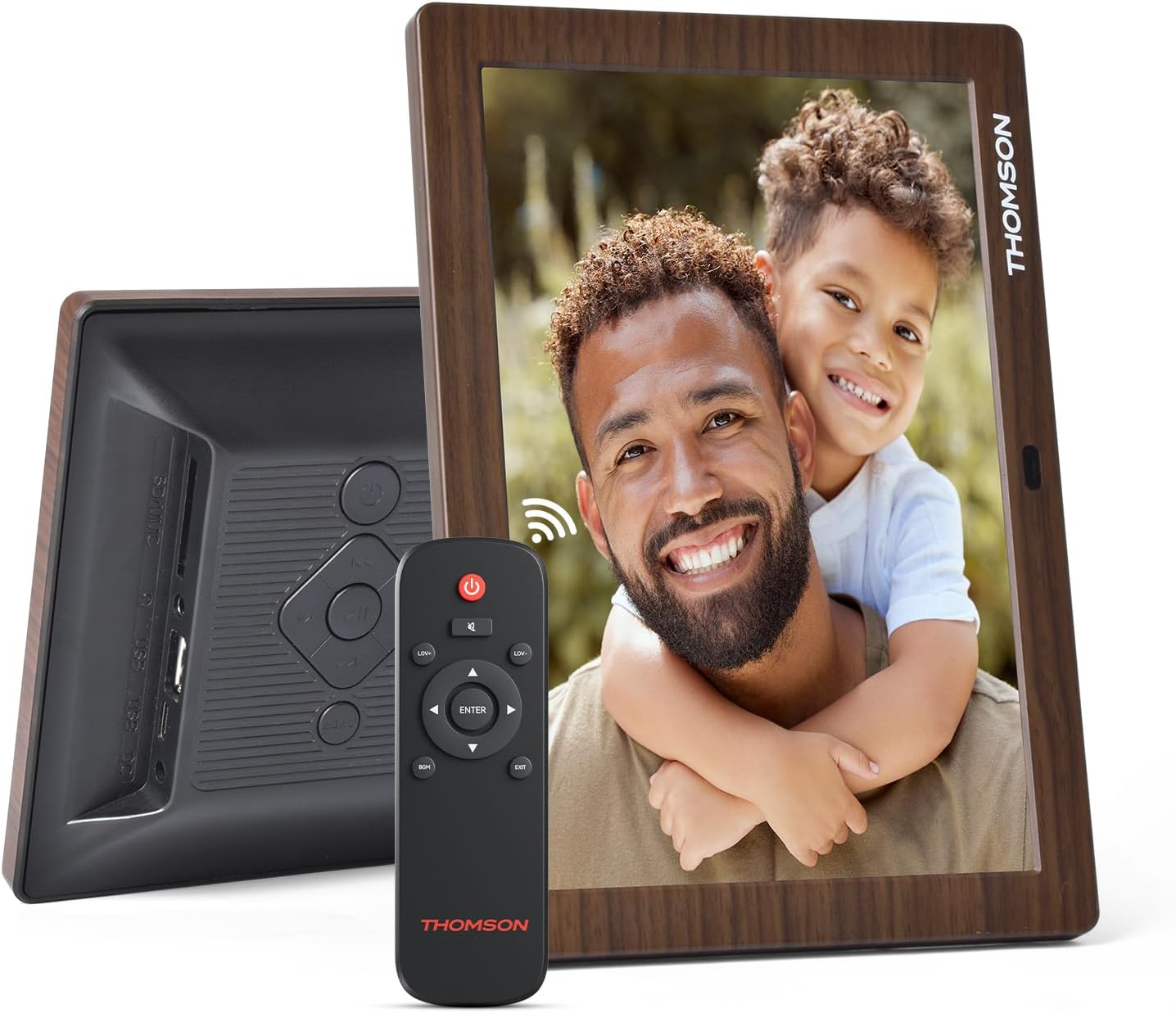
Figear 3.1: Cùl view of the frame with power input and physical controls.
3.3 Stàladh an Stand
The digital photo frame can be placed on a flat surface using the included stand. Insert the stand into the designated slot on the back of the frame. The frame also supports wall mounting using the integrated mounting holes.
4. Stiùireadh Obrachaidh
4.1 Feartan taisbeanaidh
- 8-inch IPS HD Screen: Enjoy clear and vibrant images with a 1280x800 resolution from various viewing ceàrnan.
- Cuairteachadh fèin-ghluasadach: The built-in gravity sensor automatically adjusts the photo orientation (landscape or portrait) for optimal viewing.

Figure 4.1: The 8-inch IPS HD screen provides a high-quality display for your memories.
4.2 Ath-chluich nam Meadhanan
The frame supports playback of photos, music, and videos. You can navigate through your media using the remote control or the physical buttons.
- Photo Slideshow: Configure slideshow intervals and transition effects in the settings.
- Ath-chluich Ciùil: Cluich ceòl cùl fhad ‘s a tha thu viewing ing photos.
- Ath-chluich bhidio: Enjoy your favorite video clips directly on the frame.

Figure 4.2: User interface for media selection and playback options.
4.3 Remote Control and Physical Buttons
Control your digital photo frame conveniently using the included remote control or the physical buttons located on the back of the frame.
- Feartan smachd aig astar: Power on/off, adjust volume, navigate images, control background music, and access menus.
- Putanan fiosaigeach: Provide direct control for essential functions, useful for elderly users.

Figure 4.3: Remote control for convenient operation of the frame.
4.4 Expansion Modes
The frame supports various expansion options for storing your media:
- SD/SDHC/MMC Card: Expand storage up to 32 GB.
- USB-A/Type-C/U-disk: Connect USB drives for additional media.
- Thoir an aire: This frame does not have built-in storage. An external memory card or USB drive is required for media storage.

Figure 4.4: Memory expansion slots on the back of the frame.
4.5 Cumhachd Air/Dheth Fèin-ghluasadach
You can set a customized automatic start and stop time for the frame to conserve energy and manage display times.

Figure 4.5: Setting automatic power on/off times for convenience.
5. Cumail suas
- Glanadh an sgrion: Use a soft, dry, lint-free cloth to gently wipe the screen. For stubborn marks, slightly dampnigh an clò le uisge no le fuasgladh glanaidh sgrion. Seachain ceimigean làidir.
- A 'glanadh an fhrèam: Sguab am frèam le clò bog, tioram.
- Stòradh: When not in use for extended periods, disconnect the power adapter and store the frame in a cool, dry place away from direct sunlight.
6. A ’dèanamh trioblaid
| Trioblaid | Adhbhar a dh’fhaodadh a bhith ann | Fuasgladh |
|---|---|---|
| Chan eil am frèam a’ dol air. | Chan eil an inneal-atharrachaidh cumhachd ceangailte no lochtach. | Dèan cinnteach gu bheil an inneal-atharrachaidh cumhachd ceangailte gu tèarainte ris a’ fhrèam agus ri socaid cumhachd a tha ag obair. Feuch socaid eadar-dhealaichte. |
| Chan eil dealbhan/bhideothan air an taisbeanadh. | No memory card/USB drive inserted or media files are corrupted/unsupported. | Insert a memory card or USB drive with supported media files. Thoir sùil file formats (JPEG for photos, MP4 for videos). Ensure the memory card/USB drive is properly inserted. |
| Smachd iomallach gun a bhith ag obair. | Low battery or obstruction. | Replace the remote control battery. Ensure there are no obstructions between the remote and the frame's IR receiver. |
| Images are distorted or incorrect orientation. | Incorrect display settings or disabled auto-rotation. | Check display settings in the menu. Ensure the auto-rotation feature is enabled if desired. |
7. Sònrachaidhean
- Àireamh Modail: TRDF-8001C
- Meud sgrion: 8 òirlich
- Fuasgladh: 1280x800 (WXGA)
- Co-mheas taobh: 16:10
- Teicneòlas taisbeanaidh: IPS HD
- Ceangal: DC-4.0, USB-A, Type-C, SD Card, 3.5MM earphone jack
- Leudachadh cuimhne: SD/SDHC/MMC card up to 32GB, U-disk
- Stòr cumhachd: Electric Corded
- Cuir a-steach Eadar-aghaidh Cleachdaiche: Buttons, Remote Control
- Stuth frèam: Plastaig
- Meudan toraidh: 24.4 x 18 x 2.51 cm
- Cuideam toraidh: 240 gram
8. Barantas agus Taic
For warranty information and customer support, please refer to the documentation included in your product packaging or visit the official Thomson weblàrach. Cùm do chuidhteas ceannach mar dhearbhadh ceannach airson tagraidhean barantais sam bith.