
1. Ro-ràdh
This manual provides detailed instructions for the setup, operation, and maintenance of your JoFomp 17.3" Large Digital Wall Clock. Please read this manual thoroughly before use to ensure proper functionality and longevity of the product.
2. Fiosrachadh Sàbhailteachd
- Ensure the clock is connected to a stable power source (5V/2A adapter included).
- Na cuir an inneal fo theodhachd anabarrach, solas dìreach na grèine, no taiseachd àrd.
- Cùm a-mach à ruigsinn chloinne.
- Na feuch ris an inneal a thoirt às a chèile no a chàradh thu fhèin. Cuir fios gu taic teachdaiche airson cuideachadh.
- Feumaidh an smachd iomallach 2 bataraidh AAA (gun a thoirt a-steach).
- A 1 AAA battery (not included) is required for the memory function to retain settings during power outagtha.
3. Pasgan-susbaint
Dèan cinnteach gu bheil a h-uile nì anns a’ phacaid:
- JoFomp 17.3" Digital Wall Clock
- Smachd Iomallach
- Adapter Cumhachd 5V / 1A DC
- Corda cumhachd
- Mounting Hooks (2)
- Mounting Template Ruler
- Leabhar-làimhe cleachdaiche (an sgrìobhainn seo)

Figear 3.1: Goireasan agus prìomh aonad a tha air an toirt a-steach.
4. Toradh thallview
The JoFomp 17.3" Large Digital Wall Clock features a clear LED display and multiple functions for convenience.

Figure 4.1: Front display of the digital wall clock.
4.1 Feartan taisbeanaidh
- Taisbeanadh ùine: Large 17.3" LED digits.
- Taisbeanadh Ceann-latha: Month and Day.
- Latha na Seachdain: Indicated by illuminated text (Mon-Sun).
- Teòthachd: Displays in Celsius or Fahrenheit.
- Taiseachd: Displays relative humidity percentage.
- Alarm dà-chànanach: Two independent alarm settings.
- Comharra DST: Daylight Saving Time status.

Figure 4.2: Labeled display functions.
4.2 Back Panel and Buttons
The back of the clock houses control buttons and connection ports.

Figure 4.3: Back panel with labeled components.
- Putanan suidheachadh: Five buttons for manual adjustments (Light, SET, +, -, Alarm).
- Memory Battery Compartment: For 1 AAA battery (not included) to retain settings.
- Port cumhachd: Airson an adapter cumhachd a cheangal.
- Tuill-taic: For wall installation.
5. Suidhich
5.1 Ceangal cumhachd
- Connect the power cord to the clock's power port.
- Plug the 5V/2A power adapter into a standard electrical outlet. The clock will power on and display.
Thoir an aire: The clock requires continuous power to operate. It is not battery-powered for primary display.
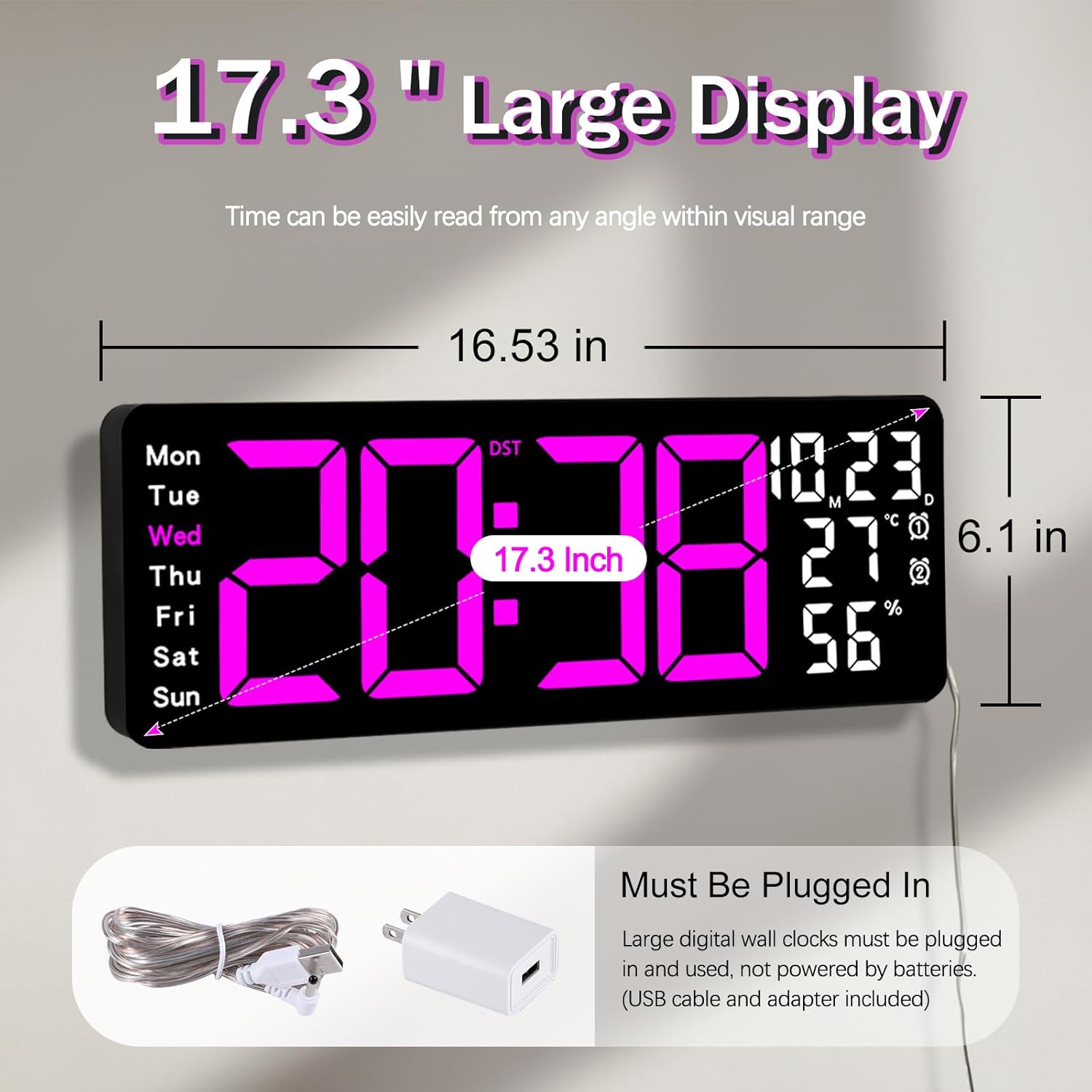
Figure 5.1: Power connection and dimensions.
5.2 Memory Battery Installation (Optional)
To retain time and settings during a power outage, install a 1 AAA battery (not included) into the memory battery compartment on the back of the clock.
- Locate the memory battery compartment on the back of the clock.
- Fosgail còmhdach na roinne.
- Insert one 1.5V AAA battery, ensuring correct polarity (+/-).
- Dùin còmhdach na roinne gu tèarainte.
5.3 Stàladh balla
Use the included mounting template ruler and hooks for easy wall installation.
- Determine the desired location for your clock.
- Place the mounting template ruler on the wall at the desired height.
- Mark the positions for the mounting hooks according to the ruler's indications.
- Install the mounting hooks into the wall at the marked positions.
- Carefully hang the clock onto the installed hooks, ensuring it is level and secure.
6. Stiùireadh Obrachaidh
The clock can be operated using either the remote control or the buttons on the back.
6.1 Suidheachadh Ùine is Ceann-latha
Use the remote control or the "SET" button on the back of the clock.
- Brùth an SET button (on remote or back of clock) to enter setting mode.
- Cleachd an + agus - buttons to adjust the flashing value (e.g., hour, minute, year, month, day).
- Brùth SET again to confirm the current setting and move to the next parameter.
- Dèan a-rithist gus an tèid na roghainnean uile a rèiteachadh.
6.2 12/24 Hour Format Conversion
Gus atharrachadh eadar cruthan ùine 12-uair agus 24-uair:
- Brùth air an fhear sònraichte 12/24h putan air an smachd iomallach.
- Alternatively, during time setting, the format option will appear.

Figure 6.1: 12/24H format conversion.
6.3 Tionndadh Aonad Teòthachd (°C/°F)
Gus gluasad eadar aonadan teòthachd Celsius agus Fahrenheit:
- Brùth an ° C / ° F putan air an smachd iomallach.
6.4 Alarm Setting (Dual Alarms)
Tha an gleoc a’ toirt taic do dhà inneal-rabhaidh neo-eisimeileach.
- Brùth an ALARM button on the remote control or the back of the clock.
- Cleachd + agus - gus an ùine rabhaidh a tha thu ag iarraidh a shuidheachadh.
- Brùth ALARM again to confirm and move to the next alarm or exit.
- To activate/deactivate an alarm, press the corresponding alarm button (e.g., AL1 or AL2) air an iomall.
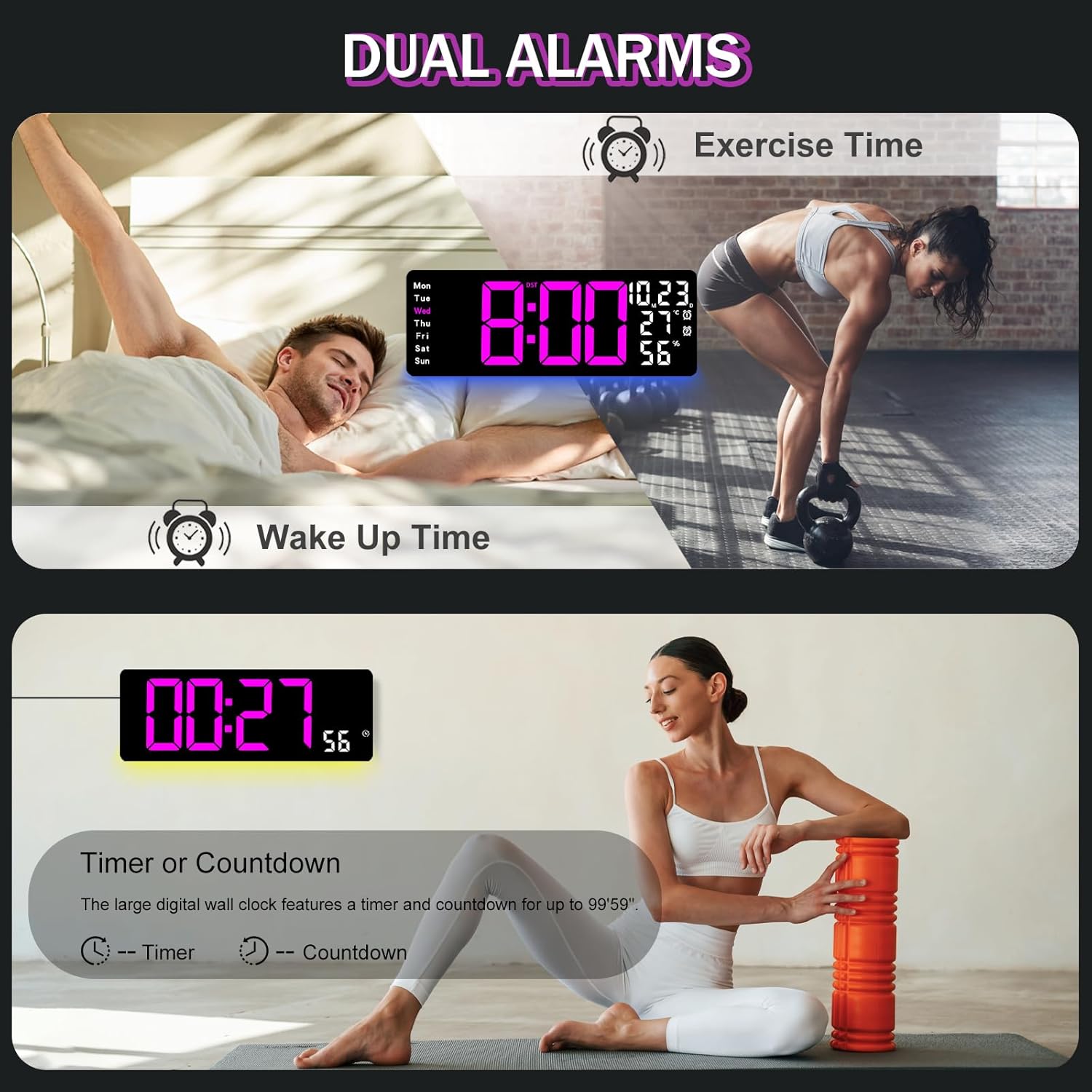
Figure 6.2: Dual alarm and timer functions.
6.5 Atharrachadh soilleireachd
The clock offers 10 levels of brightness, adjustable manually or automatically.
- Gile fèin-ghluasadach: The built-in light sensor adjusts brightness based on ambient light. Activate this mode by pressing the AUTO putan air an iomall.
- Soilleireachd làimhe: Brùth an BRIGHINN button on the remote, then use + agus - to select one of the 10 levels.

Figure 6.3: Custom and auto-brightness settings.

Figure 6.4: Brightness regulator illustration.
6.6 Ambient Light Features
The clock includes a night light feature at the bottom with multiple color options.
- Brùth an LAOIDH button on the remote control or the back of the clock to cycle through 8 fixed colors and 1 multi-color mode.
- In multi-color mode, the colors automatically convert. Press OK to fix a favorite color.
- Adjust the brightness of the ambient light using the + agus - buttons when the ambient light is active.

Figure 6.5: Multiple ambient night light options.

Figure 6.6: 9 color ambient light options.
6.7 Gnìomh Timer agus Cunntadh-sìos
The clock features a timer (count-up) and countdown function up to 99 minutes and 59 seconds.
- Brùth an TIMER putan air an smachd iomallach.
- Cleachd + agus - to set the desired time for countdown.
- Brùth Tòiseachadh/STOP to begin or pause the timer/countdown.
- Brùth ATHARRACHADH gus an timer a ghlanadh.

Figure 6.7: Timing function (count-up/countdown).
Video 6.1: Demonstration of multi-functional features including night light change, brightness control, count-up, and countdown. This video also shows the time, date, day, alarm clock, temperature, and humidity displayed on the same screen, along with 12/24 hour conversion, Celsius/Fahrenheit conversion, and DST enablement. The back design and buttons are also briefly shown.
6.8 Àm Sàbhalaidh Solais an Latha (DST)
If DST is observed in your region, you can enable or disable it.
- Brùth fada air an - button on the remote control to enable or disable DST. The DST indicator will appear/disappear on the display.

Figure 6.8: Enabling and disabling Daylight Saving Time.

Figure 6.9: Daylight Saving Time (DST) functionality.
6.9 Cleachdadh Smachd Iomallach
The remote control provides convenient access to all clock functions without needing to reach the clock directly.

Figure 6.10: Remote control and its functions.

Figure 6.11: Remote control in use.
- Ensure the remote control has 2 AAA batteries installed (not included).
- Point the remote control directly at the clock for optimal response.
- Each button on the remote corresponds to a specific function as described in this manual.
7. Cumail suas
- Clean the clock's display and body with a soft, dry cloth. Avoid abrasive cleaners or solvents.
- Ensure the power adapter and cord are free from damage.
- Replace the memory battery annually to ensure settings are retained during power interruptions.
8. A ’dèanamh trioblaid
| Trioblaid | Adhbhar a dh’fhaodadh a bhith ann | Fuasgladh |
|---|---|---|
| Tha taisbeanadh a’ chloca dheth. | Gun solar cumhachd. | Check if the power adapter is securely plugged into the clock and the outlet. Ensure the outlet is functional. |
| Smachd iomallach gun a bhith ag obair. | Low or dead batteries in remote; obstruction; remote out of range. | Replace remote batteries (2 AAA). Ensure no obstructions between remote and clock. Point directly at the clock within effective range. |
| Roghainnean air chall às dèidh cumhachd a thoirt dhethtage. | No memory battery or dead memory battery. | Install a fresh 1.5V AAA battery in the memory compartment. |
| Incorrect temperature/humidity reading. | Sensor interference or placement. | Ensure the clock is not placed near heat sources, direct sunlight, or in areas with extreme drafts. Allow time for the sensor to stabilize. |
| Ambient light not changing colors. | Stuck in fixed color mode. | Press the LIGHT button on the remote to cycle through modes. If stuck on a fixed color, press the OK button to release it from fixed mode. |
9. Sònrachaidhean
| Feart | Mion-fhiosrachadh |
|---|---|
| Brand | JoFomp |
| Modail Àireamh | 6669 |
| Seòrsa Taisbeanaidh | LED didseatach |
| Meud taisbeanaidh | 17.3 òirlich |
| Meudan toraidh | 16.5"L x 6.7"À |
| Stòr cumhachd | Dealain le Càball (inneal-atharrachaidh 5V/2A air a ghabhail a-steach) |
| Bataraidh Cuimhne | 1 x AAA (gun a thoirt a-steach) |
| Ìrean soilleireachd | 10 (Auto/Manual) |
| Ambient Light Colors | 8 Fixed + 1 Multi-color |
| Feartan sònraichte | Large Display, Adjustable Brightness, Temperature Display, Humidity Display, Dual Alarms, Timer, Countdown, DST, Remote Control |
| Seòrsa stàladh | Srath balla |
| Cuideam nì | 1.95 not |
10. Barantas agus Taic
JoFomp products are designed for reliability and performance. For warranty information or technical support, please refer to the contact details provided with your purchase or visit the official JoFomp weblàrach. Cùm do chuidhteas ceannach mar dhearbhadh ceannach.