
1. Ro-ràdh
The TRIGKEY Key-N150 Mini PC is a compact and efficient computer designed for various tasks, from office work to media entertainment. It features an Intel Twin Lake N150 processor, 16GB DDR4 RAM, and a 500GB M.2 PCIeX4 SSD, offering reliable performance in a small form factor. This manual provides essential information for setting up, operating, and maintaining your Mini PC.

Dealbh 1.1: Aghaidh view of the TRIGKEY Key-N150 Mini PC.
2. Pasgan-susbaint
Thoir sùil air a’ phacaid airson nan nithean a leanas:
- TRIGKEY Key-N150 Mini PC
- Leabhar-làimhe cleachdaiche
- Càball HDMI (1m)
- AC Power Cable (Optional: US/EU/UK/JP/AU)
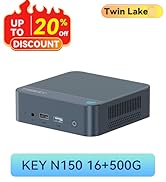
Image 2.1: TRIGKEY Key-N150 Mini PC and included accessories.
3. Toradh thallview
The Key-N150 Mini PC is equipped with a variety of ports and internal components to support its functionality.
3.1 Front and Rear Panel Interfaces

Image 3.1: Front panel of the Mini PC, showing USB ports and audio jack.

Image 3.2: Rear panel of the Mini PC, showing AC power, USB, LAN, and HDMI ports.
The Mini PC features:
- Aghaidh: 3.5mm Audio Jack, USB 2.0, USB 3.2 (10Gbps), Power Button, Power Indicator Light.
- Cùl: AC Power Input, USB 3.2 (10Gbps) x2, LAN (1000M) x2, HDMI x2.
3.2 Pàirtean a-staigh
Ìomhaigh 3.3: Spreadhadh view showing the internal components of the Mini PC, including the CPU, fan, RAM, and SSD slots.
Am measg nam prìomh fheartan a-staigh tha:
- Pròiseasar: Intel Twin Lake N150 (4 Cores/4 Threads, up to 3.60GHz).
- Grafaigean: Intel UHD Graphics (24EUs, 1000MHz).
- Cuimhne: 16GB DDR4 3200MHz SO-DIMM (single channel, expandable).
- Stòradh: 500GB M.2 PCIeX4 SSD (supports dual M.2 2280 SSDs, up to 2TB expansion).
- Ceangal gun uèir: WiFi 5 and Bluetooth 5.0.
- Solar cumhachd: Built-in 45W PSU.

Image 3.4: Details of the Intel Twin Lake N150 processor, highlighting its 3.6 GHz max turbo frequency, 4 cores, and 4 threads.

Image 3.5: Illustration of the 16GB DDR4 SO-DIMM RAM and the dual M.2 2280 SSD slots for storage expansion.
4. Stiùireadh Stèidheachaidh
Follow these steps to set up your TRIGKEY Key-N150 Mini PC:
- Ceangail ri taisbeanadh: Use an HDMI cable to connect the Mini PC to your monitor or TV. The device supports dual HDMI output for multiple displays.
- Ceangail peripherals: Cuir do mheur-chlàr agus do luchag USB a-steach do na puirt USB a tha rim faighinn.
- Ceangail ris an Lìonra: For a wired connection, connect an Ethernet cable to one of the two LAN ports. For wireless, ensure your WiFi network is available during initial setup.
- Cumhachd air: Connect the AC power cable to the Mini PC and then to a power outlet. Press the power button on the front panel.
- Tòiseachadh Tùsail: The Mini PC will boot up. Follow the on-screen instructions to complete the operating system setup (if not pre-configured).
Bhidio 4.1: Thar-chrìochview of the TRIGKEY Key-N150 Mini PC, demonstrating its features and connectivity options. This video provides a visual guide to the product's design and capabilities.
5. Stiùireadh Obrachaidh
5.1 Gnìomh Bunaiteach
Once set up, your Mini PC functions like a standard desktop computer. You can perform tasks such as web browsing, media playback, and office applications.

Image 5.1: The Mini PC supports various applications including web brobhsadh, dibhearsain nam meadhanan, obair oifis, agus ath-chluich bhidio 4K.
5.2 Suidheachadh Taisbeanaidh Dhùbailte
The Mini PC supports connecting two monitors via its dual HDMI ports. To configure dual displays:
- Connect both monitors to the HDMI ports on the rear of the Mini PC.
- Power on the Mini PC and both monitors.
- The operating system should automatically detect both displays. You can adjust display settings (extend, duplicate, primary display) through your OS display settings.
5.3 Intel Unison App
The Intel Unison App allows seamless connection between your Mini PC and mobile devices. This enables features such as:
- Viewing photo galleries from your PC.
- Extending your PC screen with a tablet.
- Making and receiving phone calls from your PC.
- A' gluasad files between phone/tablet and PC.
- Sending and receiving text messages from your PC.
- Managing device notifications from a single source.

Image 5.2: The Intel Unison App facilitates seamless connectivity and data transfer between your Mini PC and mobile devices.
6. Cumail suas
To ensure the longevity and optimal performance of your Mini PC, consider the following maintenance tips:
- Cùm e glan: Regularly clean the exterior of the Mini PC with a soft, dry cloth. Ensure ventilation holes are free from dust and obstructions to maintain efficient cooling.
- Ùrachaidhean bathar-bog: Cùm an siostam obrachaidh agus na draibhearan agad air an ùrachadh chun na dreachan as ùire airson leasachaidhean tèarainteachd is coileanadh.
- Sguabadh ceart: Dùin sìos am Mini PC gu ceart tron t-siostam obrachaidh an-còmhnaidh gus casg a chur air truailleadh dàta.
- Suidheachaidhean Àrainneachdail: Cleachd am Mini PC ann an àite le deagh fhionnarachadh, air falbh bho sholas dìreach na grèine, cus teas agus taiseachd.

Image 6.1: The Mini PC features an efficient cooling system to ensure stable operation and heat dissipation.
7. A ’dèanamh trioblaid
If you encounter issues with your Mini PC, refer to the following common solutions:
- Gun chumhachd: Ensure the AC power cable is securely connected to both the Mini PC and the power outlet. Try a different power outlet.
- Gun taisbeanadh: Check that the HDMI cable is firmly connected to both the Mini PC and the monitor. Verify the monitor is powered on and set to the correct input source. Try a different HDMI cable or monitor if possible.
- Gun cheangal eadar-lìn: For wired connections, check the Ethernet cable and router status. For wireless, ensure Wi-Fi is enabled in the operating system and you are connected to the correct network with the correct password.
- Innealan-iomaill nach eil ag obair: Ensure USB devices are properly plugged into the USB ports. Try different USB ports or restart the Mini PC.
- Slaodadh Siostaim: Dùin aplacaidean neo-riatanach. Thoir sùil airson pròiseasan cùl-fhiosrachaidh a tha ag ithe mòran ghoireasan. Dèan cinnteach gu bheil àite stòraidh saor gu leòr.
- Dùintean ris nach robh dùil: Ensure the Mini PC is in a well-ventilated area and not overheating. Check for any recent software or driver installations that might be causing instability.
If problems persist, consult the TRIGKEY support resources mentioned in the Warranty and Support section.
8. Sònrachaidhean
| Feart | Mion-fhiosrachadh |
|---|---|
| Brand | TRIGKEY |
| Modail Àireamh | KEY N150 |
| Modail CPU | Intel Twin Lake N150 (Celeron) |
| Luas CPU | Suas gu 3.6 GHz |
| Cunntas Pròiseasaran | 4 |
| Grafaigeachd coprocessor | Grafaigean Intel UHD |
| Cuimhne RAM air a stàladh | 16 GB DDR4 SDRAM |
| Luas Cuimhne | 3200 MHz |
| Slots Cuimhne Ri fhaighinn | 1 |
| Comas stòraidh cuimhne | 500 GB |
| Tuairisgeul diosc cruaidh | 500GB M.2 PCIeX4 SSD |
| Siostam-obrachaidh | OS (Ro-stàlaichte) |
| Teicneòlas ceangail | Bluetooth, Ethernet, HDMI, Wi-Fi |
| Co-fhreagarrachd gun uèir | 802.11ac (Wi-Fi 5), Bluetooth 5.0 |
| Gu h-iomlan puirt USB | 3 (USB 3.2 x2, USB 2.0 x1) |
| Total Number of HDMI Ports | 2 |
| Fuasgladh taisbeanaidh as àirde | 3840x2160 (4K) |
| Modh fuarachaidh | Passive (with fan for efficient heat dissipation) |
| Seòrsa plug cumhachd | Seòrsa A - 2 phrìne (Ameireaga a Tuath) |
| Dath | Glas |
9. Barantas agus Taic
TRIGKEY is committed to providing excellent customer service and support for your Mini PC.
- Freagairt sgiobalta: Support inquiries receive a reply within 24 hours.
- Poileasaidh Tilleadh: Poileasaidh tilleadh 30-latha.
- Ath-àite: Ath-chur ri fhaighinn taobh a-staigh 12 mìosan bho cheannach.
- Taic Fad-beatha: Lifetime after-sales service and technical support.

Image 9.1: TRIGKEY's commitment to customer service, including response times, return policy, replacement period, and lifetime technical support.
Cuir fios thugainn
For further assistance, technical support, or warranty claims, please use the following channels:
- Post-d: Refer to your product packaging or the official TRIGKEY website for email contact information.
- Weblàrach: Tadhail air an TRIGKEY oifigeil weblàrach airson Ceistean Cumanta, draibhearan, agus goireasan taic.
- Co-chomhairle air-loidhne: Check the TRIGKEY store page for online chat or consultation options.

Image 9.2: Various contact methods for TRIGKEY customer service and technical support.