
1. Ro-ràdh
Thank you for choosing the MEETION BTM011 Ergonomic Wireless Bluetooth Vertical Mouse. This device is designed to provide a comfortable and efficient computing experience by promoting a natural hand position, reducing wrist strain. It offers versatile connectivity options for multiple devices and adjustable precision to suit various tasks.

The ergonomic design of the MEETION vertical mouse helps maintain a natural hand and wrist posture, reducing discomfort compared to traditional mice.
2. Pasgan-susbaint
- MEETION BTM011 Ergonomic Wireless Bluetooth Vertical Mouse
- USB 2.4G Receiver (stored in the mouse battery compartment)
- Adapter USB-A gu USB-C
- Leabhar-làimhe cleachdaiche
3. Toradh thallview
Familiarize yourself with the various components and buttons of your MEETION BTM011 mouse.

Gu mionaideach view of the mouse components, including the Mode Switching Button, Power Switch (ON/OFF), Low Battery Indicator, Charging Indicator, DPI Speed Switch Button, 2.4G Connection Indicator, Bluetooth 1 Connection Indicator, and Bluetooth 2 Connection Indicator.
- Putan Clì: Gnìomh àbhaisteach cliog clì.
- Putan deas: Gnìomh àbhaisteach cliog deas.
- Cuibhle Scroll: For scrolling up and down.
- Putan air adhart: A’ seòladh air adhart ann an web brobhsairean no file luchd-rannsachaidh.
- Putan air ais: Seòlaidh e air ais a-steach web brobhsairean no file luchd-rannsachaidh.
- Putan suidse DPI: Atharraichidh seo cugallachd a’ chursair.
- Putan Atharrachaidh Modh: Switches between 2.4G, Bluetooth 1, and Bluetooth 2 modes.
- Tionndadh cumhachd (AIR / OFF): Tionndaidh an luchag air no dheth.
- Roinn Bataraidh: Located at the bottom, for 1x AA battery and USB receiver storage.
4. Stiùireadh Stèidheachaidh
4.1 Stàladh bataraidh
The mouse requires one AA battery (not included).
- Lorg còmhdach roinn a’ bhataraidh aig bonn na luchaige.
- Slaod an còmhdach fosgailte.
- Cuir a-steach aon bataraidh AA, a’ dèanamh cinnteach gu bheil am polarachd cheart (+/-).
- Dùin an còmhdach roinn bataraidh gu tèarainte.

Insert one AA battery into the compartment. The USB receiver is also stored here.
4.2 Cumhachd air / dheth
Slide the power switch located on the bottom of the mouse to the "ON" position to turn it on. Slide to "OFF" to conserve battery when not in use.
4.3 Modhan Ceangail
The MEETION BTM011 mouse supports three connection modes: 2.4GHz wireless (via USB receiver) and two independent Bluetooth 5.3 channels (BT1 and BT2). You can connect to up to three devices simultaneously and switch between them.

The mouse supports 2.4G wireless and two Bluetooth 5.3 connections for seamless switching between devices.
4.4 2.4GHz USB Connection
- Take out the USB receiver from the battery compartment of the mouse.
- Insert the USB receiver into an available USB-A port on your computer. If your computer only has USB-C ports, use the provided USB-A to USB-C adapter.
- Tionndaidh air an luchag le bhith a’ cleachdadh an suidse cumhachd.
- Press the Mode Switching Button until the 2.4G Connection Indicator (green light) lights up. The mouse should now be connected.
4.5 Ceangal Bluetooth (BT1 / BT2)
- Tionndaidh air an luchag le bhith a’ cleachdadh an suidse cumhachd.
- Press the Mode Switching Button to select either Bluetooth 1 (BT1) or Bluetooth 2 (BT2). The corresponding blue indicator light will blink, indicating pairing mode.
- On your device (computer, laptop, tablet, smartphone), go to Bluetooth settings.
- Lorg airson new devices. You should find "Meetion_MS_BT1" or "Meetion_MS_BT2".
- Select the device to pair. Once paired, the blue indicator light will stop blinking and remain solid for a few seconds.

Visual guide for connecting the mouse via 2.4G USB receiver and Bluetooth modes.
5. Stiùireadh Obrachaidh
5.1 Atharrachadh DPI
The mouse features 4 adjustable DPI levels: 1200, 1600, 2400, and 3200. Press the DPI Switch Button (located behind the scroll wheel) to cycle through these settings. Each press changes the cursor speed, allowing you to select the precision suitable for your task.
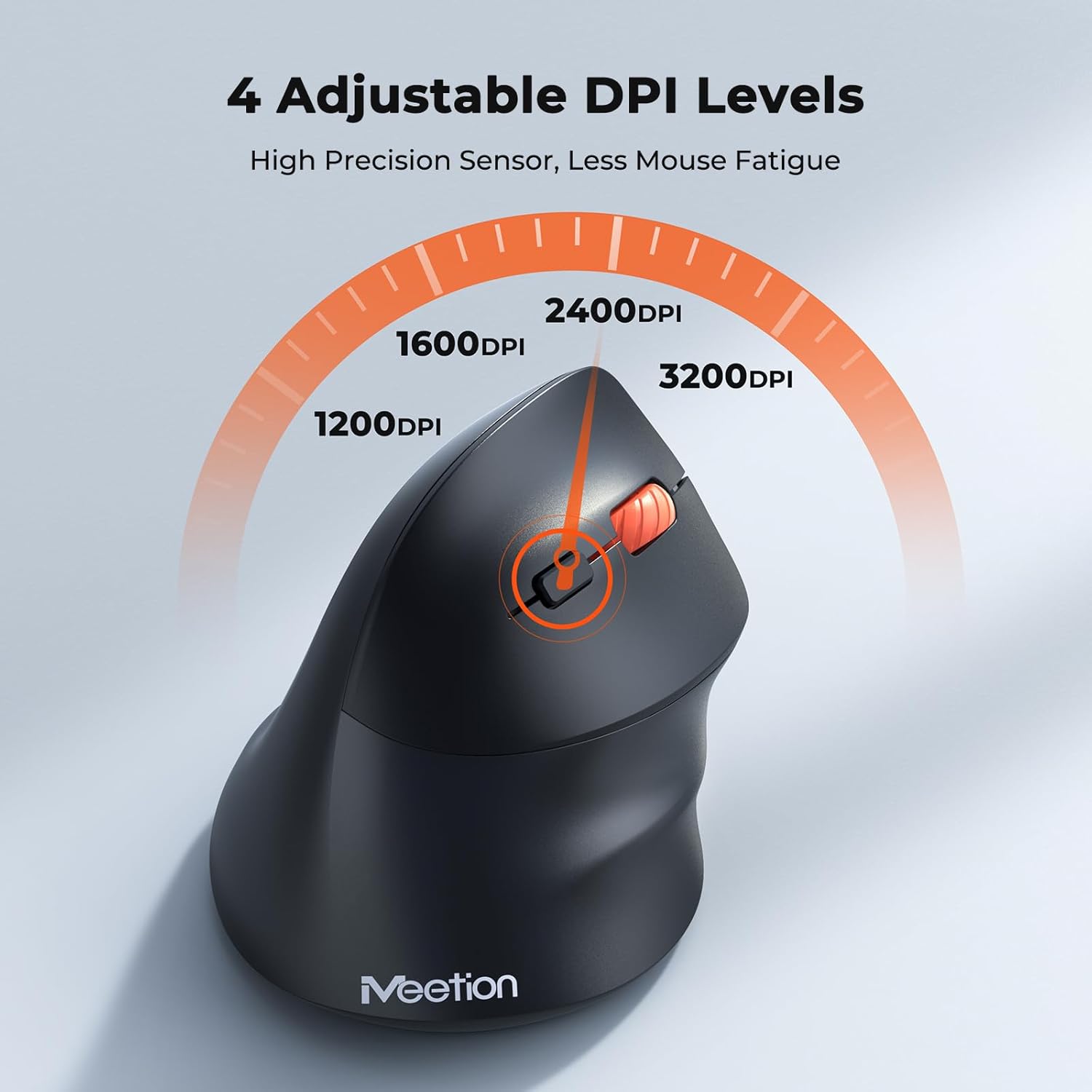
Adjust the DPI to match your preference for cursor speed and precision.
5.2 Atharrachadh Ioma-Inneal
To switch between connected devices, simply press the Mode Switching Button located on the bottom of the mouse. The corresponding indicator light (green for 2.4G, blue for BT1/BT2) will illuminate to show the active connection.
5.3 Forward/Back Buttons
Use the Forward and Back buttons, conveniently located on the side of the mouse, for quick navigation in web brobhsairean, file rannsachairean, agus aplacaidean eile a tha a’ toirt taic do na gnìomhan sin.
6. Riaghladh Cumhachd
6.1 Modh Cadail Fèin-ghluasadach
To conserve battery life, the mouse will automatically enter sleep mode after 20 minutes of inactivity. This intelligent feature helps extend the battery's operational time.
6.2 Waking the Mouse
To wake the mouse from sleep mode, simply press any button. It will instantly reconnect to the last active device.
6.3 Beatha Bataraidh
With typical usage, a single AA battery can power the mouse for up to 3 months. Actual battery life may vary based on usage patterns and battery quality.
7. Cumail suas
To ensure optimal performance and longevity of your mouse, follow these maintenance guidelines:
- Glanadh: Cleachd clò bog, tioram airson uachdar na luchaige a sguabadh. Airson salachar stòlda, cleachd clò beagan tioram.amp Faodar clò a chleachdadh, ach dèan cinnteach nach tèid taiseachd a-steach don inneal. Seachain ceimigean cruaidh no innealan-glanaidh sgrìobach.
- Ath-nuadhachadh bataraidh: Replace the AA battery when the low battery indicator lights up or when mouse performance degrades. Always dispose of used batteries responsibly.
- Stòradh: When not in use for extended periods, turn off the mouse and store it in a dry, cool place.
8. A ’dèanamh trioblaid
If you encounter issues with your MEETION BTM011 mouse, refer to the following solutions:
| Trioblaid | Fuasgladh |
|---|---|
| Chan eil an luchag a’ freagairt |
|
| Tha gluasad a’ chursair neo-riaghailteach no slaodach |
|
| Chan urrainn dhuinn ceangal a dhèanamh tro Bluetooth |
|
| Forward/Back buttons not working |
|
9. Sònrachaidhean
| Feart | Mion-fhiosrachadh |
|---|---|
| Modail | BTM011 |
| Ceangalachd | 2.4GHz Wireless, Bluetooth 5.3 (BT1, BT2) |
| Ìrean DPI | 1200/1600/2400/3200 |
| Putanan | 7 (Left, Right, Scroll Wheel, Forward, Back, DPI Switch, Mode Switch) |
| Stòr cumhachd | 1x AA Battery (not included) |
| Auto-cadal | Às deidh 20 mionaidean de neo-ghnìomhachd |
| Co-fhreagarrachd | Windows, Mac OS, Linux, Android, iOS (for iPad/iPhone) |
| Stuth | Plastaig |
| Meudan (approx.) | 4.4 x 3.29 x 2.74 òirleach (11.18 x 8.36 x 6.96 cm) |
10. Barantas agus Taic
10.1 Fiosrachadh Barantais
MEETION products are designed and manufactured to the highest quality standards. This product is covered by a limited warranty against defects in materials and workmanship. Please retain your proof of purchase for warranty claims. Specific warranty terms may vary by region; refer to your local retailer or the official MEETION weblàrach airson mion-fhiosrachadh.
10.2 Taic teachdaiche
For technical assistance, troubleshooting, or general inquiries, please contact MEETION customer support:
- Post-d: seirbheis@meetion.com
- Weblàrach: Visit the official MEETION weblàrach airson Ceistean Cumanta agus goireasan a bharrachd.