
1. Toradh thallview
The MOBAPAD N1 HD is a versatile wireless controller designed for an enhanced gaming experience across multiple platforms. It features advanced technologies such as Hall Effect Joysticks for precise control, ALPS Dual-Axis Motors for immersive HD vibration, and six-axis motion control. This controller is compatible with Nintendo Switch, PC, iOS, and Android devices, offering seamless connectivity and responsive performance.

Ìomhaigh: Aghaidh view of the MOBAPAD N1 HD Wireless Controller, showcasina dhealbhadh ergonomic agus cruth phutanan.
2. Prìomh fheartan
- Co-fhreagarrachd ioma-ùrlar: Fully compatible with Nintendo Switch, PC, iOS, and Android devices, ensuring broad usability.
- Luing-stiùiridh Buaidh Talla: Provides smooth, precise, and durable control with minimal wear, ideal for accurate gaming.
- ALPS Dual-Axis Motors with HD Vibration: Delivers realistic and immersive haptic feedback for enhanced gameplay.
- Smachd gluasad sia-axis: Built-in gyroscope enables enhanced motion control for compatible games.
- NFC for Amiibo Scanning: Supports NFC technology for scanning Amiibo figures on Nintendo Switch.

Image: The controller illustrating its immersive motion control capabilities with swirling lines around it.

Image: The controller positioned in front of a collection of Amiibo figures, highlighting its NFC scanning function.

Image: The controller shown alongside icons for Switch, Android/iOS, and PC, demonstrating its multi-device compatibility.
3. Setup agus Ceangal
Follow these steps to connect your MOBAPAD N1 HD controller to your desired device.
3.1. A’ ceangal ri Nintendo Switch
- Bho chlàr na DACHAIGH, tagh Luchd-riaghlaidh, an uair sin Atharraich Grip/Òrdugh.
- While the screen is displaying "Press L + R on the controller", press and hold the Putan dachaigh on the MOBAPAD N1 HD controller for 3-5 seconds until the player LEDs begin to flash.
- Once connected, the player LED(s) corresponding to the controller number will remain lit.
3.2. Connecting to PC (Windows)
- Connect the controller to your PC using a USB-C cable. The controller will be recognized as a wired controller.
- For wireless connection, ensure your PC has Bluetooth enabled. Go to Bluetooth & other devices settings.
- Select "Add Bluetooth or other device" and choose "Bluetooth".
- Brùth agus cùm an Putan dachaigh on the controller until the LEDs flash rapidly, indicating pairing mode.
- Select "MOBAPAD N1 HD" from the list of available devices.
3.3. Connecting to iOS/Android Devices
- Dèan comas air Bluetooth air an inneal iOS no Android agad.
- Rach gu roghainnean Bluetooth agus rannsaich airson innealan ùra.
- Brùth agus cùm an Putan dachaigh on the controller until the LEDs flash rapidly.
- Select "MOBAPAD N1 HD" from the list of available devices to pair.
4. Ag Obrachadh an Smachdair
Familiarize yourself with the controller's layout and functions for optimal gameplay.
4.1. Cruth nam Putanan
- Bata Analogach Clì: For movement and camera control. Features Hall Effect technology.
- Bata Analogach Deas: For camera control and aiming. Features Hall Effect technology.
- D-Pad: Directional input for menu navigation and specific game actions.
- Putanan A/B/X/Y: Putanan gnìomh àbhaisteach.
- Putanan Clì/Deas: Putanan gualainn.
- Putanan ZL/ZR: Putanan brosnachaidh.
- Minus (-) Putan: Typically for opening in-game menus or specific functions.
- Putan a bharrachd (+): Typically for opening in-game menus or specific functions.
- Putan Dachaigh: Returns to the system's home screen. Also used for pairing and NFC scanning.
- Putan Glac: Takes screenshots or video clips (Nintendo Switch).
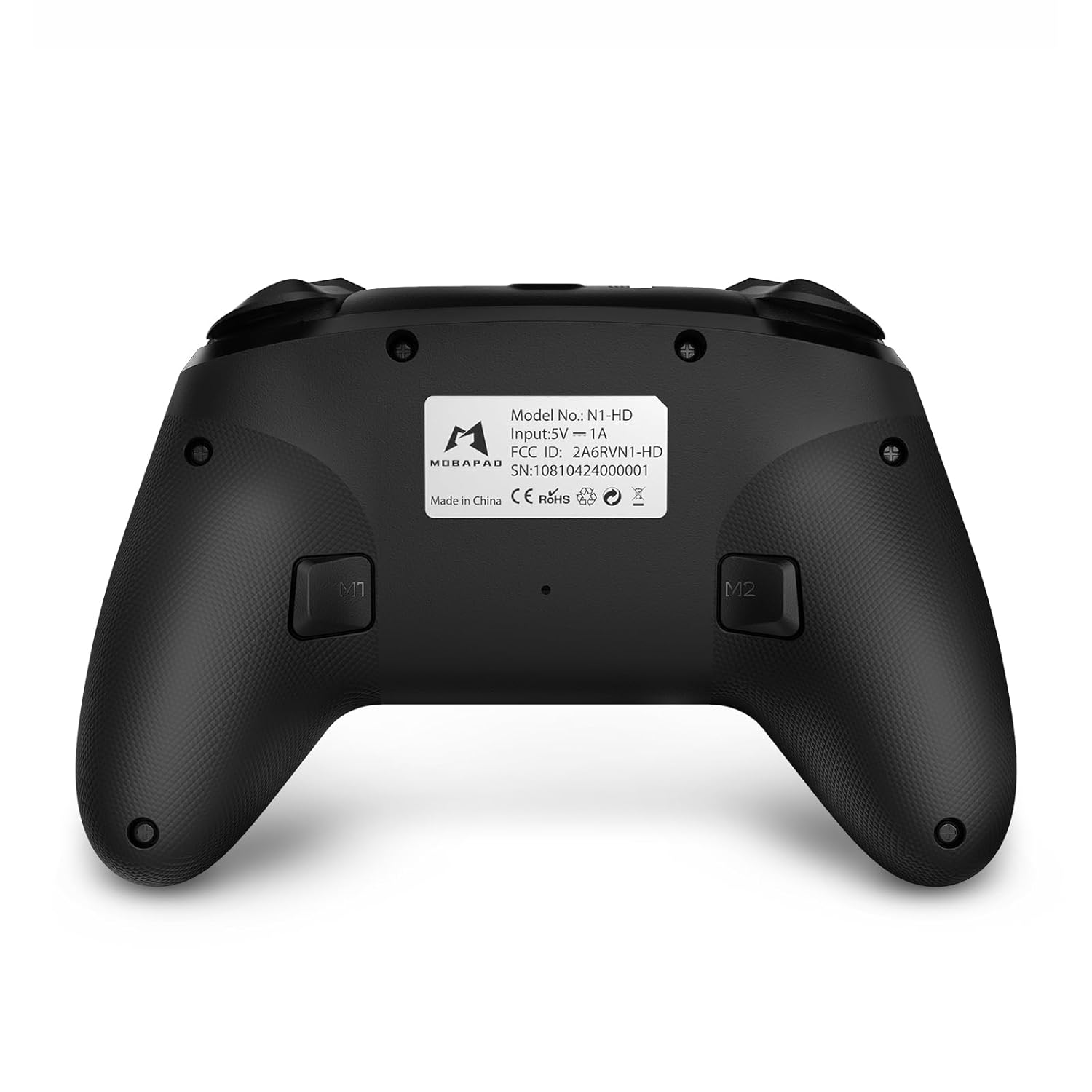
- Putanan M1/M2: Programmable back buttons for custom macros or remapping.
Ìomhaigh: Aghaidh mhionaideach view of the MOBAPAD N1 HD controller, showing all buttons and joysticks.

Ìomhaigh: Cùl view of the MOBAPAD N1 HD controller, highlighting the M1 and M2 programmable buttons and product label.
4.2. NFC Functionality (Amiibo Scanning)
To use the NFC function for Amiibo scanning on Nintendo Switch:
- Ensure your controller is connected to the Nintendo Switch.
- In a compatible game, when prompted to scan an Amiibo, place the Amiibo figure directly over the Putan dachaigh area on the controller.
- Hold the Amiibo in place until the game registers the scan.
5. Cumail suas agus Cùram
Nì cumail suas ceart cinnteach gum mair an rianadair agad fad-beatha agus gum bi e ag obair gu math.
- Glanadh: Cleachd clò bog, tioram airson an rianadair a sguabadh sìos. Airson salachar stòlda, beagan bog.ampnigh an clò le uisge. Seachain ceimigean cruaidh no stuthan sgrìobach.
- Stòradh: Stòraich an rianadair ann an àite fionnar, tioram air falbh bho sholas dìreach na grèine agus teòthachd anabarrach.
- Cùram Bataraidh: The controller contains a Lithium Ion battery. Avoid fully discharging the battery frequently. If storing for extended periods, charge the battery to about 50% to prolong its lifespan. Do not expose the battery to fire or extreme heat.
- Làimhseachadh: Seachain an rianadair a leigeil sìos no a chur fo bhuaidhean làidir, oir faodaidh seo milleadh a dhèanamh air na pàirtean a-staigh.
6. A ’dèanamh trioblaid
If you encounter issues with your MOBAPAD N1 HD controller, refer to the following common solutions.
| Trioblaid | Adhbhar a dh’fhaodadh a bhith ann | Fuasgladh |
|---|---|---|
| Chan eil an rianadair a’ ceangal. | Bataraidh ìosal, a-mach à raon, modh paidhreachaidh ceàrr, bacadh. | Charge the controller fully. Ensure it is within range of the device. Re-enter pairing mode (hold Home button). Move closer to the device or away from other wireless devices. |
| Chan eil putanan no luing-stiùiridh a’ freagairt. | Software glitch, physical obstruction, damage. | Restart the controller and the connected device. Check for any debris around the buttons/joysticks. If issues persist, contact customer support. |
| Vibration is weak or absent. | Vibration setting off, game does not support vibration, motor issue. | Check in-game settings and system settings to ensure vibration is enabled. Verify if the game supports vibration feedback. |
| NFC scanning fails. | Incorrect placement, game not prompting scan, controller not connected. | Ensure the Amiibo is placed directly over the Home button area. Confirm the game is prompting for an Amiibo scan. Verify controller is properly connected to the Switch. |
7. Sònrachaidhean
| Feart | Mion-fhiosrachadh |
|---|---|
| Modail Àireamh | Mobapad N1 HD Black |
| Meudan (L x W x H) | 5.91 x 2.36 x 3.94 òirleach |
| Cuideam | 7.05 unnsa |
| Seòrsa bataraidh | 1 bataraidh lithium-ion (air a ghabhail a-steach) |
| Ceangalachd | Wireless (Bluetooth), USB-C (wired) |
| Co-fhreagarrachd | Nintendo Switch, PC, iOS, Android |
| Feartan sònraichte | Hall Effect Joysticks, ALPS Dual-Axis Motors, HD Vibration, Six-Axis Gyroscope, NFC |
8. Barantas agus Taic
For warranty information or technical support, please contact MOBAPAD customer service. Refer to the official MOBAPAD weblàrach-lìn no na sgrìobhainnean ceannach agad airson teirmichean barantais sònraichte agus fiosrachadh conaltraidh.
You can visit the official MOBAPAD store on Amazon for more information: MOBAPAD Store