
1. Ro-ràdh
This manual provides detailed instructions for the safe and effective operation, setup, and maintenance of your ONEVAN 16 Lines Laser Level. This device features a 4x360° 4D green beam, self-leveling capabilities, and remote control for various leveling and alignment tasks. Please read this manual thoroughly before using the product to ensure proper function and safety.
2. Pasgan-susbaint
Dèan cinnteach gu bheil na nithean gu lèir a tha air an liostadh gu h-ìosal air an toirt a-steach don phacaid agad:
- 1 x Laser Level Unit
- 1 x Smachd Iomallach
- 2 x Lithium Batteries (1200mAh each)
- 1 x Rotating Base
- 1 x Brac Balla
- 1 x Lifting Platform
- 1 x luchdadh a-nuas
- 1 x Adapter
- 1 x Canvas Bag
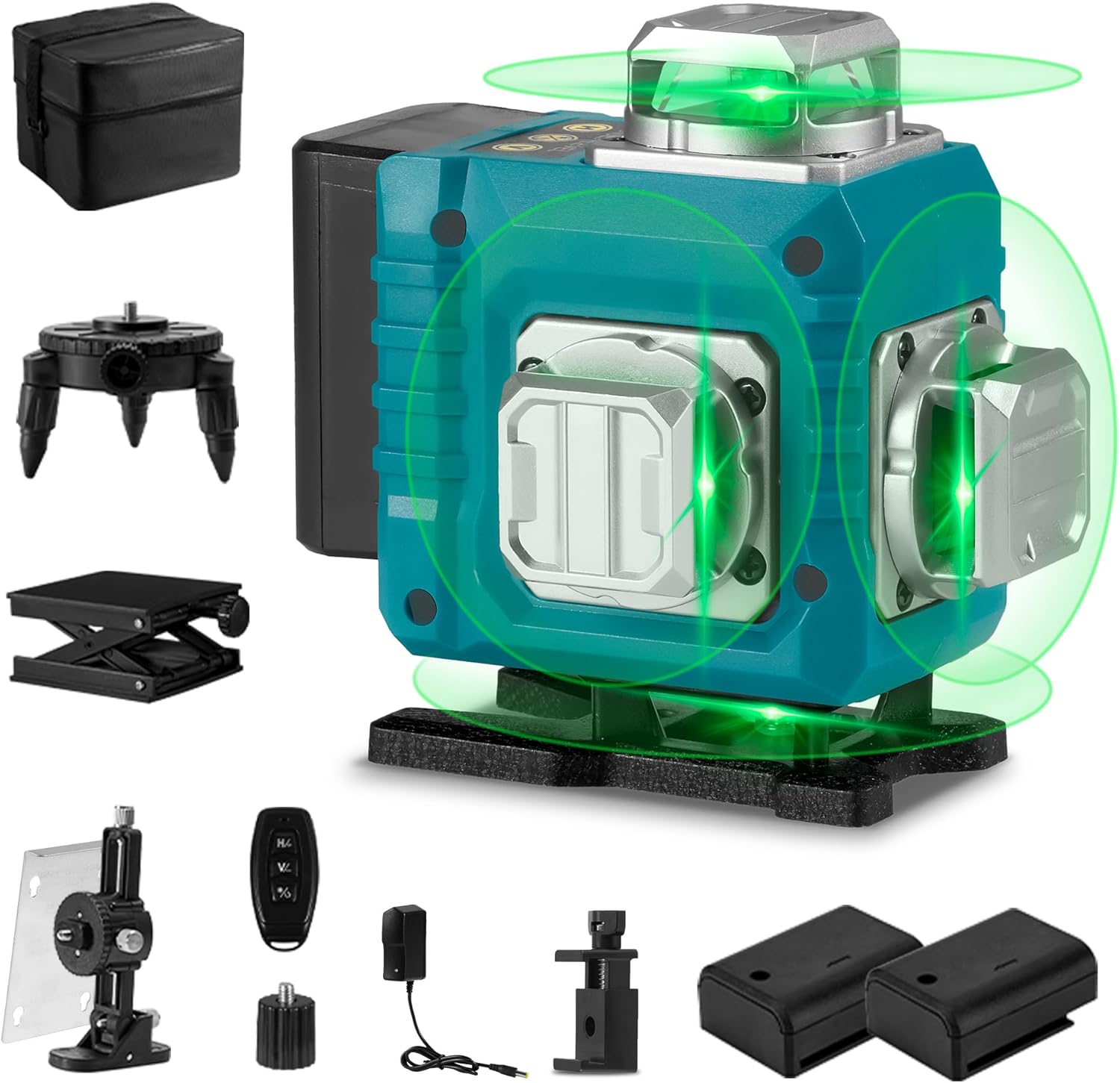
Image 2.1: The ONEVAN 16 Lines Laser Level shown with all its accessories, including the main unit, remote control, batteries, various mounting bases, charger, and canvas bag.
3. Feartan toraidh
- 4x360° Laser Lines: Projects two 360° horizontal lines and two 360° vertical lines, providing comprehensive coverage for floor, wall, and ceiling applications. This allows for a complete square layout visualization.
- Modh fèin-ìre: Automatically levels within a tilt angle of ±3°. If the tilt exceeds this range, the device will emit an audible alarm to indicate it is out of level.
- Modh làimhe: For projecting laser lines at any desired angle, activate manual mode by holding the "OUTDOOR" button for 3 seconds. The self-leveling function is deactivated in this mode.
- Smachd air astar: Allows convenient selection of laser lines without needing to directly interact with the unit, enhancing operational flexibility.
- Seasmhachd: Features an IP54 waterproof and dustproof rating, ensuring reliable performance in various working conditions.
- High Visibility Green Beam: Utilizes advanced diode technology for a green laser beam that is approximately four times brighter than red beams, improving visibility and accuracy. The working range is up to 82 feet (25 meters).
- Solar cumhachd: Comes with two rechargeable 1200mAh lithium batteries for extended use.
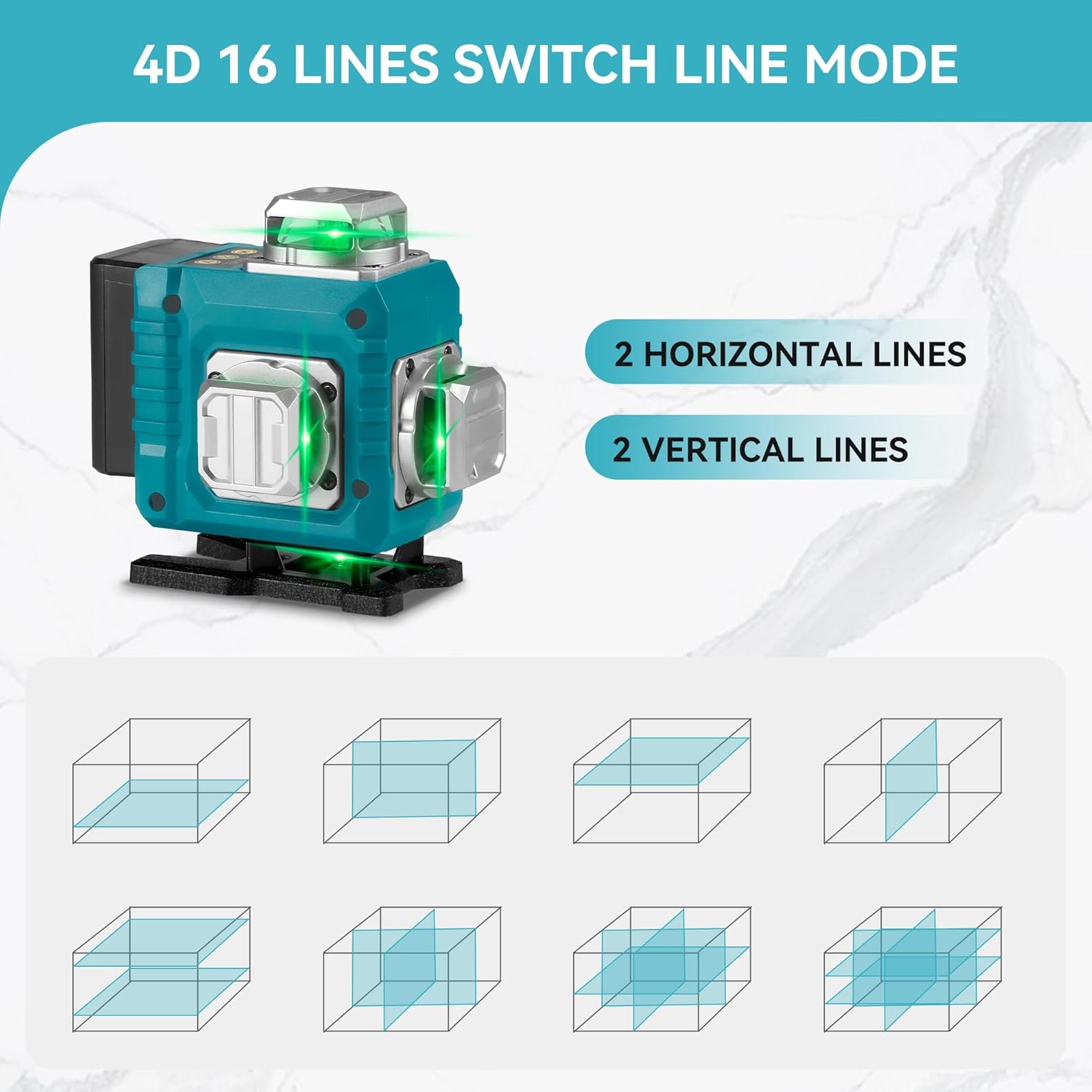
Image 3.1: Illustration of the 4D 16-line laser level, demonstrating how two horizontal and two vertical 360-degree laser lines provide full room coverage and various projection modes.
4. Stiùireadh Sàbhailteachd
WARNING: This product contains a Class II laser. Avoid direct eye exposure to the laser beam. Staring into the beam can cause eye injury.
- Na seall gu dìreach a-steach don beam laser.
- Na comharraich an beam laser gu daoine no beathaichean.
- Do not operate the laser level in explosive atmospheres or near flammable materials.
- Cùm an inneal a-mach à ruigsinn chloinne.
- Use only the provided charger and batteries.
- Do not attempt to modify or disassemble the laser level. This will void the warranty and may result in hazardous laser exposure.
- Dèan cinnteach gu bheil an inneal seasmhach mus tèid a chleachdadh gus casg a chur air gluasad gun fhiosta.
5. Suidhich
- Stàladh bataraidh: Open the battery compartment and insert the two provided lithium batteries, ensuring correct polarity. Close the compartment securely.
- A' cur cosgais: Connect the charger to the laser level and plug it into a power outlet. The charging indicator will show the battery status. Ensure batteries are fully charged before first use.
- Roghainnean stàlaidh:
- Bunait cuairteachaidh: Attach the laser level to the rotating base for precise 360° rotation on a flat surface.
- Lifting Platform: Use the lifting platform to adjust the height of the laser level for various applications.
- Braca balla: Secure the wall bracket to a vertical surface and attach the laser level for wall-mounted operations.
- Suidheachadh: Place the laser level on a stable, level surface or mount it securely using the appropriate accessory. For self-leveling mode, ensure the surface is within the ±3° tilt range.
6. Stiùireadh Obrachaidh
- Cumhachd air / dheth:
- To power on, slide the pendulum lock switch to the unlocked position. The laser level will automatically enter self-leveling mode.
- To power off, slide the pendulum lock switch to the locked position.
- Modh fèin-ìre:
When the pendulum lock switch is in the unlocked position, the laser level will automatically self-level. If the device is tilted beyond ±3°, it will emit an audible alarm and the laser lines will flash, indicating it is out of level. Adjust the position of the laser level until it is within the self-leveling range.
- Manual Mode (Lock Mode):
- To activate manual mode, ensure the pendulum lock switch is in the locked position. Then, press and hold the "OUTDOOR" button on the control panel for 3 seconds. The laser lines will turn on, allowing you to project lines at any angle without self-leveling.
- This mode is ideal for tasks requiring angled lines, such as installing handrails or decorative patterns.
- To exit manual mode, press the "OUTDOOR" button again or slide the pendulum lock switch to the unlocked position.
- Line Selection:
- Use the buttons on the control panel or the remote control to cycle through different laser line combinations (e.g., horizontal lines only, vertical lines only, all lines).
- Typically, a button marked "H" controls horizontal lines, and a button marked "V" controls vertical lines.
- Gnìomh smachd iomallach:
The remote control allows you to switch between laser lines and modes from a distance. Ensure the remote control has working batteries and is pointed towards the laser level for effective communication.

Image 6.1: Demonstrates the laser level in use for both self-leveling applications, such as floor tiling, and manual mode for angled projections, like installing ceiling fixtures.
7. Cumail suas
- Glanadh: Cleachd bog, damp cloth to clean the laser level. Do not use abrasive cleaners or solvents. Keep the laser apertures clean and free of dust.
- Stòradh: When not in use, store the laser level in its canvas bag in a dry, cool place, away from direct sunlight and extreme temperatures. Ensure the pendulum lock is engaged before storage to protect the internal components.
- Cùram Bataraidh: Remove batteries if the device will not be used for an extended period. Recharge batteries regularly to maintain their lifespan, even if not in use.
- Calibration: If you suspect the laser level is out of calibration, contact customer support for assistance. Do not attempt to recalibrate the device yourself.
8. A ’dèanamh trioblaid
| Trioblaid | Adhbhar a dh’fhaodadh a bhith ann | Fuasgladh |
|---|---|---|
| Laser lines are not visible or dim. | Low battery; dirty laser aperture; excessive ambient light. | Recharge or replace batteries; clean laser apertures; use in lower light conditions or with a laser receiver (not included). |
| Laser level beeps and lines flash. | Device is out of its self-leveling range (tilted more than ±3°). | Place the laser level on a more level surface or adjust its position until it is within the self-leveling range. |
| Chan eil smachd iomallach ag obair. | Remote control batteries are dead; remote is too far or not pointed correctly. | Replace remote control batteries; ensure remote is within range and pointed towards the laser level. |
| Chan eil loidhnichean laser dìreach no ceart. | Device is not properly leveled (in self-leveling mode); device requires calibration. | Ensure the device is within its self-leveling range; if issues persist, contact customer support for calibration assistance. |
9. Sònrachaidhean
- Ìre dìon: IP54 (Waterproof/Dustproof)
- Cruinneas tomhais: ±1mm/7m
- Automatic Leveling Range: ±3°
- Raon-obrach: Mu 82 troighean (25 meatairean)
- Number of Laser Lines: 16 lines / 4D (2 horizontal, 2 vertical 360° lines)
- Comas bataraidh: 2 x 1200mAh Lithium Battery
- Astar smachd iomallach: 82 troigh (25 meatairean)
- Clas laser: Class II, <1mW power output
- Teòthachd iomchaidh: -10°C gu 50°C (14°F gu 122°F)
- Cuideam nì: 1.48 kg
- Stuth: Meatailt, plastaig
10. Barantas agus Taic
Airson fiosrachadh barantais, taic theicnigeach, no ceistean seirbheis, cuir fios chun neach-dèanamh no an àite ceannach agad. Cùm do chuidhteas ceannach mar dhearbhadh ceannach.
Airson tuilleadh cuideachaidh, faodaidh tu tadhal air an ONEVAN Store on Amazon.