
KEENSTAR ST-265TC
KEENSTAR ST-265TC Touch Screen 2-Slice Toaster
Model: ST-265TC
1. Dìon Cudromach
Nuair a bhios tu a’ cleachdadh innealan dealain, bu chòir an-còmhnaidh ceumannan sàbhailteachd bunaiteach a leantainn, a’ toirt a-steach na leanas:
- Leugh a h-uile stiùireadh mus obraich thu an tostair.
- Na cuir suathadh air uachdar teth. Cleachd làmhan no snaidhmeannan.
- Gus dìon an aghaidh clisgeadh dealain, na bogadh corda, plug no tostar ann an uisge no leaghan eile.
- Tha feum air sùil gheur nuair a bhios clann a’ cleachdadh inneal sam bith no faisg air làimh.
- Unplug bhon ionad nuair nach eilear ga chleachdadh agus mus glanadh thu. Leig le fuarachadh mus cuir thu air no a 'toirt dheth pàirtean.
- Na obraich inneal sam bith le sreang no pluga millte, no às deidh don inneal a dhol ceàrr no a bhith air a mhilleadh ann an dòigh sam bith.
- Na leig leis an t-sreang crochadh thairis air oir a’ bhùird no a’ chunntair, no suathadh air uachdar teth.
- Na cuir air no faisg air inneal losgaidh gas no dealain teth, no ann an àmhainn teas.
- Na cleachd an tostar airson cleachdadh eile a tha san amharc.
- Oversize foods, metal foil packages, or utensils must not be inserted into a toaster as they may involve a risk of fire or electric shock.
- Faodaidh teine tachairt ma tha tostars còmhdaichte no suathadh air stuth lasanta, a’ toirt a-steach cùirtearan, draperies, ballachan is an leithid, nuair a bhios iad ag obair.
- Na feuch ri biadh a leigeil ma sgaoil nuair a tha tostar air a phlugadh a-steach.
- Tha an inneal seo airson cleachdadh dachaigh a-mhàin.
2. Toradh thallview
The KEENSTAR ST-265TC is a modern 2-slice toaster featuring a touch screen interface for precise control over your toasting preferences. It includes wide slots to accommodate various bread types and a removable crumb tray for easy cleaning.
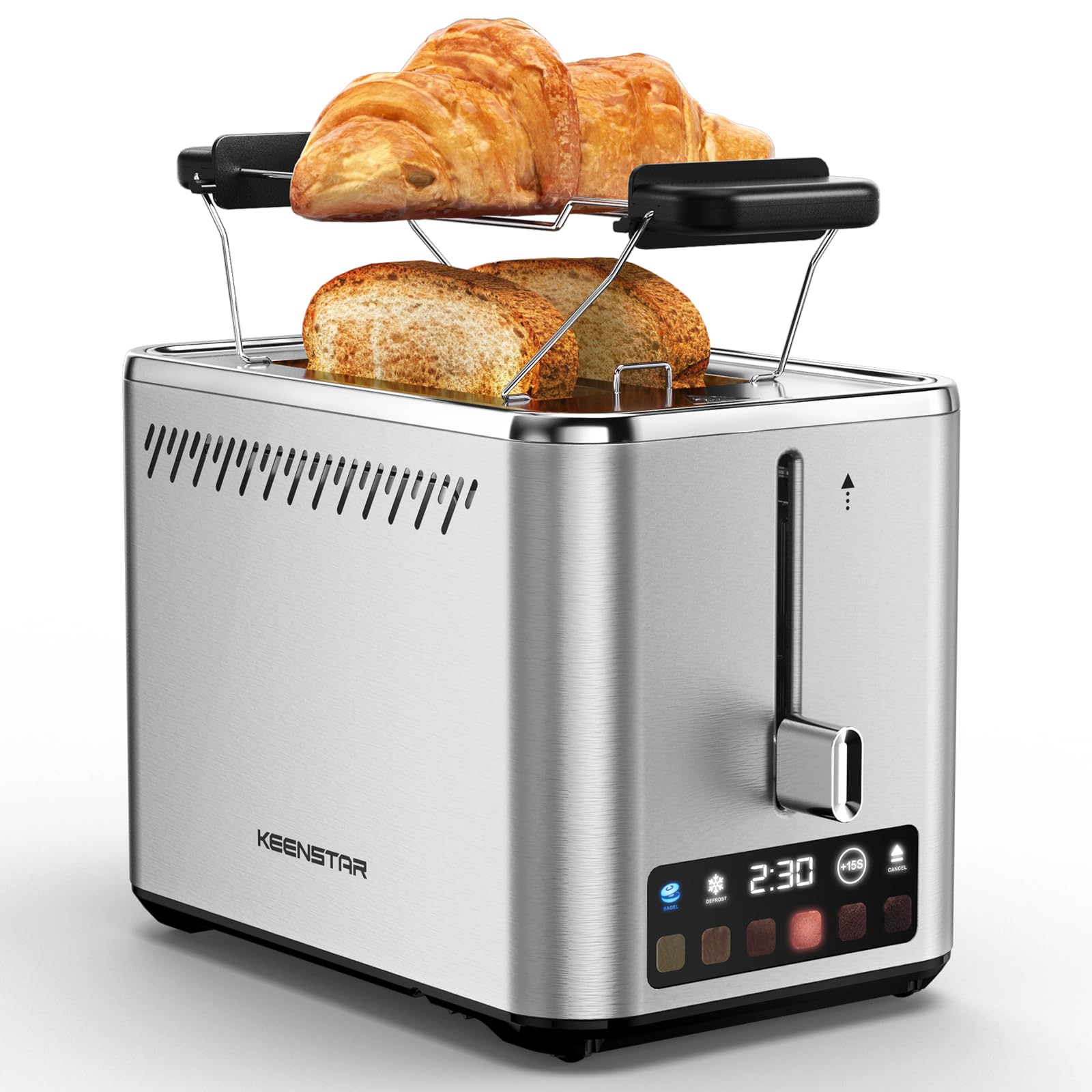
Image: KEENSTAR ST-265TC 2-Slice Toaster in silver stainless steel.
3. Suidhich
A' dì-phapadh
Carefully remove the toaster and all packaging materials from the box. Ensure all accessories, including the warming rack, are present.
Suidheachadh
Cuir an tostair air uachdar seasmhach, còmhnard, teas-dhìonach, air falbh bho stuthan lasanta leithid cùirtearan no ballachan. Dèan cinnteach gu bheil fionnarachadh iomchaidh timcheall an inneil.
Ciad chleachdadh
Before toasting food for the first time, operate the toaster without bread on the highest browning setting (level 6) to burn off any manufacturing residues. A slight odor or smoke may be present; this is normal and will dissipate.
4. Stiùireadh Obrachaidh
Pannal Smachd Os a chionnview

Image: The toaster's smart touch control display showing 6 browning levels and extra functions like Bagel, Defrost, +15S, and Cancel.
Tòstadh Bunasach
- Insert up to two slices of bread into the wide 1.5-inch slots.
- Select your desired browning level (1-6) by touching the corresponding icon on the display. Level 1 is the lightest, and Level 6 is the darkest.
- Press the lever down until it locks into place. The digital display will show a countdown timer.
- The toast will automatically pop up when the cycle is complete.

Image: Visual guide showing the steps for easy toaster operation: 1. Put bread in slots, 2. Select browning level and function, 3. Press the lever down, 4. Enjoy delicious bread.
Dreuchd Bagel
This function is designed to toast the cut side of bagels while gently warming the outer side.
- Insert bagel halves into the slots with the cut side facing outwards.
- Tagh an ìre donnachaidh a tha thu ag iarraidh.
- Tap air an BEAGLACH button on the display. It will illuminate.
- Press the lever down until it locks.

Image: The toaster's display showing the illuminated BAGEL mode. BAGEL mode toasts one side only; place the cut side facing outward.
Dreuchd dì-losgadh
Use this function to toast frozen bread without pre-thawing.
- Cuir aran reòta a-steach do na sliotan.
- Tagh an ìre donnachaidh a tha thu ag iarraidh.
- Tap air an DEFROST button on the display. It will illuminate.
- Press the lever down until it locks.

Image: The toaster's display showing the illuminated DEFROST mode. This mode allows you to cook frozen breads easily without guesswork.
+15S Function
If your toast is not quite browned enough after a cycle, you can add an additional 15 seconds of toasting time.
- After a toasting cycle, if more browning is desired, touch the +15S putan.
- The toaster will initiate a 15-second toasting cycle.
Sguir dheth gnìomh
To stop the toasting cycle at any time, simply touch the A CHUR button. The lever will automatically raise, and the heating elements will turn off.

Image: The toaster's display highlighting the +15S button to increase baking time by 15 seconds, and the Cancel button to stop heating.
Raca blàthachaidh
The included warming rack can be used to warm pastries, croissants, or other items that cannot be placed directly into the toaster slots.
- Place the warming rack securely on top of the toaster, aligning it over the slots.
- Place the item to be warmed on the rack.
- Start a toasting cycle (without bread in the slots) to generate heat. The heat rising from the toaster will warm the item on the rack.
- Monitor the item closely to prevent over-warming or burning.

Image: The removable warming rack attached to the toaster, with a croissant placed on it for warming.
Bhideothan toraidh
Video: Demonstrates the touchscreen and warming tray features of the KEENSTAR toaster.
Bhidio: Ath-sgrùdadh mionaideachview of the KEENSTAR Smart 2-Slice Toaster, highlighting its touch screen and various functions.
Video: Explores the key features and functionalities of the KEENSTAR toaster.
5. Cumail suas agus Glanadh
Glanadh Coitcheann
Always unplug the toaster from the power outlet and allow it to cool completely before cleaning. Wipe the exterior with a soft, damp clò. Na cleachd innealan-glanaidh sgrìobach no padaichean sgrìobaidh meatailt, oir faodaidh iad sin crìoch an stàilinn gun smal a sgrìobadh.
Trèana crumb
The removable crumb tray collects crumbs during toasting and should be emptied regularly to prevent fire hazards.
- Dèan cinnteach gu bheil an tostair air a dhì-phlugachadh agus gu bheil e gu tur fionnar.
- Tarraing a-mach an treidhe crùbain a tha suidhichte aig bonn cùl an tostair.
- Tilg air falbh na crùbanan agus sguab an treidhe glan le sanasamp aodach.
- Sleamhnaich an treidhe crùbach air ais na àite gus an cliog e gu tèarainte.

Image: The toaster's convenient design showing the removable crumb tray being pulled out and the cord storage area on the bottom.
Stòradh corda
For neat storage, the power cord can be wrapped around the designated area on the underside of the toaster.
6. A ’dèanamh trioblaid
- Tostair nach eil a’ tionndadh air: Ensure the power cord is securely plugged into a working electrical outlet. Make sure the toast lever is fully pressed down.
- Tòstadh neo-chothromach: Ensure bread slices are centered in the slots. Try adjusting the browning level. Different types of bread may require different settings.
- Aran steigte ann an sliotan: Unplug the toaster immediately and allow it to cool. Gently remove the bread using non-metallic tongs. Never use metal utensils.
- Smoke coming from toaster: Unplug the toaster immediately. Remove any food particles or crumbs that may be lodged inside the slots or on the heating elements. Ensure the crumb tray is clean.
7. Sònrachaidhean
| Brand | KEENSTAR |
| Modail | ST-265TC |
| Cumhachd | 900 watt |
| Voltage | 120 bholt (AC) |
| Àireamh sliseagan | 2 |
| Stuth | Stàilinn nach meirg |
| Meudan toraidh (D x W x H) | 10.39" x 7.1" x 6.1" |
| Leud Slot | 1.5 òirlich |
| Feartan sònraichte | Cancel Function, LED Indicator, Removable Crumb Tray, Touchscreen, Warming Rack |

Image: Diagram showing the dimensions of the KEENSTAR ST-265TC toaster: 9.4 inches (24cm) length, 6.1 inches (15.6cm) width, 7 inches (18cm) height, and 1.5 inch (3.8cm) wide slots.
8. Barantas agus Taic
Barantas
This KEENSTAR toaster comes with a 2-year warranty. Please refer to the warranty card included in the product packaging for detailed terms and conditions.
Taic Luchd-cleachdaidh
For any questions, technical assistance, or warranty claims, please contact KEENSTAR customer support. Contact information can typically be found on the warranty card or the official KEENSTAR weblàrach.