
1. Ro-ràdh
Thank you for choosing the Acouto Programmable LED Display. This flexible, IP65 water-resistant LED panel features 16x96 pixels, offering a versatile solution for displaying custom messages, patterns, and animations. Powered by a standard USB 5V connection, it is designed for ease of use and portability. This manual provides essential information for the proper setup, operation, and maintenance of your LED display.
2. Fiosrachadh Sàbhailteachd
- Ensure the power supply is 5V/2A. Using an incorrect power supply may damage the device.
- Na cuir an inneal fo theodhachd anabarrach no fo sholas dìreach na grèine airson ùine mhòr.
- Avoid bending the panel excessively or sharply, as this may damage the internal circuitry.
- Keep the device away from open flames and heat sources.
- Although IP65 water-resistant, avoid submerging the device in water.
- Na feuch ris an inneal a thoirt às a chèile no a chàradh thu fhèin. Cuir fios gu taic teachdaiche airson cuideachadh.
3. Toradh thallview
Prìomh fheartan:
- Taisbeanadh gnàthaichte: Personalize with text, patterns, animations, doodles, and musical rhythms. Adjust brightness and speed.
- High-Intensity Light Output: Equipped with 1536 RGB lamp beads for bright color effects with low energy consumption.
- IP65 Seasmhachd Uisge: Durable design suitable for various environments.
- Dealbhadh so-ghiùlain: Thin and lightweight with a USB interface for easy folding and bending.
- Eco-friendly Control: Powered by the ipixel color app, eliminating the need for batteries.
- Cleachdadh ioma-chruthach: Ideal for festive gatherings, weddings, bars, trade shows, offices, and holiday decorations.
Susbaint a’ phacaid:
- 1 x Acouto Programmable LED Display (16x96 Pixels)
- 1 x càball USB
- 1 x Remote Control (with 1 CR2025 200mAh battery included)
- Adhesive Strips for mounting
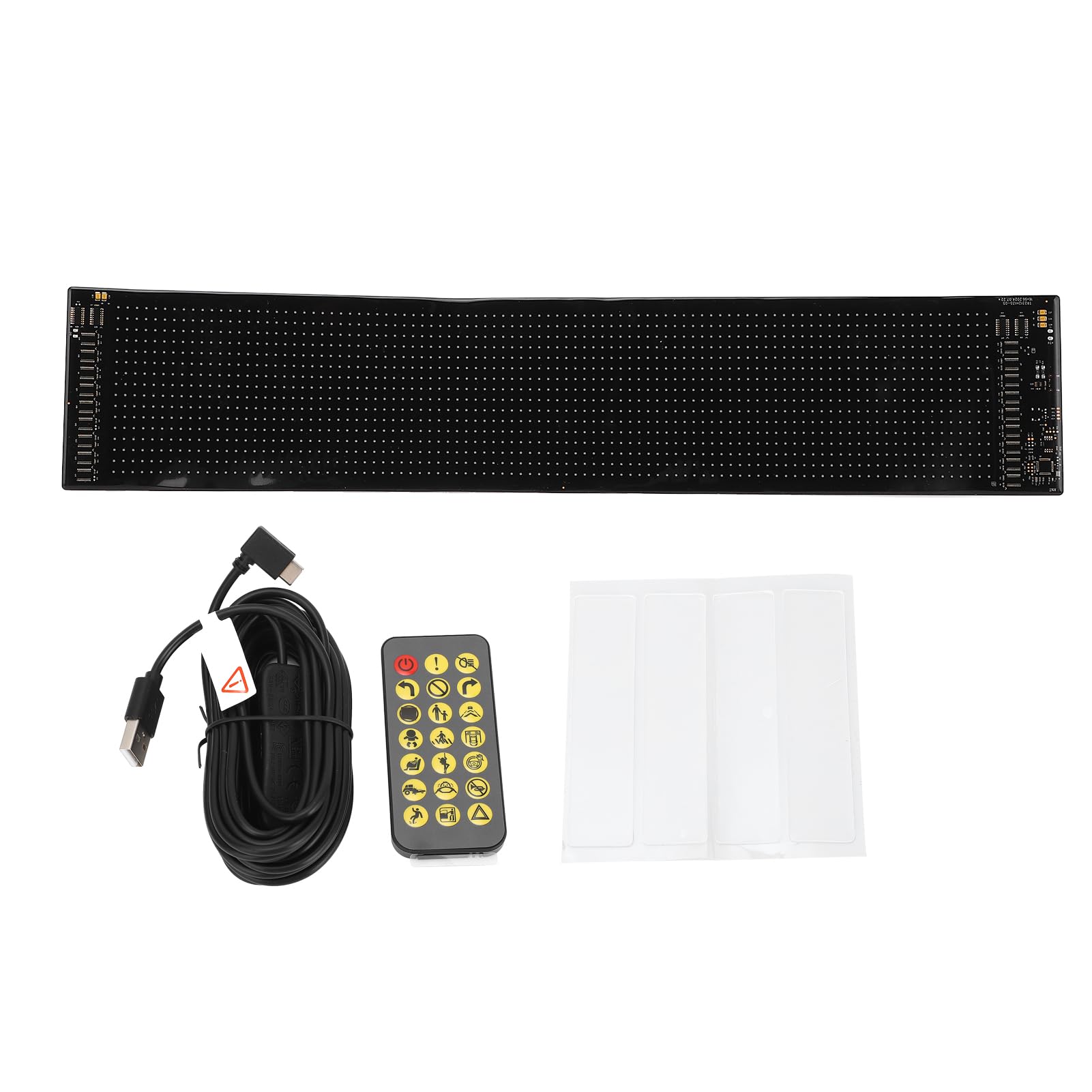
Image 3.1: The Acouto Programmable LED Display, showcasing an dealbhadh sùbailte aige.

Image 3.2: Included USB cable and remote control for the LED display.
4. Suidhich
4.1 Ceangal cumhachd
- Unroll the LED display carefully.
- Connect the provided USB cable to the display's USB port.
- Plug the other end of the USB cable into a 5V/2A USB power source (e.g., a wall adapter, power bank, or computer USB port). The display should power on.

Ìomhaigh 4.1: Sealladh dlùth view of the LED display's connection area, showing the USB port.
4.2 Stàladh App
- Luchdaich sìos an "ipixel color" application from your smartphone's app store (iOS or Android).
- Stàlaich an aplacaid air an inneal agad.
- Open the app and follow the on-screen instructions to connect to your LED display via Bluetooth.
4.3 A’ cur suas an taisbeanaidh
The display is lightweight and flexible, allowing for various mounting options:
- Teip adhesive: Use the provided adhesive strips to attach the display to smooth, clean surfaces like walls, windows, or other objects. Ensure the surface is dry and free of dust before application.
- Folding/Bending: The flexible design allows it to conform to curved surfaces or be folded for storage.

Image 4.2: Adhesive strips provided for easy mounting of the LED display.
5. Stiùireadh Obrachaidh
5.1 Using the ipixel color App
The ipixel color app is the primary interface for customizing your LED display.
- ceangail: Ensure your display is powered on and Bluetooth is enabled on your smartphone. Open the ipixel color app and connect to your device.
- Taisbeanadh teacsa: Enter custom text messages. You can adjust font, size, color, scrolling direction, and speed.
- Patterns & Animations: Select from pre-loaded patterns or animations, or create your own.
- Doodles: Use the app's doodle feature to draw custom images or designs directly on the display.
- Rhythm Ciùil: Synchronize the display's patterns with music played through your phone.
- Soilleireachd & Luas: Adjust the overall brightness of the display and the scrolling speed of text/animations within the app settings.

Image 5.1: The LED display showcasing a custom text message, controlled via the app.

Image 5.2: The LED display presenting a dynamic pattern, customizable through the app.
5.2 A’ cleachdadh an Smachd Iomallach
The included remote control provides quick access to basic functions:
- Putan Cumhachd: Turn the display On/Off.
- Taghadh Modh: Cycle through different display modes (e.g., text, patterns, animations).
- Atharrachadh soilleireachd: Increase or decrease display brightness.
- Atharrachadh astair: Control the scrolling speed of text or animations.
- Smachd stiùiridh: Change the scrolling direction.
6. Cumail suas
- Glanadh: Gently wipe the display surface with a soft, dry cloth. Do not use abrasive cleaners or solvents.
- Stòradh: When not in use, store the display in a cool, dry place. Avoid sharp folds or heavy objects on top of it.
- Ath-chur Bataraidh (Iomallach): If the remote control stops responding, replace the CR2025 battery. Ensure correct polarity.
7. A ’dèanamh trioblaid
- Chan eil an taisbeanadh a’ dol air:
- Check if the USB cable is securely connected to both the display and the power source.
- Ensure the USB power source is providing 5V/2A. Try a different USB port or adapter.
- App Not Connecting to Display:
- Dèan cinnteach gu bheil cumhachd aig an taisbeanadh.
- Dèan cinnteach gu bheil Bluetooth air a chomasachadh air an fhòn-smart agad.
- Restart the ipixel color app and try connecting again.
- If issues persist, try restarting both your smartphone and the LED display.
- Smachd air astar nach eil ag obair:
- Thoir sùil a bheil feum air bataraidh an smachd iomallach (CR2025) a chur na àite.
- Ensure there are no obstructions between the remote and the display.
- Display Content Not Updating:
- Verify that the app is successfully connected to the display.
- Confirm that you have saved and sent the new content from the app to the display.
8. Sònrachaidhean
| Feart | Sònrachadh |
|---|---|
| Seòrsa nì | Programmable LED Display |
| Modail Àireamh | Acoutomgf4in3x68 |
| Stuth | Silicone, PCB |
| Pixels sgrion | 16 x 96 |
| Meudan gun fhilleadh (L x W) | Approx. 59.4 cm x 4.7 cm (23.4 x 1.85 inches) |
| An àireamh de LEDs | 1536 phìos |
| Solar cumhachd | USB 5V |
| Cuir a-steach cumhachd | 5V, 2A, 10W |
| Ìre an aghaidh uisge | IP65 |
| Bataraidh smachd iomallach | 1 x CR2025 200mAh (included) |
| Iarrtas Smachd | ipixel color app |
| Dèanadair | Acuto |
| Cuideam toraidh | 418 gram |
| Dùthaich Tùs | Sìona |
9. Barantas agus Taic
Acouto products are designed for reliability and performance. For warranty information or technical support, please refer to the documentation provided with your purchase or contact your retailer. If you encounter any issues not covered in this manual, please reach out to Acouto customer service for assistance.