
Ro-ràdh
Thank you for choosing the AWEI T16 Wireless Earbuds. These earbuds are designed to provide a high-quality audio experience with advanced features such as Bluetooth 5.3 connectivity, IPX6 waterproof rating, and intuitive touch controls. This manual will guide you through the setup, operation, and maintenance of your new earbuds to ensure optimal performance and longevity.

Image: The AWEI T16 Wireless Earbuds, showing one earbud removed from its open charging case, highlighting the compact design.
Dè th' anns a' Bhocsa
Thoir sùil air susbaint a’ phacaid gus dèanamh cinnteach gu bheil a h-uile rud ann:
- Cluas-cinn gun uèir (clì is deas)
- Cùis Cìse
- Càball Cosgais USB (Seòrsa-C)
- Leabhar-làimhe cleachdaiche
- Cluais-mheudan (diofar mheudan)
Bathar seachadview
Familiarize yourself with the components of your AWEI T16 Wireless Earbuds.
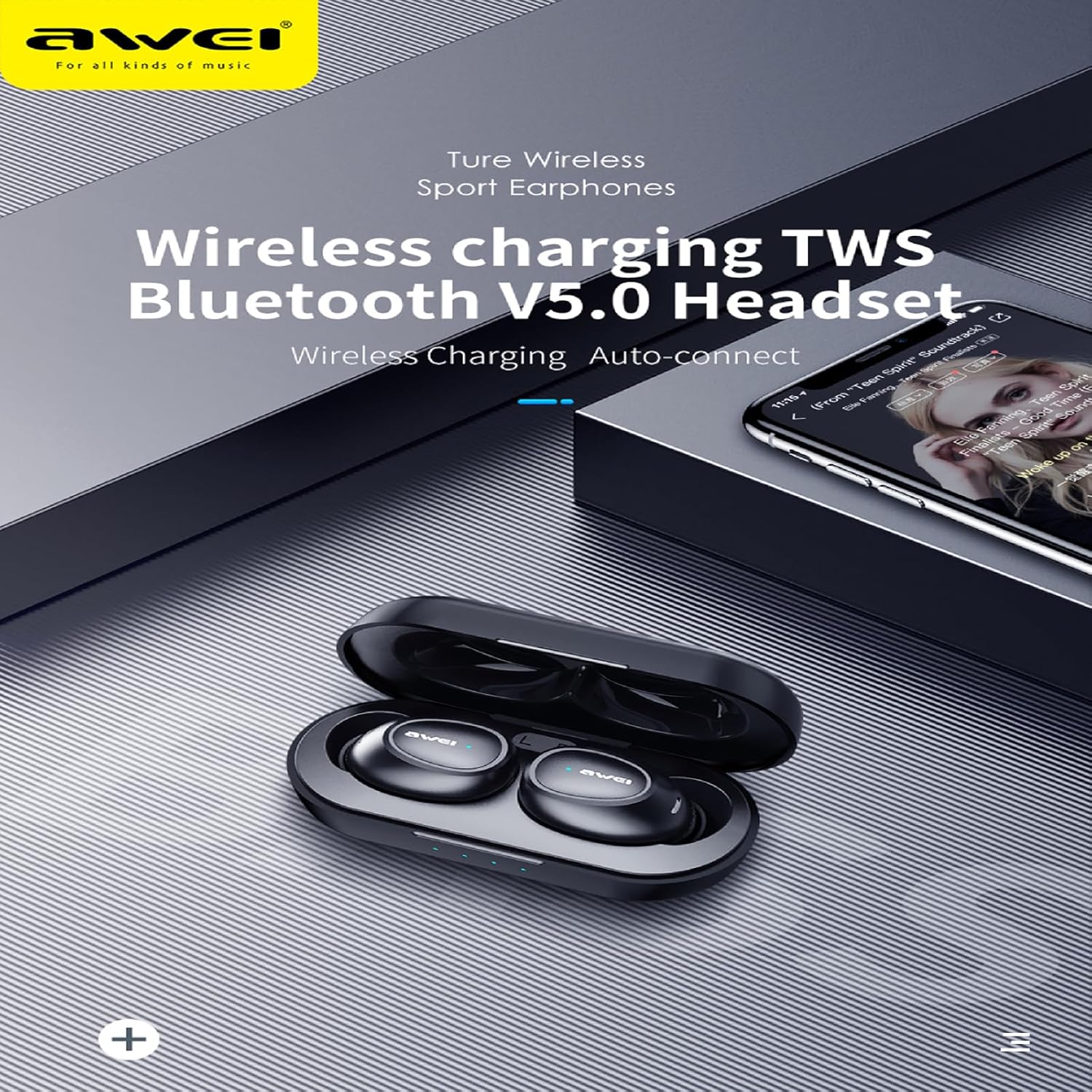
Ìomhaigh: Mion-fhiosrachadh view of the AWEI T16 Wireless Earbuds, one earbud placed outside the open charging case, showcasing the sleek black design and charging contacts.
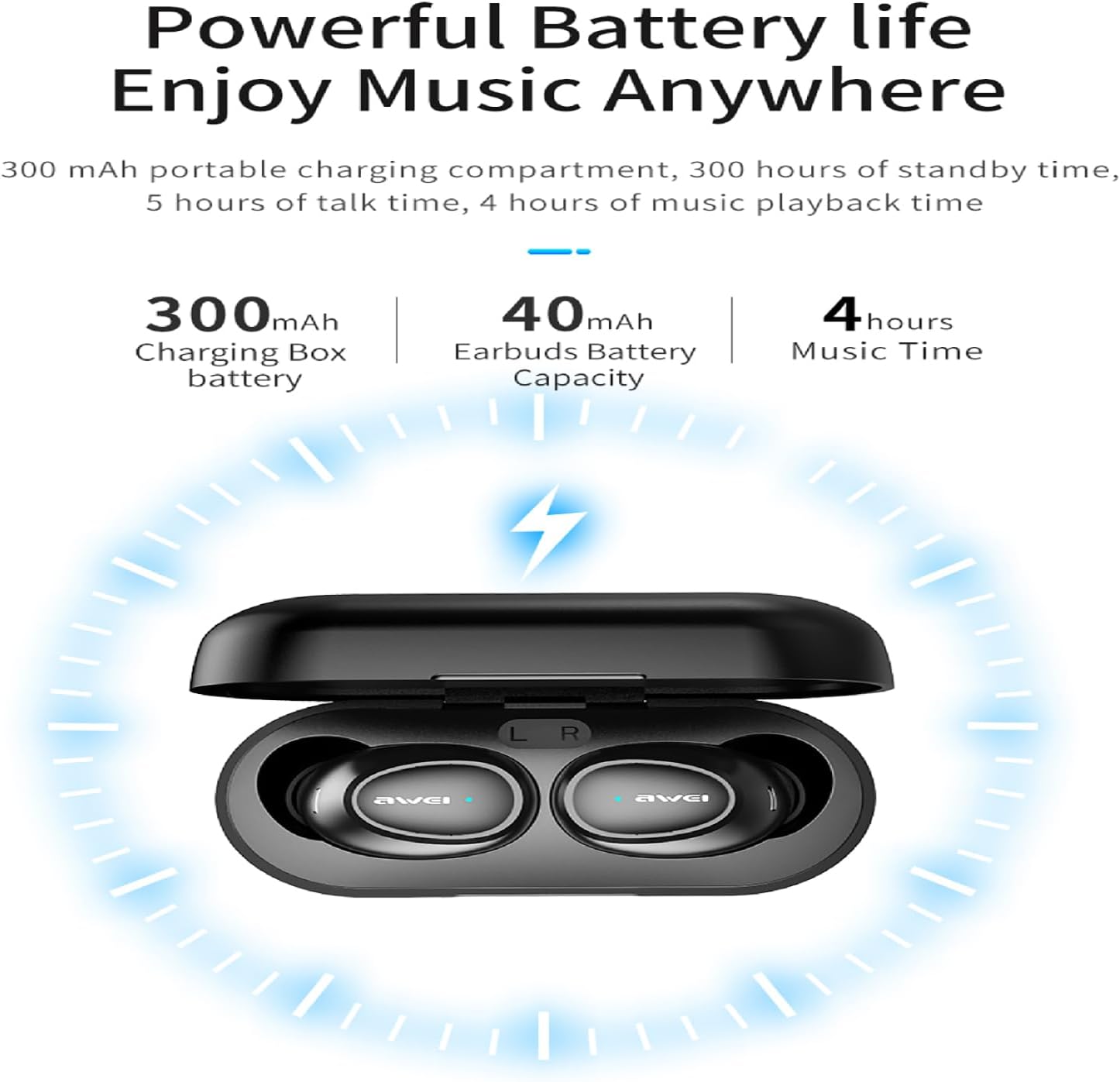
Image: The AWEI T16 Wireless Earbuds nestled within their charging case, with visible LED indicator lights on the front of the case, indicating charging status.
The earbuds are designed for a comfortable in-ear fit, while the compact charging case provides portable power and protection. The case features LED indicators to show battery status.
Suidhich
1. A’ cur cosgais air na cluasan-cluaise agus a’ chùis
Mus cleachd thu an toiseach, cuir làn-chosgais air a’ chùis cosgais agus air na fònaichean-cluaise.
- Place the earbuds into the charging case. Ensure they are correctly seated and the charging contacts align.
- Ceangail càball cosgais USB Seòrsa-C ris a’ phort cosgais air a’ chùis agus an ceann eile ri stòr cumhachd USB (me, coimpiutair, inneal-atharrachaidh balla).
- The LED indicators on the charging case will illuminate to show charging status. A full charge for the case takes approximately 1.5 hours.
- The earbuds provide approximately 7 hours of continuous playback on a single charge. The 300mAh charging case offers multiple recharges, extending total playback time to about 37 hours in dual-ear mode, or up to 60 hours in single-ear mode by alternating earbuds.

Image: A diagram illustrating the battery capacities and playback times: 300mAh for the charging box, 40mAh for earbuds, and 4 hours of music time.
Note: While the image indicates 4 hours of music time, the product specifications confirm 7 hours of continuous use per charge for the earbuds.
2. Càraid Bluetooth
The AWEI T16 earbuds utilize Bluetooth 5.3 technology for a fast and stable connection.
- Fosgail a’ chùis cosgais. Bidh na fònaichean-cluaise a’ tionndadh air gu fèin-ghluasadach agus a’ dol a-steach do mhodh càraideachaidh.
- Air an inneal agad (fòn cliste, tablet, laptop), cuir Bluetooth an gnìomh.
- Lorg airson available Bluetooth devices. You should see "AWEI T16" in the list.
- Select "AWEI T16" to connect. Once connected, you will hear a confirmation tone, and the earbud indicator lights will turn off or flash slowly.
- Ath-cheanglaicheidh na fònaichean-cluaise gu fèin-ghluasadach ris an inneal mu dheireadh a chaidh a phaireadh nuair a thèid an toirt a-mach às a’ chùis, ma tha Bluetooth air a chomasachadh air an inneal.
Stiùireadh Obrachaidh
A' caitheamh na h-Earbuds
Tha na cluasan-cluaise air an dealbhadh airson freagarachd ergonomic agus comhfhurtail.
- Comharraich na comharran 'L' (clì) agus 'R' (deas) air gach cluais-fòn.
- Gently insert the earbuds into your ear canals and rotate them slightly until they fit snugly and comfortably.
- Experiment with the different sized eartips included to find the best seal for optimal sound quality and comfort.
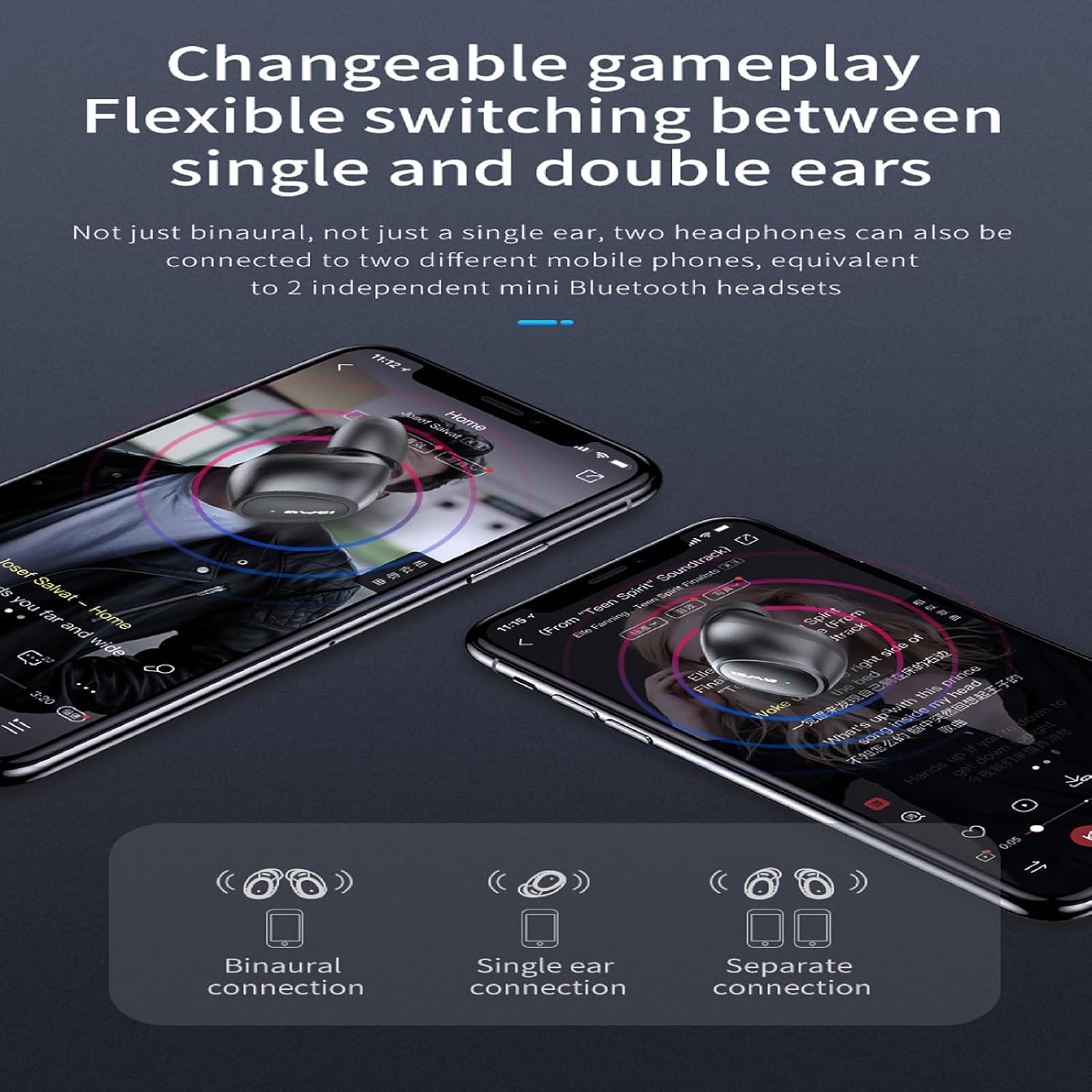
Image: A person wearing one AWEI T16 earbud, demonstrating its discreet and comfortable fit within the ear.
Smachdan suathaidh
Tha smachdan suathaidh snasail aig fònaichean-cluaise AWEI T16 airson ceòl is gairmean a riaghladh gu furasta.
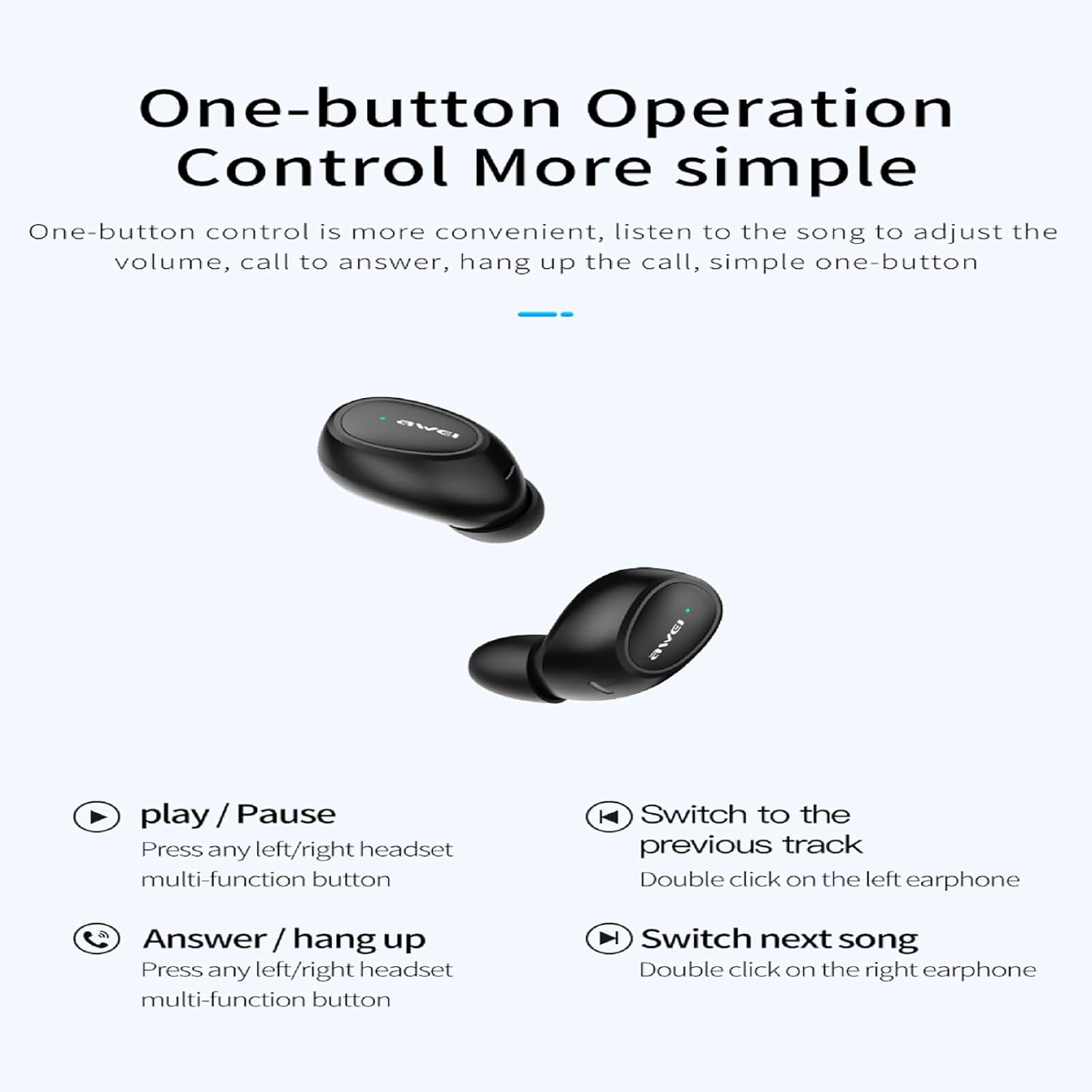
Image: A visual guide to the one-button touch operations for the AWEI T16 earbuds, showing icons for play/pause, answer/hang up, previous song, and next song.
| Gnìomh | Smachd |
|---|---|
| Cluich / Stad Ceòl | Press any left/right earbud multi-function button once. |
| An ath òran | Double click the right earbud. |
| Òran roimhe | Double click the left earbud. |
| Freagair / Croch Call | Press any left/right earbud multi-function button once. |
| Call a dhiùltadh | Press and hold any left/right earbud multi-function button for 2 seconds. |
| Cuir an gnìomh neach-cuideachaidh guth | Triple click any earbud (functionality may vary by device). |
Modh Fònaichean-cluaise Singilte is Dùbailte
The AWEI T16 earbuds support flexible switching between single and dual earbud use.
- Modh Cluas-cinn Dùbailte: Both earbuds connect simultaneously for stereo sound. This is the default mode when both are removed from the case.
- Modh Earbud Singilte: Faodaidh tu an cluais-chluas clì no deas a chleachdadh leotha fhèin. Thoir aon chluais-chluas a-mach às a’ chùis, agus ceanglaidh e ris an inneal agad. Faodar an cluais-chluas eile a chumail sa chùis no a chleachdadh nas fhaide air adhart.

Image: A visual representation of the AWEI T16 earbuds' connection flexibility, showing options for binaural (both ears), single ear, and separate connections to different devices.
Cumail suas
Nì deagh chumail suas cinnteach gum mair na fònaichean-cluaise agad fad-beatha agus gum bi iad ag obair gu math.
- Glanadh: Regularly clean the earbuds and charging case with a soft, dry, lint-free cloth. Do not use harsh chemicals or abrasive materials. Gently clean the charging contacts on both the earbuds and the case to ensure proper charging.
- Stòradh: Nuair nach eilear gan cleachdadh, stòraich na fònaichean-cluaise anns a’ chùis cosgais aca gus an dìon bho dhuslach is milleadh. Stòraich ann an àite fionnar, tioram air falbh bho theodhachd anabarrach.
- Seasmhachd uisge: The AWEI T16 earbuds are rated IPX6 waterproof. This means they are protected against powerful water jets and are suitable for use during exercise or in light rain. However, they are not designed for submersion in water. Do not swim or shower with the earbuds. Ensure the earbuds are dry before placing them back into the charging case to prevent damage.
Image: A person playing basketball in the rain, demonstrating the AWEI T16 earbuds' IPX6 waterproof capability, protecting them from sweat and splashes.
Fuasgladh thrioblaidean
If you encounter any issues with your AWEI T16 earbuds, refer to the following common solutions:
| Trioblaid | Fuasgladh comasach |
|---|---|
| Earbuds nach eil a’ cur cosgais |
|
| Fòn-cluaise nach eil a’ dol còmhla ris an inneal |
|
| Chan eil ach aon earbud ag obair |
|
| Meud ìosal no càileachd fuaim bochd |
|
Sònrachaidhean
Key technical specifications for the AWEI T16 Wireless Earbuds:
| Feart | Mion-fhiosrachadh |
|---|---|
| Ainm Modail | T16 |
| Brand | AWEI |
| Teicneòlas ceangail | Wireless (Bluetooth) |
| Teicneòlas conaltraidh gun uèir | Bluetooth 5.3 |
| Raon Bluetooth | Suas gu 10 meatairean (33 troighean) |
| Suidheachadh cluais | Anns an Ear |
| Smachd fuaim | Iomallach fuaim |
| Seòrsa smachd | Smachd-suathaidh |
| Ìre an aghaidh uisge | IPX6 uisge-dhìonach |
| Bataraidh cùis cosgais | 300 mAh |
| Beatha bataraidh Earbud | Mu 7 uairean a thìde (aon chosgais) |
| Ùine Ath-chluich Iomlan | Suas ri 37 uairean (le cùis cosgais) |
| Ùine cosgais (cùis) | Mu 1.5 uair a thìde (Seòrsa-C) |
| Meud neach-labhairt | 6mm |
| bacadh | 16 Ach |
| Dath | Dubh |
| Innealan co-fhreagarrach | Coimpiutairean-uchd, tablaidean, fònaichean-làimhe |
Fiosrachadh Barantais
Tha toraidhean AWEI air an dèanamh a rèir nan ìrean càileachd as àirde. Airson teirmichean is cumhaichean barantais sònraichte, thoir sùil air a’ chairt barantais a tha air a ghabhail a-steach leis an toradh agad no tadhail air làrach-lìn oifigeil AWEI. weblàrach. Cùm do chuidhteas ceannach mar dhearbhadh ceannach airson tagraidhean barantais sam bith.
Taic Luchd-cleachdaidh
If you have any questions or require further assistance with your AWEI T16 Wireless Earbuds, please contact AWEI customer support. You can typically find contact information on the official AWEI weblàrach-lìn no tron neach-reic far an do cheannaich thu an toradh.