
1. Ro-ràdh agus Os a chionnview
The ARCTIC Freezer 4U-M Ampere is a high-performance CPU air cooler designed for server environments. It provides efficient cooling for a range of processors, including Ampere Altra and Altra Max, as well as various AMD and Intel server CPUs. This cooler is engineered for continuous operation and features a compact design to ensure broad compatibility within 4U server cases and with dual-CPU motherboards.
Am measg nam prìomh fheartan tha:
- Ampere Ready: Includes mounting kit for Ampere Altra and Altra Max processors.
- Dealbhadh Compact: Optimized for 4U server cases and dual-CPU motherboards, ensuring RAM slot clearance.
- Fuarachadh àrd-choileanadh: Equipped with two custom 120 mm fans in a push-pull configuration with PWM control.
- Togail seasmhach: Fans feature double ball bearings for extended lifespan and 24/7 operation.
- Stàladh furasta: Comes with pre-installed mounting brackets and thermal paste.

Image: The ARCTIC Freezer 4U-M Ampere CPU Cooler, showcasing its compact design and dual fan setup.
2. Dè tha sa bhogsa
The ARCTIC Freezer 4U-M Ampere package includes the following components:
- ARCTIC Freezer 4U-M (Rev. 2) CPU Cooler with Ampere Clips
- Pre-applied thermal paste (ARCTIC MX-6)
- Pre-installed mounting brackets

Image: A close-up of the cooler's heat pipes and the included ARCTIC MX-6 thermal paste syringe.
3. Setup agus Stàladh
The Freezer 4U-M is designed for straightforward installation. Follow these general steps for mounting the cooler onto your CPU.
3.1 Co-fhreagarrachd
This cooler is compatible with a variety of CPU sockets, including:
- AMD: SP6, SP3, sTR5, TR4, sWRX8, sTRX4
- Intel: LGA4677, LGA4189, LGA4710
- Ampach: LGA4926 (Mounting Kit for Ampere Altra and Altra Max Processors included)

Image: Visual representation of compatible CPU sockets including AMD EPYC (SP6, SP3), Intel Xeon (LGA4677, LGA4189, LGA4710), AMD Ryzen Threadripper (sTR5, TR4, sWRX8, sTRX4), and Ampere Altra Max (LGA4926).
3.2 Ceumannan stàlaidh
- Prepare CPU: Ensure your CPU is correctly seated in its socket. The cooler comes with pre-applied thermal paste; if you prefer to use your own, clean the CPU surface thoroughly before application.
- Suidheachadh Fuaradair: Align the cooler's pre-installed mounting brackets with the CPU socket's mounting points.
- Fuaradair tèarainte: Gently press down and secure the cooler using the provided screws. Tighten screws evenly in a cross pattern to ensure balanced pressure. Avoid overtightening.
- Ceangail Luchd-leantainn: Connect the 4-pin PWM fan cables to the appropriate CPU fan headers on your motherboard.
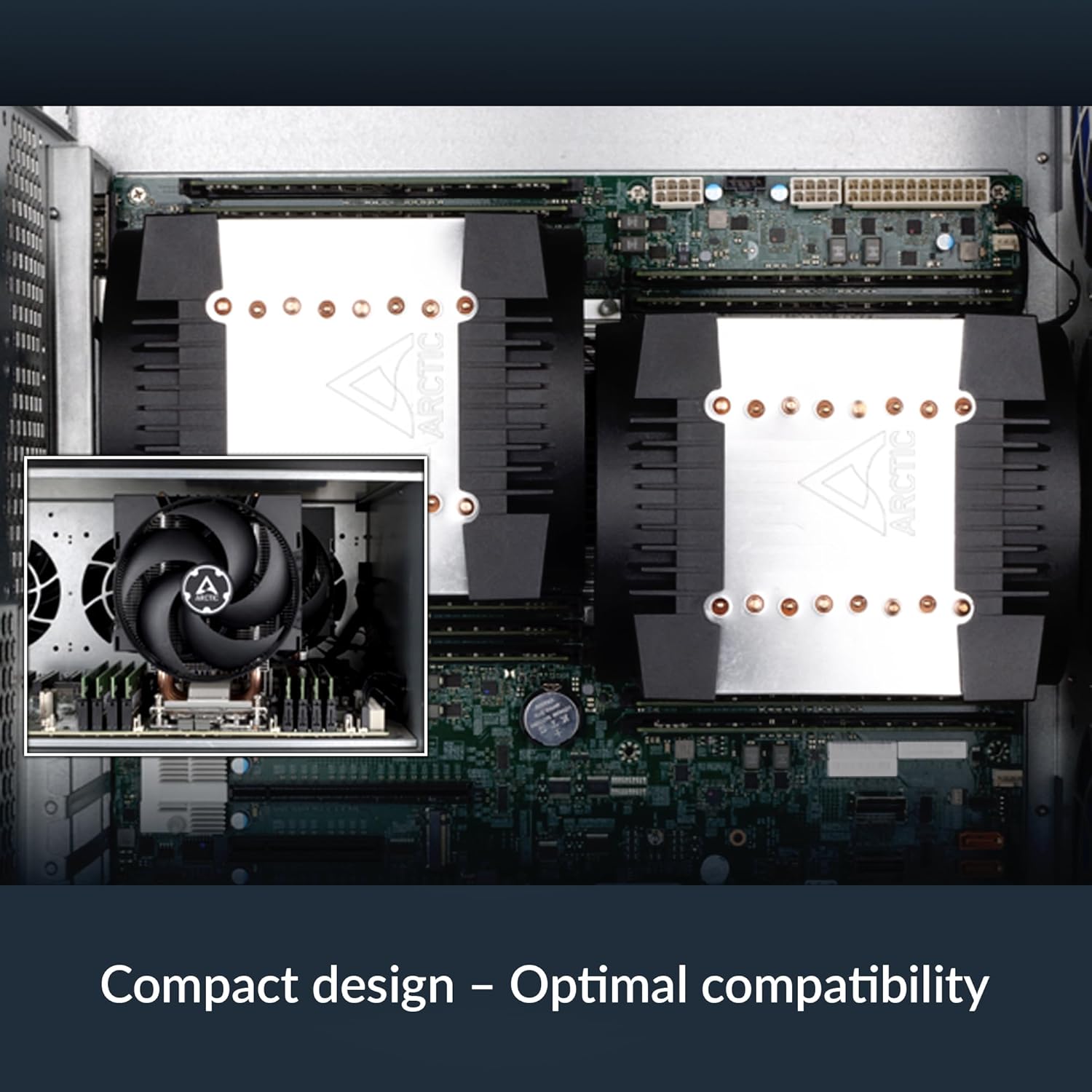
Image: The ARCTIC Freezer 4U-M Ampere installed on a motherboard within a server chassis, demonstrating its compact fit and optimal compatibility with surrounding components.
4. Stiùireadh Obrachaidh
The ARCTIC Freezer 4U-M Ampere is designed for optimal thermal performance and quiet operation in server environments.
4.1 Smachd Fan
The two 120 mm fans support Pulse Width Modulation (PWM) control. This allows your motherboard or system software to dynamically adjust fan speed based on CPU temperature, optimizing cooling performance and noise levels. Ensure the fans are connected to PWM-compatible headers for this functionality.

Image: Diagram illustrating the push-pull fan configuration of the ARCTIC Freezer 4U-M Ampere, showing airflow direction for efficient heat dissipation.
4.2 Obrachadh Leantainneach
The fans are equipped with double ball bearings, engineered for continuous 24/7 operation, making them suitable for demanding server applications.

Image: Cross-section diagram of a fan, highlighting the impeller, dual ball bearings, and steel shaft, indicating a design optimized for continuous operation.
5. Cumail suas
Regular maintenance ensures the longevity and optimal performance of your ARCTIC Freezer 4U-M Ampere CPU cooler.
- Toirt air falbh dust: Periodically inspect the heatsink fins and fan blades for dust accumulation. Use compressed air or a soft brush to gently remove dust. Ensure the system is powered off before cleaning.
- Sgrùdadh luchd-leantainn: Check fan blades for any obstructions or damage. The double ball bearings are designed for durability, but ensure free rotation.
- Pasgan Teirmeach: While the pre-applied thermal paste offers long-term performance, if you ever remove the cooler, it is recommended to clean off old thermal paste and apply a fresh layer before reinstallation.
6. A ’dèanamh trioblaid
If you encounter issues with your ARCTIC Freezer 4U-M Ampere, consider the following troubleshooting steps:
- Teòthachdan CPU àrd:
- Verify that the cooler is securely mounted and making proper contact with the CPU.
- Check if thermal paste was applied correctly and evenly.
- Ensure fans are spinning and connected to the correct motherboard headers.
- Confirm adequate airflow within the server chassis.
- Fuaim fan:
- Check for dust buildup on fan blades.
- Ensure fan cables are not obstructing fan rotation.
- Adjust fan speed settings in your motherboard's BIOS/UEFI or system software.
- Mounting Difficulties / Component Interference:
- Some motherboard designs (e.g., with tall VRM heatsinks) may require careful positioning or minor adjustments.
- Ensure the cooler is compatible with your specific motherboard model and server case dimensions.
7. Sònrachaidhean
| Feart | Sònrachadh |
|---|---|
| Modail Àireamh | ACFRE00171A |
| Meudan toraidh (L x W x H) | 6.14" x 4.88" x 5.71" |
| Modh fuarachaidh | Air |
| Meud Fan | 2 x 120 mm |
| Astar rothlach as àirde | 2300 rpm |
| Comas Sruth Adhair | 72 troighean ciùbach gach mionaid |
| Seòrsa Ceangal Cumhachd | 4-Pin PWM |
| Voltage | 12 Volt |
| Dètage | 1.44 watt |
| Stuth | Meatailt, Plastaig, Rubair |
| Cuideam nì | 2.81 not |
| Innealan co-fhreagarrach | Desktop (Server CPUs) |
| UPC | 840033402699 |
8. Barantas agus Taic
For warranty information or technical support, please refer to the official ARCTIC website or contact ARCTIC customer service directly. Keep your proof of purchase for warranty claims.
ARCTIC Official Weblàrach: www.arctic.ac