
1. Toradh thallview
The Aramox Smart Thermostat is designed for electric heating systems, offering precise temperature control and a clear LCD display. It integrates a highly reliable single-chip microcomputer for accurate temperature regulation and strong anti-interference capabilities. The thermostat provides a wide temperature measurement range and adjustable settings for a comfortable indoor environment.

Figure 1: Aramox Smart Thermostat installed in a room, displaying temperature.
2. Pasgan-susbaint
Nuair a dh’fhosglas tu am pasgan, dèan cinnteach gu bheil na nithean a leanas uile an làthair:
- 1 x Aramox Smart Thermostat Unit
- 2 x sgriothan cur suas
- 1 x Acfhainn Uèir
- 1 x Leabhar-làimhe Cleachdaiche (an sgrìobhainn seo)
3. Setup agus Stàladh
Warning: Electrical installation should be performed by a qualified professional to prevent electric shock or damage to the device. Always turn off power at the circuit breaker before beginning installation.
3.1 A’ cur suas an teirmeastat
- Tagh àite freagarrach air balla a-staigh, air falbh bho sholas dìreach na grèine, dreachdan, no stòran teas.
- Carefully remove the front panel of the thermostat to access the mounting holes.
- Mark the positions for the mounting screws on the wall.
- Drill pilot holes if necessary and secure the thermostat base to the wall using the provided screws.
3.2 Stiùireadh uèiridh
Refer to the wiring diagram on the back of the thermostat and the provided wiring harness. Ensure connections are secure and correct for your electric heating system.

Figear 2: Cùl view of the thermostat with wiring terminals labeled.
- Connect the Live (L) wire from your power supply to the L terminal on the thermostat.
- Connect the Neutral (N) wire from your power supply to the N terminal on the thermostat.
- Connect the heating load wires to the appropriate output terminals (e.g., L1, N1 for heating element).
- Once wiring is complete, reattach the front panel of the thermostat.
- Thoir air ais cumhachd aig an inneal-brisidh.
4. Stiùireadh Obrachaidh
The thermostat features an intuitive keypad and a clear LCD display for easy operation.
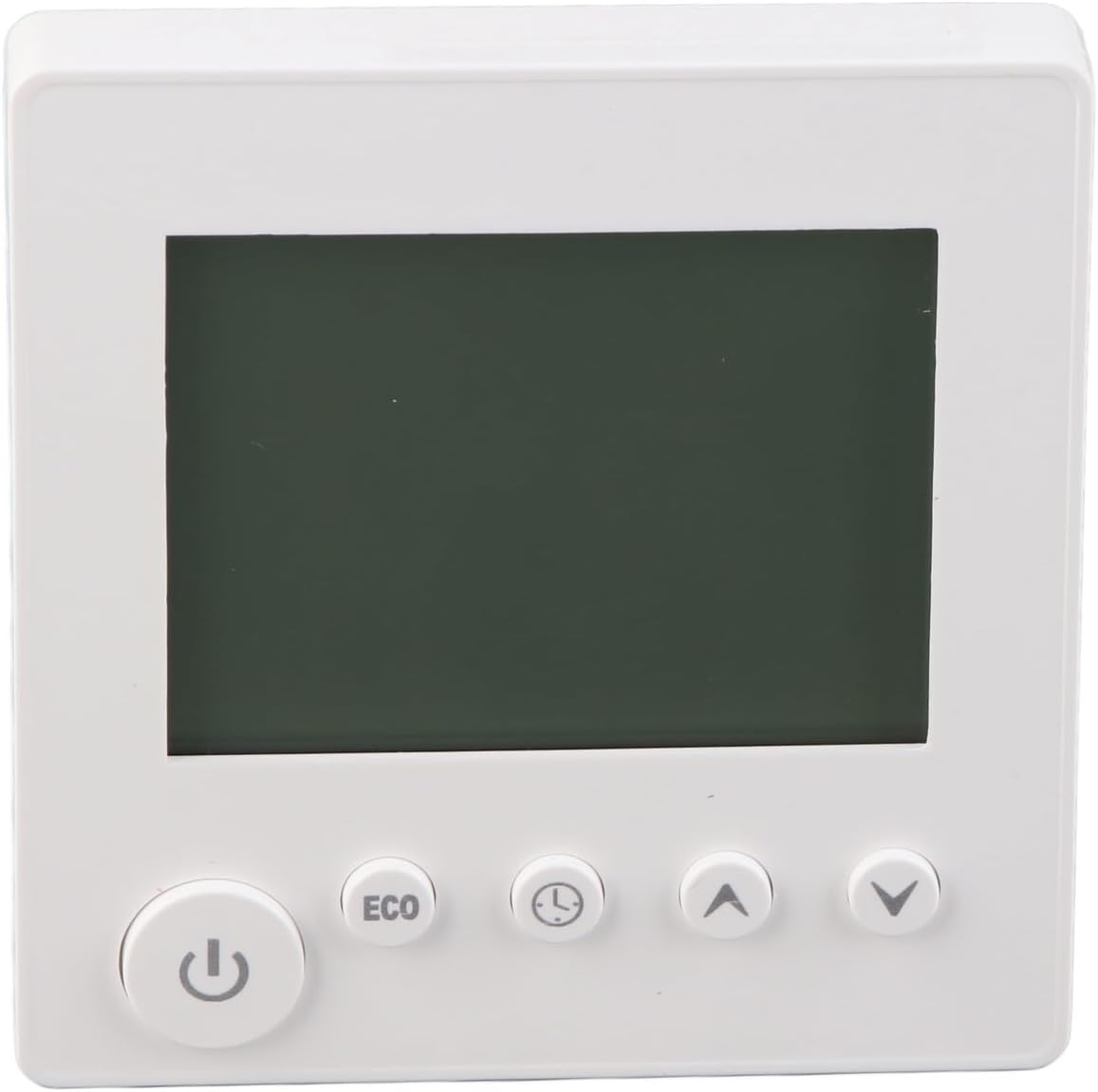
Figear 3: Aghaidh view of the thermostat showing the LCD and control buttons.
4.1 Cumhachd air / dheth
- Brùth an Putan cumhachd () gus an teirmeastat a thionndadh air no dheth.
4.2 A ’suidheachadh an teòthachd
- Cleachd an Putan saighead suas () to increase the desired temperature.
- Cleachd an Putan saighead sìos () gus an teòthachd a tha thu ag iarraidh a lughdachadh.
- The current and set temperatures will be displayed on the LCD screen.
4.3 Modh ECO
- Brùth an Putan ECO to activate or deactivate energy-saving mode. In ECO mode, the thermostat will adjust the temperature to a more energy-efficient setting.
4.4 Time/Program Settings
- Brùth an Putan Cloc/Timer () to access time and programming settings. Follow the on-screen prompts to set the current time or schedule heating periods.
5. Cumail suas
The Aramox Smart Thermostat requires minimal maintenance.
- Glanadh: The LCD screen is scratch-resistant and easy to clean. Use a soft, dry cloth to wipe the screen and the thermostat body. Avoid using abrasive cleaners or solvents.
- Sgrùdadh: Thoir sùil bho àm gu àm air na ceanglaichean uèiridh gus dèanamh cinnteach gu bheil iad tèarainte.
6. A ’dèanamh trioblaid
Ma thachras tu ri duilgheadasan leis an teirmeastat agad, thoir sùil air na duilgheadasan agus na fuasglaidhean cumanta a leanas:
| Trioblaid | Adhbhar a dh’fhaodadh a bhith ann | Fuasgladh |
|---|---|---|
| Teirmeastat gun a bhith a’ cur cumhachd air | Gun sholar cumhachd; uèirleadh ceàrr; briseadair cuairte air a thilgeil. | Check circuit breaker; verify wiring connections; ensure power is supplied to the unit. |
| Leughadh teòthachd ceàrr | Sensor obstruction; thermostat located near heat/cold source. | Ensure sensor is clear; relocate thermostat if exposed to extreme temperatures. |
| Chan eil an siostam teasachaidh a’ freagairt | Incorrect wiring; heating system malfunction; thermostat settings. | Verify wiring to the heating system; check heating system for faults; confirm thermostat is set to heating mode and desired temperature is above ambient. |
| Tha an taisbeanadh bàn no a’ priobadh | Power fluctuation; internal fault. | Cycle power to the thermostat at the circuit breaker. If the problem persists, contact support. |
7. Sònrachaidhean
| Feart | Sònrachadh |
|---|---|
| Seòrsa nì | Teirmeastat |
| Modail Àireamh | Aramox6mfynvtsku |
| Stuth | ABS |
| Gnàthach | 16A |
| Mearachd Tomhais | ± 1 ℃ |
| Raon rèiteachaidh teòthachd | 5-60 ℃ (upper limit adjustable) |
| Raon Teòthachd | 0-50 ℃ |
| Modh smachd | iuchair |
| Cuideam nì | Mu thuairmeas. 188g / 6.63oz |
| Meud pacaid | 4.33 x 3.94 x 2.76 òirleach |
8. Fiosrachadh Barantais
Specific warranty details for the Aramox Smart Thermostat (Model Aramox6mfynvtsku) may vary. Please refer to the warranty card included with your product or contact the seller/manufacturer directly for comprehensive warranty terms and conditions.
9. Taic
For technical assistance, troubleshooting beyond this manual, or inquiries regarding your Aramox Smart Thermostat, please contact your point of purchase or the manufacturer directly. Ensure you have your model number (Aramox6mfynvtsku) and purchase date available when seeking support.