
1. Ro-ràdh
This manual provides essential instructions for the safe and effective operation of your Fujifilm S4500 and S4530 Compact Digital Camera. Please read this manual thoroughly before using the camera and keep it in a safe place for future reference. The Fujifilm S4500/S4530 is equipped with a 14MP CCD sensor, a 30x optical zoom Fujinon lens, and is capable of recording 720p HD movies.
2. Toradh thallview
Dèan eòlas ort fhèin air prìomh phàirtean do chamara.
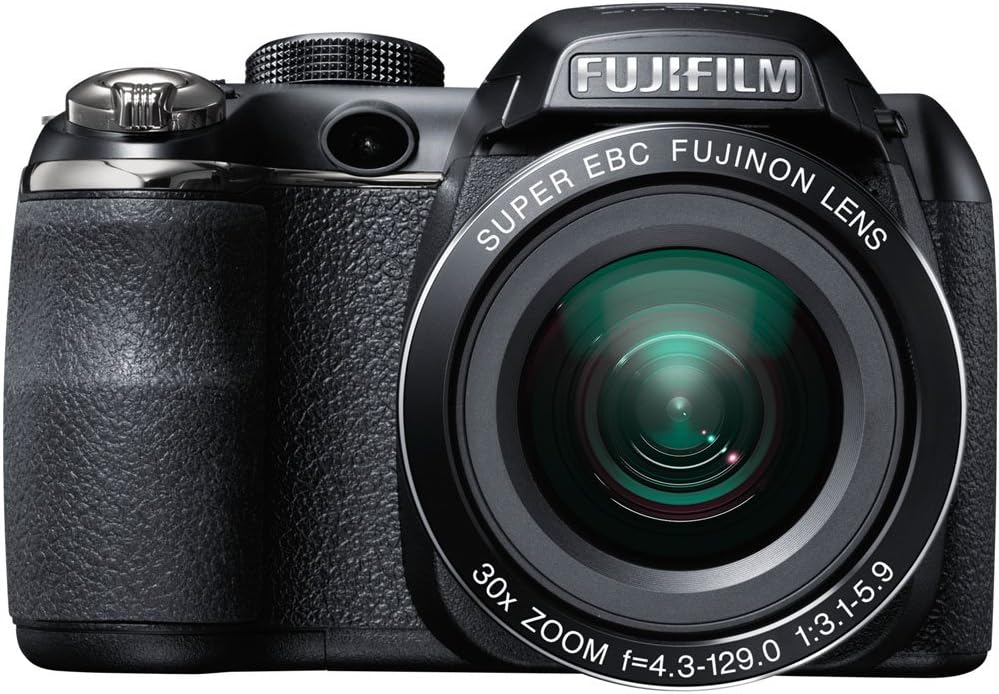
Figear 2.1: Aghaidh view of the Fujifilm S4500/S4530 camera with the built-in flash in the raised position, showcasing the Fujinon 30x optical zoom lens.

Figear 2.2: Aghaidh view of the Fujifilm S4500/S4530 camera with the built-in flash in the lowered position, highlighting the lens barrel and grip.

Figear 2.3: Taobh view of the Fujifilm S4500/S4530 camera, showing the ergonomic grip and control layout.
Prìomh cho-phàirtean:
- Lionsa: Fujinon 30x Optical Zoom Lens (24-720mm equivalent).
- Flash: Built-in pop-up flash.
- Taisbeanadh LCD: 3-inch, 230,000-dot screen for viewseòladh agus clàr-taice.
- Viewlorgadair: Dealanach Viewneach-lorg (EVF).
- Dial-smachd: For selecting shooting modes.
- Putan Shutter: Gus dealbhan a ghlacadh.
- Luamhan Zoom: A’ cumail smachd air zoom optigeach agus didseatach.
3. Suidhich
3.1. Cuir a-steach Bataraidhean
- Fosgail còmhdach roinn a’ bhataraidh a tha suidhichte aig bonn a’ chamara.
- Insert four (4) AA alkaline batteries, ensuring correct polarity (+/-) as indicated inside the compartment.
- Dùin an còmhdach roinn bataraidh gu tèarainte.
3.2. Cuir a-steach Cairt Cuimhne
- Fosgail còmhdach slot a’ chairt-chuimhne, a tha mar as trice suidhichte air taobh no bonn a’ chamara.
- Insert an SD, SDHC, or SDXC memory card with the label facing the correct direction until it clicks into place.
- Dùin còmhdach slot a’ chairt-chuimhne gu tèarainte.
3.3. A’ chiad chumhachd air agus suidheachadh ceann-latha/ùine
- Brùth an AIR/DHETH putan gu cumhachd air a ’chamara.
- The first time you power on, you will be prompted to set the date and time. Use the directional buttons to navigate and the MENU / Ceart gu leòr putan airson dearbhadh.
- Lean an stiùireadh air-sgrion gus an stèidheachadh tùsail a chrìochnachadh.
4. Stiùireadh Obrachaidh
4.1. A 'togail dhealbhan
- Tionndaidh an camara air.
- Select a shooting mode using the mode dial (e.g., AUTO for automatic settings).
- Frèamaich do dhealbh le bhith a’ cleachdadh monitor LCD no dealanach viewlorgadair.
- Cleachd an luamhan zoom gus an fad fòcas atharrachadh.
- Brùth am putan còmhlaiche letheach slighe sìos gus fòcas a chur. Bidh frèam an fhòcais a’ tionndadh uaine nuair a ruigear fòcas.
- Brùth am putan còmhlaiche gu tur sìos gus an dealbh a thogail.
4.2. Clàradh Videos
- Turn the mode dial to the movie recording setting (often indicated by a film camera icon).
- Cuir frèam air do chuspair.
- Press the dedicated movie record button (if available) or the shutter button to start recording.
- Press the button again to stop recording. The camera records in 720p HD resolution.
4.3. Ath-chluich
- Brùth an CLÀRADH putan gus a dhol a-steach don mhodh cluich.
- Use the directional buttons to scroll through your photos and videos.
- Brùth MENU / Ceart gu leòr gu view roghainnean airson an ìomhaigh/bhidio a chaidh a thaghadh.
4.4. Modhan Flash
The camera offers various flash modes, including Auto and Red Eye Reduction. To change the flash mode, press the flash button (often indicated by a lightning bolt icon) and use the directional buttons to select your desired mode from the on-screen menu.
5. Cumail suas
5.1. Glanadh a’ Chamara
- Lionsa: Use a soft, lint-free cloth or a lens brush to gently remove dust. For smudges, use a specialized lens cleaning solution applied to the cloth, not directly to the lens.
- Taisbeanadh LCD: Wipe gently with a soft, dry cloth. Avoid pressing too hard.
- Corp camara: Use a soft, dry cloth to wipe away dust and fingerprints. Do not use organic solvents or strong cleaning agents.
5.2. Cùram Bataraidh
- Remove batteries when the camera will not be used for an extended period to prevent leakage.
- Cùm bataraidhean ann an àite fionnar, tioram.
- Replace all four AA batteries at the same time with new ones for optimal performance.
5.3. Stòradh
When storing the camera, ensure it is turned off, and the lens cap is attached. Store in a dry, well-ventilated area away from direct sunlight, high temperatures, and humidity.
6. A ’dèanamh trioblaid
| Trioblaid | Fuasgladh |
|---|---|
| Chan eil an camara a’ tionndadh air. | Check if batteries are inserted correctly and are fully charged. Replace with new AA batteries if necessary. |
| Tha dealbhan doilleir. | Ensure the lens is clean. Press the shutter button halfway to allow the camera to focus before taking the shot. Check if the camera is in a suitable shooting mode for the lighting conditions. |
| Cha lasas am flash. | Check the flash mode settings. Ensure the flash is raised if it is a pop-up type. The flash may not fire if the battery level is low. |
| Mearachd cairt cuimhne. | Ensure the memory card is inserted correctly. Try formatting the card (this will erase all data). If the problem persists, try a different memory card. |
| Chan urrainnear bhidio a chlàradh. | Ensure the camera is in video recording mode. Check if there is sufficient space on the memory card. |
7. Sònrachaidhean
| Feart | Mion-fhiosrachadh |
|---|---|
| Ainm Modail | Fujifilm S4500 / S4530 |
| Sensor ìomhaigh | 14 Megapixel 1/2.3-inch CCD |
| Lionsa | Fujinon 30x Optical Zoom (co-ionann ri 24-720mm) |
| Zoom didseatach | Suas gu 6.7x |
| Stabilization Ìomhaigh | Seasamh Ìomhaigh Didseatach |
| Taisbeanadh LCD | 3.0-òirleach, 230,000 dotagan |
| Clàradh bhidio | 720p HD (MP4 format) |
| Meadhanan stòraidh | SD / SDHC / SDXC memory cards |
| Cugallachd ISO | Auto, 100, 200, 400, 800, 1600, 3200, 6400 (expanded to 51200) |
| Luas Shutter | 8 diogan gu 1/2000 diogan |
| Solar cumhachd | Bataraidhean alcaileach 4x AA |
| Ceangalachd | HDMI, USB |
| Meudan (approx.) | 1.2 notaichean (cuideam nì) |
8. Barantas agus Taic
This Fujifilm S4500/S4530 camera typically comes with a 90-day limited warranty. Please refer to your purchase documentation for specific warranty terms and conditions. For technical support or service inquiries, please contact Fujifilm customer service or the retailer from whom the product was purchased.