
1. Ro-ràdh agus Os a chionnview
The Infinity Smart Watch for Women is designed to seamlessly integrate into your daily life, offering a blend of elegance and advanced functionality. Featuring a vibrant AMOLED 1.1" screen, this smartwatch provides comprehensive health and fitness tracking, communication features, and smart notifications. It is compatible with both iOS and Android phones.

Figear 1: Aghaidh view of the Infinity Smart Watch for Women, showcasing its elegant design and vibrant AMOLED display.
2. Dè tha sa bhogsa
- Infinity Smart Watch (Model WS_BLK)
- Càball cosgais
- Leabhar-làimhe cleachdaiche
3. Suidhich
3.1 Cìs tòiseachaidh
Before first use, fully charge your smartwatch. Connect the magnetic charging cable to the charging points on the back of the watch and plug the USB end into a compatible power adapter (not included) or computer USB port. The watch display will indicate charging status.

Figure 2: The smartwatch connected to its magnetic charging cable, showing the battery charging indicator.
3.2 Stàladh is Paidhreachadh Aplacaidean
- Scan the QR code provided in the manual or on the watch screen (if available) to download the companion app. Alternatively, search for the app name (e.g., 'VeryFit' or 'FitCloudPro' as seen in related videos) in your smartphone's app store (iOS App Store or Google Play Store).
- Stàlaich an aplacaid air do fòn cliste.
- Fosgail an aplacaid agus lean an stiùireadh air an sgrion gus cunntas a chruthachadh agus do phro a stèidheachadh.file.
- Dèan cinnteach gu bheil Bluetooth air a chomasachadh air an fhòn-smart agad.
- In the app, navigate to the device pairing section and select your Infinity Smart Watch from the list of available devices.
- Dearbhaich an t-iarrtas paidhreachaidh air an dà chuid an fhòn-smart agad agus an uaireadair smart.
Video 1: Official product video demonstrating the Infinity Smart Watch for Women, including its features and design. This video provides a visual guide to the watch's capabilities.
4. Stiùireadh Obrachaidh
4.1 Seòladh Bunaiteach
- Swipe Up: View recent notifications/messages.
- Swipe Down: Access quick settings (brightness, Do Not Disturb, flashlight, phone finder, settings).
- Swipe clì/deas: Scroll through main features like activity data, heart rate, sleep tracking, and weather.
- Brùth am putan taobh: Till air ais gu aghaidh an uaireadair no faigh cothrom air a’ phrìomh chlàr-taice.
4.2 A ’dèanamh agus a’ freagairt ghairmean
Once paired with your smartphone, you can make and answer calls directly from your smartwatch.
- Gus Call a dhèanamh: Access the phone function from the main menu, use the dial pad or select a contact from your synced phonebook.
- Gus Call a fhreagairt: Nuair a thig gairm a-steach, nochdaidh an uaireadair ID an neach-fòn. Tap air an ìomhaigh uaine gus freagairt no air an ìomhaigh dhearg gus a dhiùltadh.
4.3 Fiosan Smart
Receive alerts for incoming calls, text messages, and app notifications directly on your wrist. Configure notification preferences within the companion app.

Figure 3: The smartwatch interface showing options for Bluetooth calls, smart notifications, and voice assistant.
4.4 Aghaidhean Uaireadair a Ghnàthachadh
The smartwatch offers a variety of customizable watch faces to suit your style. You can change them directly on the watch or through the companion app, which provides over 200 options.
5. Feartan Sgrùdaidh Slàinte
The Infinity Smart Watch is equipped with a comprehensive suite of health and fitness tracking features:
- Sgrùdadh Ìre Cridhe: A’ cumail sùil leantainneach air ìre do chridhe tron latha.
- Sgrùdadh cuideam fala: A’ toirt seachad leughaidhean bruthadh-fala air iarrtas.
- Sgrùdadh cadail: A’ dèanamh anailis air na pàtrain cadail agad, a’ gabhail a-steach cadal domhainn, cadal aotrom, agus amannan dùisg.
- Ceumadair: Counts your steps, distance traveled, and calories burned.
- Ioma modhan spòrs: Supports over 100 sports modes, allowing you to track specific workouts like walking, running, cycling, and swimming.
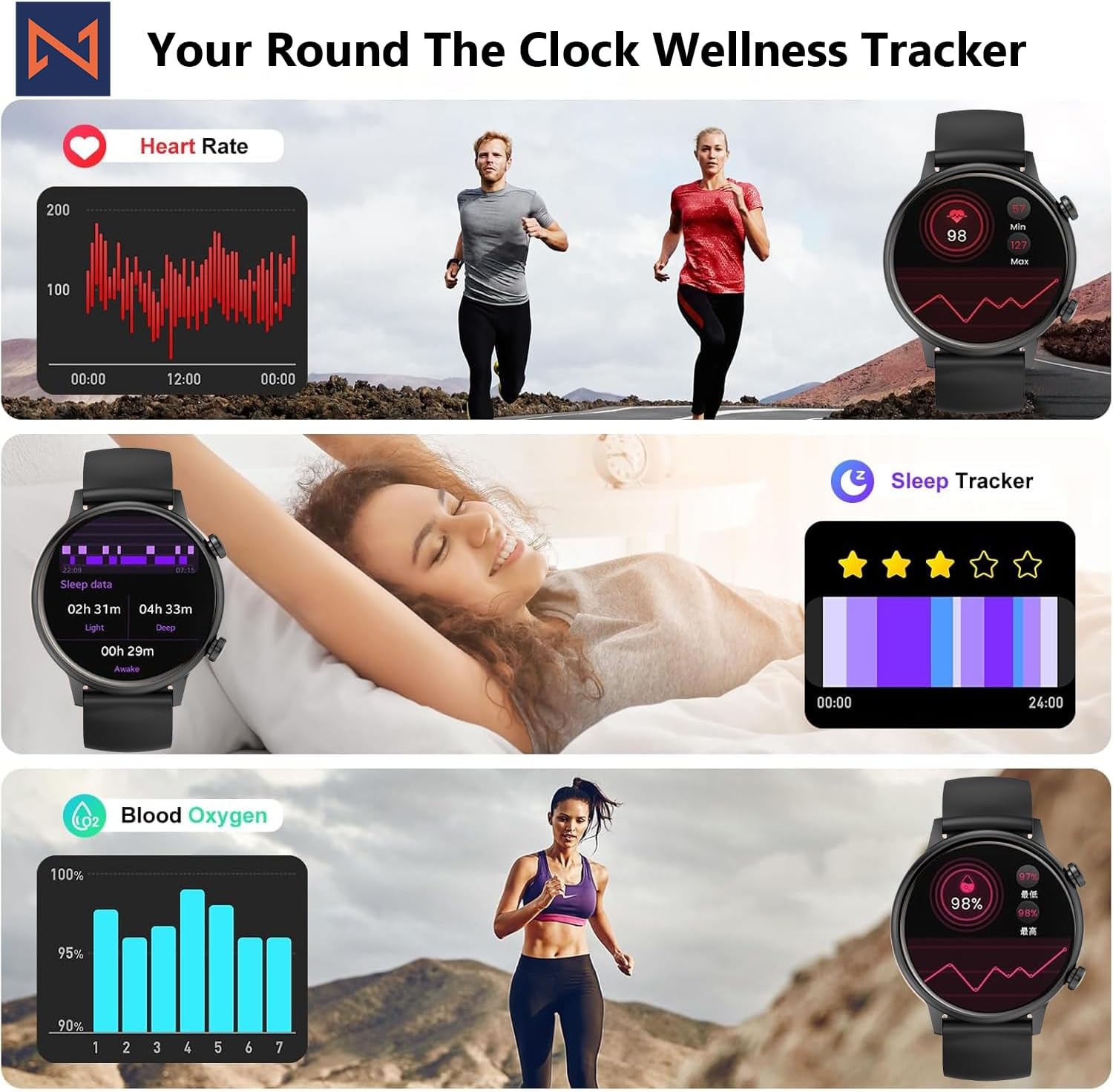
Figure 4: The smartwatch interface showing real-time heart rate, sleep tracking, and blood oxygen levels.

Figure 5: The smartwatch showing a selection of its multiple sports tracking modes.
6. Resistance uisge
The Infinity Smart Watch has an IP68 waterproof rating, making it resistant to dust, sweat, and water. It is suitable for daily wear, including hand washing, face washing, and swimming. Thoir an aire: Avoid using the watch in hot water (e.g., hot showers, saunas) or for deep-sea diving, as extreme temperatures or high-pressure water may compromise its water resistance.

Figure 6: The smartwatch demonstrating its IP68 waterproof capability during water exposure.
7. Bataraidh agus Cosgais
The smartwatch features a 200 mAh Lithium Polymer battery. A full charge typically takes approximately 2 hours, providing 3-5 days of working time and up to 30 days of standby time, depending on usage.
8. Sònrachaidhean
| Feart | Mion-fhiosrachadh |
|---|---|
| Modail Àireamh | WS_BLK |
| Meud sgrion | 1.1 òirleach AMOLED |
| Ìre dìon-uisge | IP68 |
| Comas Bataraidh | 200 mìleamp Uairean (Poileimear Lithium) |
| Ceangalachd | Bluetooth |
| Siostam-obrachaidh | Android (co-chòrdail ri iOS) |
| Comas stòraidh cuimhne | 128 MB |
| Cuideam nì | 5 unnsa |
| Dèanadair | Kizzy Enterprises Inc |
9. A ’dèanamh trioblaid
- Uaireadair nach eil a’ tionndadh air: Ensure the watch is fully charged. Long-press the side button to power on.
- Cha ghabh paidhir a dhèanamh leis a’ fòn: Ensure Bluetooth is enabled on your phone and the watch is within range. Restart both devices and try pairing again through the app.
- Fiosan nach deach fhaighinn: Check app settings on your phone to ensure notification permissions are granted for the smartwatch app. Also, verify that 'Do Not Disturb' mode is not active on the watch.
- Leughaidhean slàinte mì-chruinn: Ensure the watch is worn snugly on your wrist, not too tight or too loose. Clean the sensors regularly. Note that the blood pressure monitor may not be medically accurate and is for reference only.
- Reothadh sgrion: Restart the smartwatch by long-pressing the side button until it powers off, then power it back on. If the issue persists, check for app updates.
10. Barantas agus Taic
For warranty information, technical support, or service inquiries, please refer to the contact details provided on the product packaging or the manufacturer's official weblàrach. Cùm do chuidhteas ceannach mar dhearbhadh ceannach airson tagraidhean barantais.