
Thomson 145G
Thomson Streaming Stick 4K 145G User Manual
Modail: 145G
Ro-ràdh
This user manual provides comprehensive instructions for the setup, operation, maintenance, and troubleshooting of your Thomson Streaming Stick 4K 145G. Please read this manual carefully before using the device to ensure proper functionality and to avoid damage.

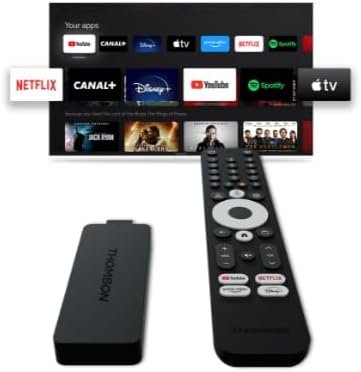
Image: The Thomson Streaming Stick 4K 145G alongside its remote control, illustrating the main components of the product.
Dè th' anns a' Bhocsa
Upon unboxing your Thomson Streaming Stick 4K 145G, please verify that all components are present:
- Thomson Streaming Stick 4K 145G
- Smachd Iomallach
- Adapter cumhachd
- USB càball (airson cumhachd)
- HDMI Extender (optional, may be included)
- Stiùireadh tòiseachaidh luath
Stiùireadh rèiteachaidh
Follow these steps to set up your Thomson Streaming Stick 4K 145G:
- Connect the Streaming Stick: Plug the Thomson Streaming Stick 4K 145G directly into an available HDMI port on your television. If space is limited, use an HDMI extender if provided.
- Ceangal cumhachd: Connect the provided USB cable to the power input port on the streaming stick and then connect the other end to the power adapter. Plug the power adapter into a wall outlet.
- Cuir an telebhisean air agus tagh an cuir-a-steach: Turn on your television and select the HDMI input to which the streaming stick is connected.
- Suidheachadh tùsail: The device will boot up and guide you through the initial setup process on your TV screen. This typically includes:
- Taghadh cànain.
- A’ ceangal ris an lìonra Wi-Fi agad.
- Signing in with your Google account (required for Google TV features and app downloads).
- A’ gabhail ri teirmichean is cumhaichean.
- Paidhir smachd iomallach: The remote control should automatically pair with the device. If not, follow the on-screen instructions or press and hold the Home and Back buttons simultaneously on the remote until pairing is complete.
Ìomhaigh: Mion-fhiosrachadh view of the Thomson Streaming Stick 4K 145G, highlighting its HDMI connector for TV input and the power input port.
Stiùireadh Obrachaidh
Once set up, you can begin using your Thomson Streaming Stick 4K 145G to access various streaming services and content.
Gnìomhan smachd iomallach
Dèan eòlas air na putanan smachd iomallach:
- Putan Cumhachd: Turns the device on or off (standby).
- Putan Neach-cuideachaidh Google: Cuiridh e àitheantan gutha an gnìomh airson rannsachadh agus smachd.
- Navigation Pad (Circle): Use up, down, left, right to navigate menus.
- Ceart gu leòr/Putan Tagh: A’ dearbhadh taghaidhean.
- Putan air ais: Tilleadh chun sgrion roimhe.
- Putan Dachaigh: Tillidh e gu sgrìn dachaigh Google TV.
- Putanan Meud (+/-): Atharraich meud an telebhisean.
- Putan Mute: Mutes TV volume.
- Putanan Ath-ghoirid an aplacaid: Dedicated buttons for Netflix, Disney+, YouTube, and Prime Video for quick access.

Image: The Thomson Streaming Stick 4K 145G and its remote control, showing the layout of the buttons on the remote.
A’ seòladh Google TV
The Google TV interface organizes content from your streaming services into a single, personalized experience.
- Sgrion Dachaigh: A’ taisbeanadh susbaint a thathar a’ moladh, aplacaidean stàlaichte, agus an liosta faire agad.
- Aplacaidean: Access all your installed applications. You can download more from the Google Play Store.
- Leabharlann: Find your purchased movies and TV shows from Google Play.
- Lorg: Use the search icon or Google Assistant button to find content by title, genre, or actor.
To stream content, simply select an app or a recommended title from the home screen. Ensure you have an active subscription for paid services.
Cumail suas
Proper maintenance ensures the longevity and optimal performance of your streaming stick.
- Glanadh: Use a soft, dry, lint-free cloth to clean the device and remote control. Do not use liquid cleaners or aerosols.
- Fionnarachadh: Ensure the streaming stick is placed in a well-ventilated area and not covered, as proper airflow prevents overheating.
- Ùrachaidhean bathar-bog: The device will automatically check for and install software updates. Ensure it remains connected to the internet for these updates.
- Stòradh: Nuair nach eilear ga chleachdadh airson ùine mhòr, stòraich an inneal ann an àite fionnar, tioram air falbh bho sholas dìreach na grèine.
Fuasgladh thrioblaidean
If you encounter issues with your Thomson Streaming Stick 4K 145G, refer to the following common problems and solutions:
| Trioblaid | Adhbhar a dh’fhaodadh a bhith ann | Fuasgladh |
|---|---|---|
| Gun chumhachd/Chan eil an inneal a’ tionndadh air | Power adapter not connected, faulty outlet, or damaged cable. | Dèan cinnteach gu bheil an inneal-atharrachaidh cumhachd ceangailte gu tèarainte ris an inneal agus ri socaid balla a tha ag obair. Feuch socaid eile. |
| Gun chomharra air an telebhisean | Incorrect HDMI input selected, loose HDMI connection, or device not powered on. | Verify the TV is on the correct HDMI input. Re-seat the HDMI cable. Ensure the streaming stick has power. |
| Chan eil smachd iomallach a 'freagairt | Batteries low/dead, remote not paired, or obstruction. | Replace batteries. Re-pair the remote by holding Home and Back buttons. Ensure no obstructions between remote and device. |
| Bufaireachadh no droch chàileachd sruthadh | Weak Wi-Fi signal, internet speed issues, or network congestion. | Move the device closer to the Wi-Fi router. Restart your router. Check your internet speed. Reduce other network activity. |
| Aplacaidean a’ tuiteam no a’ reothadh | Outdated app, insufficient memory, or software glitch. | Restart the device. Check for app updates in the Google Play Store. Clear app cache (Settings > Apps > [App Name] > Clear cache). |
If the issue persists after trying these solutions, you may need to perform a factory reset (Settings > System > About > Factory reset). Note that a factory reset will erase all data and settings on the device.
Sònrachaidhean
Key technical specifications for the Thomson Streaming Stick 4K 145G:
- Ainm a' mhodail: STREAMING STICK 4K THOMSON 145G
- Àireamh Modail: 145g
- Fuasgladh: 4K UHD
- Ceangal: Wi-Fi, USB, Ethernet (via adapter), HDMI, IR
- Seòrsa ceangail: HDMI
- Seirbheisean eadar-lìn le taic: Netflix, Disney+, Prime Video, YouTube, Spotify (and others via Google Play Store)
- Seòrsa Rianadair: Smachd Iomallach
- Factor foirm: Bata Tbh
- Dath: Dubh
- Meudan toraidh: 1.3 x 9.3 x 3.4 cm
- Cuideam: 460 g
- Dèanadair: MacThòmais
- A’ chiad fhear ri fhaighinn: 8 Lùnastal 2024
Barantas agus Taic
For warranty information and technical support, please refer to the documentation included with your purchase or visit the official Thomson support weblàrach. Cùm dearbhadh ceannach airson tagraidhean barantais.
Dèanadair: MacThòmais
Ùrachaidhean bathar-bog cinnteach gus an: Unknown (as per product data)
Ask a question about this manual
Ask about setup, troubleshooting, compatibility, parts, safety, or missing instructions. Manuals+ will review the question and use this page’s manual context to help answer it.