
Plugable USBC-PDMON
Plugable USB-C Portable Monitor USBC-PDMON Instruction Manual
Model: USBC-PDMON | Brand: Plugable
1. Toradh thallview agus Prìomh fheartan
The Plugable USBC-PDMON is a 15.6-inch Full HD (1920x1080) IPS portable monitor designed for enhanced productivity on the go. It features 100W Power Delivery pass-through charging and a 3x USB-C 10Gbps hub, making it a versatile solution for expanding your workspace.

Image: The Plugable USBC-PDMON portable monitor in use, showcasing its slim design and the protective case functioning as a stand.
Prìomh fheartan:
- Taisbeanadh IPS 15.6-òirleach làn HD (1920x1080): A’ toirt seachad seallaidhean soilleir, biorach le farsaingeachd viewing angles and up to 300 nits brightness.
- 100W Power Delivery Pass-Through: Allows charging of your laptop, smartphone, or tablet (up to 85W output) while using the monitor.
- Integrated 3x USB-C 10Gbps Hub: Expands connectivity with two 10Gbps USB-C ports for data transfer or connecting peripherals.
- So-ghiùlain agus cuideam aotrom: Weighing 1.85lbs (with cover), it's ideal for travel and mobile workstations.
- Protective Case/Stand: The included cover protects the screen and conveniently folds into a stand for various viewing ceàrnan.
- Co-fhreagarrachd Uile-choitcheann: Works with Mac, Windows, Chrome, iPad, iPhone, and Android devices equipped with full-featured USB-C or Thunderbolt ports.
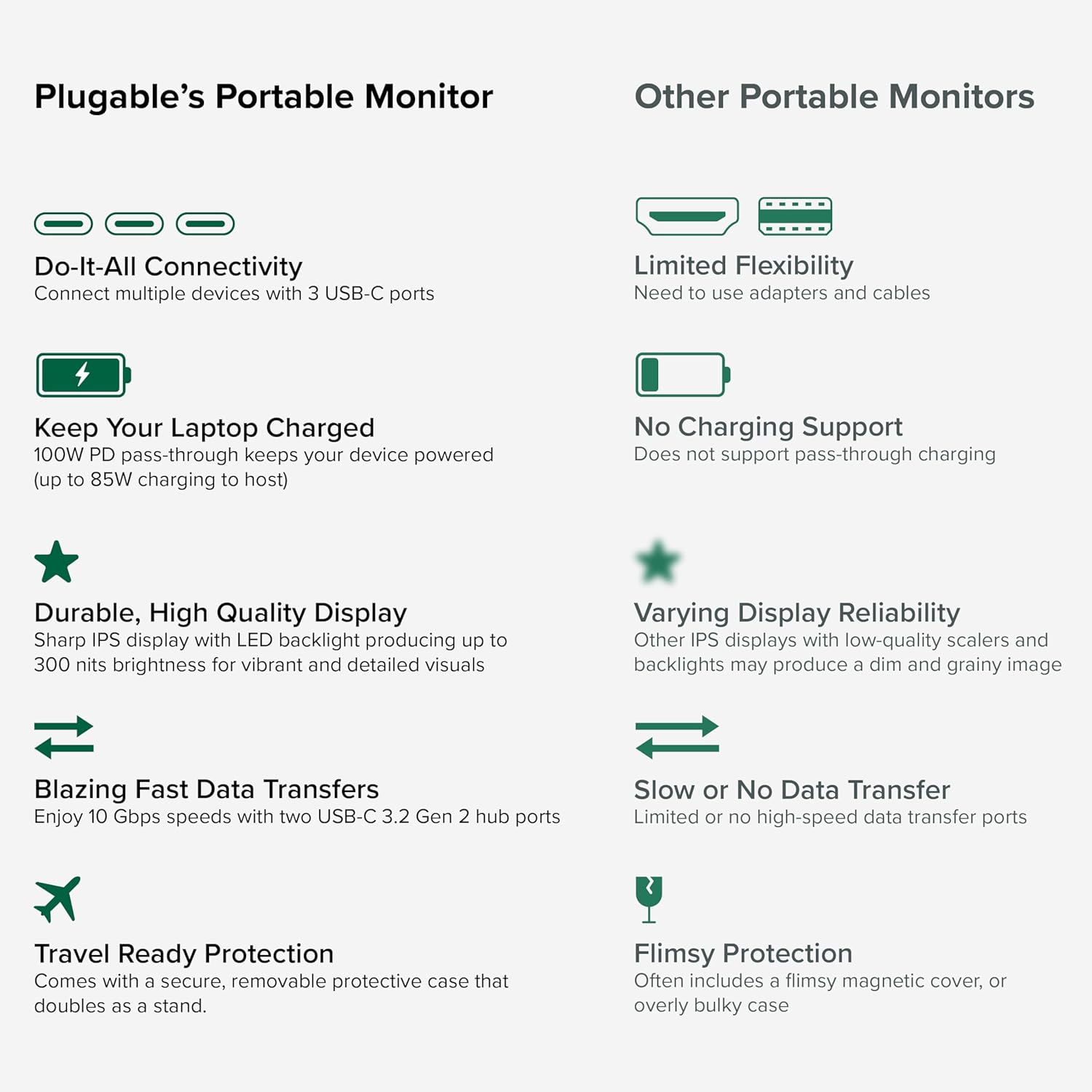
Image: A comparison highlighting the superior connectivity, charging support, display quality, data transfer speeds, and travel-ready protection of the Plugable monitor.
2. Dè tha air a ghabhail a-steach
Thoir sùil air susbaint a’ phacaid gus dèanamh cinnteach gu bheil a h-uile rud ann:
- 1920x1080 IPS Travel Display with Protective Case/Stand
- 1 Meter USB-C Host Cable
- Stiùireadh tòiseachaidh luath
3. Stiùirich rèiteachaidh
Follow these steps to set up your Plugable portable monitor:
- Unpack an Monitor: Carefully remove the monitor and its accessories from the packaging.
- Suidhich an Seas: The protective cover doubles as a stand. Fold the cover to create a stable base for the monitor. The built-in magnets will help secure it in place.
- Ceangail ris an inneal agad: Use the included 1-meter USB-C host cable to connect the monitor to your laptop, smartphone, or tablet. Ensure your device has a full-featured USB-C port that supports video output (DisplayPort Alternate Mode) and Power Delivery.
- Power the Monitor (Optional/Recommended): For optimal performance and to utilize the pass-through charging feature, connect a USB-C power adapter (not included) to the monitor's dedicated power input port. This will also allow the monitor to charge your host device (up to 85W).
- Rèiteachadh Taisbeanaidh: Your device should automatically detect the monitor. You may need to adjust display settings (e.g., extend, mirror, resolution) in your operating system's display settings.

Image: Visual instructions on how to correctly fold the protective cover to form a stable stand for the monitor.

Image: An illustration demonstrating the power flow when the monitor is used as a hub, providing 85W charging to the connected laptop from a 100W input.
Co-chòrdalachd:
The monitor is compatible with a wide range of operating systems and devices:
- Àrd-ùrlaran le taic: Mac, Windows, Chrome OS, Android.
- Ceangal ris an òstair: USB-C, USB4, Thunderbolt.
- Siostaman co-chòrdail: MacBooks, Dell XPS, Lenovo ThinkPad, Apple iPhone 15/16+, Samsung Galaxy S24, Google Pixel 8, iPads with USB-C, Samsung Galaxy Tab, Lenovo Tab.

Image: A visual guide to the monitor's broad compatibility across different operating systems and popular devices like laptops, phones, and tablets.
4. Stiùireadh Obrachaidh
Once connected, your Plugable portable monitor is ready for use. Here are some operational tips:
Modhan Taisbeanaidh:
- Leudaich an taisbeanadh: Use this mode to expand your desktop workspace across both your primary device and the portable monitor.
- Taisbeanadh sgàthan: This mode duplicates your primary device's screen onto the portable monitor, useful for presentations or sharing content.
Smachdan sgrùdaidh:
The monitor features control buttons on the side for adjustments:
- Brightness Up/Down: Adjust the screen brightness to your preference.
- Modh dath: Cycle through preset color modes (Cool, Normal, Warm, sRGB, and User) to optimize visual appearance.
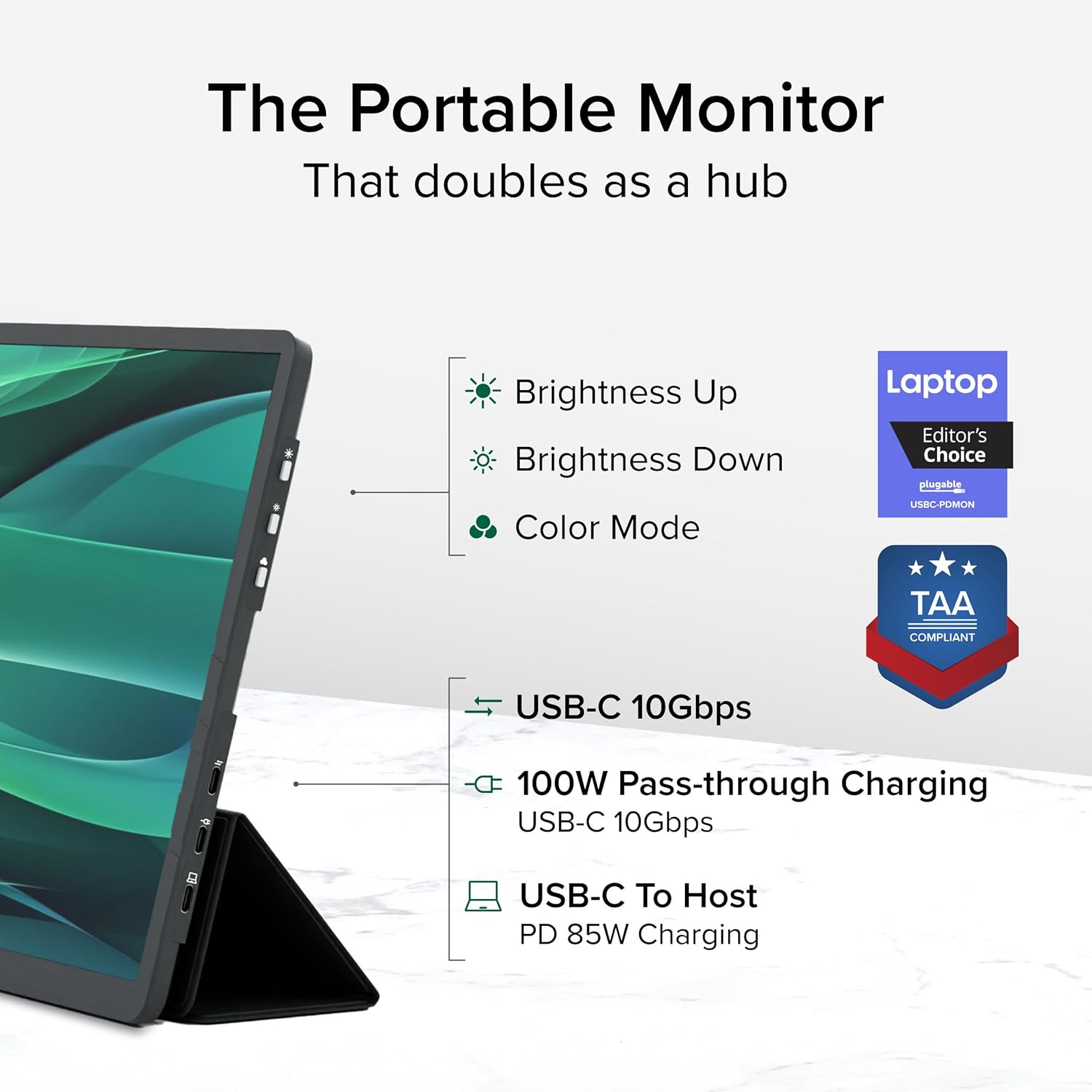
Ìomhaigh: Mion-fhiosrachadh view of the monitor's side, indicating the location of the brightness controls, color mode button, and the three USB-C ports for host connection, power delivery, and data hub functionality.
USB-C Hub Functionality:
The monitor acts as a hub, providing additional USB-C ports for your peripherals:
- Connect USB-C devices such as external drives, keyboards, or mice to the available 10Gbps USB-C ports on the monitor.
5. Cumail suas
To ensure the longevity and optimal performance of your Plugable portable monitor, follow these maintenance guidelines:
- Glanadh an sgrion: Cleachd clò bog gun lint gu h-aotrom dampened with water or a screen-cleaning solution. Avoid harsh chemicals, abrasive materials, or direct spraying onto the screen.
- A 'glanadh a' chuirp: Sguab taobh a-muigh an monitor le clò bog, tioram.
- Stòradh: When not in use, always use the protective cover to prevent scratches and damage to the screen. Store in a cool, dry place away from direct sunlight and extreme temperatures.
- Làimhseachadh: Handle the monitor with care. Avoid dropping it or subjecting it to strong impacts.
6. A ’dèanamh trioblaid
If you encounter issues with your Plugable portable monitor, refer to the following common problems and solutions:
No Display or "No Signal" Message:
- Thoir sùil air ceangal càball: Ensure the USB-C cable is securely connected to both the monitor and your host device. Try unplugging and re-plugging the cable.
- Verify USB-C Port Capability: Confirm that your device's USB-C port supports video output (DisplayPort Alternate Mode). Not all USB-C ports have this capability.
- Cumhachd a-muigh: If your host device cannot provide sufficient power, connect an external USB-C power adapter to the monitor's power input port.
- Ath-thòiseachadh innealan: Try restarting your laptop, smartphone, or tablet.
Taisbeanadh a’ priobadh no neo-sheasmhach:
- Solar cumhachd: Ensure the monitor is receiving adequate power. Connect an external USB-C power adapter if not already in use.
- Càileachd càball: Use the included high-quality USB-C cable. A different or lower-quality cable might cause instability.
- Ùraich na draibhearan: Dèan cinnteach gu bheil draibhearan grafaigean an inneil aoigheachd agad ùraichte.
No Charging or Slow Charging:
- Rangachadh adapter cumhachd: Ensure the external USB-C power adapter connected to the monitor is rated for at least 100W to provide 85W pass-through charging to your host device.
- Co-fhreagarrachd càball: Verify the USB-C cable supports Power Delivery.
If these steps do not resolve your issue, please contact Plugable support for further assistance.
7. Sònrachaidhean
Detailed technical specifications for the Plugable USBC-PDMON portable monitor:
| Feart | Sònrachadh |
|---|---|
| Meud sgrion | 15.6 òirlich |
| Fuasgladh | FHD 1080p (1920 x 1080 piogsail) |
| Teicneòlas taisbeanadh | IPS |
| Co-mheas taobh | 16:9 |
| Gile Ìomhaigh | 300 Candela (naidean) |
| Uachdar na Sgrion | Mata |
| Gu h-iomlan puirt USB | 3 (USB-C) |
| Lìbhrigeadh cumhachd | 100W Pass-Through (85W to host) |
| Luas gluasad dàta | 10Gbps (USB-C hub ports) |
| Cuideam nì | 1.85 not |
| Meudan toraidh | 0.42 x 14.21 x 8.46 òirleach |
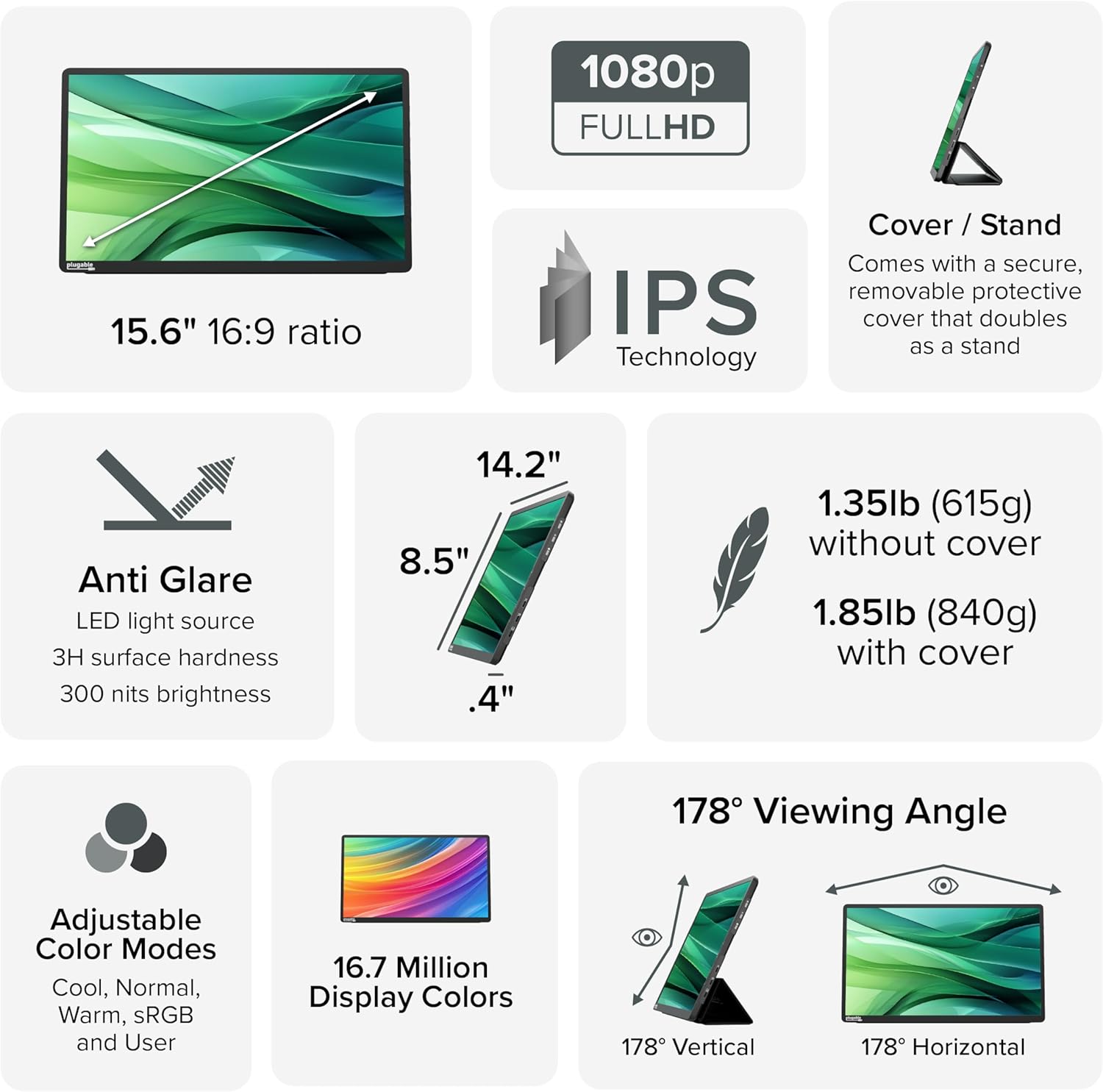
Image: A comprehensive infographic summarizing the monitor's technical specifications, such as screen size, resolution, IPS technology, anti-glare properties, weight, and viewing ceàrnan.
8. Barantas agus Taic
The Plugable USBC-PDMON portable monitor is designed with reliability at its core and built to meet the demands of both IT departments and home offices.
- Taic Fad-beatha: Includes lifetime support from our North American team of connectivity experts.
- Barantas: Air a chùl-taic le barantas 2-bliadhna.
For technical assistance or warranty claims, please visit the official Plugable weblàrach no cuir fios chun sgioba taic aca gu dìreach.
Ask a question about this manual
Ask about setup, troubleshooting, compatibility, parts, safety, or missing instructions. Manuals+ will review the question and use this page’s manual context to help answer it.