
1. Ro-ràdh
Thank you for choosing the Elitech VGW-Mini Wireless Digital Vacuum Gauge Kit. This manual provides essential information for the safe and efficient operation, maintenance, and troubleshooting of your device. Please read it thoroughly before use and keep it for future reference.
The Elitech VGW-Mini is a compact, high-precision digital vacuum gauge designed for HVAC and refrigeration systems. It offers a wide measurement range, intelligent H2O status judgment, and seamless integration with the Elitech Tools App for enhanced functionality and data management.
2. Feartan toraidh
- APP ELITECH TOOLS (iOS and Android): Integrated app for managing all Elitech tools, including vacuum pumps, digital manifolds, and refrigerant charging scales, for efficient and smart operation.
- Dealbhadh ioma-ghnìomhach: Set target values and receive notifications when readings exceed predetermined limits. Data can be recorded and exported in Excel and PDF formats.
- Intelligent H2O Status Judgment: Automatically assesses the physical state of H2O by comparing ambient temperature with the saturation temperature corresponding to the system's vacuum.
- Taisbeanadh Mòr: Continuous digital readings of the evacuation process are easily visible on the wide, full-view Sgrion LCD.
- Wide Measurement Range & High Accuracy: Used for system leak testing and evaluating vacuum pump quality in HVAC and refrigeration evacuation. Accurate measurements from 19,000 microns (atmosphere) down to 0 microns. Accuracy: ±10% or ±10 Micron.
- Note on Oil Film: An anti-oil film is present inside the product head, which may cause a delay in number display when directly connected to a vacuum pump. It is recommended to remove the oil film when connecting to the vacuum pump and reinstall it when connecting to the system.
3. Dè tha sa bhogsa
The Elitech VGW-Mini Kit includes:
- VGW-Mini HVAC Vacuum Gauge
4. Suidhich
Follow these steps to set up your Elitech VGW-Mini for initial use:
- Dèan sgrùdadh air an inneal: Ensure the vacuum gauge and all accessories are free from damage. Check that the sealing ring of the vacuum gauge is correctly installed and free of oil residue.
- Ceangail an Adapter: Attach the 1/4" SAE adapter to the vacuum gauge. Ensure a secure, leak-free connection.
- Ceangail ris an t-siostam: Connect the vacuum gauge (with adapter) to your HVAC or refrigeration system's service port.
- Cumhachd air: Press the power button to turn on the VGW-Mini.
- Ceangal Aplacaid (Roghainneil): Download the Elitech Tools App from the App Store or Google Play. Follow the in-app instructions to connect your VGW-Mini via Bluetooth for remote monitoring and data export.

Image: Elitech VGW-Mini Wireless Digital Vacuum Gauge Kit components, including the main unit, adapter, and carrying case.
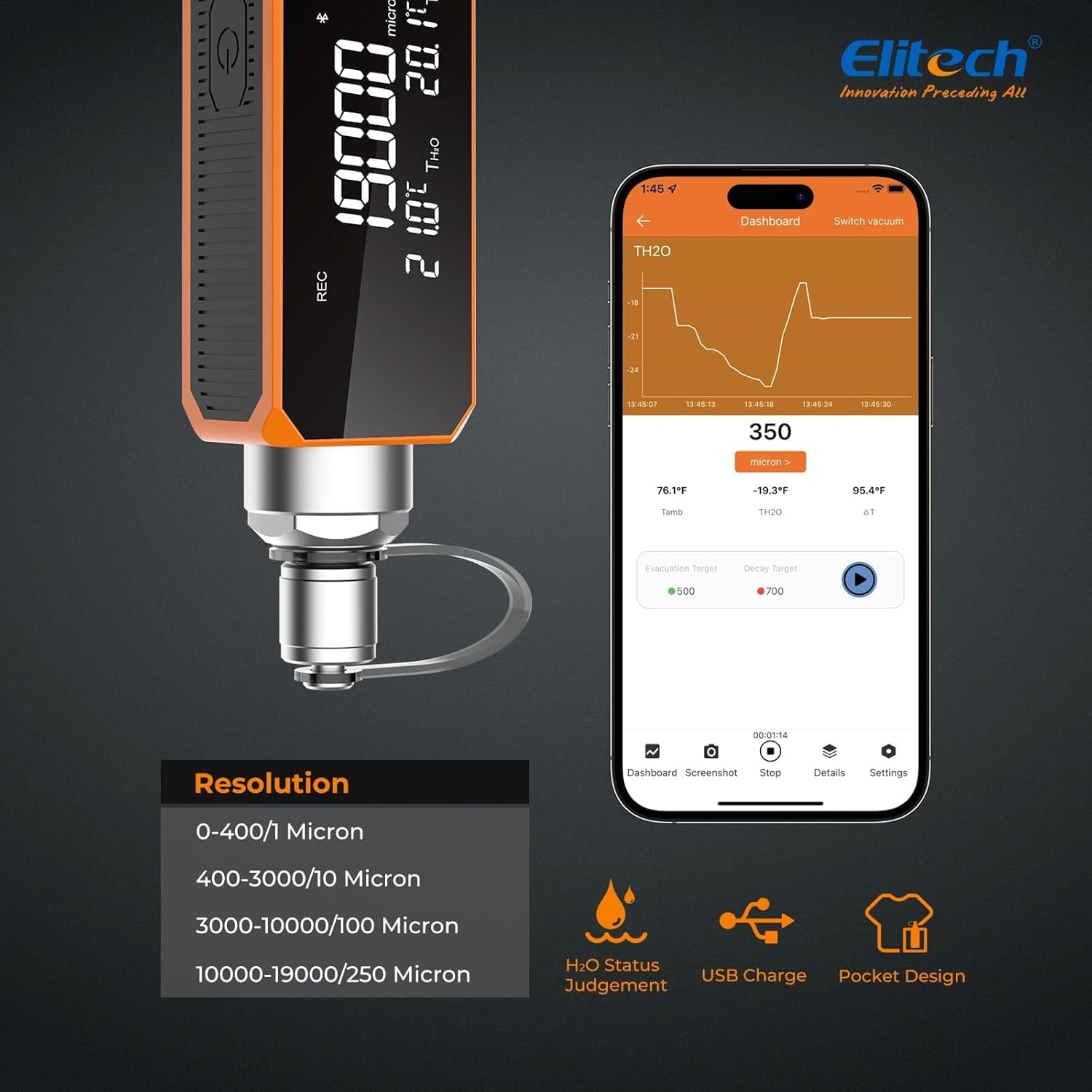
Image: The Elitech VGW-Mini connected to an HVAC system, showing the digital display.

Image: Screenshots of the Elitech Tools App interface, demonstrating temperature readings, interface buttons, and smartphone integration.
Video: A quick guide to HVAC maintenance using Elitech tools, demonstrating the use of a refrigerant leak detector, a digital manifold, and a vacuum pump. This video shows the general workflow of Elitech products in an HVAC context.
5. Stiùireadh Obrachaidh
- Cumhachd air / dheth: Brùth agus cum air a’ phutan cumhachd airson 3 dhiog gus an inneal a thionndadh air no dheth.
- Taghadh Aonad: Use the 'MODE' button to cycle through different measurement units (e.g., microns, mTorr, inHg, Pa, Tor, kPa, psia).
- Vacuum Measurement: Once connected to the system and powered on, the VGW-Mini will display real-time vacuum readings.
- H2O Status Judgment: The device automatically judges the H2O status by comparing ambient temperature (Tamb) and water saturation temperature (TH2O) corresponding to the system vacuum. The difference (ΔT = Tamb - TH2O) is displayed.
- Data Recording & Export: Utilize the Elitech Tools App to record data offline and export it in Excel or PDF formats for analysis and reporting.

Image: Close-up of the Elitech VGW-Mini's digital display, showing vacuum in microns, ambient temperature, and water saturation temperature difference.

Image: A technician monitoring the Elitech VGW-Mini's readings on a laptop via the Elitech Tools App, while the device is connected to an HVAC unit.
6. Cumail suas
- Glanadh Sensor: If the vacuum gauge is contaminated with oil, it must be cleaned multiple times with a mineral oil-based cleaning solvent. Inject 2.5ml of solvent into the sensor, shake gently for 10-15 seconds, then shake downwards to remove the solvent. Repeat 2-3 times. Place the vacuum gauge flat for 15 minutes to dry.
- Cìs bataraidh: The VGW-Mini is rechargeable. Connect it to a standard USB charger (5V) using the provided cable. The battery indicator on the display will show charging status.
- Stòradh: Store the device in a clean, dry environment when not in use.

Image: The Elitech VGW-Mini connected to a USB cable for charging, illustrating its rechargeable feature.
Video: A quick guide to HVAC maintenance using Elitech tools, demonstrating the use of a refrigerant leak detector, a digital manifold, and a vacuum pump. This video shows the general workflow of Elitech products in an HVAC context.
7. A ’dèanamh trioblaid
If your vacuum gauge is not displaying values correctly, consider the following:
- Vacuum Value Increase During Leak Test:
- A slight, gradual increase in vacuum value is normal due to the high sensitivity of the vacuum gauge and small leaks, as well as partially evacuated water in the tubing. Evaluate if the system vacuum meets requirements by checking if the vacuum value remains stable.
- If the vacuum value increases continuously and rapidly, it indicates an abnormal phenomenon.
- No Display or Incorrect Readings:
- Effective Vacuum Out of Range: If the actual vacuum is outside the measurement range, ensure the system is properly evacuated. Use a vacuum pump with a power greater than 1 HP and connect it directly to the vacuum gauge for evacuation.
- Damaged Sensor: Use a wrench to unscrew the connector of the vacuum gauge cavity and check if the long strip sensor inside the mesh is intact. If damaged, the device needs repair.
- Truailleadh Ola: If the vacuum gauge is contaminated with oil, clean it multiple times with a mineral oil-based cleaning solvent as described in the Maintenance section. After cleaning, connect the vacuum gauge directly to the vacuum pump and evacuate for 15 minutes. It should then function normally.
Video: This video addresses common issues with vacuum gauge readings, explaining why vacuum values might increase during a leak test and providing solutions for sensor cleaning and proper evacuation techniques.
8. Sònrachaidhean
| Brand | Elitech |
| Modail | VGW-mini |
| Stuth | Aluminium |
| Meudan (LxWxH) | 50 x 30 x 140 mm |
| Cuideam nì | 300 gram |
| Raon Tomhais | 0-19000 microns |
| Teòthachd Obrachaidh | -20 ° C gu 60 ° C (-4 ° F gu 140 ° F) |
| Eadar-aghaidh | 1/4" SAE |
| Cruinneas | ±10% no ±10 Micron |
| Fuasgladh | 0-400: 1 Micron 400-3000: 10 Micron 3000-10000: 100 Micron 10000-19000: 250 Micron |
9. Barantas agus Taic
For warranty information, technical support, or service inquiries, please refer to the official Elitech website or contact your local Elitech distributor. Keep your purchase receipt as proof of purchase for warranty claims.