
Ro-ràdh
Thank you for choosing the Oakcastle HIFI150 Stereo System. This manual provides essential information for setting up, operating, and maintaining your device. Please read it thoroughly before use and retain it for future reference.
Fiosrachadh Sàbhailteachd
Gus dèanamh cinnteach à obrachadh sàbhailte agus gus casg a chur air milleadh, feuch an lean thu na ceumannan sàbhailteachd a leanas:
- Na cuir an aonad fosgailte do uisge, taiseachd no teòthachd anabarrach.
- Na fosgail an casing. Thoir aire do luchd-obrach teisteanasach airson a h-uile seirbheis.
- Dèan cinnteach gu bheil fionnarachadh ceart ann timcheall an aonaid. Na cuir bacadh air fosglaidhean fionnarachaidh sam bith.
- Cleachd dìreach an inneal-atharrachaidh cumhachd a tha air a thoirt seachad leis an aonad.
- Keep the unit away from heat sources such as radiators, stoves, or other heat-producing appliances.
- Glan an aonad a-mhàin le clò tioram.
Susbaint pacaid
Dèan cinnteach gu bheil a h-uile nì an làthair sa phacaid agad:
- Siostam Stereo Oakcastle HIFI150
- Smachd Iomallach
- Bataraidhean airson smachd iomallach
- Càball cumhachd
- Leabhar-làimhe cleachdaiche
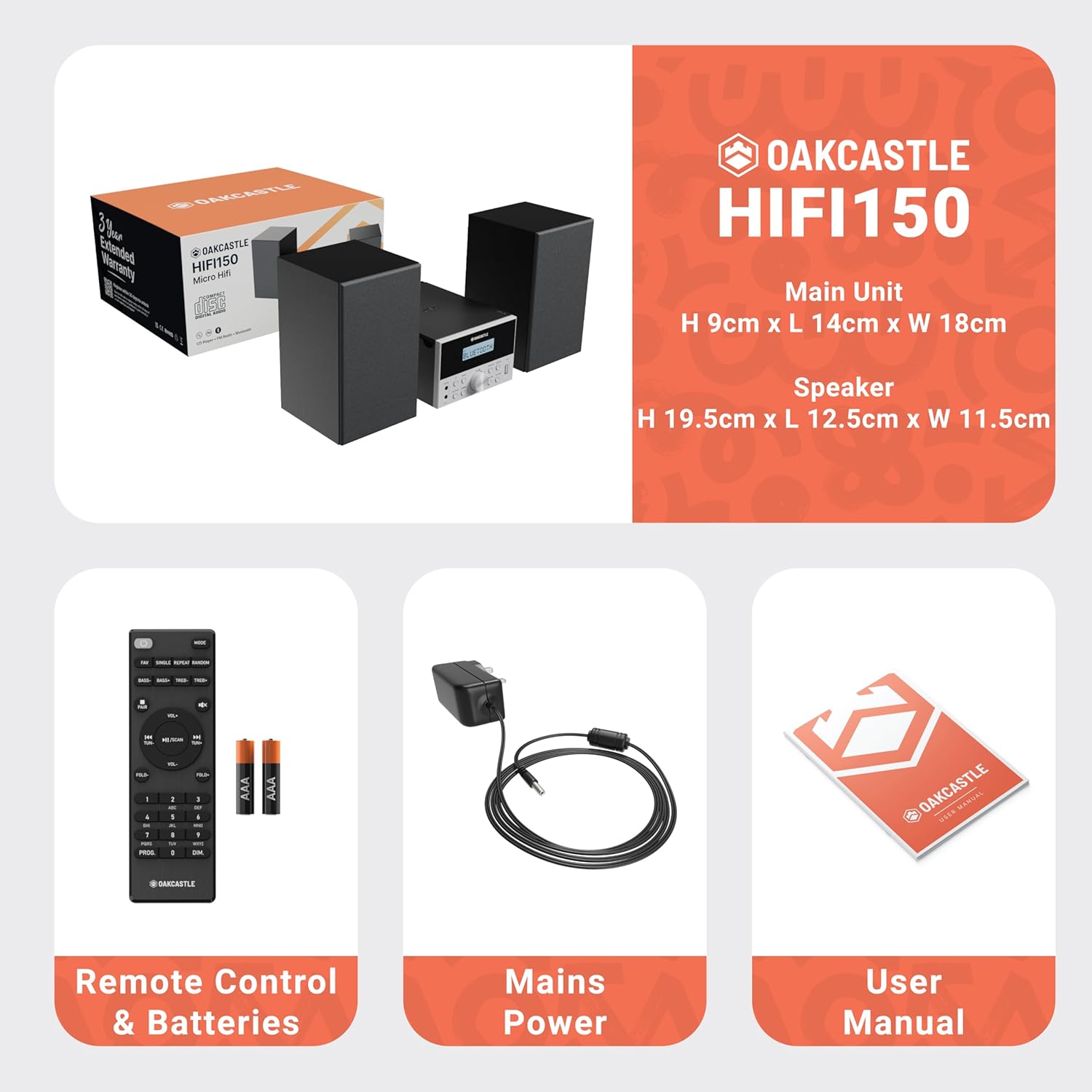
Image: The Oakcastle HIFI150 package contents, showing the main unit, two speakers, remote control with batteries, power adapter, and user manual.
Bathar seachadview
The Oakcastle HIFI150 features a compact design with intuitive controls and multiple connectivity options.
Smachdan pannal aghaidh agus taisbeanadh

Image: A close-up of the Oakcastle HIFI150 main unit's front panel, highlighting the digital display, central volume knob, mode selection buttons, and front-facing AUX In and USB ports. The display shows 'BLUETOOTH'.
- Taisbeanadh: A’ sealltainn modh làithreach, fiosrachadh mu thrac, agus tricead rèidio.
- Putan Cumhachd: Tionndaidh an aonad air no dheth.
- Putan Modh: Cycles through input sources (CD, FM, Bluetooth, AUX, USB).
- Knob Volume: Atharraich am prìomh leabhar.
- Putan Cluich/Pause: Controls playback for CD, USB, and Bluetooth.
- Putanan Leum/Tionndaidh: Navigates tracks or tunes radio frequencies.
- AUX ann am Port: Airson innealan claisneachd taobh a-muigh a cheangal tro chàball 3.5mm.
- Port USB: Airson claisneachd a chluich files bho draibh USB.
Ceanglaichean Pannal Cùil
The rear panel includes connections for speakers and power.
Suidhich
1. Ceangal an Luchd-labhairt
Connect the included speakers to the speaker terminals on the rear of the main unit. Ensure correct polarity (red to red, black to black) for optimal sound quality.
2. Ceangal Cumhachd
Plug the power cable into the AC inlet on the rear of the main unit, then plug the other end into a standard wall outlet.
Stiùireadh Obrachaidh
Cumhachd air / dheth
Brùth an Cumhachd putan air a’ phannal aghaidh no air an smachd iomallach gus an aonad a thionndadh air no dheth.
Taghadh Modh
Brùth an Modh button on the front panel or remote control repeatedly to cycle through the available input sources: CD, Rèidio FM, Bluetooth, AUX, agus USB.
Gnìomh Bluetooth
- Tagh Bluetooth mode using the Mode button. The display will show 'BLUETOOTH' and the unit will enter pairing mode.
- Air an fhòn-smart no inneal Bluetooth eile agad, cuir Bluetooth an gnìomh agus rannsaich airson innealan a tha rim faighinn.
- Select 'OAKCASTLE HIFI150' from the list. Once connected, the unit will confirm the connection.
- You can now stream audio wirelessly from your device to the HIFI150.
Ath-chluich CD

Image: The Oakcastle HIFI150 with its top-loading CD player mechanism open, revealing a compact disc placed inside. The display shows 'CD'.
- Fosgail còmhdach roinn an CD.
- Place a CD (MP3, CD, WMA, or CD-R format) onto the spindle with the label side facing up.
- Dùin còmhdach na roinne CD.
- Tagh CD mode. The unit will read the disc and begin playback automatically.
- Cleachd na putanan Cluich/Pas agus Skip gus smachd a chumail air ath-chluich.
Gnìomh rèidio FM

Image: The Oakcastle HIFI150 main unit with its telescopic antenna extended, displaying an FM radio frequency on its screen. The unit is placed between two speakers.
- Tagh Rèidio FM modh.
- Leudaich an antenna teileasgopach airson gabhail nas fheàrr.
- Sgan Auto: Press and hold the Play/Pause button to automatically scan and save available FM stations (up to 30 presets).
- Tuning Stiùireadh: Use the Skip/Tune buttons to manually adjust the frequency.
- Ath-ghairm Presets: Use the 'FAV/PROG' button on the remote to cycle through saved stations.
Ath-chluich USB
- Cuir a-steach draibhear USB a-steach don phort USB air a ’phannal aghaidh.
- Tagh USB mode. The unit will automatically detect and begin playing compatible audio files (MP3, WMA).
- Cleachd na putanan Cluich/Pas agus Skip gus smachd a chumail air ath-chluich.
In-chur AUX
- Ceangail inneal claisneachd taobh a-muigh (me, cluicheadair MP3, fòn cliste) ris an AUX A-steach port on the front panel using a 3.5mm audio cable (not included).
- Tagh AUX modh.
- Smachd air ath-chluich bhon inneal taobh a-muigh ceangailte agad.
Smachd tomhas-lìonaidh
Rothaich an Knob Volume on the front panel or use the VOL +/- putanan air an smachd iomallach gus an ìre fuaim atharrachadh.
Cleachdadh smachd iomallach
The included remote control provides full functionality for the HIFI150. Ensure batteries are correctly inserted. Point the remote control towards the front panel of the main unit for optimal response.
Cumail suas
Glanadh
- Sguab an aonad le clò bog, tioram.
- Na cleachd innealan-glanaidh sgrìobach, cèir no fuasglaidhean oir dh’ fhaodadh iad milleadh a dhèanamh air a’ chrìochnachadh.
Stòradh
If the unit is not used for an extended period, unplug it from the power outlet and store it in a cool, dry place.
Fuasgladh thrioblaidean
If you encounter issues with your HIFI150, please refer to the following common problems and solutions:
| Trioblaid | Adhbhar a dh’fhaodadh a bhith ann | Fuasgladh |
|---|---|---|
| Gun chumhachd | Càball cumhachd gun cheangal; socaid cumhachd lochtach | Dèan cinnteach gu bheil càball cumhachd ceangailte gu tèarainte; Feuch socaid cumhachd eadar-dhealaichte. |
| Gun fhuaim | Volume too low; Incorrect input mode; Speakers not connected | Increase volume; Select correct input mode; Check speaker connections. |
| CD gun a bhith a’ cluich | CD inserted incorrectly; Disc scratched/dirty; Incorrect format | Reinsert CD correctly; Clean or replace disc; Ensure disc is compatible (MP3, CD, WMA, CD-R). |
| Bluetooth nach eil a 'ceangal | Bluetooth mode not selected; Device too far; Device already connected to another unit | Select Bluetooth mode; Move device closer; Disconnect from other devices and try again. |
| Fàilteachas FM bochd | Antenna gun a bhith air a shìneadh a-mach; Comharra lag | Fully extend the telescopic antenna; Try repositioning the unit. |
Sònrachaidhean
| Modail Àireamh | 1000002971 |
| Brand | Caisteal Oak |
| Ceangalachd | Bluetooth 5.2, USB, AUX |
| Toradh Fuaim | 20W |
| Meadhanan le taic | CD, MP3, WMA, CD-R, USB |
| Rèidio | FM Radio with 30 Presets |
| Innealan co-fhreagarrach | Cluicheadair MP3, Fòn-làimhe, Clàr |
| Stuth Caibineit | Fiodh |
| Dath | Dubh |
| Meudan nì (L x W x H) | 13.7 x 17.8 x 9 cm |
| Cuideam nì | 2 cileagram |
Barantas agus Taic
The Oakcastle HIFI150 comes with an extended 3-year warranty. Registration is required to activate the full warranty period. Please refer to the warranty card included in your package or visit the official Oakcastle website for registration details and support information.
For technical assistance or further inquiries, please contact Oakcastle customer support through their official channels.