
1. Ro-ràdh
Thank you for choosing the Hama DR2002BT Digital Radio. This device offers a comprehensive audio experience with FM, DAB/DAB+ digital radio reception, and Bluetooth connectivity. Its user-friendly design, featuring large buttons and a clear 4.3-inch TFT color display, makes it suitable for all users. This manual will guide you through the setup, operation, and maintenance of your new digital radio.
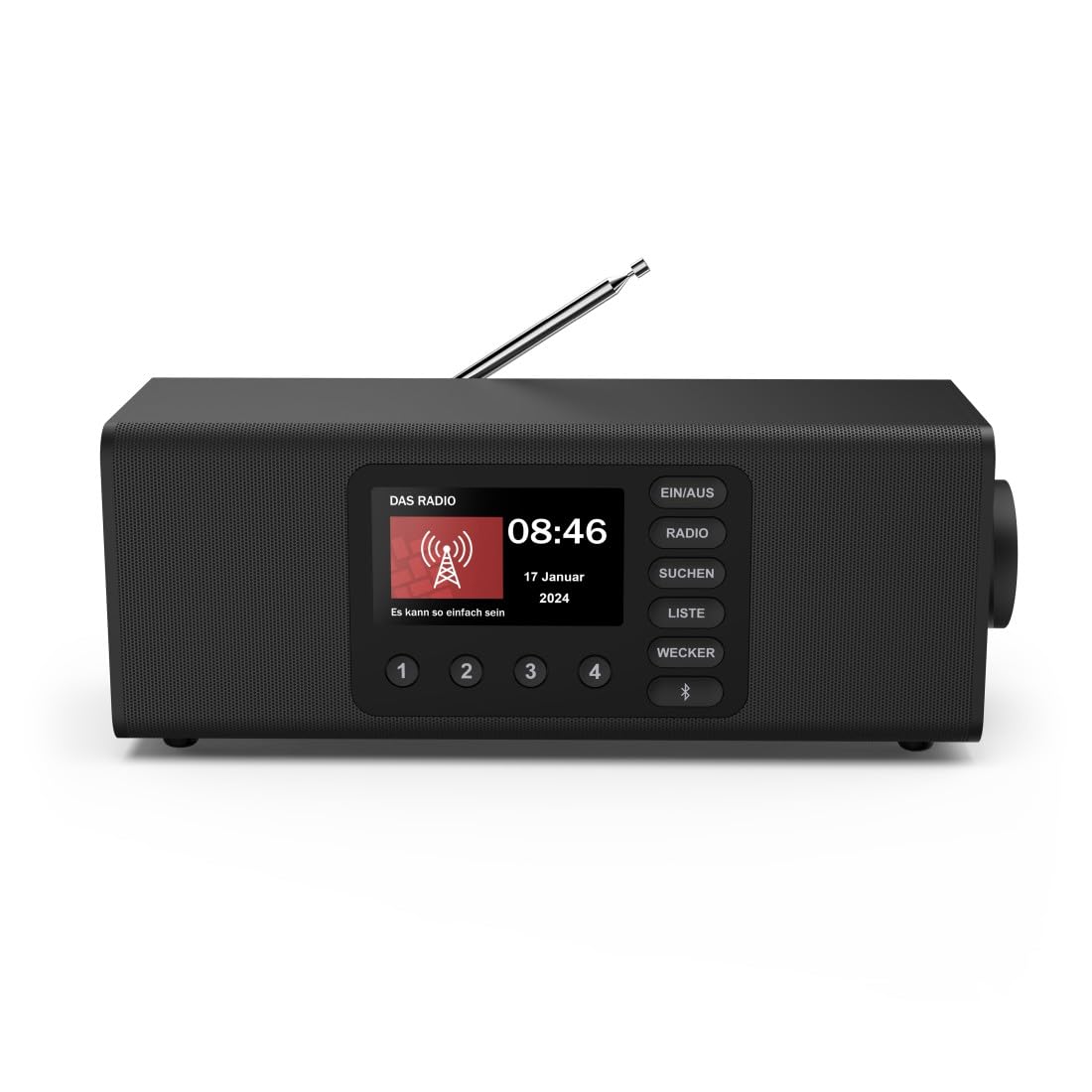
Ìomhaigh: Aghaidh view of the Hama DR2002BT Digital Radio, showcasing na putanan taisbeanaidh is smachd aige.
2. Fiosrachadh Sàbhailteachd
Leugh na stiùiridhean sàbhailteachd seo gu faiceallach mus cleachd thu an inneal. Cùm an leabhar-làimhe seo airson fiosrachadh san àm ri teachd.
- Na cuir an inneal fo bhuaidh taiseachd, uisge no teòthachd anabarrach.
- Seachain an inneal a chur faisg air stòran teas no ann an solas dìreach na grèine.
- Na fosgail an inneal casing. Repairs should only be performed by qualified personnel.
- Cleachd dìreach an adapter cumhachd a chaidh a thoirt seachad.
- Dèan cinnteach gu bheil fionnarachadh ceart timcheall an inneal.
3. Pasgan-susbaint
Dèan cinnteach gu bheil a h-uile nì an làthair nuair a dh’fhosglas tu a-mach e:
- Hama DR2002BT Digital Radio
- Adapter cumhachd
- Leabhar-làimhe cleachdaiche
4. Toradh thallview
4.1 Smachdan agus Taisbeanadh Pannal aghaidh

Image: Front panel of the radio highlighting the display and control buttons, with icons for Bluetooth, DAB+, and Alarm functions.
The front panel features a 4.3-inch TFT color display, large control buttons, and a rotary knob for easy navigation and selection. Key buttons include:
- EIN/AUS (ON/OFF): Cuiridh e an inneal air no dheth.
- RADIO: Switches between FM and DAB/DAB+ modes.
- SUCHEN (SEARCH): Initiates station scanning.
- LISTE (LIST): Accesses the list of available stations.
- WECKER (ALARM): Configures alarm settings.
- Putan Bluetooth: Cuiridh seo modh paidhreachaidh Bluetooth an gnìomh.
- Putanan Ro-shuidhichte (1-4): Quick access to stored favorite stations.
- Rotary Knob (LAUTSTÄRKE/NAVIGIEREN): Controls volume and navigates menus.
4.2 Ceanglaichean pannal cùil
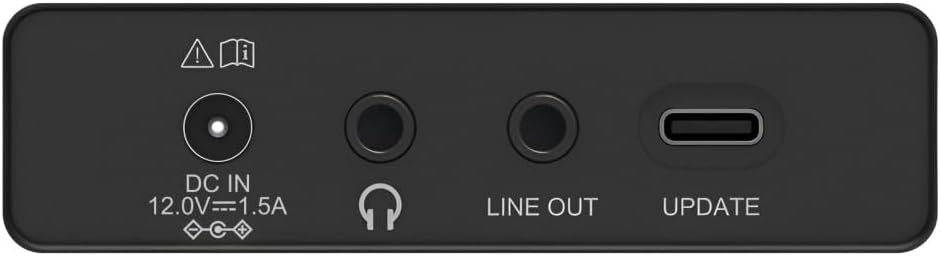
Image: Close-up of the rear panel showing the DC IN, Headphone, Line Out, and UPDATE (USB-C) ports.
The rear panel provides essential connectivity options:
- DC IN 12.0V --- 1.5A: Power input for the external adapter.
- Jack headphone (3.5mm): Airson èisteachd prìobhaideach.
- LINE A-MUIGH: Audio output for connecting to external ampluchd-labhairt no luchd-labhairt.
- UPDATE (USB-C): Airson ùrachaidhean firmware.
- Antenna teileasgopach: For FM and DAB/DAB+ reception.

Ìomhaigh: Cùl view of the Hama DR2002BT Digital Radio with its telescopic antenna extended for optimal signal reception.
5. Suidhich
5.1 Ceangal cumhachd
- Ceangail an inneal-atharrachaidh cumhachd a tha air a thoirt seachad ris an DC IN port air cùl an rèidio.
- Plug an adapter cumhachd a-steach do inneal cumhachd iomchaidh.
- Tionndaidhidh an rèidio air gu fèin-ghluasadach no thèid e a-steach don mhodh feitheimh.
5.2 Suidheachadh Antenna
For optimal FM and DAB/DAB+ reception, fully extend the telescopic antenna. Position the radio near a window if reception is poor.
5.3 Suidheachadh Tùsail (A’ Chiad Chleachdadh)
Upon first power-on, the radio may guide you through an initial setup process, including language selection and an automatic DAB station scan. Follow the on-screen prompts.
6. Stiùireadh Obrachaidh
6.1 Cumhachd air / dheth
Brùth an EIN / AUS putan gus an rèidio a thionndadh air no dheth.
Modh Rèidio 6.2 DAB/DAB+
- Brùth an RADIO putan gus modh DAB a thaghadh.
- If this is the first time in DAB mode or if you want to rescan, press SUCHEN to perform a full scan for available stations.
- Use the rotary knob to navigate through the station list. Press the knob to select a station.
- Gu view the station list, press the LIOSTA putan.
Modh Rèidio 6.3 FM
- Brùth an RADIO putan gus modh FM a thaghadh.
- Brùth SUCHEN to automatically scan for the next available FM station.
- Alternatively, use the rotary knob to manually tune to a frequency.
6.4 Storing and Recalling Presets
The radio allows you to store up to 4 favorite stations using the dedicated preset buttons (1-4).
- Tionndaidh air an stèisean a tha thu ag iarraidh (DAB no FM).
- Press and hold one of the preset buttons (1-4) until the display confirms the station has been saved.
- To recall a preset station, simply press the corresponding preset button (1-4).
6.5 Gnìomh Bluetooth

Ìomhaigh: Aghaidh view of the radio with Bluetooth and stereo speaker icons, indicating its wireless audio streaming capability.
The Hama DR2002BT can stream audio from your smartphone, tablet, or laptop via Bluetooth 5.0.
- Press the Bluetooth button on the front panel to enter Bluetooth pairing mode. The display will show a pairing indicator.
- On your external device (smartphone, tablet), enable Bluetooth and search for available devices.
- Select "Hama DR2002BT" from the list of devices to pair.
- Once paired, you can play audio from your device, and it will be output through the radio's speakers.
6.6 Gnìomh a’ Chloc-rabhaidh

Image: A person waking up with the Hama DR2002BT Digital Radio placed on a bedside table, illustrating its alarm clock functionality.
The radio features two independent alarm settings.
- Brùth an CEATHAIR putan gus faighinn gu roghainnean an rabhaidh.
- Use the rotary knob to select Alarm 1 or Alarm 2.
- Configure the alarm time, source (buzzer or radio station), and repetition (once, daily, weekdays, weekends, or specific days).
- Press the rotary knob to confirm each setting.
- To quickly activate/deactivate an alarm, press the CEATHAIR button and use the rotary knob to toggle the alarm status.

Image: A person interacting with the Hama DR2002BT Digital Radio, demonstrating its ease of use for setting functions like alarms or tuning stations.
7. Cumail suas
To ensure the longevity and optimal performance of your Hama DR2002BT Digital Radio, follow these maintenance guidelines:
- Glanadh: Cleachd clò bog, tioram, gun lint gus taobh a-muigh an rèidio a ghlanadh. Na cleachd innealan-glanaidh sgrìobach, cèir no fuasglaidhean.
- Dust: Regularly dust the device to prevent accumulation in vents and ports.
- Stòradh: Ma tha thu a’ stòradh an rèidio airson ùine mhòr, dì-cheangail e bhon t-solar cumhachd agus stòraich e ann an àite fionnar, tioram.
- Antena: Làimhsich an antenna teileasgopach gu faiceallach gus nach lùb no nach bris e.
8. A ’dèanamh trioblaid
Ma thachras tu ri duilgheadasan leis an rèidio agad, thoir sùil air na duilgheadasan agus na fuasglaidhean cumanta a leanas:
| Trioblaid | Adhbhar a dh’fhaodadh a bhith ann | Fuasgladh |
|---|---|---|
| Gun chumhachd | Power adapter not connected; Power outlet faulty | Check power adapter connection; Try a different power outlet. |
| Droch ghlacadh rèidio (DAB/FM) | Antenna gun a bhith air a shìneadh a-mach; Raon comharra lag; Bacadh | Fully extend the telescopic antenna; Reposition the radio (e.g., near a window); Perform a new station scan. |
| Dh'fhàillig am paidhir Bluetooth | Bluetooth not enabled on external device; Radio not in pairing mode; Device too far | Ensure Bluetooth is on and visible on your device; Press the Bluetooth button on the radio; Move devices closer (within 10m). |
| Gun fhuaim | Volume too low; Mute activated; Incorrect source selected | Increase volume using the rotary knob; Check if mute is active; Ensure the correct mode (DAB, FM, Bluetooth) is selected. |
| Chan eil an inneal-rabhaidh a’ fuaim | Alarm not activated; Incorrect alarm time/day set | Verify alarm is enabled in settings; Check alarm time and repetition settings. |
9. Sònrachaidhean

Image: Diagram showing the dimensions of the Hama DR2002BT Digital Radio: 35 cm (width), 12.5 cm (depth), and 13 cm (height).
| Feart | Mion-fhiosrachadh |
|---|---|
| Modail Àireamh | DR2002BT (00054298) |
| Fàilteachas | DAB, DAB+, FM |
| Tionndadh Bluetooth | 5.0 |
| Cumhachd Toraidh (RMS) | 10 W (Stereo) |
| Taisbeanadh | Taisbeanadh TFT Dathte 4.3" |
| Ceanglaichean | 3.5mm Jack (Headphone), USB-C (Update), Line Out, DC IN |
| Solar cumhachd | Adaptor Cumhachd Taobh a-muigh |
| Meudan (W x D x H) | 35 x 12.5 x 13 cm |
| Cuideam | 1788 gram |
| Stuth | Plastaig |
| Dath | Dubh |
| Feartan a bharrachd | Alarm Function (2 alarms), Direct Selection Keys |
10. Barantas agus Taic
Hama GmbH & Co KG provides a warranty for this product. Please refer to the warranty card included in your package or visit the official Hama weblàrach-lìn airson teirmichean is cumhaichean barantais mionaideach.
For technical support, troubleshooting assistance, or spare parts, please contact Hama customer service or visit their website. The availability of spare parts in the EU is guaranteed for 7 years.
- Dèanadair: Hama GmbH & Co KG
- Dùthaich Tùs: A' Ghearmailt
- EU Spare Parts Availability: 7 Bliadhna