
1. Ro-ràdh
This manual provides essential instructions for the installation, setup, and operation of your TONGOU Wi-Fi Smart Switch 1P+N DIN Rail DIY with Power Monitoring. This device allows you to transform traditional household appliances into smart, connected devices, offering remote control, voice control, and energy consumption monitoring through the Smart Life or Tuya application.

Image 1.1: TONGOU Wi-Fi Smart Switch integrated into a smart home system, showing app control and Wi-Fi connectivity.
2. Fiosrachadh Sàbhailteachd
WARNING: Electrical installation should only be performed by qualified personnel. Incorrect installation can lead to electric shock, fire, or property damage.
- Dì-cheangail an cumhachd aig a’ phrìomh bhriseadh cuairte an-còmhnaidh mus tèid a stàladh no a chumail suas.
- Dèan cinnteach gu bheil an inneal air a stàladh ann an àrainneachd thioram, air falbh bho taiseachd agus teòthachd anabarrach.
- Dèan cinnteach gu bheil an voltage and current ratings of the switch match your electrical system requirements.
- Do not exceed the maximum current rating of 6A for this model.
- Dèan cinnteach gu bheil a h-uile ceangal uèirleas tèarainte agus air a chòmhdach gu ceart.
3. Pasgan-susbaint
Dèan cinnteach gu bheil a h-uile nì anns a’ phacaid:
- 1 x TONGOU Wi-Fi Smart Switch (Model: With Power Monitoring 6A)
- 1 x Leabhar-làimhe Cleachdaiche
4. Sònrachaidhean
| Feart | Sònrachadh |
|---|---|
| Brand | TONGOU |
| Modail Àireamh | With Power Monitoring 6A |
| Vol Obrachaidhtage | AC 90 - 240 V, 50/60 Hz |
| Seòrsa gun uèir | Wi-Fi 2.4 GHz (5/4 GHz not supported) |
| Rangachadh làithreach | 6 A |
| Maximum Wiring Capacity | 10 mm² (Power side and Load side) |
| Seòrsa stàladh | Còmhdach rèile DIN |
| Meudan (L x W x H) | 9 x 2 x 8 cm |
| Cuideam | 120 gram |
| Stuth conaltraidh | Silver-plated relay contacts |
| Modh-obrachaidh | Air / dheth |
| Teisteanasan | CE |
| Teòthachd Obrachaidh | Suas gu 80 ceum Celsius |
5. Stàladh
The TONGOU Wi-Fi Smart Switch is designed for DIN rail mounting. Follow these steps for proper installation:
- Dì-cheangal cumhachd: Mus tòisich thu air obair dealain sam bith, dèan cinnteach gu bheil am prìomh sholar cumhachd don chuairt air a chuir dheth aig a’ bhriseadair cuairte.
- Stàladh: Mount the smart switch onto a standard 35mm DIN rail. The device occupies one position (18mm width).
- Uèir: Connect the power input (N for Neutral, L for Live) to the top terminals labeled 'Power'. Connect the load output (N for Neutral, L for Live) to the bottom terminals labeled 'Load'. The maximum wiring capacity is 10 mm² for both power and load sides. Ensure correct polarity.
- Dìon Cearcaill: It is recommended to install an upstream residual current circuit breaker (RCBO/A type, 30mA/10kA) to protect the circuit.
- Ceanglaichean tèarainte: Use a screwdriver to securely tighten all wire connections.

Image 5.1: Wiring diagram illustrating the connection of the TONGOU Wi-Fi Smart Switch to a circuit with an upstream circuit breaker and a light bulb as a load.
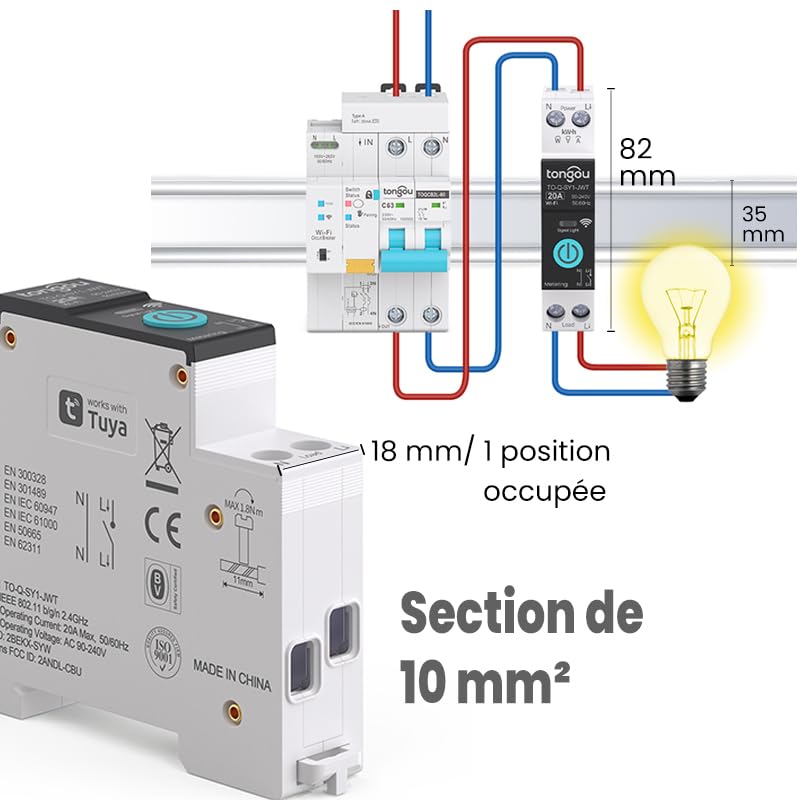
Image 5.2: Close-up of the smart switch showing its dimensions (82mm height, 35mm depth, 18mm width) and indicating a 10 mm² wiring section capacity.
6. Suidhich
To enable smart functionalities, connect your TONGOU Wi-Fi Smart Switch to the Smart Life or Tuya application.
- Luchdaich sìos an App: Download the "Smart Life" or "Tuya Smart" application from the App Store (iOS) or Google Play Store (Android).
- Clàraich/Log a-steach: Fosgail an aplacaid agus clàraich airson cunntas ùr no log a-steach le fear a th’ ann mu thràth.
- Cuir a-steach modh paidhir: After restoring power to the switch, press and hold the main button on the device for 5 to 10 seconds until the signal light blinks rapidly in blue. This indicates the device is in pairing mode.
- Cuir inneal ris san aplacaid: In the Smart Life/Tuya app, tap the "+" icon (usually in the top right corner) to add a new device. The app should automatically discover the switch. If not, manually select "Electrical" > "Circuit Breaker (Wi-Fi)" or similar.
- Ceangail ri Wi-Fi: Follow the in-app instructions to connect the device to your 2.4 GHz Wi-Fi network. Thoir an aire: The device only supports 2.4 GHz Wi-Fi; 5 GHz networks are not compatible.
- Ath-ainmich inneal: Once connected, you can rename the device for easier identification (e.g., "Living Room Light").

Image 6.1: Visual guide showing how to press and hold the button for 5-10 seconds until the blue indicator light blinks rapidly, signifying pairing mode.

Image 6.2: Screenshot of the Smart Life/Tuya app showing the login/register screen, a Wi-Fi router, and the process of adding a discovered "WiFi Din Rail Switch" device.
7. Obrachadh
Once the smart switch is successfully paired, you can control it and monitor energy usage through the app or voice commands.
7.1. Smachd Iomallach tro Aplacaid
Open the Smart Life or Tuya app. Select your TONGOU Smart Switch from the device list. You can:
- Turn the connected appliance On or Off remotely from anywhere.
- Set up various timer modes:
- Modh Ùine: Schedule specific on/off times for daily or weekly routines.
- Modh cunntais: Suidhich timer cunntaidh sìos airson an inneal a chuir dheth às dèidh ùine shònraichte.
- Cyclic Timing Mode: Cuir air dòigh cearcallan ath-aithriseach air/ dheth.
- Astronomical Timing Mode: Automate based on sunrise and sunset times.
7.2. Smachd Guth
The TONGOU Smart Switch is compatible with Amazon Alexa and Google Assistant. To enable voice control:
- Link your Smart Life/Tuya account to Amazon Alexa or Google Home app.
- Faigh a-mach innealan ùra.
- Cleachd òrdughan gutha leithid:
- "Alexa, tionndaidh air [Ainm an inneil]"
- "Hey Google, cuir dheth [Ainm an Inneil]"

Image 7.1: An Amazon Echo device displaying a voice waveform, indicating it is processing a command to turn off a lamp.
7.3. Sgrùdadh Cumhachd
The smart switch provides real-time and historical energy consumption data:
- View real-time current, voltage, and power consumption of the connected load.
- Access historical data (hourly, daily, monthly, yearly) to track energy usage patterns.
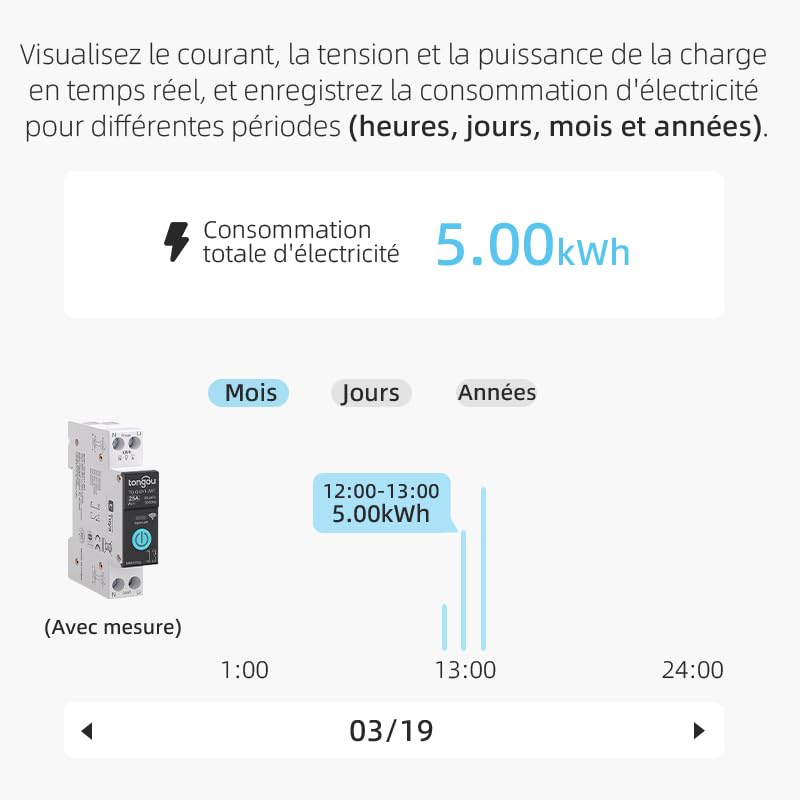
Image 7.2: A graphical representation within the app showing total electricity consumption (5.00 kWh) and a bar chart illustrating hourly consumption data for a specific date.
8. Cumail suas
To ensure optimal performance and longevity of your TONGOU Wi-Fi Smart Switch:
- Cùm an inneal glan agus saor bho dhuslach. Cleachd clò tioram, bog airson a ghlanadh.
- Na cleachd innealan-glanaidh leaghaidh no fuasglaidhean.
- Dèan cinnteach gu bheil fionnarachadh iomchaidh timcheall an inneil gus casg a chur air cus teasachadh.
- Thoir sùil cunbhalach air ceanglaichean uèirichean airson teannachadh, gu h-àraidh às dèidh an stàlaidh tùsail.
9. A ’dèanamh trioblaid
If you encounter issues with your TONGOU Wi-Fi Smart Switch, refer to the following common problems and solutions:
| Trioblaid | Adhbhar a dh’fhaodadh a bhith ann | Fuasgladh |
|---|---|---|
| Inneal nach eil a’ ceangal ri Wi-Fi | Incorrect Wi-Fi band (5GHz), weak signal, incorrect password, device not in pairing mode. | Ensure your Wi-Fi is 2.4 GHz. Move the device closer to the router. Re-enter Wi-Fi password carefully. Put the device back into pairing mode (rapid blue blinking). |
| Inneal far-loidhne san aplacaid | Wi-Fi air a dhì-cheangal, cumhachd dhethtage, cùisean leis an router. | Check your Wi-Fi router and internet connection. Verify the device has power. Re-pair if necessary. |
| Chan eil smachd guth ag obair | Cunntas gun cheangal, inneal gun lorg, òrdughan ceàrr. | Ensure Smart Life/Tuya account is linked to Alexa/Google Home. Discover devices in the voice assistant app. Use the exact device name. |
| Power monitoring data is inaccurate or missing | Incorrect wiring, device malfunction. | Double-check wiring according to the installation diagram. Contact support if the issue persists. |
| Device not responding to manual button press | No power, internal fault. | Check power supply to the device. If power is present and the device is unresponsive, contact support. |
10. Barantas agus Taic
For warranty information and technical support, please refer to the documentation provided with your purchase or contact TONGOU customer service through their official channels. Keep your purchase receipt as proof of purchase.