
1. Ro-ràdh
This manual provides detailed instructions for the installation, operation, and maintenance of your Reobiux D20-1P 2K Outdoor Surveillance Camera. Please read this manual thoroughly before using the product to ensure proper functionality and safety.
2. Pasgan-susbaint
Dearbhaich gu bheil na nithean uile a tha air an liostadh gu h-ìosal air an toirt a-steach sa phacaid agad. Ma tha nithean sam bith a dhìth no millte, cuir fios gu taic luchd-cleachdaidh.
- 1x Reobiux D20-1P Solar PTZ Camera
- 1x Solar Collector
- 1x Leabhar-làimhe Cleachdaiche
- Bunait sreap 1x
- 1x Power Supply (for initial charging)
- 1x Screws Bag (for installation)
- 1x Type-C Charging Line
3. Toradh thallview
The Reobiux D20-1P is a 2K outdoor surveillance camera designed for comprehensive home security. It features dual lenses, 360° Pan-Tilt-Zoom (PTZ) capabilities, and operates wirelessly via Wi-Fi. Key features include PIR motion detection, color night vision, two-way audio, and an IP66 weatherproof rating, powered by a solar panel and rechargeable battery.
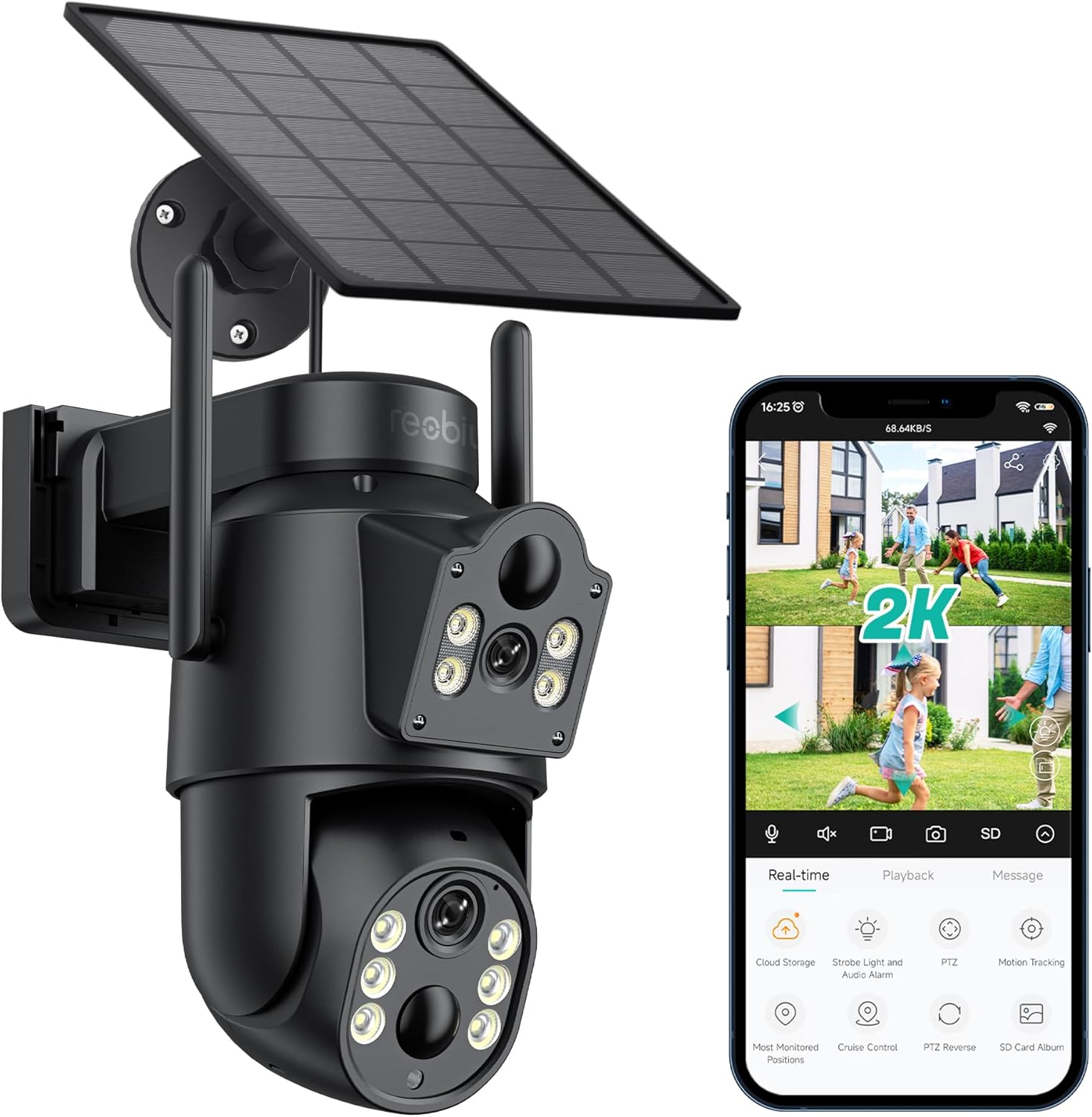
Figear 3.1: Reobiux D20-1P Solar PTZ Camera and its mobile application interface showing real-time monitoring, playback, and various control options.
Prìomh fheartan:
- 2K QHD High Resolution: A ’toirt seachad foo bhidio soilleir agus mionaideachtage.
- Dealbhadh dà-lionsa: Combines a fixed lens with a rotating lens for comprehensive coverage.
- 360° PTZ Functionality: Allows remote control of pan, tilt, and zoom for flexible viewing ceàrnan.
- Solar Powered with Rechargeable Battery: Ensures continuous operation with minimal manual charging.
- Dearbhadh Gluasad PIR: Intelligently detects human movement to reduce false alarms.
- Sealladh oidhche dath: Offers full-color video even in low-light conditions, alongside infrared night vision.
- Fuaim dà-shligheach: Enables communication with visitors or deterrence of intruders.
- IP66 Dìon-sìde: Air a dhealbhadh gus seasamh an aghaidh diofar shuidheachaidhean sìde a-muigh.
- Wireless Wi-Fi Connectivity: Easy setup and remote access via smartphone.
4. Stiùirich rèiteachaidh
4.1 Cìs tòiseachaidh
Before first use, fully charge the camera's internal battery using the provided Type-C charging line and power supply. This ensures the camera has sufficient power for initial setup and operation, especially if solar charging conditions are not optimal immediately after installation.
4.2 Stàladh Aplacaid agus Cruthachadh Cunntais
- Luchdaich sìos an iCSee aplacaid bhon stòr aplacaidean air an fhòn-smart agad (iOS App Store no Google Play Store).
- Stàlaich an aplacaid agus fosgail e.
- Lean an stiùireadh air an sgrion gus cunntas ùr a chruthachadh no log a-steach ma tha fear agad mu thràth.
4.3 Camera Connection to Wi-Fi
- Ensure your camera is powered on.
- In the iCSee app, tap the "+" icon to add a new device.
- Select the option for "Wi-Fi Camera" or "Add Device by AP Hotspot" (refer to app for exact wording).
- Follow the app's instructions to connect the camera to your 2.4GHz Wi-Fi network. You may need to scan a QR code displayed on your phone with the camera, or listen for a sound prompt.
- Cho luath ‘s a bhios e ceangailte, faodaidh tu ainm a thoirt don chamara agad agus tòiseachadh air sgrùdadh.
4.4 A ’dìreadh a’ chamara
Choose a location that provides optimal surveillance coverage and receives direct sunlight for the solar panel. Ensure the camera is within range of your Wi-Fi network.
- Tagh Àite: Identify a suitable wall or surface for mounting. Consider the camera's viewing angle (355° pan, 90° tilt) and the solar panel's exposure to sunlight.
- Comharraich Puingean Drileadh: Use the mounting base as a template to mark the screw holes on the wall.
- tuill drile: Drill pilot holes at the marked positions. Insert wall anchors if necessary.
- Attach Mounting Base: Secure the mounting base to the wall using the provided screws.
- Ceangail Camara: Mount the camera onto the secured base.
- Atharraich am pannal grèine: Position the solar panel to maximize sunlight exposure throughout the day.

Figear 4.1: Illustration of the camera mounted with its solar panel, highlighting the fixed and rotating lenses and the benefit of continuous solar power.
5. Stiùireadh Obrachaidh
5.1 Beò View agus Playback
Open the iCSee app and select your camera to access the live viewÀs an seo, faodaidh tu:
- Sgrùdadh fìor-ùine: View biadhadh bhidio beò.
- Smachd PTZ: Use the on-screen joystick to pan (355°) and tilt (90°) the camera.
- Zoom didseatach: Pinch to zoom on the live feed.
- Ath-chluich: Cothrom air a chlàradh footage stored on the SD card or cloud storage.

Figear 5.1: Demonstrates the superior clarity of 2K QHD resolution compared to 1080P, providing more details for monitoring.
5.2 Lorgaireachd Gluasaid agus Rabhaidhean
The camera utilizes PIR (Passive Infrared) intelligent detection to identify human movement, minimizing false alarms from pets or swaying branches.
- Dèan comas / à comas: Activate or deactivate motion detection in the app settings.
- Atharrachadh cugallachd: Adjust the PIR sensor's sensitivity to suit your environment.
- Brathan rabhaidh: Faigh fiosan putaidh sa bhad air an fhòn-smart agad nuair a lorgar gluasad.
- Inneal-rabhaidh fuaim is solais: Configure the camera to trigger a strobe light and audible alarm upon detection.

Figear 5.2: The camera's PIR intelligent detection distinguishes human movement from other objects, reducing unnecessary alerts.

Figear 5.3: When motion is detected, the camera can send real-time push notifications and activate a sound and light alarm to deter intruders.
5.3 Modhan Sealladh Oidhche
The camera offers two night vision modes for clear visibility in the dark:
- Spotlight Full Color Night Vision: Utilizes built-in spotlights to provide full-color video in low-light conditions.
- Spotlight Infrared Night Vision: Uses infrared LEDs for black-and-white video in complete darkness, with a range of up to 30 meters.
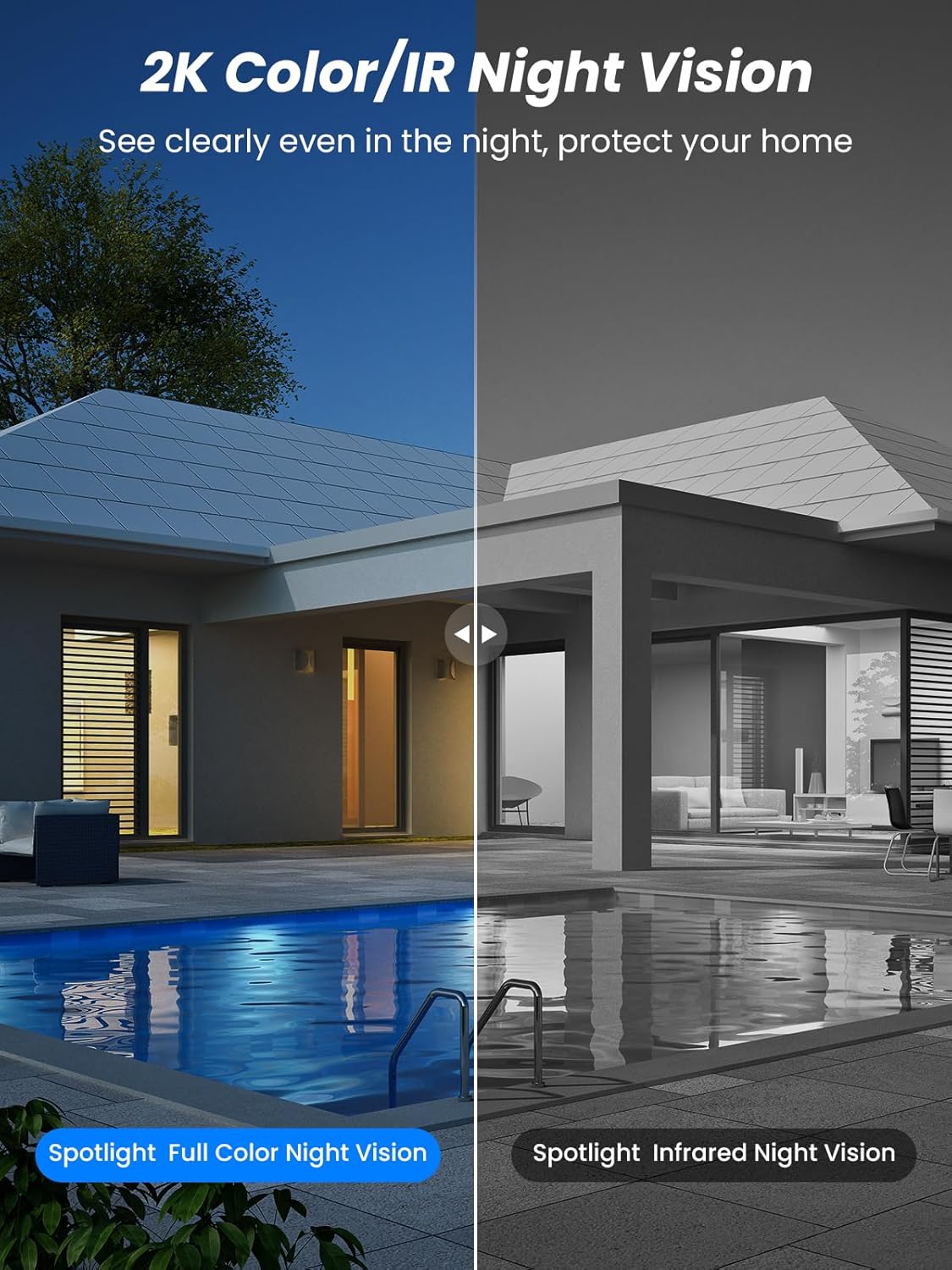
Figear 5.4: Illustrates the difference between full-color night vision, enabled by spotlights, and traditional infrared night vision.
5.4 Fuaim Dà-shligheach
The integrated microphone and speaker allow for two-way communication.
- Bruidhinn: Tap air ìomhaigh a’ mhaicreafòin san aplacaid gus bruidhinn tro neach-labhairt a’ chamara.
- Èist: The camera's microphone captures audio from its surroundings.

Figear 5.5: The two-way audio function allows for direct communication through the camera, useful for interacting with visitors or delivery personnel.
6. Cumail suas
- Glanadh: Glan lionsa a’ chamara agus am pannal grèine bho àm gu àm le clò bog, tioram.amp cloth to ensure optimal performance and clear image quality. Avoid abrasive cleaners.
- Slàinte Bataraidh: While solar-powered, extreme weather or prolonged periods of low sunlight may require manual charging. Monitor battery levels via the app.
- Ùrachaidhean firmware: Check the iCSee app regularly for available firmware updates to ensure your camera has the latest features and security enhancements.
- Dìon na h-aimsir: The camera is IP66 weatherproof, designed to withstand rain, snow, and sun. However, ensure all connections are secure to maintain water resistance.

Figear 6.1: The IP66 rating ensures the camera's durability and functionality in various outdoor weather conditions, including snow, rain, and direct sunlight.
7. A ’dèanamh trioblaid
- Cha robh an camara a’ ceangal ri Wi-Fi:
- Ensure the camera is within range of your 2.4GHz Wi-Fi network. 5GHz networks are not supported.
- Dearbhaich gu bheil am facal-faire Wi-Fi agad ceart.
- Ath-thòisich an router agad agus a’ chamara.
- If issues persist, try resetting the camera (refer to app or product for reset button location).
- Battery not charging or draining quickly:
- Ensure the solar panel is clean and receives direct sunlight for several hours daily.
- Thoir sùil air a’ cheangal eadar am pannal grèine agus a’ chamara.
- If in a low-light environment, manually charge the camera using the Type-C cable.
- Tachartasan lorgaidh gluasad tric no beò view streaming can consume battery faster. Adjust settings if needed.
- False motion detection alarms:
- Adjust the PIR motion detection sensitivity in the iCSee app.
- Ensure the camera is not pointed at areas with constant movement (e.g., busy roads, swaying trees) if not intended for monitoring.
- Càileachd ìomhaigh truagh:
- Glan an lionsa camara.
- Ensure sufficient lighting for optimal image capture, especially at night.
- Thoir sùil air neart comharra Wi-Fi; faodaidh comharra lag buaidh a thoirt air càileachd sruthadh bhidio.
8. Sònrachaidhean
| Feart | Mion-fhiosrachadh |
|---|---|
| Ainm Modail | D20-1P |
| Fuasgladh glacadh bhidio | 2.5K |
| Fuasgladh bhidio èifeachdach | 2K QHD |
| Teicneòlas conaltraidh gun uèir | Wi-Fi (2.4GHz) |
| Factor foirm | Domhsa |
| Viewann an Ceàrn | 355 Ceum (Pan), 90 Ceum (Tilt) |
| Seòrsa stàlaidh | Air a chuir suas le balla |
| Raon Lèirsinn Oidhche | 30 Meatair |
| Ìre frèam | 25 fps |
| Stuth | Plastaig |
| Voltage | 12 bholt (DC) |
| Dètage | 5 watt |
| Stòr cumhachd | Cumhachd bataraidh, cumhachd grèine |
| Bataraidhean | 3 bataraidh lithium-ion (air a ghabhail a-steach) |
| Pròtacal ceangail | Wi-Fi |
| Seòrsa Rianadair | App iCSee |
| Feartan sònraichte | Night Vision (Color/IR), PIR Motion Detection, Two-Way Audio, IP66 Weatherproof |
| Cuideam nì | 1.06 kg |
| Meudan parsail | 21.7 x 19.5 x 13.8 cm |
9. Barantas agus Taic
Reobiux offers a Barantas 1-bliadhna for this product. For any issues or inquiries, please do not hesitate to reach out to our customer service. We provide 20 hours of online service to assist you.
For support, please refer to the contact information provided with your purchase or within the iCSee application.