
Mytrix G901
Mytrix Tac Master Wireless Gaming Headset User Manual
Modail: G901
Ro-ràdh
The Mytrix Tac Master Wireless Gaming Headset is designed to provide a high-quality audio experience for gaming across multiple platforms. Featuring 2.4GHz lossless wireless technology, Bluetooth 5.3, and a 3.5mm wired connection, this headset offers versatile connectivity, low latency, and immersive surround sound. The detachable noise-canceling microphone ensures clear communication, while the ergonomic design and long battery life provide comfort for extended use.
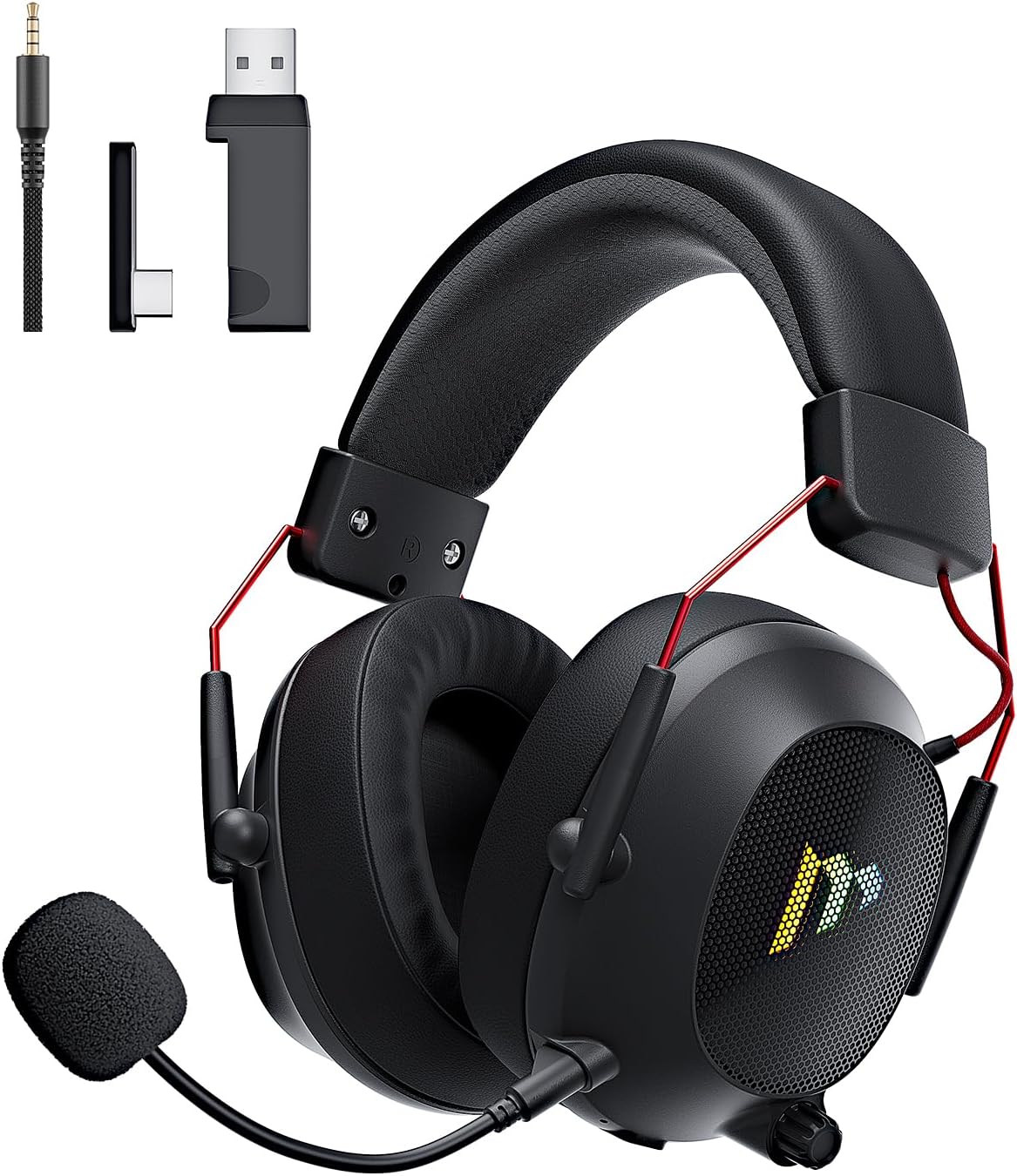
Image: The Mytrix Tac Master Wireless Gaming Headset, showcasing its sleek black design with red accents, detachable microphone, and included USB dongle and Type-C adapter.
Susbaint pacaid
Dèan cinnteach gu bheil na nithean gu lèir a tha air an liostadh gu h-ìosal air an toirt a-steach don phacaid agad:
- Mytrix Tac Master Wireless Gaming Headset
- Micreofon a ghabhas toirt air falbh a chuireas às do fhuaim
- Dongle gun uèir USB-A 2.4GHz
- USB Type-C Transmitter
- Càball claisneachd 3.5mm
- Càball Cìsean USB (USB-A gu USB-C)
- Leabhar-làimhe cleachdaiche (an sgrìobhainn seo)
Headset Controls and Components
Familiarize yourself with the various controls and components of your Mytrix Tac Master headset:

Image: Diagram illustrating the location and function of controls on the Mytrix Tac Master headset, including power button, volume wheel, microphone mute button, and mode switch.
- Putan Cumhachd: Press and hold for 3 seconds to turn on/off. Single press to pause/play audio.
- Putan Modh (M): Single press to toggle microphone on/off. Double press to switch between Bluetooth and 2.4G wireless modes. Press and hold for 3 seconds to turn RGB lights on/off.
- Cuibhle Tomhais: Rotate up to increase volume, rotate down to decrease volume.
- Port microfòn: Airson a’ mhaicreafòn a ghabhas toirt air falbh a cheangal.
- Jack claisneachd 3.5mm: Airson ceangal uèirleasach.
- Port cosgais USB-C: Airson headset luchdadh a-nuas.
- Solais RGB: Located on the earcups.
Suidhich
1. A 'cur cosgais air an Headset
Before first use, fully charge the headset. Connect the USB charging cable to the headset's USB-C port and the other end to a USB power source (e.g., computer USB port, USB wall adapter). The LED indicator will show charging status and turn off when fully charged. A full charge takes approximately 3 hours and provides up to 48 hours of battery life.

Image: Visual representation of the headset's long-lasting battery life, indicating approximately 50 hours of use and a 3-hour charging time.
2. A’ ceangal a’ mhaicreafòin
Insert the detachable microphone into the microphone port on the left earcup. Ensure it is securely seated. The microphone is flexible and omni-directional, allowing for angle adjustment.
3. Roghainnean ceangail
The Mytrix Tac Master headset offers multiple connection methods for broad compatibility:

Image: Diagram illustrating the four connection modes: 2.4GHz Dongle (USB-A and USB-C), Bluetooth 5.3, and 3.5mm Wired, along with compatible devices for each mode.
3.1. 2.4GHz Wireless Connection (Recommended for PC, PS4, PS5, Switch Docked Mode)
- Identify the appropriate dongle for your device:
- For devices with a USB-A port (PC, PS4, PS5, Switch Docked): Use the 2.4GHz USB-A dongle.
- For devices with a USB-C port (Switch Handheld, Laptops, Tablets): Use the USB Type-C transmitter.
- Plug the selected 2.4GHz dongle/transmitter into an available USB port on your device.
- Power on the headset by pressing and holding the Power button for 3 seconds.
- Ensure the headset is in 2.4GHz mode. If not, double-press the 'M' button to switch modes until the headset connects to the dongle. The headset will automatically pair with the dongle.
- On your device, select the headset as the audio output and input device.
3.2. Bluetooth 5.3 Connection (Recommended for Mobile Phones, Tablets, Laptops)
- Power on the headset by pressing and holding the Power button for 3 seconds.
- Double-press the 'M' button to switch the headset to Bluetooth pairing mode. The LED indicator will flash, indicating it's ready to pair.
- On your device, enable Bluetooth and search for "Mytrix Tac Master" in the list of available devices.
- Select "Mytrix Tac Master" to connect. Once connected, the LED indicator will stop flashing.
3.3. 3.5mm Wired Connection (Recommended for Xbox, Game Console Controllers, Devices without USB/Bluetooth)
- Connect one end of the 3.5mm audio cable to the headset's 3.5mm jack.
- Connect the other end of the 3.5mm audio cable to the audio jack on your device (e.g., Xbox controller, phone).
- In wired mode, the headset's microphone and RGB lighting functions are not active.
Stiùireadh Obrachaidh
Cumhachd air / dheth
- Gus cumhachd a thoirt air: Press and hold the Power button for approximately 3 seconds until the headset powers on.
- Gus cumhachd a thoirt dheth: Press and hold the Power button for approximately 3 seconds until the headset powers off.
Smachd tomhas-lìonaidh
- Meudaich tomhas-lìonaidh: Rotate the Volume wheel upwards.
- Lùghdaich tomhas-lìonaidh: Rotate the Volume wheel downwards.
Smachd microfòn
- Cuir dheth / cuir às do mhicreofon: Single press the 'M' button.
- The detachable microphone features noise cancellation for clear voice chat.
Smachd Solais RGB
- Turn RGB Lights On/Off: Press and hold the 'M' button for approximately 3 seconds.
Smachd Ath-chluich Fuaime
- Cluich/Stad Fuaim: Single press the Power button.
Fuaim mun cuairt
The headset features 7.1 stereo surround sound for an immersive audio experience, allowing for precise positioning of sound details in games.

Ìomhaigh: Spreadhadh view of the headset's 50mm drivers, illustrating the components that contribute to its 7.1 stereo surround sound capability.
Cumail suas
- Glanadh: Use a soft, dry cloth to clean the headset. Do not use abrasive cleaners or solvents. For earcups, gently wipe with a damp clò agus leig leis tiormachadh gu tur san adhar mus cleachd thu e.
- Stòradh: Store the headset in a cool, dry place away from direct sunlight and extreme temperatures. If storing for an extended period, ensure the battery is partially charged (around 50%) to preserve battery health.
- Cùram Bataraidh: Avoid fully discharging the battery frequently. Charge the headset regularly, even if not in constant use, to maintain battery longevity.
- Cùram microfòn: Handle the detachable microphone gently. Avoid excessive bending or twisting.
Fuasgladh thrioblaidean
| Trioblaid | Adhbhar a dh’fhaodadh a bhith ann | Fuasgladh |
|---|---|---|
| Chan eil fuaim bho headset. | Headset not powered on, low battery, incorrect audio output selected, connection issue. | Ensure headset is powered on and charged. Check device's audio settings to confirm "Mytrix Tac Master" is selected as output. Re-establish 2.4GHz or Bluetooth connection. For wired mode, ensure cable is fully inserted. |
| Microphone nach eil ag obair. | Microphone muted, not properly attached, incorrect audio input selected, wired mode limitation. | Single press the 'M' button to unmute. Ensure microphone is securely attached. Check device's audio settings to confirm "Mytrix Tac Master" is selected as input. Note: Microphone does not function in 3.5mm wired mode. |
| Chan urrainnear ceangal a dhèanamh tro lìonra gun uèir 2.4GHz. | Dongle not recognized, headset not in 2.4GHz mode, interference. | Ensure dongle is fully inserted into a working USB port. Double-press 'M' button to switch headset to 2.4GHz mode. Try a different USB port. Move closer to the dongle to reduce interference. |
| Chan urrainnear ceangal a dhèanamh tro Bluetooth. | Chan eil fònaichean-cluaise ann am modh càraideachaidh, Bluetooth à comas air an inneal, ceangailte ri inneal eile mu thràth. | Double-press 'M' button to enter Bluetooth pairing mode (LED flashes). Ensure Bluetooth is enabled on your device. Disconnect from other Bluetooth devices if necessary. |
| Solais RGB nach eil ag obair. | Lights turned off, low battery, wired mode limitation. | Press and hold the 'M' button for 3 seconds to toggle RGB lights. Ensure headset has sufficient battery. Note: RGB lights do not function in 3.5mm wired mode. |
Sònrachaidhean
| Feart | Mion-fhiosrachadh |
|---|---|
| Ainm Modail | Gaming Headset (G901) |
| Teicneòlas ceangail | Gun uèir 2.4GHz, Bluetooth 5.3, uèirleasach 3.5mm |
| Fòn-cluaise Jack | 3.5 mm Jack |
| Raon gun uèir | Up to 50 feet (in open spaces) |
| Laideachd | ≤20ms (2.4GHz) |
| Seòrsa fuaim driver | Dràibhearan fiùghantach 50mm |
| Feartan fuaim | Fuaim Timcheall Stereo 7.1 |
| Micreofon | Detachable, Omni-directional, Noise-Canceling |
| Beatha bataraidh | Suas ri 48 uairean a thìde |
| Ùine cosgais | Mu thuairmeas. 3 uairean |
| Seòrsa bataraidh | 1 bataraidh lithium-ion (air a ghabhail a-steach) |
| Cruth cluaise | Thar Cluas |
| Feartan sònraichte | Ergonomic Design, RGB Lighting, Foldable & Portable |
| Meudan toraidh | 5.91 x 3.94 x 5.91 òirleach |
| Cuideam nì | 13.4 unnsa |
| Dèanadair | Mytrix |
Barantas agus Taic
Mytrix products are manufactured to high quality standards. For information regarding warranty coverage, technical support, or service inquiries, please refer to the warranty card included with your product or visit the official Mytrix website. You may also contact Mytrix customer support directly for assistance with your Tac Master Gaming Headset.
Airson tuilleadh cuideachaidh, tadhail air an Bùth Mytrix air Amazon.
Fiosrachadh Sàbhailteachd Cudromach
- Na cuir na headsetan fo theodhachd, taiseachd no lionntan anabarrach.
- Seachain a bhith a’ leigeil sìos no a’ toirt buaidhean làidir don chluas-cinn.
- Do not attempt to disassemble or repair the headset yourself. This will void the warranty.
- Èist aig ìrean fuaim meadhanach gus casg a chur air milleadh èisteachd. Faodaidh nochdadh fada do fhuaimean àrda call èisteachd maireannach adhbhrachadh.
- Cùm a-mach à ruigsinn chloinne.