
MESWAO MES-B3
MESWAO 15.6 Inch Android 14 Tablet MES-B3 User Manual
Stiùireadh coileanta airson stèidheachadh, obrachadh agus cumail suas.
1. Ro-ràdh
This manual provides detailed instructions for the MESWAO 15.6 Inch Android 14 Tablet, model MES-B3. It covers essential information regarding product features, setup, operation, maintenance, and troubleshooting to ensure optimal performance and user experience. Please read this manual thoroughly before using your device.
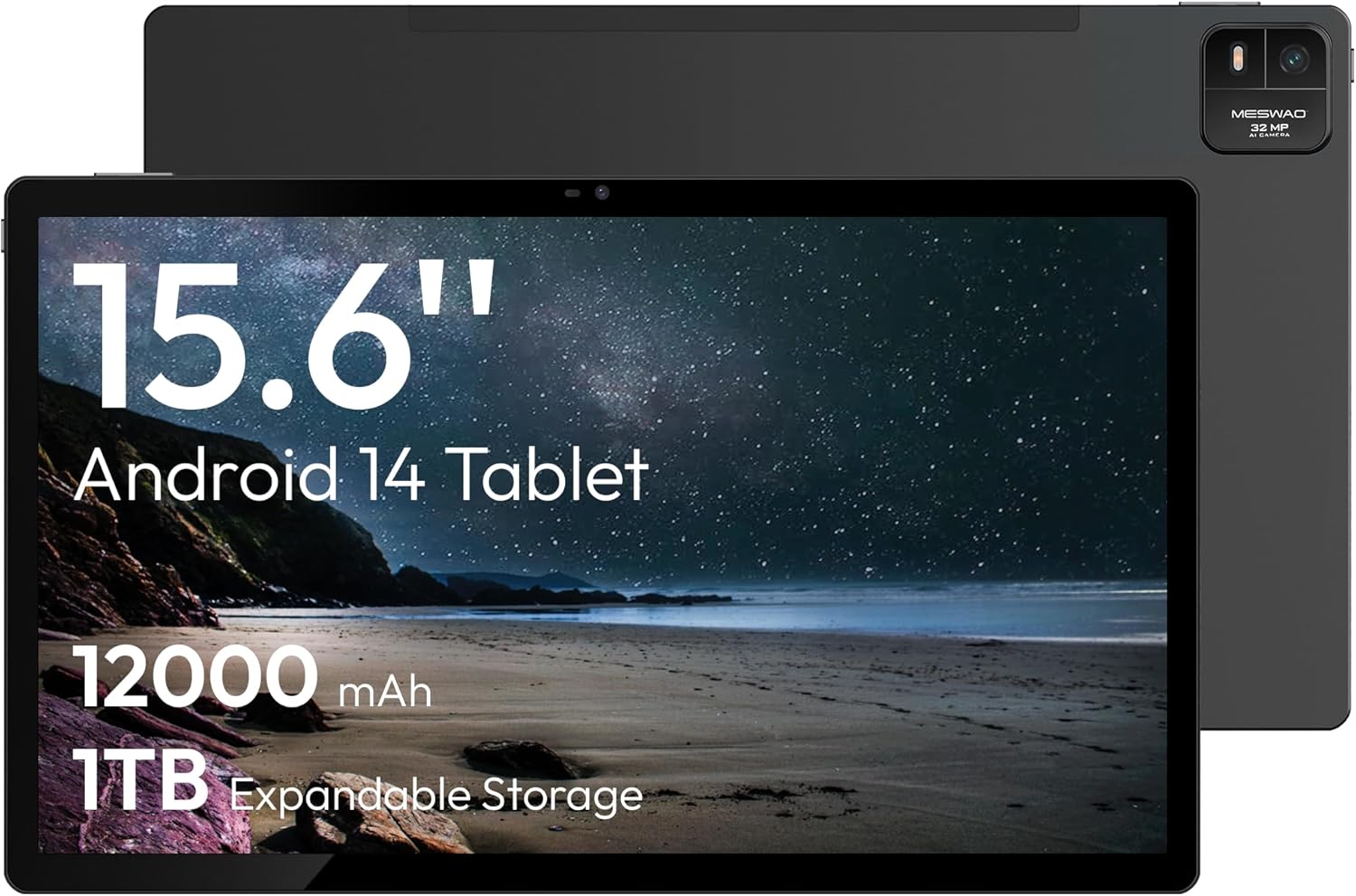
Figure 1.1: MESWAO 15.6 Inch Android 14 Tablet. This image displays the front and back view of the tablet, highlighting its large screen and rear camera module.
2. Fiosrachadh Sàbhailteachd
Gus casg a chur air milleadh air an inneal agad no leòn ort fhèin no air daoine eile, feuch an lean thu na ceumannan dìon a leanas:
- Na cuir an tablet fo theodhachd anabarrach, solas dìreach na grèine, no taiseachd àrd.
- Seachain a bhith a’ leigeil an tablet sìos no ga chur fo bhuaidh throm.
- Cleachd luchd-cosgais agus goireasan ceadaichte a-mhàin.
- Na feuch ri an tablet a thoirt às a chèile no a chàradh thu fhèin.
- Cùm an clàr air falbh bho uisge agus lionntan eile.
- Observe all local regulations regarding the use of electronic devices.
3. Pasgan-susbaint
Dèan cinnteach gu bheil a h-uile nì anns a’ phacaid:
- 15.6-inch Tablet x1
- 15W Charger x1
- Type-C to 3.5mm Adapter x1
- USB-A to Type-C Adapter x1
- Stuck Pin x1 (for SIM/TF card tray)
4. Inneal thairisview
Familiarize yourself with the physical components of your MESWAO tablet.
4.1. Feartan Fiosaigeach
- Camara aghaidh: Located at the top center of the screen when held horizontally.
- Camara cùil le Flash: Located on the back, typically in a corner.
- Putan Cumhachd: Usually on the side, used to power on/off or wake/sleep the device.
- Putanan tomhas-lìonaidh: Atharraich ìrean claisneachd.
- Port USB-C: Airson cosgais agus gluasad dàta.
- Slot cairt TF: Airson stòradh a ghabhas leudachadh.
- Luchd-labhairt: Quad speakers with 8 sound chambers for audio output.

Figear 4.1: Os a chionnview of MESWAO Tablet's physical features. This image illustrates the location of stereo speakers, power and volume buttons, front camera, rear camera with flashlight, Type-C port, and TF card slot.
5. Suidhich
5.1. Cosgais Tùsail
Before first use, fully charge the tablet using the provided 15W charger and USB-C cable. Connect the charger to the USB-C port on the tablet and plug it into a power outlet. The battery indicator on the screen will show charging progress.

Figure 5.1: Tablet charging illustration. This image shows the tablet connected to a charger, displaying a charging icon and indicating 100% charge in 3.5 hours.
5.2. A ’toirt cumhachd air / dheth
- Gus cumhachd a thoirt air: Press and hold the Power button until the MESWAO logo appears.
- Gus cumhachd a thoirt dheth: Press and hold the Power button until the power options menu appears, then select "Power off."
- Gus cadal/dùsgadh: Goirid brùth air a ’phutan Power.
5.3. Rèiteachadh Tòiseachaidh
Upon first power-on, follow the on-screen prompts to set up your tablet:
- Tagh an cànan as fheàrr leat.
- Ceangail ri lìonra Wi-Fi.
- Log a-steach leis a’ chunntas Google agad no cruthaich fear ùr.
- Review agus gabh ris na teirmichean is cumhaichean.
- Suidhich glas-sgrìn (PIN, pàtran, no facal-faire).
5.4. A’ cur a-steach cairt TF
To expand storage, insert a TF (microSD) card:
- Lorg an t-sliotan cairt TF air taobh a’ chlàir-bhùird.
- Use the provided stuck pin to gently eject the card tray.
- Place the TF card into the tray with the gold contacts facing down.
- Cuir an treidhe air ais dhan chlàr gu faiceallach.

Figure 5.2: Tablet storage capabilities. This image highlights the 128GB ROM and support for up to 1TB expandable storage via TF card.
6. Stiùireadh Obrachaidh
6.1. Seòladh Bunaiteach
The MESWAO tablet uses Android 14, offering intuitive touch-based navigation:
- Tap: Tagh nì no fosgail aplacaid.
- Swipe: Scrollaich tro scrionaichean no liostaichean.
- Pinch-gu-Zoom: Meudaich no lughdaich susbaint air an sgrion.
- Clò Long: Faigh cothrom air clàir-taice co-theacsa no gluais ìomhaighean.

Figure 6.1: Android 14 operating system interface. This image displays various application icons and highlights features like smooth multitasking, parental control, and enhanced privacy.
6.2. A 'ceangal ri Wi-Fi
- Rach gu Suidhichidhean > Lìonra & eadar-lìon > Wi-Fi.
- Toglaich Wi-Fi On.
- Tagh an lìonra a tha thu ag iarraidh bhon liosta.
- Cuir a-steach am facal-faire ma thèid iarraidh ort, agus an uairsin tap air Ceangail.
6.3. A’ riaghladh thagraidhean
- Stàlaich Apps: Download from the Google Play Store.
- Dì-stàlaich aplacaidean: Long-press an app icon, then drag it to "Uninstall" or go to Suidhichidhean > Apps.
- Dùin Aplacaidean: Swipe up from the bottom of the screen and swipe away the app card.
6.4. Cleachdadh Camara
The tablet features a 32MP rear camera with flash and a 5MP front camera.
- Fosgail an Camara tagradh.
- Tap air a’ phutan còmhlaiche gus dealbh a thogail.
- Gluais eadar camarathan aghaidh is cùil le bhith a’ cleachdadh ìomhaigh suidse a’ chamara.
- Access settings for flash, modes, and other options.
6.5. Riaghladh Bataraidh
Tha am bataraidh 12000mAh a’ toirt seachad cleachdadh nas fhaide. Gus beatha bataraidh a bharrachadh:
- Atharraich soilleireachd an sgrion.
- Dùin aplacaidean nach eilear a’ cleachdadh.
- Cuir modh sàbhalaidh bataraidh an gnìomh ann an Suidhichidhean > Bataraidh.
6.6. Ceangalachd
- Bluetooth: Pair with wireless headphones, speakers, or other devices via Suidhichidhean > Innealan ceangailte > Bluetooth.
- USB-C: Ceangail ri coimpiutair airson file transfer or use with compatible USB-C accessories.
- Wireless Screen Casting: Share your tablet's screen to a compatible smart TV or monitor. Access this feature from the Quick Settings panel or Suidhichidhean > Innealan ceangailte > Tilgeadh.
6.7. Roghainnean fuaim
Adjust volume and audio output options:
- Use the physical volume buttons on the side of the tablet.
- Access detailed settings in Suidhichidhean > Fuaim & crith.
- The tablet supports multiple audio options, including USB-C audio and 3.5mm via the provided adapter.
7. Cumail suas
7.1. Glanadh an Tablaid agad
Gus an clàr a ghlanadh, cleachd clò bog, gun lint. Airson smugaid stòlda, beagan dampnigh an clò le uisge no le inneal-glanaidh sgrion a chaidh a dhealbhadh airson electronics. Seachain ceimigean cruaidh no stuthan sgrìobach.
7.2. Ùrachaidhean bathar-bog
Thoir sùil gu cunbhalach airson ùrachaidhean bathar-bog agus stàlaich iad gus dèanamh cinnteach à coileanadh, tèarainteachd agus ruigsinneachd as fheàrr gu feartan ùra. Rach gu Suidhichidhean > Siostam > Ùrachadh siostam.
7.3. Riaghladh Stòraidh
Gus coileanadh a chumail suas, stiùirich stòradh an tablet agad bho àm gu àm:
- Sguab às aplacaidean neo-riatanach agus files.
- Gluais gu mòr files to the TF card or cloud storage.
- Glan dàta tasgadan airson aplacaidean ann an Suidhichidhean > Apps > [Ainm an Aplacaid] > Stòradh is tasgadan.
8. A ’dèanamh trioblaid
Thoir sùil air na cùisean agus na fuasglaidhean cumanta a leanas:
| Trioblaid | Fuasgladh |
|---|---|
| Chan eil an tablet a’ dol air. | Dèan cinnteach gu bheil am bataraidh air a luchdadh. Ceangail an charger agus feith beagan mhionaidean mus feuch thu ri a chumhachdachadh a-rithist. |
| Chan urrainn dhuinn ceangal a dhèanamh ri Wi-Fi. | Check if Wi-Fi is enabled. Verify the Wi-Fi password. Restart your router and the tablet. |
| Tha aplacaidean a’ tuiteam no a’ reothadh. | Close background apps. Clear the app's cache. Restart the tablet. Ensure the app is updated. |
| Coileanadh slaodach. | Free up storage space. Close unused apps. Restart the tablet. |
| Bidh bataraidh a’ drèanadh gu sgiobalta. | Reduce screen brightness. Disable unused features like Bluetooth or GPS. Close background apps. Check battery usage in settings. |
9. Sònrachaidhean
Key technical specifications for the MESWAO 15.6 Inch Android 14 Tablet (MES-B3):
| Feart | Mion-fhiosrachadh |
|---|---|
| Brand | MESWAO |
| Ainm Modail | MES-B3 |
| Siostam-obrachaidh | Android 14 |
| Meud sgrion | 15.6 òirlich |
| Fuasgladh sgrion | 1920 x 1080 Pixels (IPS HD) |
| Pròiseasar | Octa-Core (MediaTek Helio G99, up to 2.2 GHz) |
| Grafaigeachd coprocessor | Mali-G57 |
| RAM (Memory Storage Capacity) | 6GB (DDR3 SDRAM) |
| Internal Storage (Flash Memory Size) | 128 GB |
| Stòradh a ghabhas leudachadh | Suas ri 1TB tro chairt TF |
| Fuasgladh camara cùil | 32 BP |
| Fuasgladh camara aghaidh | 5 BP |
| Comas Bataraidh | 12000 mAh |
| Beatha bataraidh cuibheasach | 12 Uairean |
| Seòrsa gun uèir | 802.11a/b/g/n/ac (Wi-Fi 5) |
| Dath | Glas |
| Cuideam nì | 2.35 not |
| Meudan toraidh (LxWxH) | 14.53 x 8.78 x 0.43 òirleach |

Figure 9.1: Processor and performance details. This image highlights the Helio G99 Octa-Core chipset, 6nm process, 950MHz GPU, and smooth gaming/streaming capabilities.
10. Barantas agus Taic
10.1. Fiosrachadh Barantais
The MESWAO 15.6 Inch Android 14 Tablet comes with a Barantas 12 mìosan a’ còmhdach lochdan saothrachaidh. Cùm dearbhadh ceannach airson tagraidhean barantais.
10.2. Taic teachdaiche
For technical assistance, troubleshooting, or warranty inquiries, please contact MESWAO customer support. They offer Taic teachdaiche 24-uair agus tha local service centers in the US, EU, and Japan.
- Modh Conaltraidh: Refer to the contact information provided with your product packaging or visit the official MESWAO weblàrach.
- Fuasgladh cùise: Issues reported are typically responded to within 24 hours, with problems resolved or replaced according to policy.

Figure 10.1: MESWAO customer support and warranty details. This image highlights the 12-month warranty, 24-hour customer support, local after-sales centers, and quick response flow.