
1. Ro-ràdh
The NIIMBOT D11H is a compact, portable, and inkless thermal label printer designed for various labeling needs. It connects wirelessly via Bluetooth to your smartphone, allowing for easy creation and printing of high-resolution labels. This manual provides essential information for setting up, operating, and maintaining your device.
2. Pasgan-susbaint
Dèan cinnteach gu bheil na nithean gu lèir a tha air an liostadh gu h-ìosal air an toirt a-steach don phacaid agad:
- 1x NIIMBOT D11H Label Printer
- 1x Label Roll (pre-installed or included)
- 1x càball cosgais USB Type-C
- 1x User Manual (Japanese)

3. Suidhich
3.1. A’ luchdadh pàipear leubail
- Slide the cover button on the side of the printer to open the paper compartment.
- Insert the label roll into the compartment with the labels facing upwards, ensuring it is correctly aligned.
- Pull a small portion of the label paper out through the printer's exit slot.
- Dùin an còmhdach gu tèarainte.

3.2. Cumhachdachadh Air adhart
Press and hold the power button located on the front of the printer for 3 seconds until the indicator light turns green, indicating the device is powered on.
3.3. App Download and Bluetooth Connection
- Download the "NIIMBOT" app from the App Store (iOS) or Google Play Store (Android).
- Dèan comas air Bluetooth air an fhòn-smart agad.
- Open the NIIMBOT app and tap on the "Connect" or "Printer Connection" option. The app will automatically scan for nearby devices.
- Select your NIIMBOT D11H printer from the list of available devices to establish a Bluetooth connection.

4. Stiùireadh Obrachaidh
4.1. A’ cruthachadh bileagan
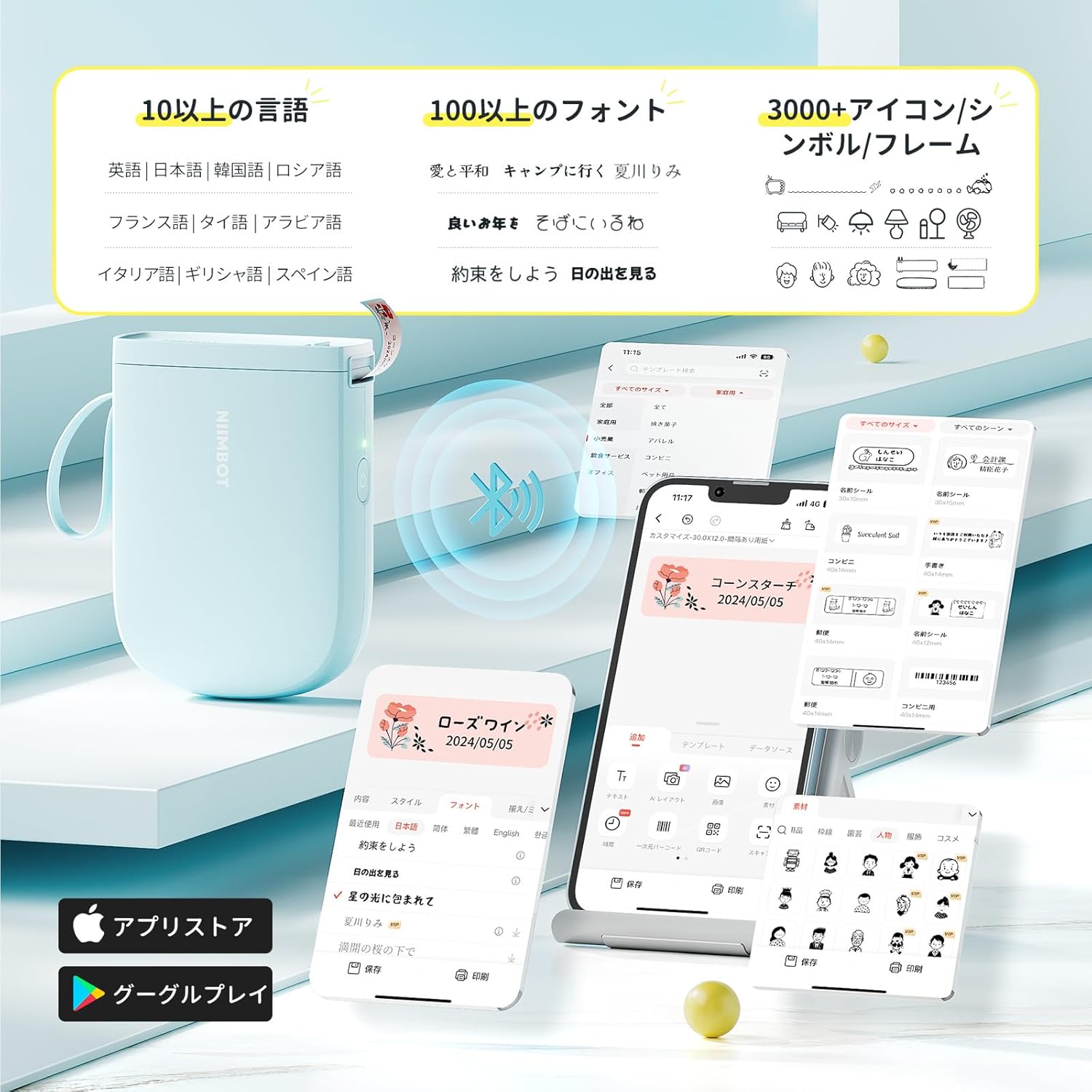
The NIIMBOT app offers a wide range of features for label creation:
- Cuir a-steach teacsa: Easily type and customize text with over 20 fonts and various styles.
- Teamplaidean: Utilize automatic template matching and thousands of image elements for quick design.
- Aithneachadh Ìomhaigh: Import images for printing.
- Còd-barra/Còd QR: Generate and print barcodes and QR codes.
- Clò-bhualadh Baidse: Print multiple labels efficiently.

4.2. Clò-bhualadh Labels
Once your label design is complete in the app, tap the "Print" button. You can adjust the number of copies and print density before confirming. The printer will automatically feed and cut the labels.
4.3. Cleachdaidhean Ioma-chruthach
The NIIMBOT D11H is suitable for a wide range of uses, including organizing documents, creating name tags, price tags, date reminders for food, and labeling items in the kitchen, office, or warehouse.


5. Cumail suas
To ensure optimal performance and longevity of your NIIMBOT D11H label printer, follow these maintenance guidelines:
- Glanadh: Regularly clean the print head with a soft, lint-free cloth moistened with alcohol. Ensure the printer is off before cleaning.
- Stòradh: Stòraich am clò-bhualadair ann an àite fionnar, tioram air falbh bho sholas dìreach na grèine agus teòthachd anabarrach.
- Bataraidh: Cuir cosgais air a’ chlò-bhualadair gu cunbhalach, fiù mura h-eil e ga chleachdadh gu tric, gus slàinte a’ bhataraidh a chumail suas.
6. A ’dèanamh trioblaid
If you encounter issues with your NIIMBOT D11H, refer to the following common troubleshooting steps:
- Clò-bhualadair gun cheangal: Ensure Bluetooth is enabled on your smartphone and the printer is powered on. Try restarting both devices and reconnecting through the app.
- Càileachd clò truagh: Check if the label paper is loaded correctly and is a genuine NIIMBOT thermal label. Clean the print head if necessary. Adjust print density in the app settings.
- Jam pàipeir: Open the paper compartment, carefully remove any jammed paper, and reload the label roll correctly.
- Clò-bhualadair gun fhreagairt: Ensure the battery is charged. If the device is unresponsive, try resetting it by holding the power button for an extended period (e.g., 10-15 seconds).
7. Sònrachaidhean
| Feart | Sònrachadh |
|---|---|
| Brand | NIIMBOT |
| Ainm Modail | D11H |
| Teicneòlas ceangail | Bluetooth |
| Teicneòlas clò-bhualaidh | Teirmeach |
| Fuasgladh Clò-bhualaidh as Motha (Moncromach) | 300 pso |
| Astar Clò-bhualaidh as Motha (Moncromach) | 40.0 mm / s |
| Max Media (Paper) Size | 15mm (leud) |
| Meudan toraidh | 11 x 3 x 7 cm |
| Cuideam nì | 360 g |
| Innealan co-fhreagarrach | Fònaichean sgairteil (Android & iOS) |
| Dath | Gorm |
8. Barantas agus Taic
For warranty information or technical support, please refer to the official NIIMBOT weblàrach no cuir fios chun neach-reic agad. Cùm do chuidhteas ceannach mar dhearbhadh ceannach.