
ASD A-SFL-20WH-SC
ASD Security Flood Light Camera Outdoor - Smart Floodlight Camera, Model A-SFL-20WH-SC User Manual
Stiùireadh coileanta airson stàladh, obrachadh agus cumail suas.
1. Ro-ràdh
Thank you for choosing the ASD Security Flood Light Camera Outdoor. This smart floodlight camera is designed to provide enhanced security and illumination for your outdoor spaces. Featuring a 180° motion sensor, adjustable light heads, and smart app control, it integrates seamlessly with your smart home ecosystem, including Alexa and Google Assistant. This manual provides essential information for safe installation, operation, and maintenance of your device.
2. Fiosrachadh Sàbhailteachd Cudromach
Leugh a h-uile stiùireadh gu faiceallach mus stàlaich thu agus mus cleachd thu e. Cùm an leabhar-làimhe seo airson fiosrachadh san àm ri teachd.
- Sàbhailteachd dealain: Feumaidh dealanair teisteanasach no neach le eòlas dealain an stàladh a dhèanamh. Dèan cinnteach gu bheil an cumhachd dheth aig a’ bhriseadair cuairte mus tèid a stàladh no a sheirbheiseachadh.
- Voltage: This product is designed to operate on 120V circuits.
- Stàladh: Mount the fixture securely to a junction box. Ensure the mounting surface can support the weight of the fixture.
- Àiteachan fliuch: This product is Wet Locations rated (IP54), suitable for outdoor use. However, avoid submerging the unit in water.
- Teas: Do not operate the fixture near flammable materials. Allow the fixture to cool before handling.
- Lionsa camara: Avoid touching the camera lens directly to prevent smudges or damage.
3. Pasgan-susbaint
Dèan cinnteach gu bheil na pàirtean uile an làthair mus tòisich an stàladh:
- ASD Security Flood Light Camera Outdoor (1 unit)
- Mounting Crossbar
- Sgriubha stàladh
- Cnothan uèir
- Pad EVA
- Leabhar-làimhe cleachdaiche (an sgrìobhainn seo)
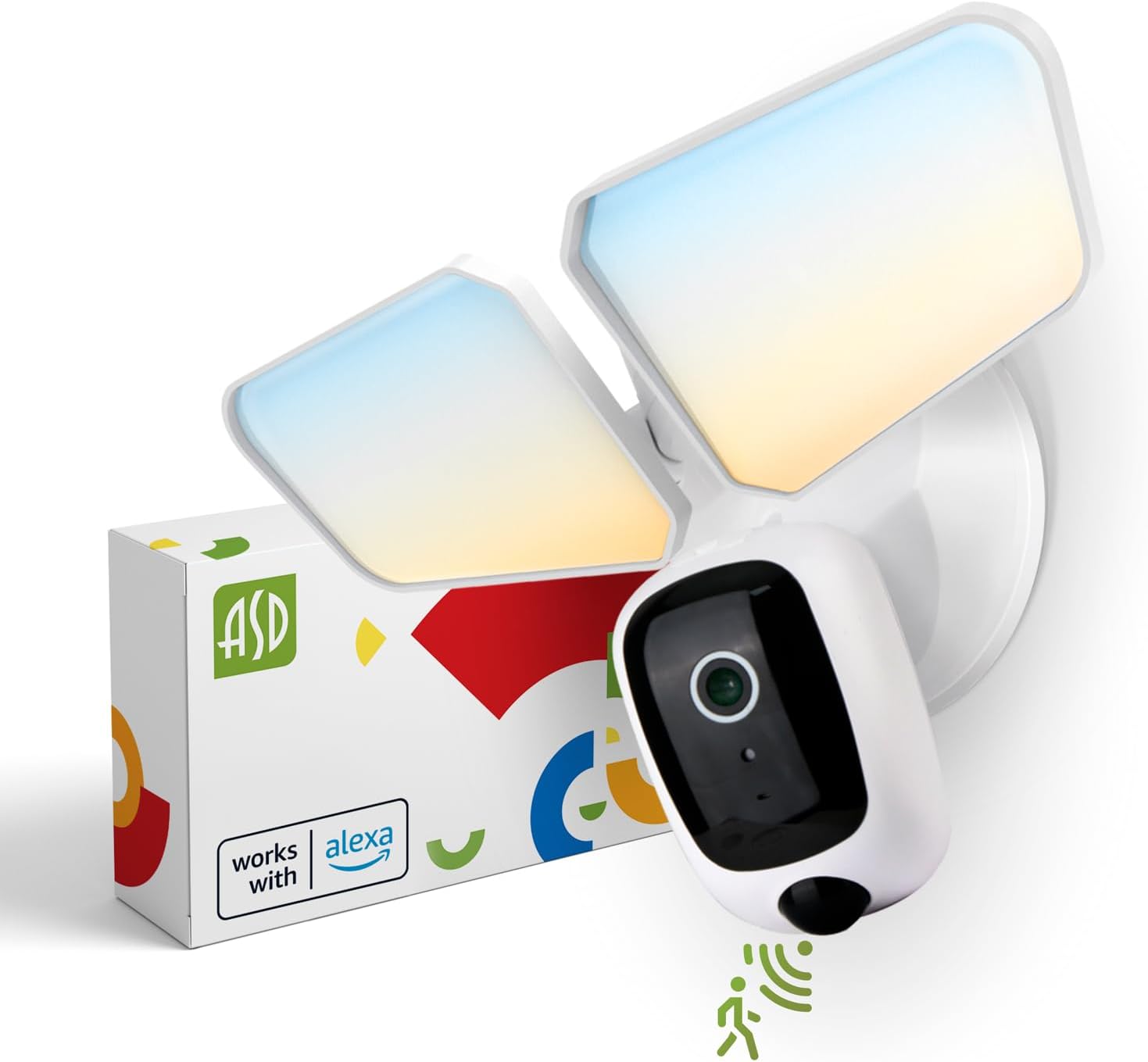
Image 1: ASD Security Flood Light Camera Outdoor and its packaging.
4. Feartan toraidh
- Cinn solais a ghabhas atharrachadh: Side-to-side (150°) and up-and-down (180°) rotatable light heads for directional illumination.
- Integrated Smart Camera: Monitor, record, and engage in two-way audio communication.
- 180° Motion Sensor: Automatically activates light and camera recording upon motion detection.
- Cealla-foto bho dhùsgadh gu breacadh an latha: Automatically turns the light on at dusk and off at dawn.
- Color Selectable: Choose from 5 color temperatures: 2700K (Soft White), 3000K (Warm White), 3500K (Neutral White), 4000K (Cool White), or 5000K (Daylight).
- Amalachadh dachaigh glic: Co-chòrdail ri Amazon Alexa agus Google Assistant airson smachd gutha.
- Smachd app: Manage settings, view live feed, and receive motion-activated push notifications via the dedicated app.
- Roghainnean stòraidh: Records can be stored on a Micro SD card (not included) or in a Cloud service (subscription may be required).
- Togail seasmhach: Made from Aluminum and Polycarbonate.
- Teisteanasan: UL and DLC Premium certified, ensuring quality and safety.

Image 2: Key features of the ASD Security Flood Light Camera.
5. Sònrachaidhean Teicnigeach
| Sònrachadh | Mion-fhiosrachadh |
|---|---|
| Modail Àireamh | A-SFL-20WH-SC |
| Stòr cumhachd | Cruaidh-chruaidh |
| Voltage | 120 Volt |
| Dètage | 20 watt |
| Seòrsa Stòr Solais | LED |
| Teòthachd Dhathan (CCT) | 2700K, 3000K, 3500K, 4000K, 5000K (Roghnaichte) |
| Ceàrn lorg sensor gluasad | 180° |
| Astar lorg sensor gluasad | 16.4-32.9 troigh (5-10 m) |
| Ceàrn Beam | 100° |
| Stuth | Aluminium, polycarbonate |
| Meudan toraidh | 10.24"F x 4.45"L x 7.68"À |
| Cuideam nì | 1.2 Punnd |
| Cleachdadh a-staigh / a-muigh | A-muigh |
| Seòrsachadh Solais Sgìre | IP54 (Wet Locations Rated) |
| Pròtacal ceangail | Wi-Fi |
| Seòrsa Rianadair | Amazon Alexa, Neach-taic Google, App |
| Fad-beatha | 145,000 uairean |

Image 3: Detailed product specifications and dimensions.
6. Ceumannan Stàladh
Mus tòisich thu: Turn off power at the circuit breaker. Ensure you have the necessary tools (screwdriver, wire strippers, etc.).
- Ullaich an tàmh-àirneis:
Attach the crossbar to the outlet box using two mounting screws. Remove the cover on the top of the camera. Insert a Micro SD card (sold separately) into the slot until it clicks. Place the cover back on. Change the position of the CCT switch on the housing to the desired color temperature (2700K, 3000K, 3500K, 4000K, or 5000K). - Mount and Wire:
Tear off the EVA pad adhesive and stick it on the rear cover (pay attention to the direction of the gap). Thread the fixture wire through the gasket. Connect the wires: Black to Black, White to White, and Green to Green (ground). Secure the connection with wire nuts. - Sàbhail an tàmh-àirneis:
Drive the bracket screw through the center hole of the fixture base to the crossbar and secure it by tightening.

Image 4: Visual guide for the installation process.
7. Stiùireadh Obrachaidh
7.1 Obrachadh Braitear Gluasaid
The built-in 180° motion sensor detects movement within its range (16.4-32.9 ft or 5-10 m). When motion is detected, the floodlight will illuminate, and the camera will begin recording. You can adjust the sensitivity and duration settings via the ASD SMART app.

Image 5: The built-in motion sensor detects movement.
7.2 Dusk-to-Dawn Photocell
The integrated photocell automatically senses ambient light levels. It will turn the floodlight on when it gets dark and turn it off when daylight returns, ensuring efficient operation without manual intervention.

Image 6: Built-in dusk-to-dawn photocell for automatic operation.
7.3 Color Temperature Selection (CCT)
Before final installation, you can select your preferred color temperature using the switch located on the fixture's housing. Choose from 2700K (Soft White), 3000K (Warm White), 3500K (Neutral White), 4000K (Cool White), or 5000K (Daylight) to match your aesthetic and lighting needs.

Image 7: Selectable color temperature options.
8. App Control and Smart Integration
8.1 ASD SMART App Setup
To unlock the full potential of your floodlight camera, download and set up the ASD SMART app:
- Luchdaich sìos an ASD SMART app bhon App Store (iOS) no Google Play Store (Android).
- Clàraich no log a-steach don chunntas agad.
- Select "Add a device" and choose "Camera and lock".
- Follow the on-screen instructions to connect your device to your Wi-Fi network.
- Scan the QR code on your camera when prompted.
For a detailed guide, please refer to the full manual PDF: ASD Security Flood Light Camera Manual PDF
Luchdaich sìos an app:
- Stòr App iOS: ASD SMART on App Store
- Android Google Play: ASD SMART on Google Play

Image 8: App control interface and smart assistant compatibility.
8.2 Remote Monitoring and Two-Way Audio
Through the ASD SMART app, you can:
- View live video feed from your camera anytime, anywhere.
- Engage in two-way audio communication with visitors or deter intruders.
- Receive instant motion-activated push notifications on your smartphone.
8.3 Recording Storage
Video recordings can be stored in two ways:
- Cairt Micro SD: Cuir cairt Micro SD (suas ri 128GB, gun a bhith air a ghabhail a-steach) a-steach don t-slot ainmichte air a’ chamara airson stòradh ionadail.
- Seirbheis Sgòth: Opt for a cloud storage subscription (available through the app) for secure, remote access to your recordings.

Image 9: Remote monitoring and recording storage options.
8.4 Amalachadh Neach-cuideachaidh Smart
Connect your ASD Security Flood Light Camera to Amazon Alexa or Google Assistant for convenient voice control. Follow the instructions within the ASD SMART app to link your accounts and enable features like turning the light on/off or viewing the camera feed on compatible smart displays.
9. Cumail suas
- Glanadh: Dèan cinnteach gu bheil an cumhachd dheth mus glan thu e. Sguab an uidheam le clò bog, tioram.amp aodach. Na cleachd luchd-glanaidh sgudail no solventan.
- Cùram lionsa: Gently clean the camera lens with a microfiber cloth to maintain clear image quality.
- Sgrùdaidhean cunbhalach: Periodically check for any loose connections or damage to the wiring and housing.
10. A ’dèanamh trioblaid
| Trioblaid | Adhbhar a dh’fhaodadh a bhith ann | Fuasgladh |
|---|---|---|
| Cha bhith solas a ’tionndadh. | No power, faulty wiring, photocell issue, CCT switch not set. | Check circuit breaker. Verify wiring connections. Ensure photocell is not obstructed. Confirm CCT switch is set. |
| Chan eil sensor gluasad a’ lorg. | Incorrect sensitivity settings, obstruction, improper installation height. | Adjust motion sensor sensitivity in the app. Clear any obstructions. Ensure installation height is appropriate (approx. 9.8 ft / 3 m). |
| Cha bhith an camara a’ ceangal ri Wi-Fi. | Facal-faire Wi-Fi ceàrr, comharra lag, cùisean leis an router. | Double-check Wi-Fi password. Move router closer or use a Wi-Fi extender. Restart router. Ensure 2.4GHz Wi-Fi network is used. |
| Deagh chàileachd bhidio. | Dirty lens, poor Wi-Fi signal, low light conditions. | Clean camera lens. Improve Wi-Fi signal strength. Ensure adequate lighting. |
| Chan eil fuaim dà-shligheach ag obair. | Microphone/speaker issues, app permissions. | Check app permissions for microphone. Ensure volume is up on your device. |
11. Fiosrachadh Barantais
Tha ASD a’ toirt seachad Barantas cuibhrichte 5-bliadhna for this Security Flood Light Camera. This warranty covers defects in materials and workmanship under normal use. Please retain your proof of purchase for warranty claims. For full warranty terms and conditions, please refer to the official ASD weblàrach-lìn no cuir fios gu taic teachdaiche.
12. Taic teachdaiche
For additional assistance, technical support, or warranty inquiries, please visit the ASD Lighting Corporation website or refer to the comprehensive manual available online.
- ASD Lighting Corporation Store: Visit ASD Store on Amazon
- Full Product Manual (PDF): Luchdaich a-nuas Handbook PDF
Ask a question about this manual
Ask about setup, troubleshooting, compatibility, parts, safety, or missing instructions. Manuals+ will review the question and use this page’s manual context to help answer it.