
ROMJ E99 A14
ROMJ E99 A14 Foldable Drone User Manual
Stiùireadh Coileanta airson Obrachadh is Cumail Suas
1. Toradh thallview
The ROMJ E99 A14 is a compact and foldable drone designed for both adults and beginners, featuring a 4K/1080P HD camera for high-quality aerial photography and videography. Its intelligent functions like auto-return and one-touch take-off/landing make it user-friendly. The drone's foldable design ensures portability and easy storage, making it an ideal companion for outdoor adventures.
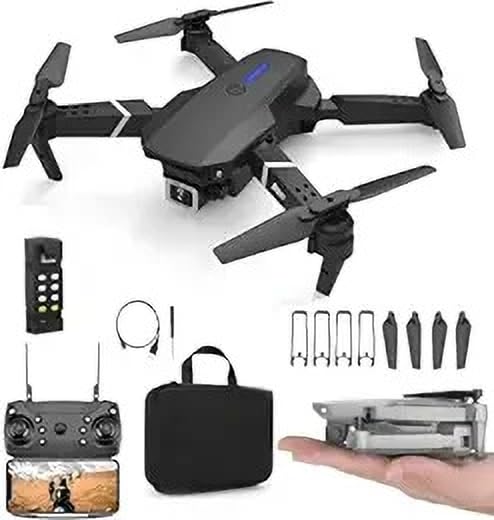
Image: The ROMJ E99 A14 drone, remote control, spare propellers, USB charging cable, and a carrying bag are shown. The drone is black with four propellers and an integrated camera. A smaller image shows the drone folded and held in a hand, highlighting its compact size.
2. Pasgan-susbaint
Dèan cinnteach gu bheil na nithean gu lèir a tha air an liostadh gu h-ìosal an làthair sa phacaid agad:
- ROMJ E99 A14 Foldable Drone
- Smachd Iomallach
- Battery (Lithium Polymer)
- Propellers (Spare set included)
- USB charger
- Storage Bag (as shown in images)
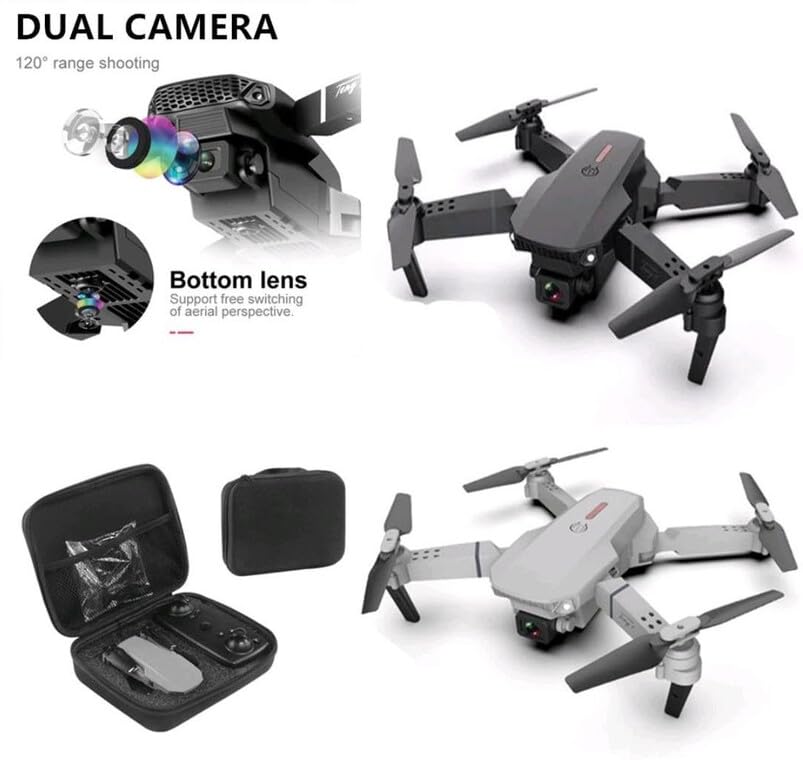
Image: An open black travel storage bag for the drone, showing the drone and remote control neatly fitted inside. The bag is designed for convenient and light travel.
3. Stiùireadh Sàbhailteachd
Operating a drone requires responsibility. Adhere to the following safety guidelines to ensure a safe and enjoyable flight experience:
- Sgrùdadh Ro-itealaich: Always inspect the drone, propellers, and battery before each flight.
- Mothachadh Àrainneachdail: Fly in open areas, away from people, animals, buildings, and power lines. Avoid flying in strong winds or adverse weather conditions.
- Loidhne seallaidh: Cùm loidhne-sheallaidh leis an dròn an-còmhnaidh.
- Sàbhailteachd bataraidh: Use only the provided charger and battery. Do not overcharge or puncture batteries. Discontinue use if batteries are damaged or swollen.
- Sàbhailteachd Propeller: Cùm làmhan, aghaidh, agus aodach sgaoilte air falbh bho propellaran rothlach.
- Gèilleadh laghail: Be aware of and comply with local drone regulations and airspace restrictions.
- Moladh aois: This product is not a toy and is recommended for users of appropriate age and skill level.
4. Suidhich
4.1 A’ fosgladh an dròin
- Gently pull out each of the four propeller arms until they lock into place.
- Ensure all arms are fully extended and stable before flight.
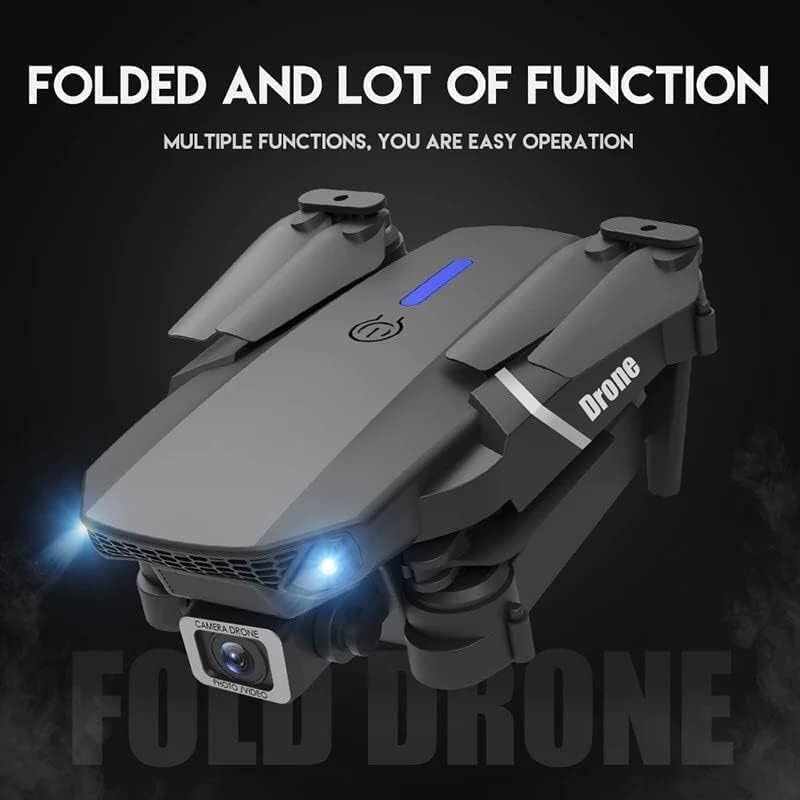
Image: The ROMJ E99 A14 drone in its folded state, showcasing its compact design. The front lights are illuminated, indicating power or readiness.
4.2 Stàladh is Cosgais Bataraidh
- Bataraidh Drone: Insert the fully charged Lithium Polymer battery into the battery compartment on the drone's rear until it clicks into place.
- Bataraidh smachd iomallach: Open the battery cover on the back of the remote control and insert the required batteries (not specified, assume AA/AAA, user should check remote). Close the cover.
- A' cur cosgais: Connect the USB charger to the drone's battery (or directly to the drone if integrated charging) and then to a USB power source. The indicator light will show charging status (refer to charger's specific light indications).
4.3 Stàladh Propeller (ma tha feum air)
Mar as trice bidh propellaran ro-stàlaichte air an dròn. Ma tha feum air fear ùr:
- Identify the correct propeller type (A or B) for each motor arm. Propellers are usually marked.
- Align the propeller with the motor shaft and press down firmly until it is securely attached. Ensure it spins freely without wobbling.
5. Stiùireadh Obrachaidh
5.1 Smachd Iomallach thairisview
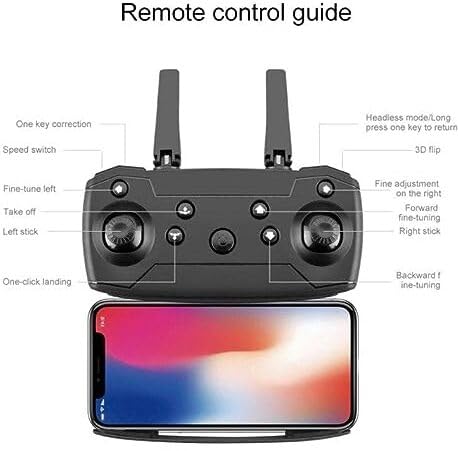
Image: A detailed diagram of the drone's remote control, labeling various buttons and joysticks. Key functions include One Key Correction, Speed Switch, Fine-tune Left, Take off, Left Stick, One-click Landing, Headless Mode/Long press one key to return, 3D Flip, Fine adjustment on the right, Forward fine-tuning, Right Stick, and Backward fine-tuning. A smartphone is shown mounted below the remote, indicating app connectivity.
- Bata Clì: A’ cumail smachd air àirde (suas/sìos) agus rothladh (clì/deas).
- Bata ceart: A’ cumail smachd air gluasad air adhart/air ais agus clì/deas.
- One Key Take-off/Landing: Press to automatically take off or land.
- Atharrachadh luaths: Atharraich astar an itealaich (m.e., ìosal, meadhanach, àrd).
- Modh gun cheann: Simplifies flight by orienting the drone relative to the pilot, regardless of the drone's front direction.
- Tilleadh aon iuchair: Initiates an automatic return to the take-off point (requires calibration).
- Dèan flip air 3D: Executes an acrobatic flip (ensure sufficient altitude).
- Putanan Mìneachaidh: Used to trim the drone's flight to correct drift.
5.2 Pairing the Drone
- Cuir an drone air uachdar còmhnard, còmhnard.
- Cuir an dròn air. Bidh na solais-comharrachaidh a’ priobadh.
- Cumhachd air an smachd iomallach.
- Push the left joystick up to the maximum position, then pull it down to the minimum position. The drone lights will stop flashing and become solid, indicating successful pairing.
5.3 Togail is Tighinn air Tìr
- One-Touch Take-off: After pairing, press the "Take off" button on the remote control. The drone will automatically ascend to a stable hovering height.
- Gluasad làimhe: After pairing, push both joysticks simultaneously to the bottom-outer corners to arm the motors. Then, slowly push the left joystick up to ascend.
- One-Touch Landing: Press the "One-click Landing" button. The drone will slowly descend and land.
- Cur air tìr le làimh: Slowly pull the left joystick down to descend. Once landed, pull both joysticks to the bottom-outer corners again to disarm the motors.
5.4 Obrachadh Camara
The ROMJ E99 A14 features an integrated 1080p HD camera and a bottom lens for diverse aerial perspectives.
Ìomhaigh: Sealladh dlùth view of the drone's front, highlighting its dual camera system. The main camera is visible at the front, and a secondary bottom lens is shown, indicating support for free switching of aerial perspectives.
- Dealbh/Bhidio: Use the dedicated buttons on the remote control (or via the companion app) to capture photos or start/stop video recording.
- Ceangal app: For live video feed and advanced camera controls, download the official ROMJ drone app (check manual for QR code or app store name) and connect your smartphone via Wi-Fi to the drone's network.
5.5 Special Flight Functions
- 360° Tumbling Stunt: Press the 3D Flip button and then move the right joystick in the desired direction to perform a flip. Ensure sufficient altitude (at least 2-3 meters) for this maneuver.
- Modh gun cheann: Activate Headless Mode before take-off. In this mode, the drone's forward direction is always the direction the pilot is facing when Headless Mode was activated, simplifying control.
- Tilleadh aon iuchair: Long press the One Key Return button. The drone will fly back towards its take-off position. This function works best after proper compass calibration.
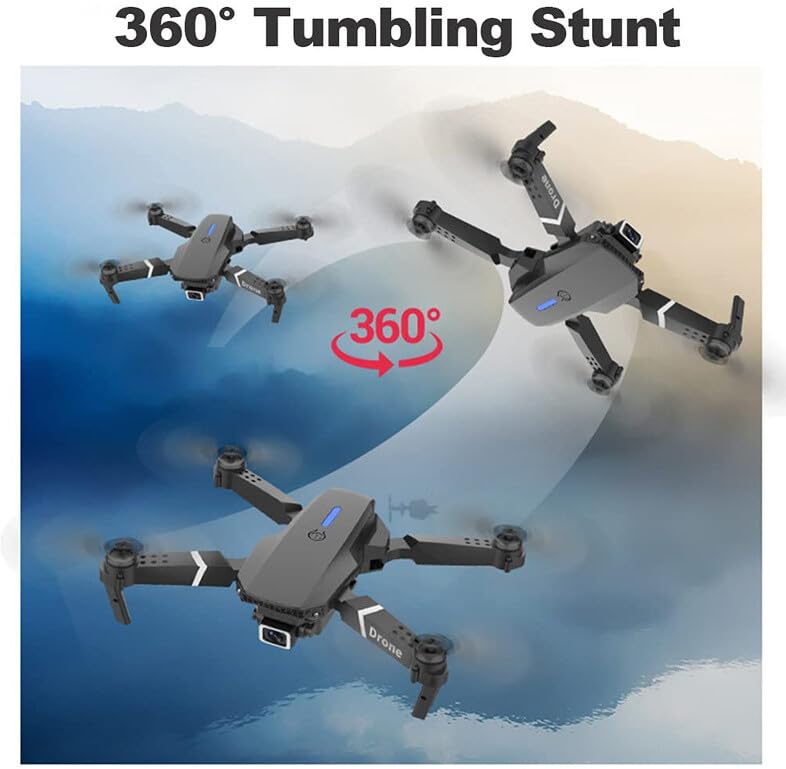
Image: Three instances of the ROMJ E99 A14 drone in mid-air, illustrating a 360-degree tumbling stunt. The drone is shown at different angles during the flip, with an arrow indicating the circular motion.
6. Cumail suas
- Glanadh: Cleachd clò bog, tioram gus corp an dròin agus lionsa a’ chamara a ghlanadh. Seachain lionntan no fuasglaidhean a chleachdadh.
- Sgrùdadh Propeller: Thoir sùil cunbhalach air na propellaran airson sgàinidhean, lùban no milleadh. Cuir propellaran millte an àite sa bhad le bhith a’ cleachdadh nam pàirtean a bharrachd a tha air an toirt seachad.
- Cùram Bataraidh: Store batteries in a cool, dry place. Do not store fully charged or completely depleted batteries for extended periods. Charge them to about 50-60% for long-term storage.
- Cùram motair: Cùm motaran saor bho dhuslach is sprùilleach. Na feuch ri motaran a lubricadh.
- Stòradh: When not in use, fold the drone and store it in its original packaging or the provided storage bag to protect it from dust and physical damage.
7. A ’dèanamh trioblaid
| Trioblaid | Adhbhar a dh’fhaodadh a bhith ann | Fuasgladh |
|---|---|---|
| Chan eil an dròn a’ tionndadh air. | Chan eil am bataraidh air a luchdadh no chan eil e air a stàladh gu ceart. | Dèan cinnteach gu bheil am bataraidh làn-luchdaichte agus air a chur a-steach gu ceart. |
| Remote control does not connect to drone. | Not paired correctly; interference. | Repeat pairing procedure (Section 5.2). Ensure no strong Wi-Fi interference. |
| Bidh dròn a’ gluasad rè itealaich. | Not calibrated; wind interference. | Perform gyroscope calibration (refer to app/remote instructions for specific steps). Use fine-tuning buttons. Fly in calm conditions. |
| Camera not recording or poor quality. | SD card issues (if applicable); lens dirty; app not connected. | Ensure SD card is inserted and formatted (if applicable). Clean camera lens. Verify app connection. |
| Ùine itealaich goirid. | Bataraidh gun a bhith làn-luchdaichte; bataraidh sean; itealaich ionnsaigheach. | Dèan cinnteach gu bheil am bataraidh làn-luchdaichte. Smaoinich air bataraidhean sean a chur nan àite. Itealaich le barrachd cùram. |
8. Sònrachaidhean
| Feart | Mion-fhiosrachadh |
|---|---|
| Brand | ROMJ |
| Ainm Modail | E99 A14 |
| Feartan sònraichte | Compact, Foldable, Integrated Camera |
| Fuasgladh glacadh bhidio | 1080p |
| Teicneòlas ceangail | USB, Wi-Fi |
| Co-phàirtean air an toirt a-steach | Battery, Propeller, USB Charger |
| Ìre Sgilean | Uile |
| Stuth | Styrene acrylonitrile butadiene, plastaig |
| Co-chruinneachadh cealla bataraidh | Polymer lithium |
| Smachd Iomallach air a ghabhail a-steach? | Tha |
9. Barantas agus Taic
ROMJ products are manufactured to high-quality standards. For any issues, technical support, or warranty inquiries, please contact your retailer or the official ROMJ customer service channel. Please retain your proof of purchase for warranty claims.
For the most up-to-date support information, please visit the official ROMJ weblàrach-lìn no thoir sùil air am fiosrachadh conaltraidh a chaidh a thoirt seachad leis a’ cheannach agad.
Sgrìobhainnean co-cheangailte - E99 A14
 |
Leabhar-làimhe Cleachdaiche Drone Pro 2 fillte le camara dùbailte HD E99 Leabhar-làimhe coileanta airson an Foldable Drone Pro 2 le HD Dual Camera E99, a’ còmhdach smachd iomallach thairis airview, stàladh is cosgais bataraidh, cruinneachadh itealain, smachdan itealaich, gnìomhan adhartach leithid gleusadh grinn agus tionndadh, modh gun cheann, tilleadh aon-iuchair, agus fuasgladh dhuilgheadasan. |
 |
Leabhar-làimhe Cleachdaiche Dròn LYZRC L900 PRO: Camara 4K, GPS, 5G WiFi Leabhar-làimhe coileanta airson an dròn LYZRC L900 PRO. Ionnsaich mu na camarathan dùbailte 4K HD aige, suidheachadh GPS, 5G WiFi, motaran gun bhruis, dealbhadh fillte, agus comasan FPV. |
 |
Leabhar-làimhe Cleachdaiche Dròn Wipkviey T6 Leabhar-làimhe airson an Wipkviey T6 Drone le camara 1080P HD, anns a bheil bhidio beò WiFi, cumail àirde, tionndadh 3D, mothachair grabhataidh, smachd gluasadan-bodhaig, agus àithne gutha. Freagarrach do luchd-tòiseachaidh agus inbhich. |
 |
GT50 Obstacle Avoidance Drone: 4K HD Aerial Photography Quadcopter Explore the GT50 Obstacle Avoidance Drone, featuring a 4.3-inch screen, 4K HD camera, 20-minute flight time, and advanced features like optical flow positioning and EIS stabilization. Includes package contents and specifications. |
 |
Leabhar-làimhe Cleachdaiche Dròn Camara HEYGELO S80 Leabhar-làimhe coileanta airson an HEYGELO S80 Camera Drone, a’ còmhdach stiùiridhean sàbhailteachd, obrachadh, cumail suas, sònrachaidhean, agus fiosrachadh barantais. |
 |
Leabhar-làimhe Cleachdaiche Dròn Fillte - E88 Pro / E99 Pro Leabhar-làimhe coileanta airson an Dròn Fillte, a’ còmhdach gnìomhan smachd iomallach, suidheachadh, obrachadh itealaich, riaghladh bataraidh, agus fuasgladh dhuilgheadasan airson modailean mar an E88 Pro agus an E99 Pro. |
Ask a question about this manual
Ask about setup, troubleshooting, compatibility, parts, safety, or missing instructions. Manuals+ will review the question and use this page’s manual context to help answer it.