
Ro-ràdh
Thank you for choosing Linkind WiFi Smart Light Bulbs. These advanced LED bulbs offer a wide spectrum of colors, tunable white light, and smart control features to enhance your home lighting experience. This manual provides detailed instructions for setup, operation, maintenance, and troubleshooting to ensure optimal performance and enjoyment of your new smart bulbs.
Feartan toraidh
- 16 Million Colors & Tunable White: Offers a full spectrum of 16 million colors and tunable white light from 1800K (soft white) to 6500K (cool white) for various moods and daily lighting needs.
- Smachd guth: Co-chòrdail ri Amazon Alexa agus Google Assistant airson smachd gun làmhan.
- Sioncronadh ciùil: Lights change colors with the rhythm of music detected by your smartphone's microphone via the AiDot App.
- WiFi & Bluetooth Dual Connectivity: Provides fast and reliable connection. Bluetooth assists with initial setup and local control without WiFi. (Note: Requires 2.4GHz WiFi only).
- Preset Scenes & Schedules: Customize lighting for different occasions with pre-programmed scenes or create personalized schedules for automatic on/off.
- Smachd buidhne: Control multiple smart light bulbs simultaneously by creating groups within the AiDot App.
- Èifeachdach lùtha: 9 Watts (60W equivalent) with 800 Lumens brightness, offering significant energy savings.
- Fad-beatha fada: Designed for approximately 25,000 hours of operation.
- Bunait àbhaisteach: A19 bulb shape with E26 base for wide compatibility.
Dè th' anns a' Bhocsa
- 8 x Linkind A19 E26 WiFi Smart Light Bulbs
- 1 x Leabhar-làimhe Stiùiridh
Stiùiridhean rèiteachaidh
1. Install the Smart Light Bulbs
- Carefully screw the Linkind Smart Light Bulb into any standard E26 light socket.
- Dèan cinnteach gu bheil an cumhachd air a chuir dheth mus tèid a stàladh.
- Cuir an cumhachd air an inneal-solais. Bu chòir don bholgan lasadh suas.
2. Download the AiDot App
The Linkind Smart Light Bulbs are controlled via the AiDot App. Download it from your device's app store.
Image: Steps to download the official AiDot App from the App Store or Google Play. Lorg airson "AiDot" and ensure it's the official app before downloading.
3. Connect the Smart Light Bulbs to the App
Follow these steps to pair your bulbs with the AiDot App:
- Dèan cinnteach gu bheil Bluetooth an fhòn-smart agad air a chomasachadh.
- Open the AiDot App and sign in or create an account.
- Tap the '+' icon on the top right corner of the home screen to 'Add Device'.
- The app will automatically scan for nearby devices. Select your Smart Light Bulb from the list.
- Follow the on-screen prompts to complete the connection, including entering your 2.4GHz WiFi network password.

Image: Visual guide demonstrating the four steps to connect the smart light bulbs to the AiDot app, from lighting up the bulbs to successful addition.
4. Connect to Alexa or Google Home (Optional)
To enable voice control, link your AiDot account with your preferred voice assistant:
- Once your device is connected to the AiDot app, navigate to 'AiDot to Integration'.
- Choose Amazon Alexa or Google Home.
- You will be redirected to the Alexa/Google Home app to enter your credentials and link the accounts.
- Once linked, you can use voice commands to control your lights.
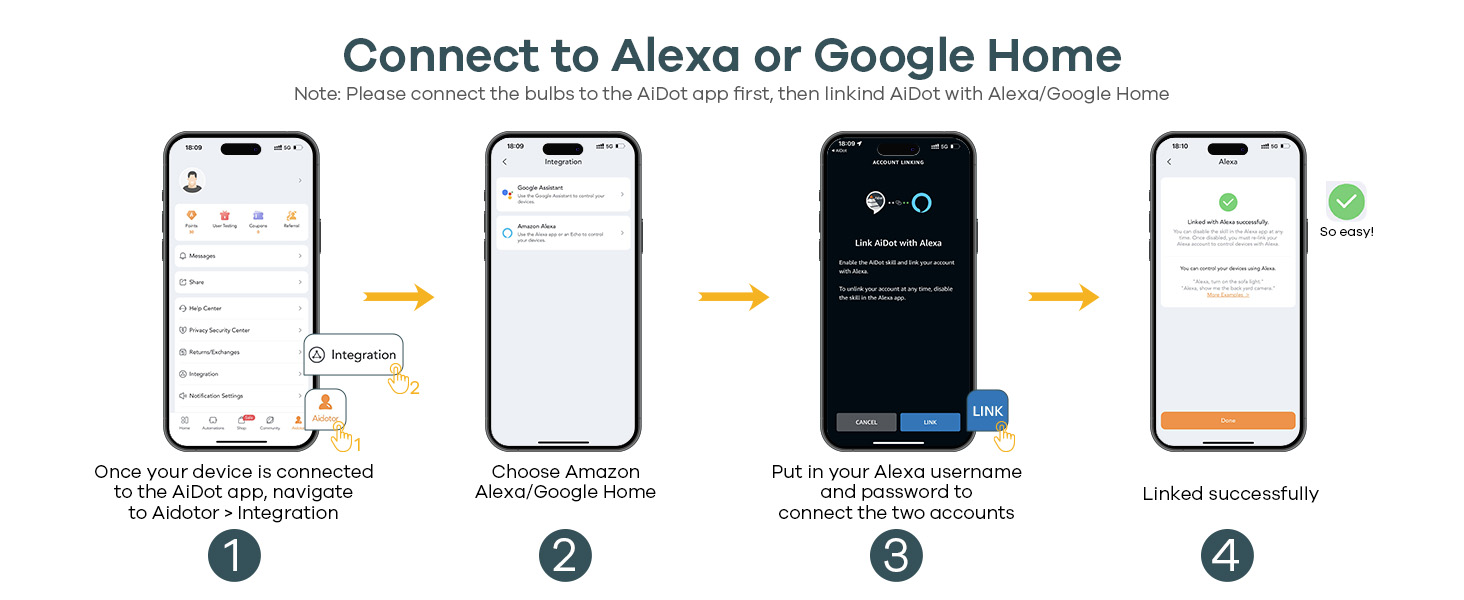
Image: A four-step visual guide illustrating how to integrate Linkind smart bulbs with Amazon Alexa or Google Home for voice control.
5. Product Verification (Amazon Transparency)
This product is verified by Amazon Transparency. You can use the Transparency app to authenticate units and verify origin and authenticity of your purchase.

Image: A diagram explaining the Amazon Transparency process, from authentic units with codes to scanning by Amazon and authentication via the Transparency app.
Stiùireadh Obrachaidh
1. Adjust Color and Brightness
Use the AiDot App to select from 16 million colors or adjust the white light temperature between 1800K and 6500K. You can also dim the brightness from 1% to 100%.

Image: A hand holding a smartphone displaying the AiDot app, showing a color wheel for 16 million colors and sliders for adjusting white light temperature (1800K-6500K) and brightness (1%-100%).
2. Use Preset Scenes
The app offers various preset scenes (e.g., Party, Reading, Night Light) to instantly change the ambiance of your room.

Image: A smartphone displaying the AiDot app with various preset scenes, including Bonfire, Party, Night Light, TV, Morning, Emotion, Reading, and Sunset, available to enrich your life.
3. Suidhich Clàran-ama
Create custom schedules to automatically turn your lights on or off at specific times, aligning with your daily routine.

Image: A smartphone displaying the AiDot app's scheduling feature, showing a house with lights turning on at 18:00 and off at 7:00, demonstrating automated lighting routines.
4. Sioncronachadh Ciùil
Activate the Music Sync feature in the AiDot App to have your lights change colors and intensity in rhythm with your music. Ensure microphone permissions are granted to the app.

Image: A couple dancing in a vibrant room, illuminated by color-changing lights synchronized with music, controlled via the AiDot App.
Video: A demonstration of Linkind color-changing smart bulbs creating a light show, highlighting the music sync feature and various dynamic lighting effects.
5. Smachd Buidhne
Group multiple Linkind Smart Light Bulbs together in the app to control them simultaneously with a single command.

Image: A modern house with various rooms illuminated by Linkind smart bulbs, demonstrating how a single tap on the AiDot app can control all lights in the same group.
6. Smachd Guth
After integrating with Alexa or Google Home, use simple voice commands to manage your lights (e.g., "Alexa, turn on the light," "Hey Google, dim the room light to 60%").

Image: A woman in a kitchen using voice commands with an Amazon Echo device to control her Linkind smart lights, demonstrating compatibility with Alexa and Google Home.
Bhidio: Taisbeanadh bhidio brosnachaidhasing Linkind Smart Light Bulbs' compatibility with Alexa and Google Home, demonstrating voice control for color changes, dimming, and on/off functions.
Cumail suas
- Glanadh: Ensure the bulb is cool and power is off before cleaning. Wipe with a soft, dry cloth. Do not use liquid cleaners or abrasive materials.
- Stòradh: Store bulbs in a cool, dry place when not in use for extended periods.
Fuasgladh thrioblaidean
- Bulb gun cheangal: Ensure your WiFi network is 2.4GHz. The bulbs do not support 5.0GHz WiFi. Bluetooth is used for initial connection, so ensure it's enabled on your phone and the phone is close to the bulb.
- A' frasadh no a' slugadh: Do not use these smart light bulbs with traditional dimmer switches. They are designed for app-based dimming. Using them with dimmer switches may cause instability.
- Cùisean smachd guth: Verify that your AiDot account is correctly linked to your Alexa or Google Home account. Check your internet connection and ensure your voice assistant device is online.
- Cumhachd Outage Ath-bheothachadh: The bulbs are designed to recover quickly after a power outage, reconnecting to your WiFi.
Sònrachaidhean
| Brand | Linkind |
| Ainm Modail | LS01017116 |
| Seòrsa Solais | LED |
| Feart sònraichte | Color Changing, Energy Efficient, Timer, Tunable |
| Dètage | 9 watt |
| Co-ionann gealbhruthach | 60 watt |
| Meud cumadh bulb | A19 |
| Bunait nam bulbaichean | E26 |
| Dath aotrom | Multicolor (RGBTW), 1800K-6500K White |
| Gile | 800 Lumen |
| Teicneòlas ceangail | Bluetooth, Wi-Fi (2.4GHz Only) |
| Seòrsa Rianadair | Amazon Alexa, Neach-taic Google |
| Beatha Obrachaidh Stòr Solas | 25000 Uairean |
| Seòrsa Stuth | Aluminium, plastaig |
Barantas & Taic
Linkind products come with a 1-year coverage for product quality assurance. For any inquiries or support, please contact Linkind customer service. Live customer service is available Monday-Friday, 9 AM - 5 PM PST.
Return Policy: This product is eligible for a refund/replacement within 30 days of purchase.