
1. Ro-ràdh
The COLBOR Wonder W60 is a compact and powerful LED video light designed for various photography and videography needs, including YouTube content creation and live streaming. It offers a wide color temperature range from 2700K to 6500K and boasts a high CRI of 97+ for accurate color rendition. Its lightweight and slim design make it highly portable, while multiple power options and APP control enhance its versatility and ease of use.
2. Dè tha sa bhogsa

Image: The COLBOR Wonder W60 LED Video Light shown with its complete set of accessories.
- COLBOR Wonder W60 Video Light x1
- Càball x1
- Adapter cumhachd x1
- Còmhdach COB x1
- Dome x1
- Faileas x1
3. Toradh thallview agus Suidhich
Familiarize yourself with the components and initial setup of your COLBOR Wonder W60 LED Video Light.
3.1 Co-phàirtean toraidh

Ìomhaigh: Taobh view of the COLBOR Wonder W60, highlighting the control buttons and ports.
- Putan Cumhachd: Used for turning the device on and off.
- Wireless Control Setting Button: For switching between 2.4GHz remote and APP control modes, and initiating pairing.
- Brightness Control Wheel: Adjusts the light's brightness.
- Color Temperature Control Knob: Adjusts the color temperature.
- NFC Detection Area: Airson paidhreachadh luath le innealan co-chòrdail.
- COLBOR Mount Lock & Mount: Securely attach accessories.
- DC Port: Airson an adapter cumhachd a cheangal.
- Port Seòrsa C: For PD Type-C fast charging.
- 1/4" Hole Screw: For mounting the light onto stands or grips.
3.2 Light Installation
Follow these steps to prepare your light for use:
- Removal of COB protection cover: Hold the COB cover with the COLBOR Mount tenon and rotate it to remove it.
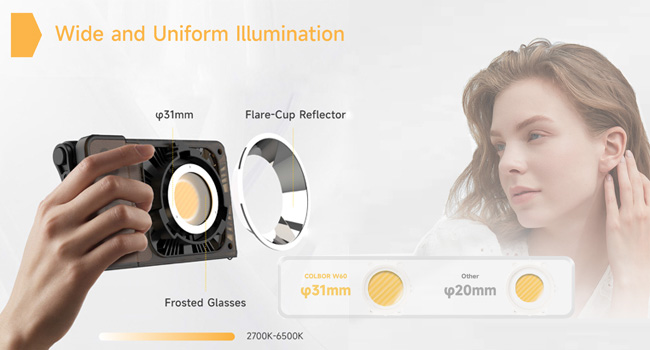
Image: Demonstrating the removal of the protective COB cover by rotating it from the mount.
- Stàladh agus toirt air falbh reflector: Co-thaobhadh an sgàthan leis an groove timcheall an lamp head and clip it in, then rotate it to fix it. Follow the instructions for "Removal of COB protection cover" to remove the reflector.

Image: A reflector being attached to the front of the COLBOR W60 light.
- Installation of stand: Align the 1/4" screw hole on the light's bottom or side with the 1/4" screw on the stand, and rotate it to fix it.

Image: The COLBOR W60 shown mounted on a light stand and also attached to a power grip, demonstrating versatile mounting options.
3.3 A 'toirt cumhachd don inneal
The COLBOR Wonder W60 offers flexible powering options:
- Power with power adapter: Ceangail an inneal-atharrachaidh cumhachd, co-thaobhadh jack cumhachd DC an lamp body, and then power on through the cable after stable connection.
*Do not suspend the power adapter in the air. Use wire rings to hang it on the lamp seasamh.

Image: The COLBOR W60 being powered via its included power adapter.
- Power with COLBOR Power Grip: Align the 1/4" screw hole on the light's bottom or side with the 1/4" screw on the stand. Rotate it to fix it. Connect the light to the Power Grip via the D-Tap to DC cable for powering.
*Please do not use the Type-C to Type-C cable to power the light.

Image: The COLBOR W60 connected to a COLBOR Power Grip for portable power.
4. Stiùireadh Obrachaidh
Learn how to operate your COLBOR Wonder W60 LED Video Light.
Video: Official instruction video for the COLBOR Wonder W60/W100 LED Video Light, covering setup, powering, and operation.
4.1 Cumhachd air / dheth
- Cumhachd air: Ceangail ris an stòr cumhachd agus an uairsin fada brùth am putan cumhachd.
- Cumhachd dheth: Long-press the power button to turn it off.
4.2 Color Teòthachd Atharrachadh
- Rotate the color temperature control knob for continuous color temperature adjustment.
- Short press the knob to select the preset color temperature: (2700K, 3200K, 4300K, 5600K, 6500K).
4.3 Atharrachadh soilleireachd
- Roll the brightness adjustment wheel for continuous brightness adjustment.
- Short press the wheel side to select preset brightness: (0%, 25%, 50%, 75%, 100%).
4.4 Wireless Connection (APP Control)
The COLBOR Wonder W60 supports APP control for seamless and efficient lighting adjustments.
- Goirid brùth air a ’phutan smachd iomallach gus atharrachadh eadar modhan smachd 2.4GHz (CTRL1 iomallach) agus APP (COLBOR Studio APP).
- Long-press the button to start pairing with the APP.
- Ceangail ris an APP airson roghainnean Fan agus roghainnean EFF.

Image: The COLBOR W60 being controlled remotely via the COLBOR Studio APP on a smartphone.
