
1. Ro-ràdh
This manual provides instructions for the proper use and maintenance of the SUNMI V2SE Smart Mobile Terminal. The V2SE is a versatile device designed for various business applications, featuring an integrated 58mm thermal printer, 1D/2D barcode recognition, NFC capabilities, and running on Android 12.0.
Am measg nam prìomh fheartan tha:
- Integrated 58mm thermal printer with 80mm/s print speed.
- 1D/2D Barcode recognition for efficient scanning.
- NFC for contactless transactions.
- Android 12.0 operating system with a Quad Core 2.0 GHz CPU.
- 2 GB RAM and 8 GB ROM for smooth operation.
- Connectivity: 4G/3G/2G, 2.4G/5G Wi-Fi, Bluetooth 2.1/3.0/4.2.
- Removable Lithium Ion battery.
2. Co-phàirtean inneal
Familiarize yourself with the main components of your SUNMI V2SE terminal.
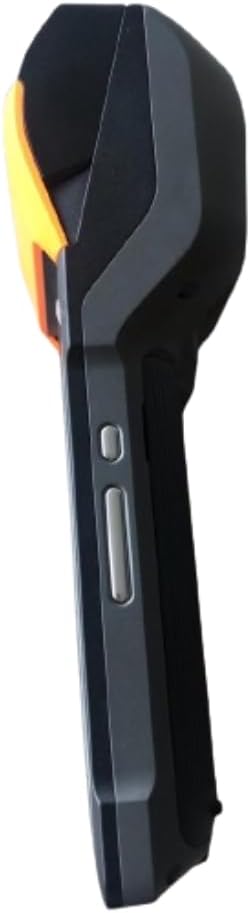
Figear 2.1: Beulaibh is Taobh View. This image displays the device's screen, the integrated barcode scanner at the top, and the power and volume buttons located on the side.

Figear 2.2: Taobh ViewTha an ìomhaigh seo a’ sealltainn an taobh profile of the terminal, including the cover for the SIM card slot and additional buttons.

Figear 2.3: Air ais View. This image illustrates the rear of the device, featuring the thermal printer cover, the 0.3 MP camera, and the charging contact points.
Liosta de cho-phàirtean:
- Sgrion Taisbeanaidh: Touch-sensitive LCD for user interaction.
- Sganadair còd-barra: Integrated 1D/2D scanner for data capture.
- Clò-bhualadair teirmeach: For printing receipts and other documents.
- Putan Cumhachd: To turn the device on/off or wake/sleep.
- Putanan tomhas-lìonaidh: Gus ìrean fuaime atharrachadh.
- Camara: 0.3 MP front photo sensor.
- Slot Cairt SIM: Supports 1 Nano SIM.
- Roinn Bataraidh: Houses the removable Lithium Ion battery.
- Charging Port/Contacts: Airson an inneal a luchdadh a-nuas.
3. Suidheachadh tòiseachaidh
3.1. Stàladh bataraidh
- Dèan cinnteach gu bheil an inneal air a chuir dheth.
- Locate the battery compartment cover on the back of the device (refer to Figure 2.3).
- Remove the cover by sliding or lifting it according to the markings.
- Cuir a-steach am bataraidh Lithium-ion a tha air a thoirt seachad, a’ dèanamh cinnteach gu bheil na ceanglaichean air an co-thaobhadh gu ceart.
- Cuir an àite còmhdach roinn bataraidh gu tèarainte.
3.2. Stàladh cairt SIM
- Ensure the device is powered off and the battery is installed.
- Locate the SIM card slot cover on the side of the device (refer to Figure 2.2).
- Fosgail an còmhdach.
- Insert a Nano SIM card into the designated slot with the gold contacts facing down and the notched corner aligned.
- Close the SIM card slot cover firmly.
3.3. Thermal Paper Loading
- Locate the printer cover release latch, typically on the top or side of the printer compartment (refer to Figure 2.3).
- Fosgail còmhdach a’ chlò-bhualadair.
- Insert a 58mm thermal paper roll into the compartment, ensuring the paper feeds from the bottom and the leading edge extends out of the printer slot.
- Close the printer cover firmly until it clicks into place. Ensure there is no slack in the paper roll.
3.4. Cosgais tùsail agus Cumhachd air
- Connect the provided power adapter to the device's charging port.
- Plug the adapter into a power outlet. Allow the device to charge fully before first use.
- To power on, press and hold the Power button (refer to Figure 2.1) until the SUNMI logo appears on the screen.
4. Stiùireadh Obrachaidh
4.1. Cumhachd Air/Dheth agus Modh Cadail
- Cumhachd air: Brùth is cum sìos am putan Cumhachd gus an crith an inneal agus gus an las an scrion suas.
- Cumhachd dheth: Press and hold the Power button until a power menu appears. Select "Power Off" and confirm.
- Cadal/Wake: Brùth air a’ phutan Cumhachd goirid gus an inneal a chur ann am modh cadail no gus a dhùsgadh.
4.2. Using the Thermal Printer
The integrated 58mm thermal printer can be used to print receipts, tickets, and other documents.
- Ensure thermal paper is correctly loaded (refer to Section 3.3).
- Open the application that requires printing (e.g., POS software).
- Initiate the print command within the application. The device will automatically print the content.
- Tear off the printed paper against the serrated edge.
4.3. Sganadh Còd-barra
The V2SE supports 1D and 2D barcode recognition.
- Open an application that requires barcode input.
- Point the scanner window (located at the top of the device, refer to Figure 2.1) at the barcode.
- Press the dedicated scan button (if available) or trigger the scan function within the application.
- Ensure the barcode is within the scanner's field of view and well-lit for optimal performance.
4.4. Gnìomhachd NFC
The device supports Near Field Communication (NFC) for contactless operations.
- Ensure NFC is enabled in the device settings (Settings > Connected devices > NFC).
- Open an application that utilizes NFC (e.g., payment app, data transfer app).
- Hold the NFC-enabled card or device close to the NFC detection area on your terminal (typically near the top or back of the device).
- Follow the on-screen prompts to complete the transaction or data transfer.
4.5. Ceangal lìonra
- Wi-Fi: Rach gu Roghainnean > Lìonra is eadar-lìon > Wi-Fi gus ceangal ri lìonraidhean gun uèir a tha rim faighinn.
- Mobile Data (4G/3G/2G): Ensure a valid SIM card is installed and mobile data is enabled in Settings > Network & internet > Mobile network.
- Bluetooth: Rach gu Roghainnean > Innealan ceangailte > Bluetooth gus paidhir a dhèanamh le innealan Bluetooth eile.
5. Cumail suas
5.1. A ’glanadh an inneal
- Cuir dheth an inneal mus tèid a ghlanadh.
- Cleachd clò bog, gun lint beagan dampened with water or a mild, non-abrasive cleaner to wipe the exterior.
- For the display, use a screen-specific cleaner and a microfiber cloth.
- Do not use harsh chemicals, solvents, or abrasive materials. Avoid spraying liquids directly onto the device.
5.2. Cùram Bataraidh
- Charge the battery regularly, avoiding complete discharge whenever possible.
- Na cuir am bataraidh gu teòthachd anabarrach.
- If the device will not be used for an extended period, charge the battery to about 50% and store it in a cool, dry place.
- Cleachd an charger agus bataraidh tùsail no ceadaichte a-mhàin.
5.3. Printer Head Cleaning
Regular cleaning of the printer head can prevent print quality issues.
- Power off the device and open the printer cover.
- Cleachd swab cotain gu socairampened with isopropyl alcohol to gently wipe the thermal print head.
- Allow the print head to dry completely before closing the cover and powering on the device.
6. A ’dèanamh trioblaid
| Trioblaid | Adhbhar a dh’fhaodadh a bhith ann | Fuasgladh |
|---|---|---|
| Chan eil cumhachd aig an inneal | Low battery; Faulty battery; Power button issue | Charge the device for at least 30 minutes. Ensure battery is correctly installed. Try a different charger. |
| Clò-bhualadair gun chlò-bhualadh | No paper; Paper jammed; Printer head dirty; Application error | Check and load paper. Clear any paper jams. Clean the printer head (Section 5.3). Restart the application or device. |
| Barcode scanner not working | Scanner window obstructed; Barcode damaged; Application error | Ensure scanner window is clean. Try scanning a different barcode. Restart the application or device. |
| Chan eil ceangal Wi-Fi ann | Wi-Fi off; Incorrect password; Out of range | Enable Wi-Fi in settings. Re-enter password. Move closer to the Wi-Fi router. |
| No mobile data | SIM card not installed; Mobile data off; No network coverage | Check SIM card installation. Enable mobile data in settings. Check for network coverage in your area. |
7. Sònrachaidhean
| Feart | Mion-fhiosrachadh |
|---|---|
| Modail | V2SE |
| Siostam-obrachaidh | Android 12.0 |
| CPU | Quad Core 2.0 GHz |
| RAM | 2 GB |
| ROM | 8 GB |
| Taisbeanadh | LCD, 1920 x 1080 resolution, 16:9 Aspect Ratio |
| Clò-bhualadair | 58 mm thermal printer, 80 mm/s print speed |
| Barcode Recognition | 1D / 2D Barcode recognition |
| Camara | 0.3 MP Front Photo Sensor |
| Slot SIM | 1 Nano SIM (Dual SIM support) |
| Ceangalachd | 4G/3G/2G Cellular, Wi-Fi (2.4G/5G), Bluetooth 2.1/3.0/4.2, NFC |
| GPS | True, Supports GPS satellite navigation system |
| Bataraidh | 1 Lithium Ion battery (removable, included) |
| Meudan | 22 x 9 x 9 cm |
| Cuideam | 400 g |
| Dèanadair | SUNMI |
8. Barantas agus Taic
Airson fiosrachadh barantais agus taic theicnigeach, thoir sùil air na sgrìobhainnean a chaidh a thoirt seachad leis a’ cheannach agad no cuir fios chun neach-reic agad. Cùm dearbhadh do cheannach airson tagraidhean barantais.