
1. Ro-ràdh
The OSD Audio DAC-X200 is a powerful 2-channel Class D stereo amplifier designed to deliver high-fidelity audio. It features a built-in Hi-Res 24bit/192khz DAC, offering superior digital audio conversion. With versatile input options including USB, Optical, and RCA, and A/B speaker switching, this amplifier is suitable for various home audio setups, from driving bookshelf speakers to powering floorstanding units.
2. Stiùireadh Sàbhailteachd
- Stòr cumhachd: Ceangail an aonad ris an tomhas-lìonaidh solar cumhachd ainmichte a-mhàintage.
- Fionnarachadh: Dèan cinnteach gu bheil fionnarachadh iomchaidh ann. Na cuir bacadh air fosglaidhean fionnarachaidh.
- Uisge agus Taiseachd: Na cuir an aonad fosgailte do uisge, taiseachd no cus taiseachd.
- Stòran teas: Cùm an aonad air falbh bho thùsan teas leithid rèididheatoran, clàran teas, stòbhaichean, no innealan eile a bhios a’ gineadh teas.
- Glanadh: Glan a-mhàin le clò tioram.
- Seirbheis: Na feuch ris an toradh seo a sheirbheis dhut fhèin. Thoir sùil air gach seirbheis gu luchd-obrach le teisteanas.
- Suidheachadh: Place the unit on a stable, flat surface. Avoid placing heavy objects on top of the amplosgadair.
3. Pasgan-susbaint
Dèan cinnteach gu bheil a h-uile nì anns a’ phacaid:
- OSD Audio DAC-X200 Amplosgadair
- Stiùireadh tòiseachaidh luath
- Càball cumhachd
- Smachd Iomallach (ma tha e air a ghabhail a-steach leis a’ mhodail agad)
4. Toradh thallview
4.1 Pannal aghaidh
Tha am pannal aghaidh a’ toirt cothrom air smachdan riatanach airson obrachadh làitheil.

Figear 4.1: Aghaidh view of the DAC-X200 amplifier, showing the power button, speaker selectors, balance, and volume controls.

Figear 4.2: Detail of the front panel, highlighting the Power button and Speaker A/B selection buttons.

Figear 4.3: Detail of the front panel, showing the Balance and Volume control knobs.
4.2 Cùl Pannal
The rear panel houses all input and output connections for audio sources and speakers.
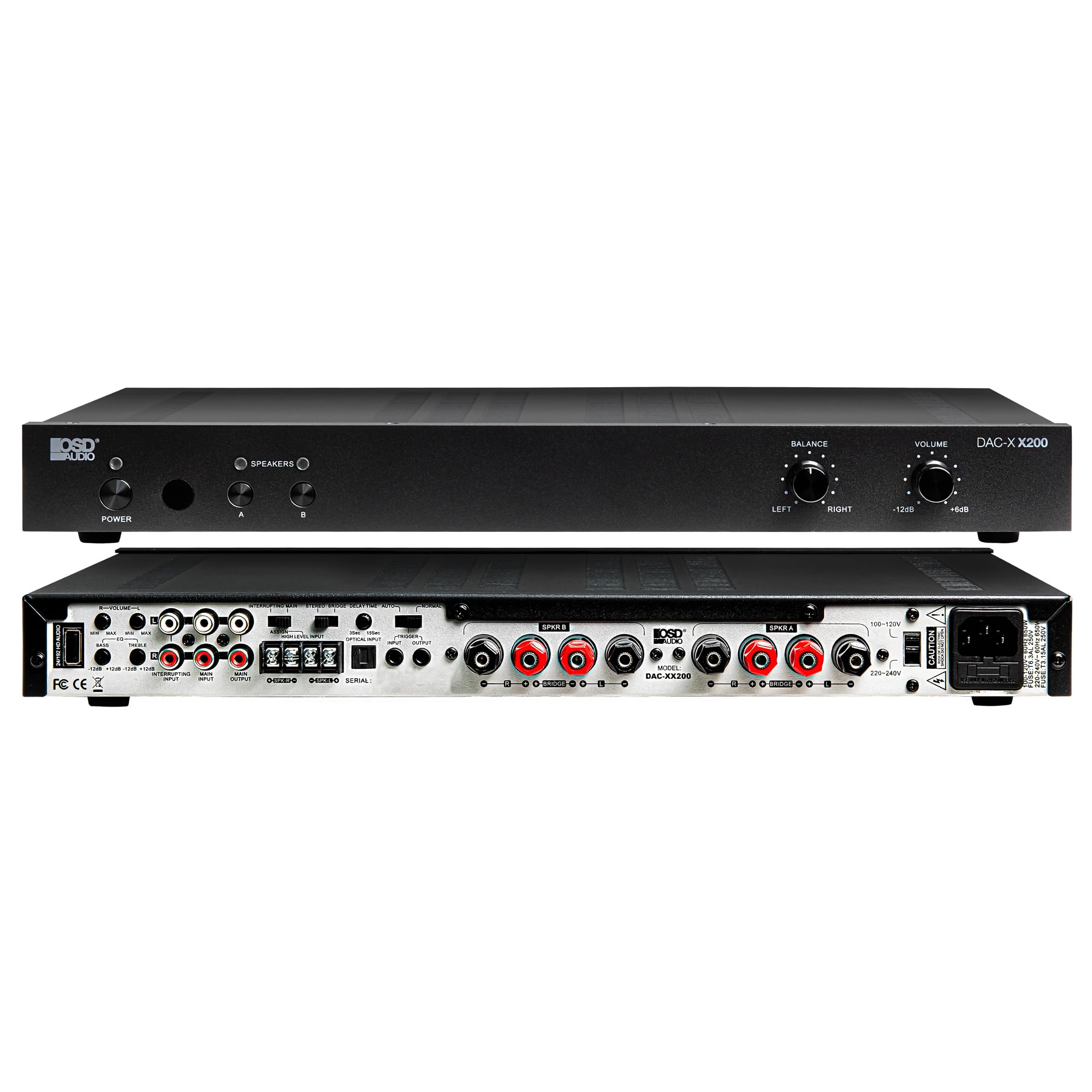
Figear 4.4: Cùl view of the DAC-X200 amplifier, displaying various audio inputs (USB, Optical, RCA), speaker outputs, and power input.

Figear 4.5: Detail of the rear panel inputs, including USB, Optical, and RCA connections.

Figear 4.6: Detail of the rear panel speaker output terminals for Speaker A and Speaker B.
5. Suidhich
5.1 Suidheachadh
Place the DAC-X200 on a flat, stable surface with adequate space around it for ventilation. Avoid enclosed cabinets or areas with poor airflow to prevent overheating.
5.2 A’ ceangal luchd-labhairt
- Dèan cinnteach gu bheil an ampTha an lifer dheth agus gun phluga.
- Ceangail na luchd-labhairt fulangach agad ris an SPEAKER A agus/no SPEAKER B terminals on the rear panel. Observe correct polarity (+ to + and - to -).
- For optimal performance, use high-quality speaker wire.
5.3 A’ ceangal stòran claisneachd
The DAC-X200 supports multiple input types:
- Input USB: Connect a computer or other USB audio source using a Type A to Type A USB 2.0 cable.
- Teachd a-steach optigeach: Connect digital audio sources like TVs or CD players using an optical cable.
- Toraidhean RCA: Connect analog audio sources such as music streamers, turntables (with a pre-amp), or other devices using RCA cables.
5.4 Ceangal cumhachd
After all audio and speaker connections are made, connect the supplied power cable to the ampin-ghabhail cumhachd an inneal-liquidachaidh agus an uairsin gu socaid cumhachd AC iomchaidh.
6. Stiùireadh Obrachaidh
6.1 Cumhachd air / dheth
Brùth an CUMHACHD putan air a’ phannal aghaidh gus an tionndadh amplifier on or off. The power indicator light will illuminate when the unit is on.
6.2 Taghadh a-steach
The DAC-X200 features smart source switching, automatically detecting and switching to an active input. If multiple inputs are active, you may need to manually select the desired input using the remote control (if applicable) or by cycling through inputs.
6.3 Smachd tomhas-lìonaidh
Atharraich meud an toraidh iomlan a’ cleachdadh an LUACHMHOR knob on the front panel. Rotate clockwise to increase volume and counter-clockwise to decrease it.
6.4 Smachdan Tòna
Cleachd an BEANNACHADH knob to adjust the left/right channel balance. The DAC-X200 also includes bass and treble adjustment knobs (located on the rear panel or accessible via remote, depending on model variation) to fine-tune the sound to your preference or room acoustics.
6.5 A/B Speaker Switching
Brùth an A or B buttons on the front panel to select which set of speakers (Speaker A, Speaker B, or both) are active. This allows for multi-room audio configurations.
7. Cumail suas
- Glanadh: Cleachd clò bog, tioram gus taobh a-muigh an taighe a ghlanadh ampNa cleachd innealan-glanaidh leaghaidh no aerosolan.
- Fionnarachadh: Dèan cinnteach bho àm gu àm gu bheil na fosglaidhean fionnarachaidh saor bho dhuslach is sprùilleach.
- Stòradh: Ma tha thu a’ stòradh an aonaid airson ùine mhòr, tarraing a-mach am pluga bhon t-socaid cumhachd agus stòraich e ann an àite fionnar, tioram.
8. A ’dèanamh trioblaid
| Trioblaid | Adhbhar a dh’fhaodadh a bhith ann | Fuasgladh |
|---|---|---|
| Gun chumhachd | Power cable not connected; Power outlet not active; Amplifier dheth. | Check power cable connection; Test power outlet; Press the Power button. |
| Gun fhuaim | Incorrect input selected; Speaker cables loose; Volume too low; Speakers A/B not selected. | Select correct input; Check speaker connections; Increase volume; Ensure Speaker A or B is active. |
| Fuaim air a mhilleadh | Input signal too high; Speaker impedance mismatch; Faulty cable. | Reduce source volume; Verify speaker impedance (8̣ or 4̣); Replace audio cables. |
| Input not switching automatically | Multiple active sources; Specific source not detected. | Manually select input; Ensure only one source is playing if auto-switching is desired. |
9. Sònrachaidhean
- Modail: DAC-X200
- Cumhachd toraidh: 100W RMS per channel at 8̣; 225W RMS per channel at 4̣; 450W bridged mono
- Àireamh de shianalan: 2
- DAC: Hi-Res 24bit/192khz, DSD formats supported
- Cur a-steach: USB, Optical, RCA
- Speaker Zones: A/B Switching
- Meudan (L x W x H): 16.7 x 10 x 2 òirleach
- Seòrsa stuth: Plastaig
- UPC: 810074881173
10. Fiosrachadh Barantais
OSD Audio products are designed for reliability and performance. This product is covered by a limited warranty against defects in materials and workmanship. Please refer to the official OSD Audio weblàrach-lìn no sgrìobhainnean a’ cheannaich agad airson teirmichean is cumhaichean sònraichte a’ bharantais, a’ gabhail a-steach mion-fhiosrachadh mu fhad agus còmhdach. Cùm do dhearbhadh ceannach airson tagraidhean barantais.
11. Taic
For technical assistance, troubleshooting not covered in this manual, or service inquiries, please contact OSD Audio customer support. You can find contact information, FAQs, and additional resources on the official OSD Audio weblàrach.
Weblàrach: www.osdaudio.com