
Ro-ràdh
This manual provides instructions for the Ceybo 3026000066 Remote Control, designed for use with Onn Roku Smart TVs. This remote offers an intuitive layout and simple button configuration for ease of use. It is a direct replacement and requires no programming.

Aghaidh view of the Ceybo 3026000066 remote control, showing its ergonomic design and button layout.
Suidhich
Stàladh bataraidh
The Ceybo 3026000066 remote control requires two AAA batteries (not included) for operation. Follow these steps to install the batteries:
- Lorg còmhdach roinn a’ bhataraidh air cùl an smachd iomallach.
- Brùth sìos air an taba agus sleamhnaich an còmhdach sìos gus an roinn fhosgladh.
- Cuir a-steach dà bataraidh AAA ùr, a’ dèanamh cinnteach gu bheil na cinn-uidhe adhartach (+) agus àicheil (-) a’ freagairt gu ceart ris na comharran taobh a-staigh an roinn.
- Sleamhnaich còmhdach roinn a’ bhataraidh air ais na àite gus an cliog e gu tèarainte.
Thoir an aire: This remote control does not require any programming or pairing. Once batteries are installed, it is ready for use with compatible Onn Roku Smart TVs.
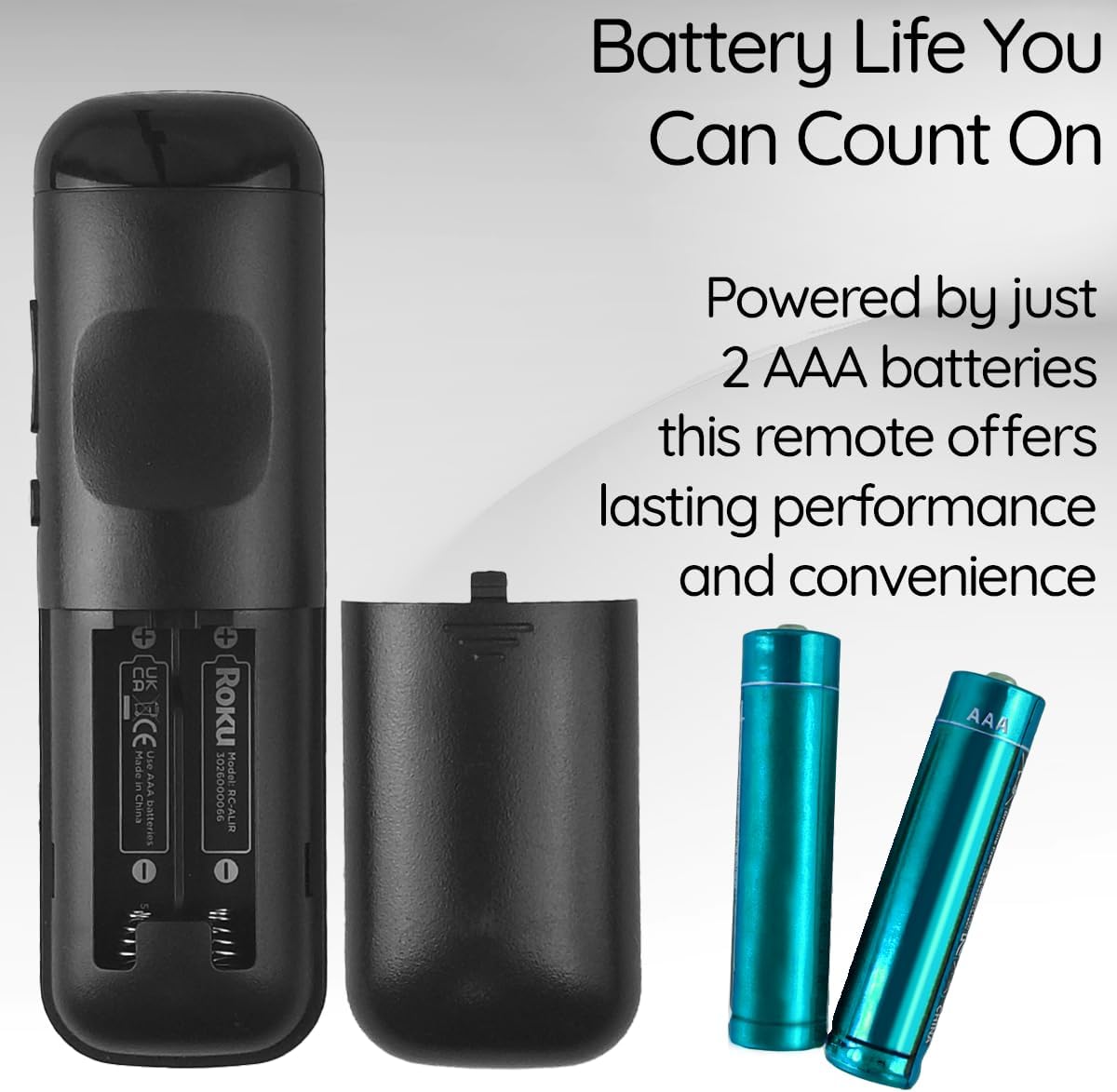
View of the remote control's battery compartment, indicating the use of two AAA batteries.
Stiùireadh Obrachaidh
The Ceybo 3026000066 remote control features a user-friendly design with clearly labeled buttons for easy navigation and quick access to your entertainment options.
Prìomh dhleastanasan:
- Putan Cumhachd: Tionndaidh an telebhisean air no dheth.
- Directional Pad (Up, Down, Left, Right) & OK Button: A’ seòladh clàran-bìdh agus a’ taghadh roghainnean.
- Putan air ais: Tilleadh chun sgrion no clàr-taice roimhe.
- Putan Dachaigh: Tillidh e gu scrion dachaigh Roku.
- Meud suas/sìos: Atharraich meud an telebhisean.
- Putan Mute: A’ cuir dheth no a’ cuir dheth fuaim an TBh.
- Cluich/Stad, Luath Air Adhart, Ath-fhilleadh: A ’cumail smachd air ath-chluich meadhanan.
- Star Button (*): Accesses options within certain apps or menus.
Putanan Ath-ghoirid Sònraichte:
This remote includes dedicated shortcut buttons for popular streaming services, allowing for instant access with a single press:
- Netflix
- Prìomh-mheud+
- Tbh Apple
- HBOMax

Faisg air làimh view of the remote control highlighting the dedicated shortcut buttons for Netflix, Paramount+, Apple TV, and HBOMax.
Co-fhreagarrachd
The Ceybo 3026000066 Remote Control is compatible with the following Onn Roku Smart TV models:
- 100005843
- 100007147
- 100012586
- 100005397
- 100018971
- 100005844
- 100024699
- 100012587
- 100021261
- 100012588
- 100012590
- 100012589
- 100005395
- 100005842
- 100068372
- 100018254
- 100012584
- 100012585
- 100021258
- 100005396
Cudromach: Tha an smachd iomallach seo neo-fhreagarrach with Roku Box or Roku Stick devices.

Image illustrating the Ceybo remote control alongside various Onn Roku Smart TV models, indicating broad compatibility.
Cumail suas
To ensure optimal performance and longevity of your remote control, consider the following maintenance tips:
- Ath-nuadhachadh bataraidh: Replace both AAA batteries when the remote's responsiveness decreases or it stops functioning. Always replace both batteries at the same time with new ones.
- Glanadh: Use a soft, dry cloth to clean the remote's surface. Avoid using liquid cleaners or abrasive materials, as these can damage the remote.
- Stòradh: Store the remote in a dry place away from extreme temperatures and direct sunlight. If the remote will not be used for an extended period, remove the batteries to prevent leakage.
Fuasgladh thrioblaidean
If you encounter issues with your Ceybo 3026000066 remote control, try the following troubleshooting steps:
- Iomallach nach eil a’ freagairt:
- Thoir sùil a bheil na bataraidhean air an cur a-steach gu ceart leis a’ phòlaireachd cheart (+/-).
- Replace the batteries with new AAA batteries. Weak or dead batteries are a common cause of remote control issues.
- Dèan cinnteach gu bheil loidhne-sheallaidh shoilleir eadar an smachd iomallach agus glacadair infridhearg an Tbh. Faodaidh bacadh sam bith an comharra a bhacadh.
- Putanan nach eil ag obair:
- If only specific buttons are not working, try cleaning the remote's surface around those buttons.
- Replace the batteries, as low power can sometimes affect individual button responsiveness.
- Remote Works Intermittently:
- Bidh seo gu tric a’ comharrachadh gu bheil cumhachd a’ bhataraidh ìosal. Cuir na bataraidhean ùra nan àite.
- Ensure you are within the maximum operating range of 30 feet from the TV.
If these steps do not resolve the issue, please refer to the Warranty and Support section.
Sònrachaidhean
| Brand | Ceybo |
| Ainm / Àireamh Modail | 3026000066 |
| Feart sònraichte | Ergonomic, Lightweight, No Programming Required |
| Dath | Dubh |
| An àireamh as motha de dh’ innealan le taic | 1 |
| Innealan co-fhreagarrach | Television (Onn Roku Smart TVs) |
| Teicneòlas ceangail | Fo-dhearg |
| Meud a' Phutain | 15 |
| Seòrsa Rianadair | Smachd putan |
| Raon as àirde | 30 troigh |
| Seòrsa bataraidh | AAA (2 required, not included) |
| UPC | 689176329575 |
Barantas agus Taic
This Ceybo remote control comes with a Barantas Dèanadair 1 Bliadhna.
For technical support, warranty claims, or further assistance, please contact Ceybo customer service. Refer to the product packaging or the Ceybo official weblàrach-lìn airson fiosrachadh conaltraidh.