
Ro-ràdh
This manual provides detailed instructions for the safe and effective use of your Yesido SF17 Multifunctional Selfie Stick Tripod. Please read this manual thoroughly before operating the device and retain it for future reference.
Bathar seachadview
The Yesido SF17 is a versatile device designed to function as both a selfie stick and a tripod stand. It features an extendable pole, a 360-degree rotating phone holder, and a detachable Bluetooth remote control for convenient photo and video capture.
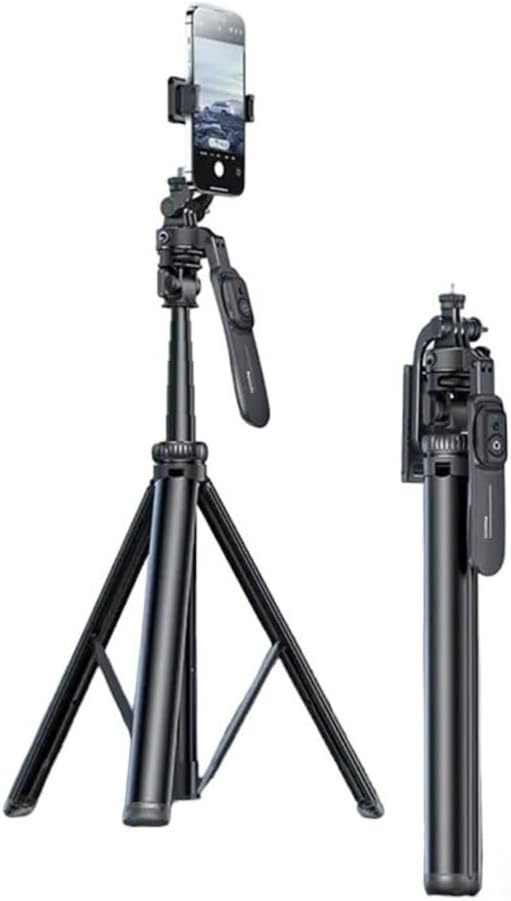
Image: The Yesido SF17 Selfie Stick Tripod shown both fully extended as a tripod with a phone attached, and folded into a compact stick for portability.
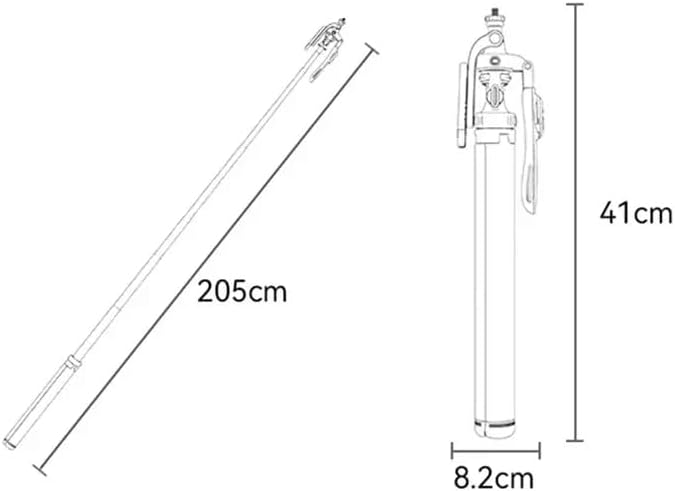
Image: A diagram illustrating the dimensions of the Yesido SF17. When folded, it measures approximately 41cm in length and 8.2cm in width. When fully extended, the pole reaches 205cm.
Prìomh cho-phàirtean:
- Pòla a ghabhas leudachadh: Allows for adjustable height up to 200cm.
- Casan trì-phòid: Provides stable support when used as a tripod.
- Neach-gleidhidh fòn: a ghabhas atharrachadh clamp to secure smartphones.
- Smachd Iomallach Bluetooth: Detachable remote for wireless photo/video capture.
- 1/4" Screw Mount: For attaching professional cameras or other accessories.
- Suidheachan Bròg Fuar: For mounting supplementary lighting or microphones.

Ìomhaigh: Dlùth-shealladh views of the Yesido SF17 tripod head, highlighting the 1/4 inch screw for professional camera installation, a 1/4 inch nut for microphone attachment, and a cold shoe seat for supplementary lighting.
Stiùiridhean rèiteachaidh
- Fosgail an Tripod: Gently pull the three legs outwards from the base of the stick until they are fully extended and stable.
- Leudaich am Pol: Pull the telescopic sections of the stick upwards to achieve the desired height. Ensure all sections are securely locked in place.
- Ceangail an inneal agad:
- Airson fònaichean sgairteil: Open the adjustable phone holder clamp and carefully insert your smartphone. Ensure it is securely gripped. The holder supports phones between 4.7 and 7.1 inches.
- Airson camarathan: If using a camera, screw it onto the 1/4" screw mount located at the top of the tripod head.
- Paidhir an Bluetooth Remote:
- Ensure the remote control is charged (if applicable) and powered on.
- Cuir an gnìomh Bluetooth air do fòn cliste.
- Lorg airson available devices and select "YESIDO" or a similar identifier.
- Once paired, the remote can be used to trigger your phone's camera shutter from up to 10 meters away.

Image: The Yesido SF17 tripod stand with a smartphone mounted, demonstrating the use of the detachable Bluetooth remote control for capturing photos from a distance of up to 10 meters.
Stiùireadh Obrachaidh
- Adjusting Phone Holder Orientation: The phone holder can be rotated horizontally or vertically to suit your shooting needs.
- Adjusting Shooting Angles:
- The tripod head allows for 360-degree pan tilt rotation for panoramic shots.
- The holder can be adjusted up and down by 260 degrees to meet various shooting angles.
- Further adjustments of 180 degrees are available for diverse photo styles.
- Using as a Selfie Stick:
- Fold the tripod legs back into the handle.
- Extend the pole to your desired length.
- Use the Bluetooth remote to capture photos or videos.
- Attaching External Accessories:
- Micreofon: Utilize the 1/4" nut for attaching external microphones.
- Supplementary Lighting: Mount LED lights or other lighting accessories onto the cold shoe seat.
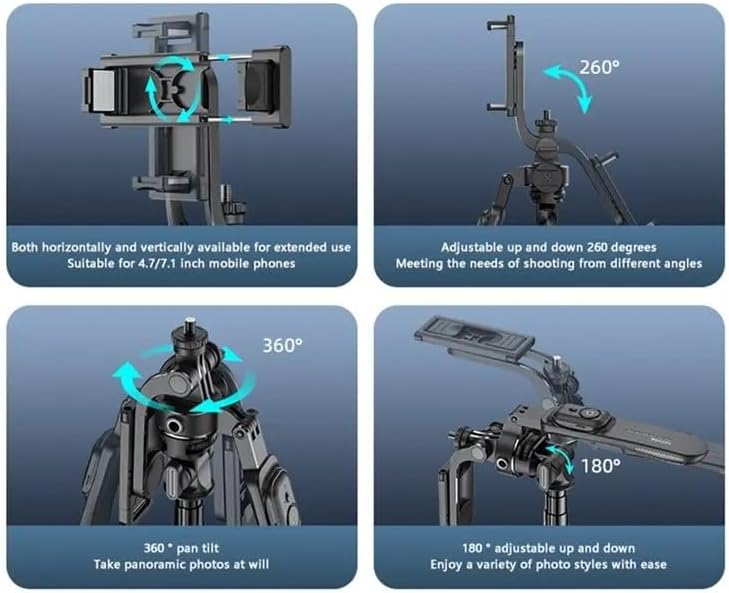
Image: Illustrations demonstrating the various adjustment capabilities of the Yesido SF17 tripod: horizontal and vertical phone holder rotation, 260-degree up and down adjustment, 360-degree pan tilt for panoramic photos, and 180-degree adjustable up and down for diverse photo styles.
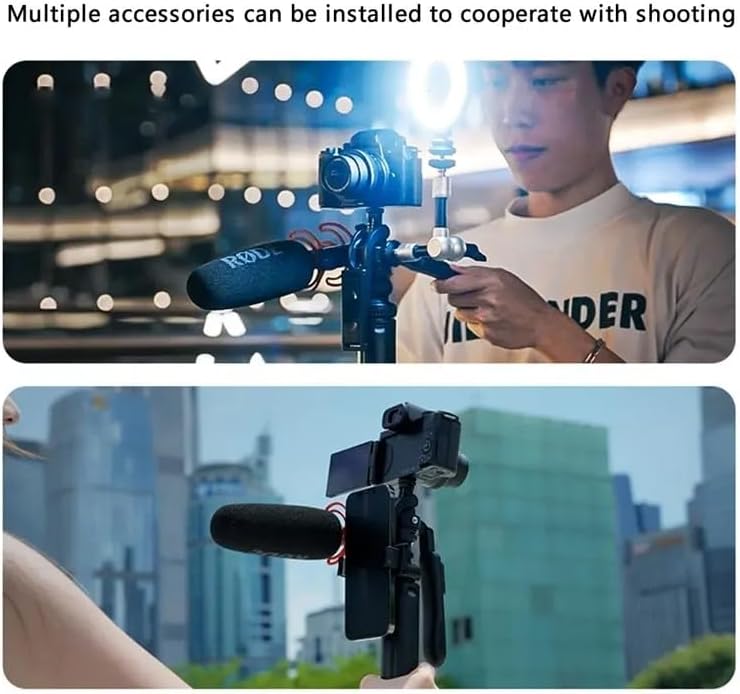
Image: Two scenarios showing the Yesido SF17 tripod with multiple accessories installed. The top image shows a camera, microphone, and supplementary light attached. The bottom image shows a smartphone, microphone, and external screen attached, demonstrating its versatility for content creation.
Cumail suas
- Clean the device with a soft, dry cloth. Avoid using abrasive cleaners or solvents.
- Stòraich an tripod ann an àite fionnar, tioram air falbh bho sholas dìreach na grèine agus teòthachd anabarrach.
- Ensure the telescopic pole sections are free from dust and debris to maintain smooth extension and retraction.
- Thoir sùil bho àm gu àm air na sgriothan agus na ceanglaichean uile gus dèanamh cinnteach gu bheil iad tèarainte.
Fuasgladh thrioblaidean
- Problem: Bluetooth remote does not pair.
- Fuasgladh: Ensure the remote is charged and powered on. Turn off and on your phone's Bluetooth. If the issue persists, try restarting both your phone and the remote.
- Problem: Tripod feels unstable.
- Fuasgladh: Ensure the tripod legs are fully extended and placed on a flat, stable surface. Do not overload the tripod beyond its weight capacity.
- Problem: Pole does not extend or retract smoothly.
- Fuasgladh: Check for any obstructions or debris in the telescopic sections. Clean the pole with a dry cloth. Avoid forcing the pole if it resists movement.
Sònrachaidhean
| Ainm Modail | Multifunctional Tripod Stand (SF17) |
| Brand | YESIDO |
| Stuth | Metal, Acrylonitrile Butadiene Styrene (ABS), Aluminum |
| An àirde as àirde | 200 Centimeters (205cm as per image) |
| Faid fillte | Approximately 41 Centimeters |
| Cuideam nì | 0.3 cileagram (300 g) |
| Comas cuideam as àirde | 2.2 Punnd |
| Innealan co-fhreagarrach | Smartphones (4.7-7.1 inches), Cameras |
| Raon Iomallach Bluetooth | Suas gu 10 meatair |
| Co-chòrdalachd siostam | Android 4.4 / iOS 5.1 no nas àirde |
| Seòrsa ceann tripod | Cinn Ball |
Fiosrachadh Sàbhailteachd
- Na cuir an inneal fo uisge no cus taiseachd.
- Seachain a bhith a’ leigeil às no fo smachd an inneal gu buaidhean làidir.
- Cùm a-mach à ruigsinn chloinne.
- Na feuch ris an inneal a thoirt às a chèile no atharrachadh.
- Ensure your device is securely mounted before use to prevent accidental falls.