
1. Ro-ràdh
Thank you for choosing the TECLAST Mini PC N15. This compact and powerful mini computer is designed for a wide range of applications, from home entertainment and office tasks to creative work and light gaming. Featuring an Intel N5095 processor, 16GB DDR4 RAM, and a 512GB PCI-e 3.0 SSD, it offers efficient performance in a small form factor. This manual provides essential information for setting up, operating, maintaining, and troubleshooting your device.
2. Pasgan-susbaint
Please verify that all items listed below are included in your package. If any items are missing or damaged, please contact TECLAST customer support.
- 1x TECLAST N15 Mini PC
- 1x Leabhar-làimhe Cleachdaiche
- Càball HDMI 1 x
- 1x VESA Mount
- Adaptor cumhachd 1x
- 1 x càball cumhachd

Image: Package contents of the TECLAST N15 Mini PC.
3. Toradh thallview
3.1. Prìomh fheartan
- Pròiseasar: Intel N5095 (4 Cores, 4 Threads, up to 2.9GHz Turbo Frequency)
- Grafaigean: Grafaigean Intel UHD
- Cuimhne: 16 GB de RAM DDR4
- Stòradh: 512GB PCI-e 3.0 SSD
- Ceangal: Dual 2.5GbE RJ45 Ethernet, Wi-Fi (2.4G+5G ac), Bluetooth 4.2
- Toradh bhidio: Supports up to three 4K displays (HDMI, DisplayPort, Full-Function Type-C)
- Puirt: Multiple USB 3.2, USB 2.0, Full-Function Type-C, DisplayPort, HDMI, COM Port, Micro SD Card Reader, Headphone Output, Microphone Input
- Dealbhadh: Compact (0.53L volume, 400g weight), Aluminum Body, VESA Mountable

Image: Intel N5095 Processor specifications and architecture.
3.2. Puirt agus Eadar-aghaidh
The TECLAST N15 Mini PC offers a comprehensive set of ports for versatile connectivity:
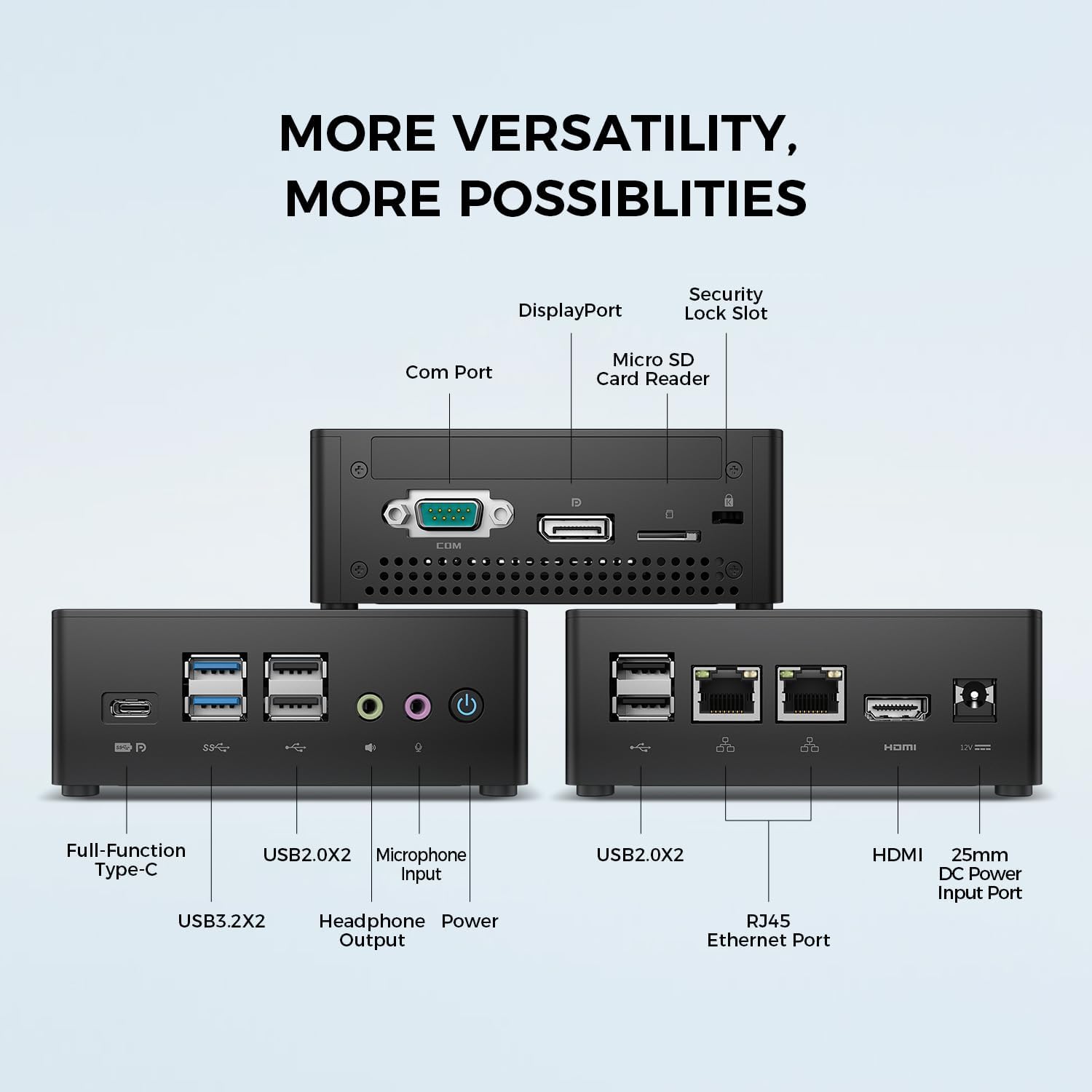
Ìomhaigh: Mion-fhiosrachadh view of the TECLAST N15 Mini PC's front, side, and rear ports.
- Pannal aghaidh: Full-Function Type-C (supports charging, data, video, audio), 2x USB 3.2, 2x USB 2.0, Headphone Output, Microphone Input, Power Button.
- Pannal Taobh: COM Port, DisplayPort, Micro SD Card Reader, Security Lock Slot.
- Pannal cùil: 2x USB 2.0, 2x RJ45 Ethernet Ports (2.5GbE), HDMI, DC Power Input.

Image: Dual 2.5GbE RJ45 Ethernet Ports for high-speed networking.
3.3. Siostam fuarachaidh
The N15 Mini PC is designed for efficient heat dissipation to ensure stable and quiet operation. It features a 15W TDP, nickel-plated heat pipe, and a turbo fan, providing over 16000mm² of heat dissipation area.

Image: Internal cooling system design for quiet and efficient operation.
3.4. Dealbhadh Compact
With a compact volume of approximately 0.53L and a weight of 400g, the N15 Mini PC is highly portable and can be easily integrated into any workspace. Its aluminum body ensures durability.

Image: Compact size and lightweight design of the Mini PC.
4. Stiùireadh Stèidheachaidh
4.1. Ceangal Peripherals
- Ceangail Monitor: Use the provided HDMI cable to connect your monitor to the HDMI port on the Mini PC. Alternatively, use a DisplayPort cable or a Full-Function Type-C cable for compatible monitors.
- Ceangail am Meur-chlàr agus an Luchag: Plug your USB keyboard and mouse into any available USB ports on the Mini PC.
- Ceangail ris an lìonra (Roghainneil): For a wired connection, connect an Ethernet cable from your router or modem to one of the RJ45 ports on the Mini PC. For wireless, ensure your Wi-Fi network is available during initial setup.
- Ceangal cumhachd: Connect the power adapter to the DC Power Input port on the Mini PC, then plug the power cable into a wall outlet.
4.2. Powering On agus Tòiseachadh Setup
- Brùth am Putan Cumhachd air aghaidh a’ Mini PC.
- The system will boot up. If it's the first time, it will guide you through the Windows operating system setup process. Follow the on-screen instructions to configure language, region, network, and user accounts.
- Ensure all drivers are installed. Windows Update typically handles this automatically.
5. Stiùireadh Obrachaidh
5.1. Obrachadh Bunaiteach
Once setup is complete, your TECLAST N15 Mini PC functions like a standard desktop computer. You can launch applications, browse the internet, and manage files using your connected keyboard and mouse.
5.2. Suidheachadh Ioma-thaisbeanaidh
The Mini PC supports connecting up to three 4K displays simultaneously, enhancing productivity and entertainment experiences.
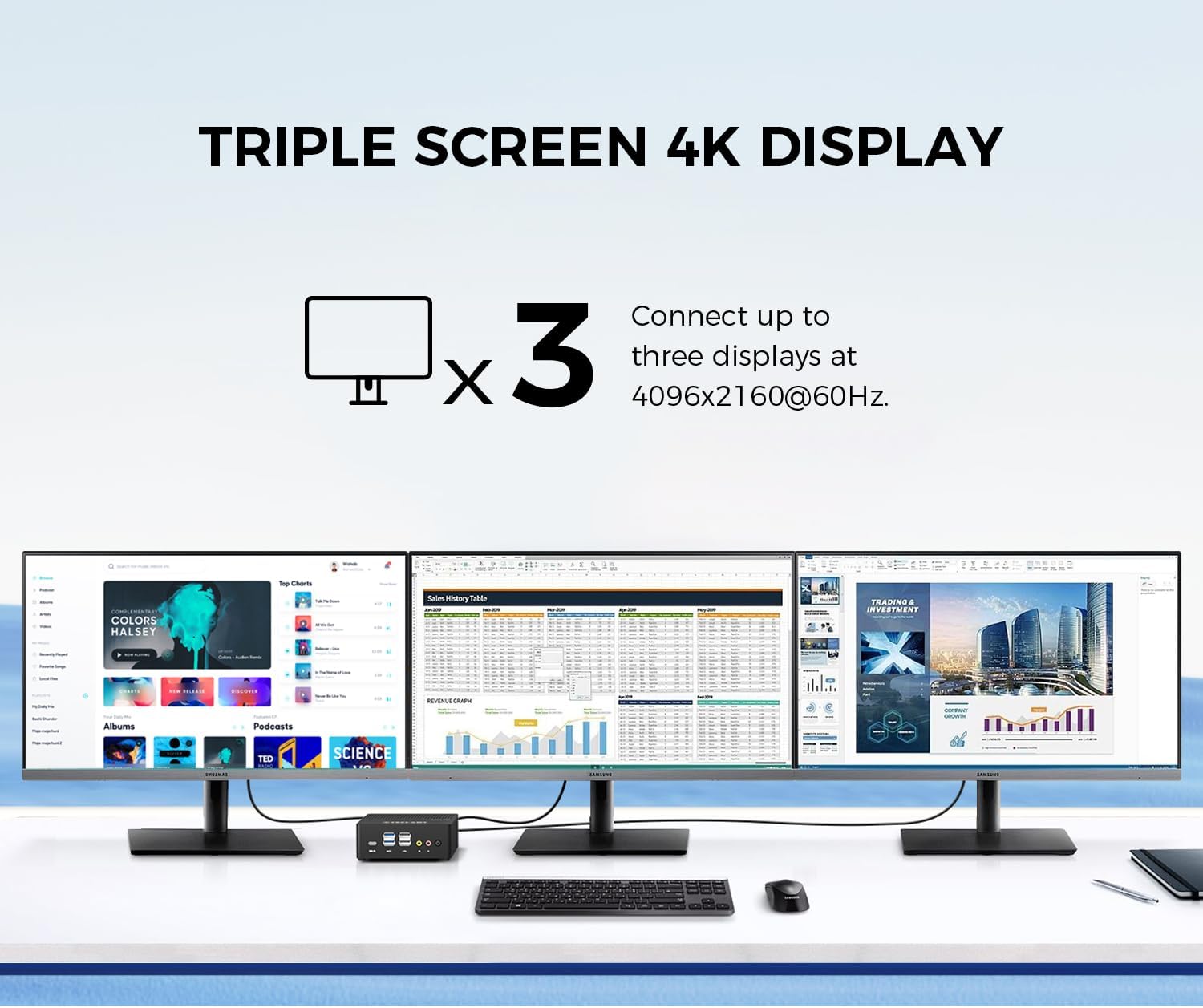
Image: Triple screen 4K display setup with the Mini PC.
- Connect your primary monitor via HDMI.
- Connect a second monitor via DisplayPort.
- Connect a third monitor via the Full-Function Type-C port (requires a compatible Type-C to DisplayPort/HDMI adapter or monitor).
- In Windows, right-click on the desktop and select "Display settings" to configure your multiple displays (extend, duplicate, or show only on one).
5.3. Wireless Connectivity
The Mini PC supports 2.4G+5G ac Wi-Fi and Bluetooth 4.2 for wireless connections.
- Wi-Fi: Access Wi-Fi settings in Windows to connect to your preferred wireless network.
- Bluetooth: Pair Bluetooth devices like keyboards, mice, or headphones through Windows Bluetooth settings.
6. Cumail suas
Bidh cumail suas cunbhalach a’ cuideachadh le bhith a’ dèanamh cinnteach gum mair am Mini PC agad fad-beatha agus gum bi e ag obair gu math.
- Glanadh: Use a soft, dry cloth to clean the exterior. For dust accumulation in vents, use compressed air. Ensure the device is powered off and unplugged before cleaning.
- Ùrachaidhean bathar-bog: Regularly check for and install Windows updates and driver updates to maintain system security and performance.
- Stiùireadh Stòraidh: Glan suas rudan neo-riatanach bho àm gu àm files and applications to free up storage space and improve system responsiveness.
- Fionnarachadh: Dèan cinnteach gu bheil am Mini PC air a chur ann an àite le deagh fhionnarachadh agus nach eil na beul-fhionnaidh aige air am bacadh gus casg a chur air cus teasachadh.
7. A ’dèanamh trioblaid
If you encounter issues with your TECLAST N15 Mini PC, refer to the following common troubleshooting steps:
| Cùis | Fuasgladh comasach |
|---|---|
| Gun taisbeanadh air an monitor | Check all cable connections (HDMI, DisplayPort, Type-C). Ensure the monitor is powered on and set to the correct input source. Try a different cable or monitor if possible. |
| Chan eil am mini PC a’ tionndadh air | Verify the power adapter is securely connected to both the Mini PC and a working power outlet. Try a different power outlet. |
| Gun cheangal eadar-lìn (Wi-Fi) | Check if Wi-Fi is enabled in Windows settings. Ensure you are connected to the correct network and have entered the password correctly. Restart your router/modem. |
| No internet connection (Wired) | Ensure the Ethernet cable is securely connected to both the Mini PC and your router/modem. Check the network status in Windows. Restart your router/modem. |
| Coileanadh slaodach | Close unnecessary applications. Check for background processes consuming resources. Ensure sufficient free storage space. Run a system scan for malware. |
| Peripheral devices not recognized | Try connecting the device to a different USB port. Ensure device drivers are installed. Restart the Mini PC. |
If the issue persists after trying these steps, please contact TECLAST customer support for further assistance.
8. Sònrachaidhean
Detailed technical specifications for the TECLAST N15 Mini PC:
| Feart | Sònrachadh |
|---|---|
| Brand | TECLAST |
| Modail Àireamh | N15 |
| Modail CPU | Intel Celeron N5095 |
| Luas CPU | Up to 2.9 GHz (Turbo Frequency) |
| Cunntas Pròiseasaran | 4 |
| Cuimhne RAM air a stàladh | 16 GB DDR4 |
| Meud as motha de chuimhne RAM | 16 GB |
| Comas stòraidh cuimhne | 512 GB PCI-e 3.0 SSD |
| Grafaigeachd coprocessor | Grafaigean Intel UHD |
| Fuasgladh taisbeanaidh as àirde | 3840 x 2160 piogsail (4K) |
| Eadar-aghaidh toraidh bhidio | HDMI, DisplayPort, Type-C |
| Teicneòlas ceangail | Ethernet (Dual RJ45 2.5GbE), HDMI, LAN, Wi-Fi (802.11ac), Bluetooth 4.2 |
| Gu h-iomlan puirt USB | 6 (2x USB 3.2, 4x USB 2.0) |
| Cuideam nì | 400 gram |
| Caitheamh cumhachd | 15 watt |
| Modh fuarachaidh | Air (with Turbo Fan and Nickel-Plated Heat Pipe) |
| Dath | Dubh |
9. Barantas agus Taic
TECLAST products are designed for quality and reliability. For any product-related inquiries, technical support, or warranty claims, please contact TECLAST customer service. Most questions are answered within 24 hours.
For further assistance, please visit the official TECLAST weblàrach no cuir fios chun na seanalan taic aca gu dìreach.
10. Bhidio Bathar
Coimhead air a’ bhidio toraidh oifigeil seo airson sealladh farsaingview of the TECLAST N15 Mini PC's features and connectivity.
Bhidio: Tharview of the TECLAST N15 Mini PC, showcasing its design, ports, and internal components.