Signia Signia Charge and Go

Leabhar-làimhe Cleachdaiche Charger So-ghiùlain Signia Silk Charge & Go IX

Brand: Signia | Modail: Signia Charge and Go

1. Ro-ràdh

This manual provides comprehensive instructions for the Signia Silk Charge & Go IX portable charger. This device is designed to offer convenient and wireless charging for compatible Signia Silk IX 5 and 7 hearing aids, ensuring they remain powered throughout the day and providing additional charges when away from a power outlet.

2. Fiosrachadh Sàbhailteachd

Please read all safety information carefully before using the Signia Silk Charge & Go IX portable charger. Failure to follow these instructions may result in injury or damage to the device.

  • Na dean expose the charger to extreme temperatures, direct sunlight, or high humidity.
  • Na dean immerse the charger in water or any other liquids.
  • Na dean attempt to open, modify, or repair the charger yourself. Refer all servicing to qualified personnel.
  • Cùm an charger a-mach à ruigsinn clann is peataichean.
  • Use only the charging cable and power adapter recommended by Signia.
  • If the charger shows signs of damage, discontinue use immediately.

3. Toradh thallview

The Signia Silk Charge & Go IX portable charger is a compact and efficient charging solution. Familiarize yourself with its components:

3.1 Co-phàirtean an luchdadair

Signia Silk Charge & Go IX portable charger with lid open, showing empty charging slots.

Dealbh 1: The Signia Silk Charge & Go IX portable charger with its lid open, revealing the two empty charging slots designed for hearing aids. This view highlights the compact and ergonomic design of the charging case.

  • Sliotan cosgais: Two dedicated slots for left (blue) and right (red) hearing aids.
  • Comharran LED: Small lights on the front of the charger that indicate charging status and battery level.
  • Port cosgais USB-C: Located on the back or side for connecting the charger to a power source.
  • Mullach: Protects the hearing aids and ensures proper contact during charging.

3.2 Closed View

Signia Silk Charge & Go IX portable charger in a closed position, showing its compact and sleek design.

Dealbh 2: The Signia Silk Charge & Go IX portable charger in its closed state. This image emphasizes the device's portability and discreet appearance, suitable for carrying in a pocket or bag.

When closed, the charger is designed to be compact and easily portable, allowing you to carry it with your hearing aids safely stored inside.

4. Suidhich

4.1 Fosgladh a’ bhogsa agus a’ chiad chosgais

  1. Thoir an charger agus na goireasan uile a-mach às a’ phacaid gu faiceallach.
  2. Connect the provided USB-C cable to the charging port on the charger and the other end to a compatible USB power adapter (not included) or a computer USB port.
  3. Allow the charger to fully charge before first use. The LED indicator will show the charging status (e.g., blinking while charging, solid when fully charged). A full charge typically takes a few hours.

4.2 Inserting Hearing Aids

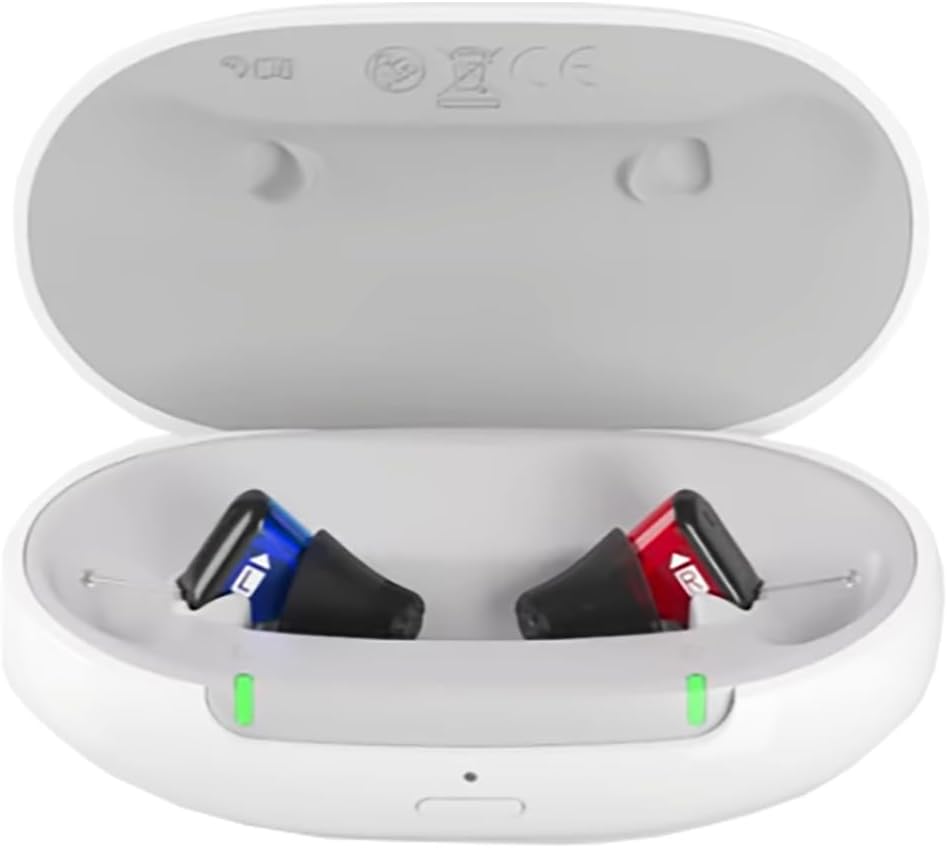
Signia Silk Charge & Go IX portable charger with two hearing aids inserted, showing green indicator lights.

Dealbh 3: The Signia Silk Charge & Go IX portable charger with two Signia Silk IX hearing aids correctly placed in their respective charging slots. Green indicator lights are visible, signifying that the hearing aids are actively charging.

  1. Open the lid of the portable charger.
  2. Identify the left (blue) and right (red) indicators inside the charging slots.
  3. Gently place your Signia Silk IX hearing aids into their corresponding slots. Ensure they are seated correctly and make proper contact with the charging pins.
  4. Close the lid. The hearing aids will automatically begin charging.

5. Ag obair an charger

5.1 Charging Hearing Aids

Once hearing aids are correctly placed in the charger and the lid is closed, charging will commence. The LED indicators on the charger will provide feedback:

  • A ’lùbadh uaine: Hearing aids are charging.
  • Uaine cruaidh: Hearing aids are fully charged.
  • Blinking Orange/Red: Low battery on the portable charger itself.

A full charge for the hearing aids typically takes approximately 4 hours. The portable charger can provide up to 4 days of additional charges for your hearing aids on a single full charge of the charger itself.

5.2 Portable Charging

The Signia Silk Charge & Go IX is designed for portability. Once the charger itself is fully charged, you can disconnect it from the power source and use it to charge your hearing aids on the go. Simply place your hearing aids in the charger, close the lid, and they will charge wirelessly using the internal battery of the portable charger.

6. Cumail suas

6.1 Glanadh an charger

  • Ensure the charger is disconnected from any power source before cleaning.
  • Wipe the exterior of the charger with a soft, dry, lint-free cloth.
  • Na cleachd innealan-glanaidh sgrìobach, fuasglaidhean, no ceimigean cruaidh.
  • Gently clean the charging contacts inside the slots with a dry cotton swab if necessary, ensuring no debris is present.

6.2 Stòradh

When not in use, store the charger in a cool, dry place, away from direct sunlight and extreme temperatures. If storing for an extended period, ensure the charger has at least a partial charge to maintain battery health.

7. A ’dèanamh trioblaid

If you encounter issues with your Signia Silk Charge & Go IX portable charger, refer to the following common problems and solutions:

  • Charger not powering on or charging:
    • Dèan cinnteach gu bheil an càball USB-C ceangailte gu tèarainte ris an charger agus ris an stòr cumhachd.
    • Feuch port USB no inneal-atharrachaidh cumhachd eile.
    • Dèan cinnteach a bheil an t-ionad cumhachd obrachail.
  • Hearing aids not charging when placed in the charger:
    • Ensure the hearing aids are correctly seated in their respective left/right slots and making proper contact with the charging pins.
    • Verify that the portable charger itself has sufficient battery charge (check its LED indicator).
    • Clean the charging contacts on both the hearing aids and the charger.
    • Dèan cinnteach gu bheil am mullach dùinte gu tur.
  • Comharran LED nach eil ag obair:
    • If the charger is connected to power, ensure the power source is active.
    • If the charger is running on its internal battery, ensure it has charge.
    • Ma mhaireas a’ chùis, cuir fios gu taic teachdaiche.

If these steps do not resolve the issue, please contact Signia customer support or your hearing care professional.

8. Sònrachaidhean

FeartSònrachadh
Meudan toraidh1 x 3.5 x 1 òirleach
Àireamh Modail NìSignia Charge and Go
Teicneòlas ceangailUSB
Seòrsa ceangailSeòrsa C USB
Innealan co-fhreagarrachSignia Silk IX 5 & 7 Hearing Aids
Feart sònraichteCharger so-ghiùlain
DathGeal
Gu h-iomlan puirt USB1
Dètage10 watt
Àireamh de nithean1
StuthPlastaig
DèanadairWSAUD A/S
ASINB0CRLCHFFR

9. Barantas agus Taic

9.1 Fiosrachadh Barantais

The Signia Silk Charge & Go IX portable charger comes with a Barantas 1-bliadhna provided through the manufacturer. Please retain your proof of purchase for warranty claims.

9.2 Taic teachdaiche

For technical assistance, troubleshooting beyond this manual, or warranty inquiries, please contact Signia customer support or your authorized Signia hearing care professional. Contact information can typically be found on the manufacturer's official weblàrach-lìn no tron ​​àite ceannach agad.