
1. Ro-ràdh
The FNIRSI HS-01 is a smart, portable electric soldering iron designed for precision soldering tasks. It features adjustable temperature control, fast heating capabilities, and supports both PD 65W and DC 96W power inputs, making it versatile for various applications including electronic assembly and circuit board repair. This manual provides essential information for the safe and effective operation of your device.
2. Fiosrachadh Sàbhailteachd
Please read and understand all safety instructions before using the soldering iron. Failure to follow these instructions may result in electric shock, fire, or serious injury.
- Always wear appropriate personal protective equipment, including safety glasses, to protect against solder splashes and fumes.
- Obraich ann an sgìre le deagh fhionnarachadh to avoid inhaling harmful solder fumes.
- Do not touch the soldering iron tip or heating element when hot. Temperatures can reach up to 420°C and cause severe burns.
- Place the soldering iron in its stand when not in use to prevent accidental contact or damage to surfaces.
- Ensure the power supply is compatible with the soldering iron's voltage agus wattage requirements (9-24V DC, up to 96W).
- Keep the soldering iron away from flammable materials.
- Unplug the soldering iron when not in use or before performing any maintenance.
- Do not use the soldering iron if it is damaged or if the power cord is frayed.
- Cùm a-mach à ruigsinn chloinne.
3. Pasgan-susbaint
The FNIRSI HS-01 Smart Electric Soldering Iron PD 65W Kit typically includes the following items:
- FNIRSI HS-01 Soldering Iron
- Soldering Iron Tip (pre-installed or separate)
- Seasamh Iarainn-sàdaidh
- Càball USB Type-C
- PD 65W Power Adapter
- Uèir solder
- Sponge glanaidh
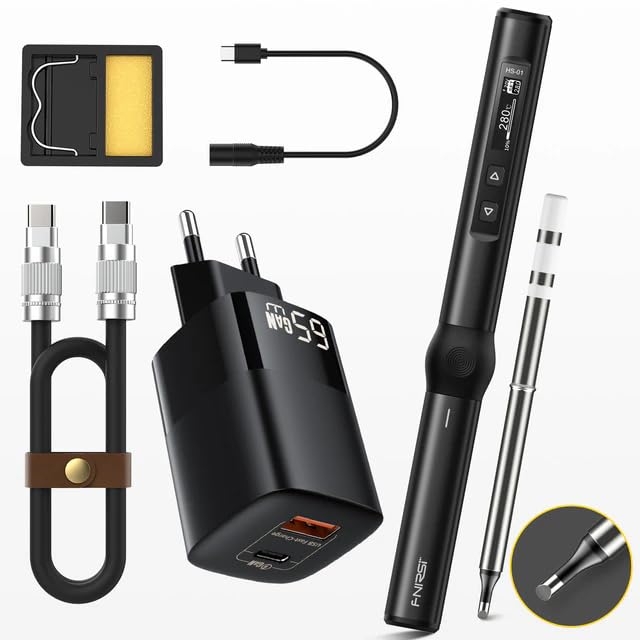
Image 3.1: Contents of the FNIRSI HS-01 Smart Electric Soldering Iron PD 65W Kit. The image displays the soldering iron, a stand, a USB Type-C cable, a PD 65W power adapter, solder wire, and a cleaning sponge.
4. Feartan toraidh
- Teòthachd fhreagarrach: Teòthachd raon bho 80 ° C gu 420 ° C.
- Teasachadh luath: Achieves operating temperature quickly, with heating up in 1 second and melting tin in 6 seconds (depending on power supply and tip).
- Cuir a-steach Cumhachd Dùbailte: Supports Power Delivery (PD) up to 65W and DC power up to 96W (9-24V).
- Taisbeanadh OLED: 0.87-inch OLED screen for clear temperature and status indication.
- PID Temperature Control: Ensures stable and accurate temperature with less than 2% deviation.
- Inductive Sleep & Auto Shutdown: Automatically enters sleep mode and shuts down after 30 minutes of inactivity to prevent dry burning and save energy.
- Dealbhadh so-ghiùlain: Compact and lightweight for easy transport and field repairs.
- Togail seasmhach: Made with high-quality stainless steel and CNC metal integral molding.

Dealbh 4.1: Thairisview of the FNIRSI HS-01's key features, highlighting its fast heating capability (1s heat-up, 6s tin melting) and portability for field repairs. It also mentions DC 96W and PD 65W power, constant temperature, and smart safety anti-scald features.

Image 4.2: Illustration of the inductive sleep and auto shutdown feature. The soldering iron automatically enters sleep mode and shuts down after 30 minutes of inactivity to prevent dry-burning.

Image 4.3: Diagram showing the PID control for stable temperature, indicating rapid and stable heating with less than 2% accuracy deviation. It also highlights the lead-free soldering iron tip with fast heat conduction.
5. Sònrachaidhean
| Paramadair | Luach |
|---|---|
| Modail | HS-01 |
| Brand | FNIRSI |
| PD Operating Voltage | 9-20V |
| DC Obrachaidh Voltage | 9-24V |
| Cumhachd PD | 65W aig a’ char as àirde |
| Cumhachd DC | 96W aig a’ char as àirde |
| Raon Teòthachd | 80°C - 420°C |
| Eadar-aghaidh solar cumhachd | USB Type-C |
| Pròtacal cosgais luath | PD Trigger |
| Sgrion | OLED 0.87 òirleach |
| Seòrsa eileamaid teasachaidh | Ceirmeach |
| Meudan | 184mm (Fad) x 20mm (trast-thomhas) |
| Tùs | Sìona |
| Teisteanas | CE |

Image 5.1: Detailed parameters and dimensions of the FNIRSI HS-01 soldering iron, including PD/DC operating voltage, power, temperature range, power supply type, fast charging protocol, and screen size.

Image 5.2: Information on PD power supply and adjustable input voltage. The image includes a table detailing operating voltage, current, power, and melting time for various input voltages (9V, 12V, 15V, 20V, 24V). It also shows the Type-C interface.
6. Suidhich
- Unpack: Thoir air falbh na pàirtean gu lèir bhon phacaid gu faiceallach.
- Cuir a-steach tip tàthaidh: Ensure the soldering tip is securely inserted into the heating element of the soldering iron.
- Ceangal cumhachd: Connect the USB Type-C cable to the soldering iron and then to a compatible power source (PD 65W power adapter or DC 9-24V power supply).
- Àite anns an t-Seata: Position the soldering iron securely in its stand when not actively being held for soldering.
7. Stiùireadh Obrachaidh
7.1 Cumhachd air / dheth
- Cumhachd air: Once connected to a power source, the soldering iron will automatically power on and display the current temperature on the OLED screen.
- Cumhachd dheth: Disconnect the power cable from the soldering iron. The device will cool down and shut off.
7.2 Atharrachadh Teòthachd
- Cleachd an Up agus Sìos buttons located on the handle to adjust the target temperature.
- The OLED screen will display the set temperature and the current temperature.
- The soldering iron will rapidly heat up to the set temperature and maintain it using PID control.
7.3 Inductive Sleep Mode
The HS-01 features an inductive sleep function. If the soldering iron is placed in its stand or remains inactive for a set period (default 30 minutes), it will automatically reduce its temperature to a lower sleep temperature to prevent dry burning and prolong tip life. It will resume heating to the set temperature once movement is detected.
8. Cumail suas
- Glanadh Tip: Glan bàrr an tàthaidh gu cunbhalach le bhith a’ cleachdadh sanasamp spong no clòimh umha gus cus tàthar agus oxidation a thoirt air falbh. Cuidichidh seo le bhith a’ cumail suas gluasad teas èifeachdach.
- A’ snìomh a’ chomhairle: After cleaning and before storing, apply a small amount of fresh solder to the tip (tinning) to prevent oxidation and ensure longevity.
- Stòradh: Store the soldering iron in a dry, safe place, preferably in its original packaging or a protective case, when not in use.
- Sgrùdadh: Periodically inspect the power cable and the soldering iron for any signs of damage. Do not use if damaged.
9. A ’dèanamh trioblaid
- Iarann-tàthaidh gun teasachadh:
- Ensure the power cable is securely connected to both the soldering iron and the power source.
- Verify that the power source (PD adapter or DC supply) is functioning correctly and provides sufficient power (9-24V, up to 96W).
- Check if the soldering tip is properly inserted.
- Atharrachadh teòthachd:
- Ensure the soldering tip is clean and properly tinned. Oxidation can affect temperature stability.
- Verify the power supply is stable and meets the required specifications.
- Taisbeanadh OLED nach eil ag obair:
- Thoir sùil air ceangal cumhachd.
- Ma tha an cuir a-steach voltage is lower than 9V, the screen may display "LOW VOLTAGE". Ensure adequate power.
- Soldering Iron Enters Sleep Mode Too Quickly:
- The sleep time is typically fixed at 30 minutes. Ensure you are actively using the iron or moving it slightly to keep it awake.
10. Barantas agus Taic
The FNIRSI HS-01 Smart Electric Soldering Iron is designed for durability and performance. Spare parts availability in the EU is typically 1 year from the date of purchase.
For technical support, warranty claims, or service inquiries, please contact your retailer or the manufacturer directly through their official channels. Please have your purchase receipt and product model number (HS-01) ready when contacting support.