
1. Ro-ràdh agus Os a chionnview
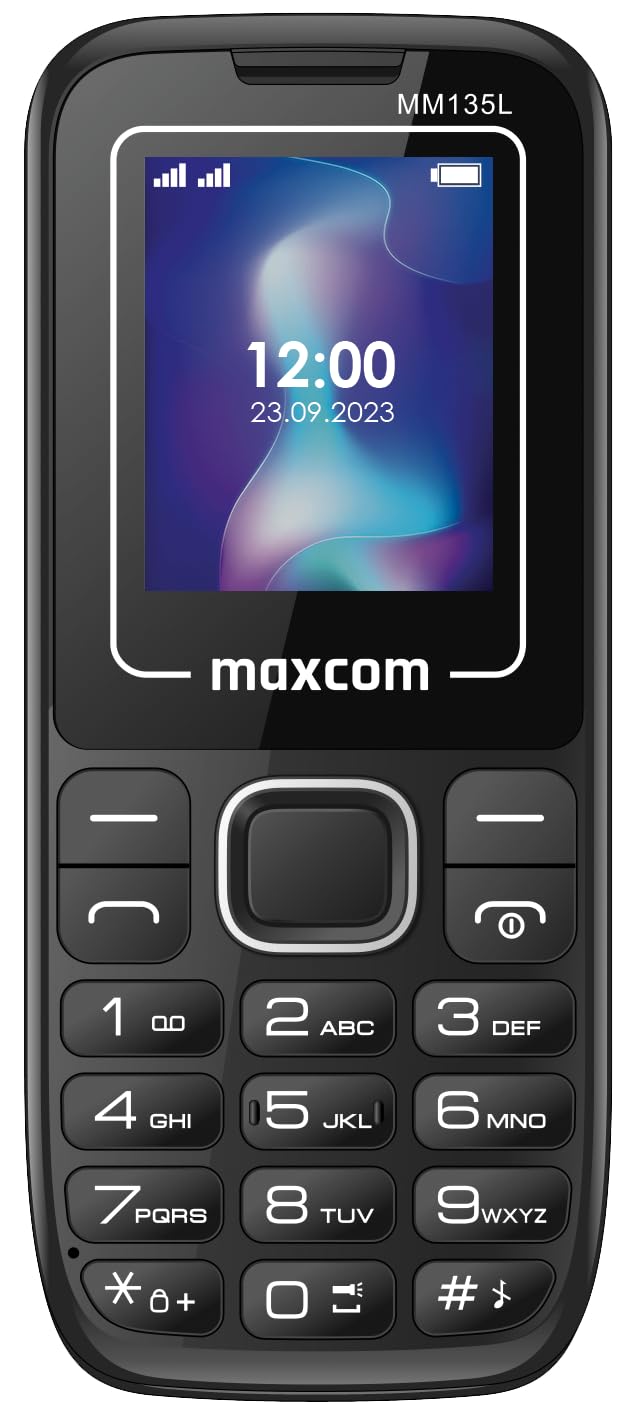
This manual provides essential instructions for the safe and efficient use of your Maxcom MM135L Basic Mobile Phone. The MM135L is designed for straightforward communication, featuring a user-friendly interface, large keys, and a 1.77-inch screen. It supports 2G networks and includes dual SIM capability, an SOS button for emergencies, and convenient USB-C charging. Please read this manual thoroughly before operating the device.
2. Pasgan-susbaint
Dèan cinnteach gu bheil a h-uile nì anns a’ phacaid:
- Maxcom MM135L Mobile Phone
- Battery (Lithium-Ion, 600 mAh)
- Càball USB
- Ejector treidhe SIM
- Leabhar-làimhe cleachdaiche (an sgrìobhainn seo)
3. Cruth inneal
Familiarize yourself with the physical components of your Maxcom MM135L phone.
Figear 3.1: Cùl view of the Maxcom MM135L phone, showing the blue textured back cover, Maxcom logo, and speaker grille at the top.

Figear 3.2: Aghaidh view of the Maxcom MM135L phone, displaying the screen, large numeric keypad, and call/end buttons.

Figure 3.3: Bottom edge of the phone, featuring the USB-C charging port and a 3.5mm headphone jack.

Figure 3.4: Top edge of the phone, highlighting the integrated flashlight.
Prìomh cho-phàirtean:
- Sgrion Taisbeanaidh: 1.77-inch LCD for clear text and call information.
- Meur-chlàr àireamhach: Large, tactile buttons for easy dialing and texting.
- Putanan gairm/crìochnachaidh: Dedicated buttons for managing calls.
- Iuchraichean seòlaidh: Airson seòladh clàr-taice.
- Putan SOS: Located on the rear for emergency calls (refer to Figure 3.1).
- Flashlight: Integrated at the top of the device (refer to Figure 3.4).
- Port USB-C: For charging the device (refer to Figure 3.3).
- Seabhag Jack: 3.5mm port for audio accessories (refer to Figure 3.3).
4. Suidhich
4.1 Stàladh bataraidh
- Thoir air falbh còmhdach cùil a’ fòn gu faiceallach.
- Cuir ceanglaichean a’ bhataraidh còmhla ris na cinn-uidhe taobh a-staigh roinn a’ bhataraidh.
- Brùth am bataraidh gu socair na àite.
- Replace the back cover, ensuring it clicks securely.
4.2 Stàladh cairt SIM
The Maxcom MM135L supports dual SIM cards.
- With the phone powered off and the back cover removed, locate the SIM card slots.
- Insert your SIM card(s) into the designated slot(s) with the gold contacts facing down, following the orientation indicated on the phone.
- Dèan cinnteach gu bheil a’ chairt (na cairtean) SIM nan àite gu tur.
- Replace the back cover and battery.
4.3 A’ cur cosgais air a’ fòn
The phone uses a USB-C port for charging.
- Connect the USB-C cable to the charging port at the bottom of the phone (refer to Figure 3.3).
- Ceangail ceann eile a’ chàball USB ri inneal-atharrachaidh cumhachd USB co-chòrdail no ri port USB coimpiutair.
- Seallaidh comharra a’ bhataraidh air an sgrion inbhe na cosgais.
- Cuir às don charger aon uair ‘s gu bheil am bataraidh làn chìsean.
Thoir an aire: For optimal battery life, fully charge the phone before first use.
5. Stiùireadh Obrachaidh
5.1 Cumhachd air / dheth
- Gus cumhachd a thoirt air: Brùth agus cùm an Call/Power putan gus am bi an scrion a’ lasadh suas.
- Gus cumhachd a thoirt dheth: Brùth agus cùm an Crìoch / cumhachd button until the power off options appear, then confirm.
5.2 A’ dèanamh agus a’ faighinn ghairmean
- Gus Call a dhèanamh: Cuir a-steach an àireamh fòn a’ cleachdadh am meur-chlàr agus brùth air Call putan.
- Gus Call a fhreagairt: Brùth an Call putan nuair a bhios am fòn a’ bualadh.
- Gus crìoch a chuir air gairm: Brùth an Crìochnaich putan.
5.3 A’ cur is a’ faighinn teachdaireachdan
- Navigate to the "Messages" menu using the navigation keys.
- Select "Create New Message" to compose an SMS.
- Enter the recipient's number and your message, then send.
- Received messages will appear in the "Inbox".
5.4 A’ cleachdadh a’ phutan SOS
The SOS button is located on the rear of the phone. It is designed for emergency situations.
- Gus a ghnìomhachadh: Press and hold the SOS button for several seconds.
- The phone will automatically sound an alarm and send emergency SMS messages to pre-set contacts.
- It will then automatically call the saved emergency contacts in a loop until a call is answered.
- Ensure emergency contacts are properly configured in the phone settings.
5.5 Gnìomh an t-Solais-làimhe
The built-in flashlight can be activated for convenience.
- Refer to the phone's specific settings or a dedicated side button for flashlight activation. Typically, a long press on a designated key or a side switch controls it.
6. Cumail suas
- Glanadh: Cleachd clò bog, tioram gus uachdar a’ fòn a ghlanadh. Seachain innealan-glanaidh leaghaidh.
- Cùram Bataraidh: Na cuir am bataraidh fo theodhachd anabarrach. Seachain a bhith ga leigeil às gu tur gu tric.
- Stòradh: Stòraich am fòn ann an àite fionnar, tioram nuair nach eilear ga chleachdadh airson ùine mhòr.
- Seasmhachd uisge: Chan eil am fòn seo dìonach bho uisge. Seachain conaltradh ri lionntan.
7. A ’dèanamh trioblaid
| Trioblaid | Fuasgladh comasach |
|---|---|
| Chan eil am fòn a’ dol air. | Dèan cinnteach gu bheil am bataraidh air a stàladh gu ceart agus air a luchdadh. Ceangail an charger agus feuch ris a-rithist. |
| Chan urrainnear gairmean a dhèanamh no fhaighinn. | Check if the SIM card is properly inserted and activated. Verify network signal strength. Contact your service provider if issues persist. |
| Bataraidh gun a bhith a ’togail cosgais. | Ensure the USB-C cable and charger are securely connected and functional. Try a different charging cable or adapter. |
| Chan eil am putan SOS ag obair. | Verify that emergency contacts are saved in the phone's settings. Ensure the phone has network coverage. |
| Droch chàileachd gairm. | Move to an area with better network reception. Check the speaker and microphone for obstructions. |
8. Sònrachaidhean
| Feart | Mion-fhiosrachadh |
|---|---|
| Ainm Modail | MM135L |
| Meud sgrion | 1.77 òirlich |
| Seòrsa Taisbeanaidh | LCD |
| Fuasgladh | 128 x 160 |
| Teicneòlas cealla | 2G |
| Taic SIM | SIM dùbailte |
| Seòrsa bataraidh | Lithium-Ion |
| Comas Bataraidh | 600 mAh |
| Port luchdadh a-nuas | USB-C |
| Meudan (L x W x H) | 7 x 14 x 3.5 cm |
| Cuideam | 60 g |
| Feartan sònraichte | SOS Button, Flashlight, Expandable Memory, Fast Charging Support |
9. Barantas agus Taic
For warranty information, technical support, or service inquiries, please refer to the warranty card included with your product or contact Maxcom customer service directly. Keep your proof of purchase for warranty claims.