
SZSINOCAM B0CPXDFVRP
Szsinocam Wi-Fi Camera Outdoor/Indoor User Manual
Model: B0CPXDFVRP | Brand: SZSINOCAM
1. Ro-ràdh
This manual provides detailed instructions for the installation, operation, and maintenance of your Szsinocam Wi-Fi Camera. Designed for both outdoor and indoor surveillance, this camera offers advanced features to enhance your security and monitoring needs. Please read this manual thoroughly before using the product to ensure proper setup and optimal performance.

Figure 1: Szsinocam Wi-Fi Camera and Mobile Application Interface
2. Feartan toraidh
The Szsinocam Wi-Fi Camera is equipped with a range of features designed for comprehensive surveillance:
- Dual Lens & Dual Screen Monitoring: Features two independent lenses allowing simultaneous monitoring of two different areas.
- Ìomhaigh àrd-rùn: A’ glacadh biadh soilleir agus mionaideachtage with 4-megapixel resolution.
- Flexible Pan & Tilt: Offers a 355° horizontal rotation and 60° vertical tilt for extensive coverage.
- Zoom didseatach 6x: Allows for closer inspection of details within the monitored area.
- Three Night Vision Modes: Supports infrared, full-color, and intelligent night vision for clear viewann an suidheachaidhean aotrom ìosal.
- Brath gluasad & rabhaidhean: Automatically detects movement and sends instant notifications to your connected device.
- Fuaim dà-shligheach: A’ comasachadh conaltradh ann an àm fìor tro mhaicreafòn agus neach-labhairt togte a’ chamara.
- Iomadh Roghainn Stòraidh: Supports both cloud storage and local storage via a Micro SD card (up to 256GB, sold separately).
- Stàladh ioma-chruthach: Can be mounted on a wall, placed on a flat surface, or installed on the ceiling.

Figure 2: Dual Lens and Dual Screen Capability

Figure 3: High-Resolution 4MP Image Quality
Figear 4: Trì Modhan Seallaidh Oidhche
3. Stiùirich rèiteachaidh
3.1 Susbaint a’ phacaid
Mus tèid thu air adhart, dèan cinnteach gu bheil a h-uile rud anns a’ phacaid:
- Szsinocam Wi-Fi Camera
- Adapter cumhachd
- Càball USB
- Bracaid sreap agus sgriothan
- Leabhar-làimhe cleachdaiche (an sgrìobhainn seo)
3.2 A’ cur a’ chamara air
- Ceangail an càball USB ri port cumhachd a’ chamara.
- Cuir ceann eile a’ chàball USB a-steach don inneal-atharrachaidh cumhachd a tha air a thoirt seachad.
- Cuir an inneal-atharrachaidh cumhachd a-steach do phuing dealain àbhaisteach. Cuiridh a’ chamara cumhachd air agus tòisichidh i air an t-sreath tòiseachaidh aice.
3.3 Stàladh Aplacaid Gluasadach
Gus smachd a chumail air agus a ' view your camera, you need to install the dedicated mobile application:
- Scan the QR code provided on the camera packaging or in the quick start guide to download the official application. Alternatively, search for the application name (e.g., "OKAM PRO" or similar) in your device's app store (App Store for iOS, Google Play Store for Android).
- Stàlaich an aplacaid air do fòn cliste no tablet.
- Clàraich cunntas ùr no log a-steach ma tha fear agad mu thràth.
3.4 Paidhreachadh Camara
Follow these steps to pair your camera with the mobile application:
- Ensure your mobile device is connected to a 2.4GHz Wi-Fi network. The camera supports both 2.4GHz and 5GHz Wi-Fi.
- Open the mobile application and select "Add Device" or the '+' icon.
- Choose the camera type (e.g., "Wi-Fi Camera" or "Smart Camera").
- Follow the on-screen prompts to enter your Wi-Fi network name (SSID) and password.
- The application will generate a QR code. Position your camera's lens approximately 15-20 cm (6-8 inches) in front of your phone screen, ensuring the QR code is clearly visible to the camera.
- Wait for the camera to emit a confirmation sound or voice prompt indicating successful connection.
- Cho luath ‘s a bhios tu ceangailte, faodaidh tu ainm a thoirt don chamara agad agus tòiseachadh beò viewing.
4. Stiùireadh Obrachaidh
4.1 Beò View agus Smachd
After successful pairing, tap on the camera's name in the application to access the live viewÀs an seo, faodaidh tu:
- Pan & Teilt: Use the directional controls on the screen to rotate the camera horizontally (355°) and vertically (60°).
- Zoom didseatach: Pinch to zoom in or out on the live feed (up to 6x).
- Fuaim dà-shligheach: Tap the microphone icon to speak through the camera's speaker, and listen through your phone's speaker.
- Snapshot & Record: Capture still images or record video clips directly to your phone's gallery.
4.2 Clàradh agus Stòradh
The camera supports two primary recording methods:
- Stòradh cairt micro SD: Insert a Micro SD card (up to 256GB, Class 10 or higher recommended) into the designated slot on the camera. The camera will automatically begin recording based on your settings (continuous, motion-triggered).
- Stòradh Cloud: Subscribe to the cloud storage service through the mobile application for secure, off-site video backup. This ensures your footage is safe even if the camera is damaged or stolen.

Figure 5: Recording Options: Cloud and Micro SD Card
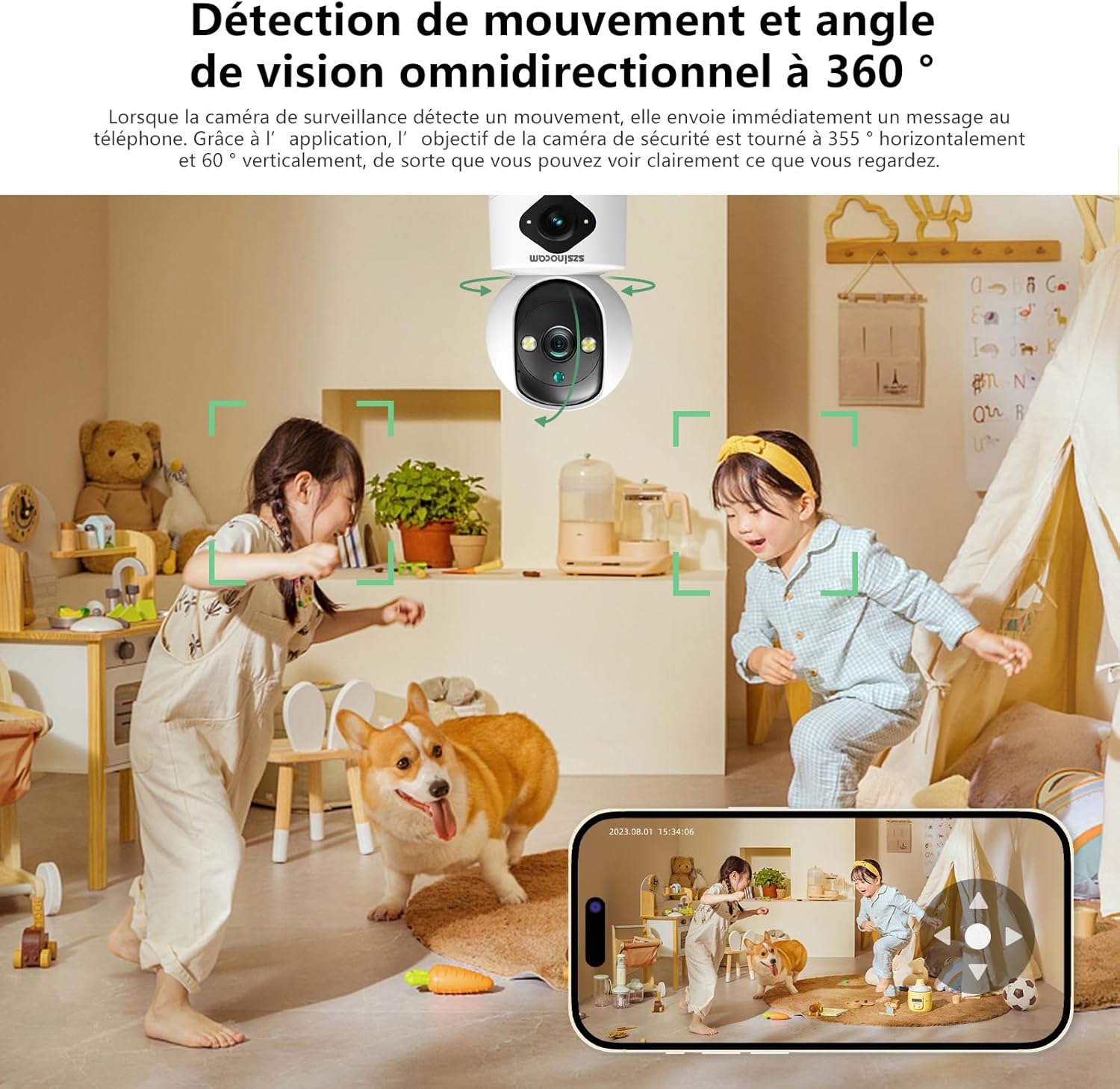
4.3 Lorgaireachd Gluasaid agus Rabhaidhean
Configure motion detection settings in the application:
- Dèan comas / à comas: Turn motion detection on or off.
- Cugallachd: Adjust the detection sensitivity to minimize false alarms.
- Rabhaidhean: Faigh fiosan putaidh air an inneal gluasadach agad nuair a lorgar gluasad.
- Sònaichean Gnìomhachd: Mìnich raointean sònraichte taobh a-staigh a’ chamara view airson lorg gluasad.

Figure 6: Motion Detection and Wide Angle View
4.4 Modhan Sealladh Oidhche
The camera offers three night vision modes for optimal viewing in various low-light conditions:
- Modh fo-dhearg: Provides clear black and white images in complete darkness using infrared LEDs.
- Sealladh Oidhche Làn-Dathte: Utilizes built-in spotlights to provide full-color images even in very low light.
- Modh Tuigseach: Automatically switches between infrared and full-color modes based on detected motion or light conditions.
5. Roghainnean stàlaidh
The Szsinocam Wi-Fi Camera offers flexible installation to suit your needs:
- Stàladh balla: Use the provided mounting bracket and screws to secure the camera to a wall.
- Suidheachadh uachdar còmhnard: Simply place the camera on any flat surface like a table, shelf, or desk.
- Stàladh mullach: Attach the camera to the ceiling using the mounting bracket for an overhead view.

Figear 7: Roghainnean Stàlaidh Sùbailte
6. Cumail suas
- Glanadh: Cleachd clò bog, tioram gus lionsa agus bodhaig a’ chamara a ghlanadh. Na cleachd innealan-glanaidh leaghaidh no stuthan sgrìobach.
- Ùrachaidhean firmware: Regularly check the mobile application for firmware updates. Keeping your camera's firmware updated ensures optimal performance, new features, and security enhancements.
- Suidheachaidhean Àrainneachdail: Ensure the camera is operated within its specified temperature and humidity ranges. Avoid direct exposure to extreme weather conditions if installed outdoors without proper protection.
7. A ’dèanamh trioblaid
| Trioblaid | Adhbhar a dh’fhaodadh a bhith ann | Fuasgladh |
|---|---|---|
| Cha bhith an camara a’ dol air. | Power adapter or cable faulty; no power from outlet. | Check power connection. Try a different outlet or USB cable/adapter. |
| Unable to pair camera with app. | Incorrect Wi-Fi password; camera too far from router; 5GHz network used; QR code not scanned properly. | Ensure correct 2.4GHz Wi-Fi password. Move camera closer to router. Ensure QR code is clear and camera lens is clean. Reset camera if necessary. |
| Càileachd droch ìomhaigh. | Lionsa salach; solas neo-iomchaidh; cùisean leud-bann lìonra. | Clean the camera lens. Ensure adequate lighting or enable appropriate night vision mode. Check Wi-Fi signal strength. |
| Cha deach rabhaidhean lorgaidh gluasad fhaighinn. | Motion detection disabled; app notifications turned off; incorrect sensitivity. | Enable motion detection in app. Check phone notification settings. Adjust sensitivity. |
| Cairt SD gun chlàradh. | SD card full, faulty, or not formatted; recording settings incorrect. | Format SD card via app. Replace SD card if faulty. Check recording schedule/settings. |
8. Sònrachaidhean
| Feart | Mion-fhiosrachadh |
|---|---|
| Brand | SZSINOCAM |
| Modail | B0CPXDFVRP |
| Fuasgladh fhathast èifeachdach | 3 BP |
| An Luas Shutter as àirde | 1/30 diogan |
| Meudan pacaid (L x W x H) | 12.8 x 10.6 x 8.7 ceudameatairean |
| Cuideam pacaid | 0.36 cileagram |
| Ceangalachd | Wi-Fi (2.4GHz/5GHz) |
| Stòradh | Cairt Micro SD (suas ri 256GB), Stòradh Neòil |
| A’ chiad cheann-latha ri fhaighinn | 16 Dùbhlachd 2023 |
Nota: Faodaidh mion-chomharrachadh atharrachadh gun rabhadh ro-làimh.
9. Barantas agus Taic
For warranty information and technical support, please refer to the contact details provided with your purchase or visit the official SZSINOCAM weblàrach. Cùm do chuidhteas ceannach mar dhearbhadh ceannach airson tagraidhean barantais.
Airson tuilleadh cuideachaidh, faodaidh tu cuideachd fios a chuir chun neach-reic tron àrd-ùrlar far an deach an toradh a cheannach.
Ask a question about this manual
Ask about setup, troubleshooting, compatibility, parts, safety, or missing instructions. Manuals+ will review the question and use this page’s manual context to help answer it.