
1. Toradh thallview
The Irfora SZ305 is a professional digital multimeter designed for accurate and rapid measurement of various electrical parameters. It features a high-definition backlit LCD display for clear readings in diverse environments and a retractable stand for convenient use.
Tha na prìomh dhleastanasan a’ gabhail a-steach:
- AC / DC Voltage agus Tomhas gnàthaichte
- Diode, Resistance, and Capacitance testing
- Tomhas tricead
- Buzzer continuity test
- hFE Triode testing for NPN/PNP transistors
- Vol neo-conaltraidhtage (NCV) lorg
- Battery detection (1.5V, 3V, 9V, 12V)

Image 1.1: The Irfora SZ305 Digital Multimeter highlighting its various measurement functions including AC/DC voltage/current, diode, capacitance, frequency, buzzer, resistance, NCV induction, hFE, and battery detection.
2. Fiosrachadh Sàbhailteachd
Please read and understand all safety instructions before operating the multimeter. Failure to follow these instructions may result in electric shock, fire, or damage to the device.
- Always ensure the multimeter is set to the correct function and range before making any measurements.
- Na feuch ri tomhas voltages or currents exceeding the maximum specified limits for the device.
- Bi air leth faiceallach nuair a bhios tu ag obair le cuairtean beò. Fuaim àrd.tagfaodaidh e a bhith cunnartach.
- Thoir sùil air uèirichean deuchainn airson milleadh mus tèid an cleachdadh. Na cleachd ma tha an t-inslitheach sgàinte no millte.
- Do not operate the multimeter if it appears damaged or is not functioning properly.
- Avoid using the multimeter in wet environments or during electrical storms.
- Cuir bataraidhean ùra an àite a chèile sa bhad nuair a nochdas comharra bataraidh ìosal gus dèanamh cinnteach gu bheil na leughaidhean ceart.
- Always disconnect test leads from the circuit before changing functions or ranges.
3. Suidheachadh agus Cleachdadh Tùsail
3.1 Stàladh bataraidh
The multimeter requires batteries for operation. To install or replace batteries:
- Dèan cinnteach gu bheil an multimeter dheth agus gu bheil na uèirichean deuchainn air an dì-cheangal.
- Lorg còmhdach roinn a’ bhataraidh air cùl an inneil.
- Cleachd screwdriver gus an roinn fhosgladh.
- Insert new batteries, observing correct polarity (+ and -).
- Cuir an àite còmhdach roinn a’ bhataraidh agus tèarainte leis an sgriubha.
3.2 Using the Retractable Support Stand
The multimeter is equipped with a retractable stand on its back for convenient viewing during measurements.
- To deploy the stand, gently pull it outwards from the back of the device until it locks into position.
- Place the multimeter on a flat surface.
- To retract the stand, push it back into its original position until it is flush with the device body.
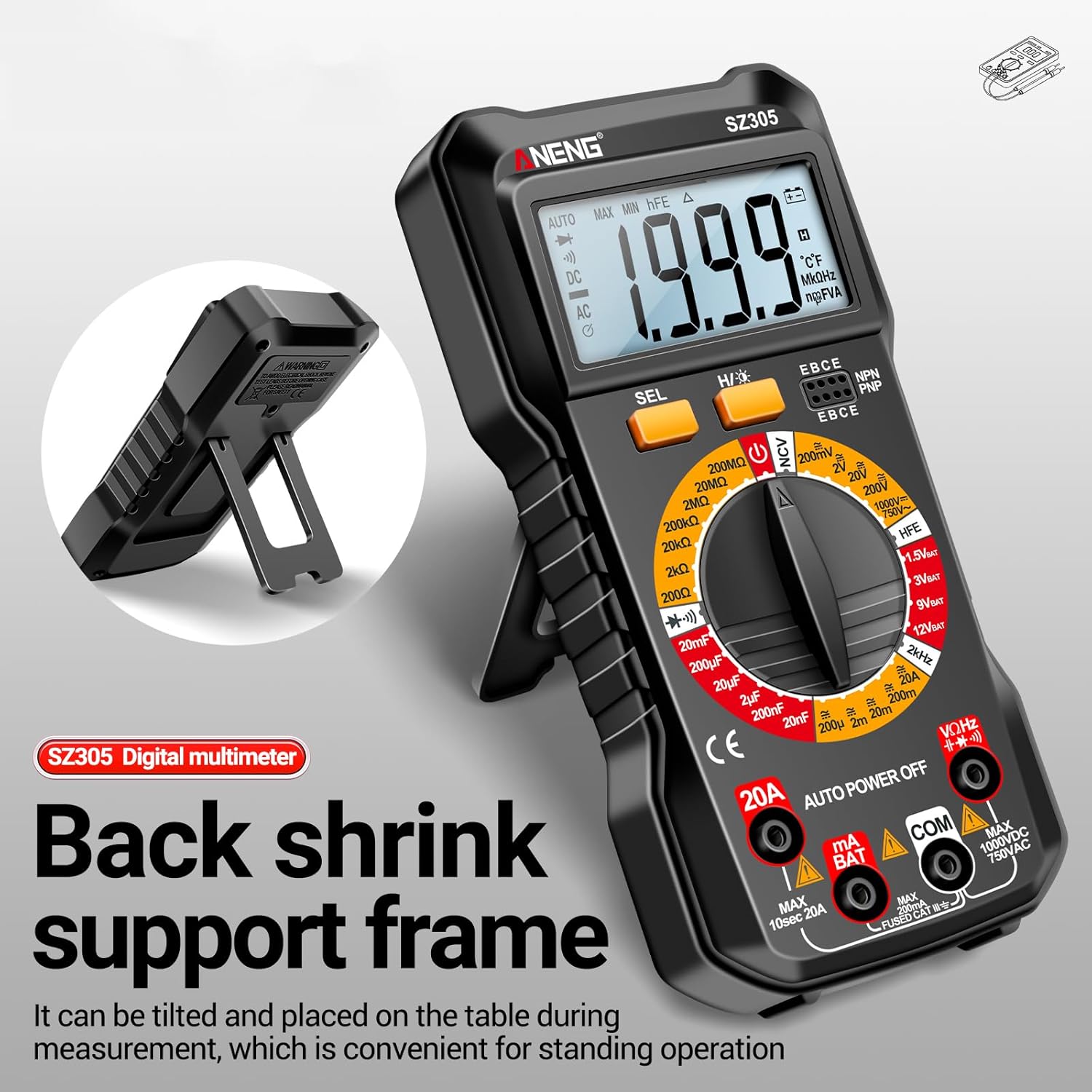
Image 3.1: The Irfora SZ305 Digital Multimeter demonstrating its retractable back support frame for angled viewing on a table.
4. Stiùireadh Obrachaidh
This section details how to perform various measurements with your Irfora SZ305 Digital Multimeter.
4.1 Power On/Off and Backlight
- To power on the device, rotate the rotary switch from "AUTO POWER OFF" to any desired measurement function.
- To power off, rotate the switch back to "AUTO POWER OFF". The device also features an auto-power-off function after a period of inactivity.
- To activate the LCD backlight, press and hold the "H/☝" button. The backlight will illuminate, improving visibility in dark environments. Press and hold again to turn off.

Image 4.1: The Irfora SZ305 Digital Multimeter displaying its high-definition backlit LCD screen, enhancing readability in low-light conditions.
4.2 AC/DC Leabhartage Tomhais
- Insert the red test lead into the "VHz" jack and the black test lead into the "COM" jack.
- Rotate the rotary switch to the "V~" (AC Voltage) no "V=" (DC Voltage) raon.
- Ceangail na proban deuchainn tarsainn air a’ chuairt no a’ phàirt a tha ri thomhas.
- Leugh an voltage luach air a thaisbeanadh air an sgrion LCD.
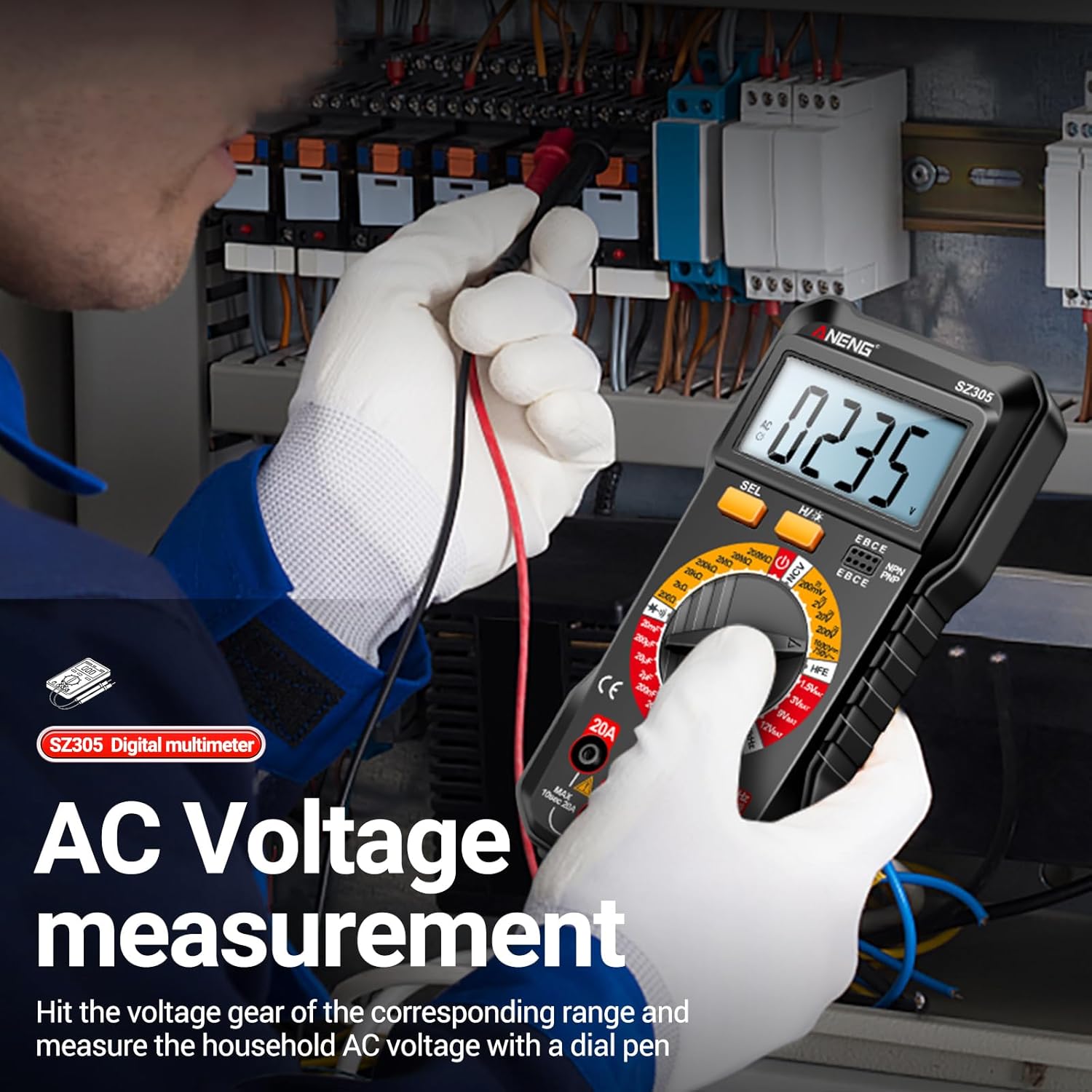
Image 4.2: A user measuring AC voltage with the Irfora SZ305 Digital Multimeter in an electrical panel, demonstrating proper probe placement.
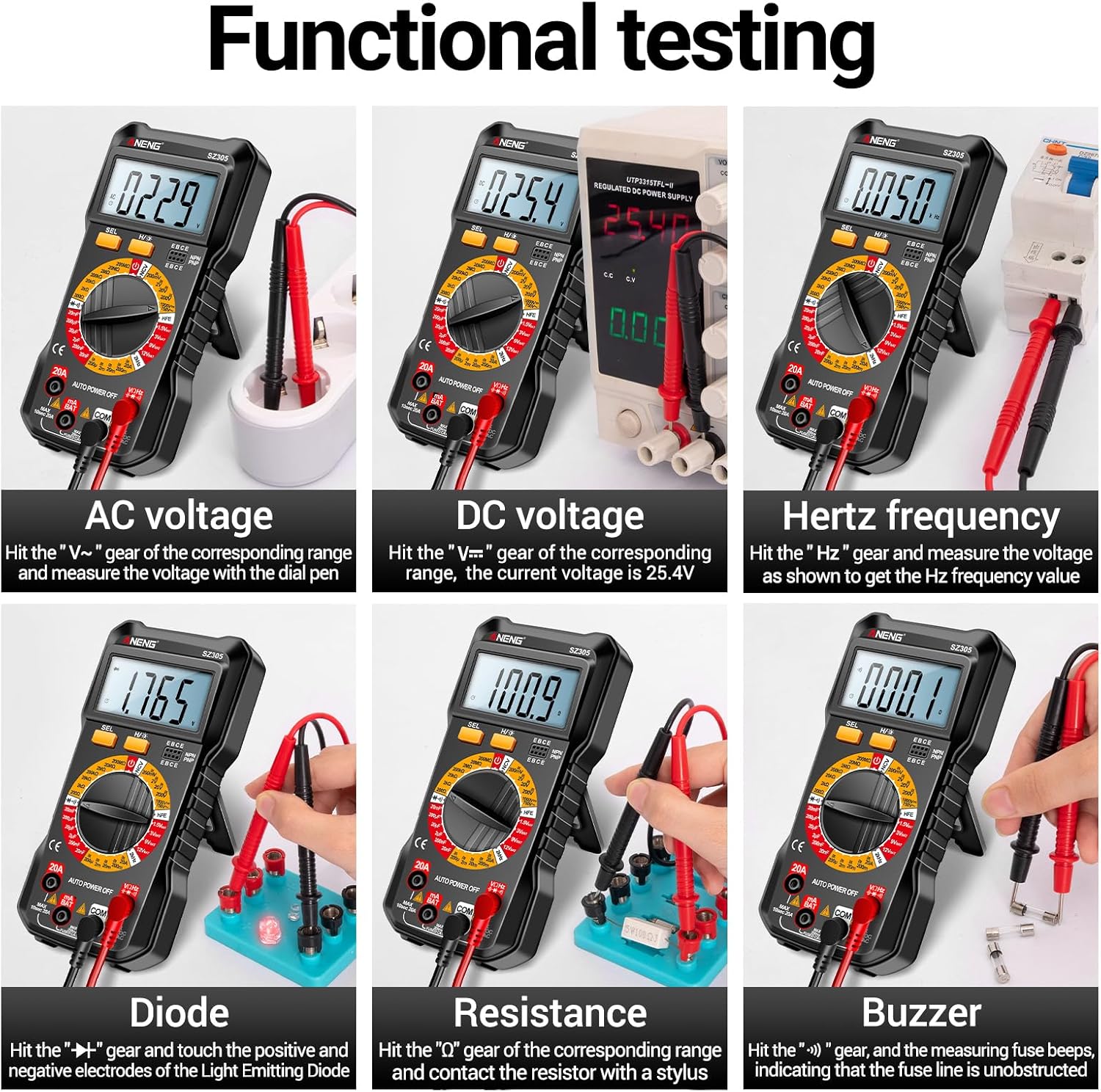
Ìomhaigh 4.3: Eisimpleiramples of functional testing with the Irfora SZ305, showing measurements for AC voltage, DC voltage, Hertz frequency, diode, resistance, and continuity (buzzer).
4.3 Tomhas Sruth AC/DC
Rabhadh: Ensure the circuit is de-energized before connecting the multimeter in series for current measurement. Incorrect connection can blow the fuse or damage the meter.
- Insert the red test lead into the "mA" or "20A" jack (depending on expected current) and the black test lead into the "COM" jack.
- Rotate the rotary switch to the appropriate "mA~" / "mA=" or "20A~" / "20A=" range.
- Fosgail a’ chuairt far a bheil an sruth ri thomhas agus ceangail am multimeter ann an sreath.
- Cuir cumhachd ris a’ chuairt agus leugh luach an t-sruth.

Ìomhaigh 4.4: Eisimpleiramples of functional testing with the Irfora SZ305, showing measurements for 9V, 3V, 1.5V, and 12V batteries, hFE, capacitance, AC current, and DC current.
4.4 Tomhas Resistance
- Insert the red test lead into the "VHz" jack and the black test lead into the "COM" jack.
- Rotate the rotary switch to the "Ω" (Resistance) range.
- Ensure the component to be measured is de-energized. Connect the test probes across the component.
- Leugh luach an aghaidh.
4.5 Tomhas Capacitance
- Insert the red test lead into the "VHz" jack and the black test lead into the "COM" jack.
- Rotate the rotary switch to the "F" (Capacitance) range.
- Dèan cinnteach gu bheil an comas-cothromachaidh air a dhì-luchdachadh gu tur mus dèan thu tomhas gus casg a chur air milleadh air a’ mheatair.
- Ceangail na proban deuchainn thairis air cinn-uidhe a’ cho-dhèanadair.
- Leugh luach a’ chomas.
4.6 Diode Test and Continuity (Buzzer)
- Insert the red test lead into the "VHz" jack and the black test lead into the "COM" jack.
- Rotate the rotary switch to the "Diode/Buzzer" symbol.
- Airson Deuchainn Diode: Ceangail am probe dearg ris an anod agus am probe dubh ri catod an diode. Meud air adharttage drop will be displayed. Reverse the probes; an open circuit ("OL") should be displayed.
- Airson Deuchainn Leantainneachd: Connect the probes across the circuit or component. If resistance is below a certain threshold, the buzzer will sound, indicating continuity.
4.7 Tomhas Tricead (Hz)
- Insert the red test lead into the "VHz" jack and the black test lead into the "COM" jack.
- Rotate the rotary switch to the "Hz" range.
- Ceangail na proban deuchainn thairis air stòr an t-soidhne.
- Read the frequency value displayed.
4.8 hFE Triode Test
This function measures the DC current gain (hFE) of transistors.
- Rotate the rotary switch to the "hFE" position.
- Identify whether the transistor is NPN or PNP type.
- Insert the transistor leads (Emitter, Base, Collector) into the corresponding sockets on the multimeter's hFE test port.
- Read the hFE value displayed on the screen.

Image 4.5: The Irfora SZ305 Digital Multimeter conducting an hFE test, showing a transistor inserted into the dedicated test socket.
4.9 Not-Contact Voltage (NCV) Dearbhadh
Leigidh an gnìomh NCV leat meud AC a lorgtage without direct contact, enhancing safety.
- Rotate the rotary switch to the "NCV" position.
- Bring the top front part of the multimeter close to the suspected AC voltage source (e.g., a live wire, outlet).
- The multimeter will emit an audible alarm and the NCV indicator will flash. The closer the device is to the voltage source, the more urgent the alarm will be.

Image 4.6: The Irfora SZ305 Digital Multimeter demonstrating its Non-Contact Voltage (NCV) detection feature near an electrical outlet, indicating the presence of AC voltage.
4.10 Battery Detection (1.5V, 3V, 9V, 12V)
The multimeter can test common battery voltagtha.
- Rotate the rotary switch to the desired battery voltage range (e.g., "1.5V BAT", "3V BAT", "9V BAT", "12V BAT").
- Ceangail an uèir deuchainn dhearg ri ceann-uidhe dheimhinneach a’ bhataraidh agus an uèir deuchainn dhubh ris a’ cheann-uidhe àicheil.
- Leugh an voltage air a thaisbeanadh air an sgrion.
5. Cumail suas
5.1 Glanadh
Gus an multimeter a ghlanadh, sguab a’ chùis le sanasamp clò agus inneal-glanaidh tlàth. Na cleachd stuthan sgrìobach no fuasglaidhean. Dèan cinnteach gu bheil an inneal dheth agus air a dhì-cheangal bho chuairtean sam bith mus glan thu e.
5.2 Ath-nuadhachadh bataraidh
Refer to section 3.1 for instructions on battery installation and replacement. Replace batteries when the low battery indicator appears on the display to maintain measurement accuracy.
5.3 Ath-shuidheachadh fiùs
If the current measurement function fails, the fuse may need replacement. This typically requires opening the back casing of the multimeter. Refer to the specifications for the correct fuse type and rating. If unsure, consult a qualified technician.
6. A ’dèanamh trioblaid
- No display or weak display:
- Check battery charge. Replace batteries if low.
- Ensure the multimeter is powered on by rotating the switch from "AUTO POWER OFF".
- Leughaidhean ceàrr:
- Dèan cinnteach gu bheil an gnìomh agus an raon ceart air an taghadh airson an tomhais.
- Check test leads for proper connection and damage.
- Verify battery charge. Low batteries can affect accuracy.
- Ensure the circuit or component is properly prepared (e.g., capacitor discharged).
- Tomhas srutha nach eil ag obair:
- Check if the fuse is blown. Replace if necessary (refer to section 5.3).
- Ensure test leads are connected to the correct current jacks ("mA" or "20A").
- Verify the multimeter is connected in series with the circuit.
- NCV function not responding:
- Ensure the rotary switch is set to "NCV".
- Confirm there is an AC voltage source present.
7. Sònrachaidhean
| Feart | Mion-fhiosrachadh |
|---|---|
| Modail | SZ305 |
| Brand | Irfora |
| Taisbeanadh | 1999 cunntadh, LCD le solas cùil |
| Gnìomhan | AC / DC Voltage, AC/DC Current, Resistance, Capacitance, Frequency, Diode, Continuity, hFE, NCV, Battery Test |
| Cumhachd fèin-ghluasadach dheth | Tha |
| Dath | Dubh |
| Iomradh Dèanadair | TYHDEE24863B |
Note: Detailed measurement ranges and accuracies are typically found in the full product datasheet.