
1. Ro-ràdh
This manual provides essential information for the installation, operation, and maintenance of your SYLVOX 43-inch Outdoor Signage TV (Model SS43A0KAGD). Please read this manual thoroughly before using the product to ensure proper function and safety. This television is designed for commercial outdoor use, offering high brightness and robust weather protection.
2. Fiosrachadh Sàbhailteachd
Lean na ceumannan sàbhailteachd a leanas gus casg a chur air milleadh air an toradh agus gus sàbhailteachd an neach-cleachdaidh a dhèanamh cinnteach:
- Solar cumhachd: Dèan cinnteach gu bheil an stòr cumhachd a rèir an voltage riatanasan air an sònrachadh air leubail an toraidh.
- Uisge agus Taiseachd: While the TV is IP55 waterproof, avoid direct high-pressure water jets. Ensure all port covers are securely closed when not in use.
- Fionnarachadh: Na cuir bacadh air fosglaidhean fionnarachaidh. Tha feum air sruth-adhair iomchaidh gus casg a chur air cus teasachadh.
- Stàladh: Use appropriate mounting hardware and follow VESA standards (400 x 200 mm) for secure installation. Professional installation is recommended for outdoor environments.
- Glanadh: Dì-cheangail an cumhachd mus glan thu e. Cleachd clò bog, tioram.amp aodach. Seachain ceimigean cruaidh.
- Teòthachd: Operate the TV within the specified temperature range (-4°F to 113°F).
3. Pasgan-susbaint
Dèan cinnteach gu bheil a h-uile nì anns a’ phacaid:
- SYLVOX 43-inch Outdoor Signage TV
- Smachd Iomallach (2 bataraidh AAA air an toirt a-steach)
- Corda cumhachd
- Leabhar-làimhe neach-cleachdaidh
- Cairt Barantais
- Screws for mounting (BM8X14MM for full motion cantilever mount, BM8X28MM & Gasket for fixed wall mount)

Figure 3.1: Included accessories with the SYLVOX 43-inch Outdoor Signage TV.
4. Toradh thallview
4.1 Prìomh fheartan
- Taisbeanadh: 43-inch 4K UHD (3840x2160) LED display with 1000 nits brightness and 1.07 Billion Colors.
- Seasmhachd: IP55 waterproof rating, corrosion-resistant and scratch-resistant metal casing. Designed for 7x24 hour operation with temperature protection.
- Siostam-obrachaidh: Linux-based system with pre-installed applications (Netflix, Pandora, Facebook, YouTube, Twitter). Note: Signage 1.0 series does not support downloading additional apps.
- Ceangal: Built-in ATSC & NTSC tuners, Bluetooth, 2.4G WiFi.
- Fuaim: Built-in speakers.

Figure 4.1: SYLVOX 43-inch Outdoor Signage TV in a commercial setting, showcasing its bright 4K display.

Figure 4.2: The TV's IP55 waterproof and wide temperature range capabilities.

Figure 4.3: Visual representation of 4K UHD picture quality and color depth.

Figear 4.4: Os a chionnview of the Linux system and integrated features.
4.2 Puirt agus Ceanglaichean
The TV offers a variety of input and output ports for versatile connectivity:
- RS232
- USB Input x 2 (USB 1.0, USB 2.0, USB 3.0 compatible)
- RJ45 (Ethernet)
- HDMI x 3
- Optical a-mach
- Audio L/R In
- YPbPr In
- Antenna In (ATSC/NTSC Tuner)
- Fòn-cluaise
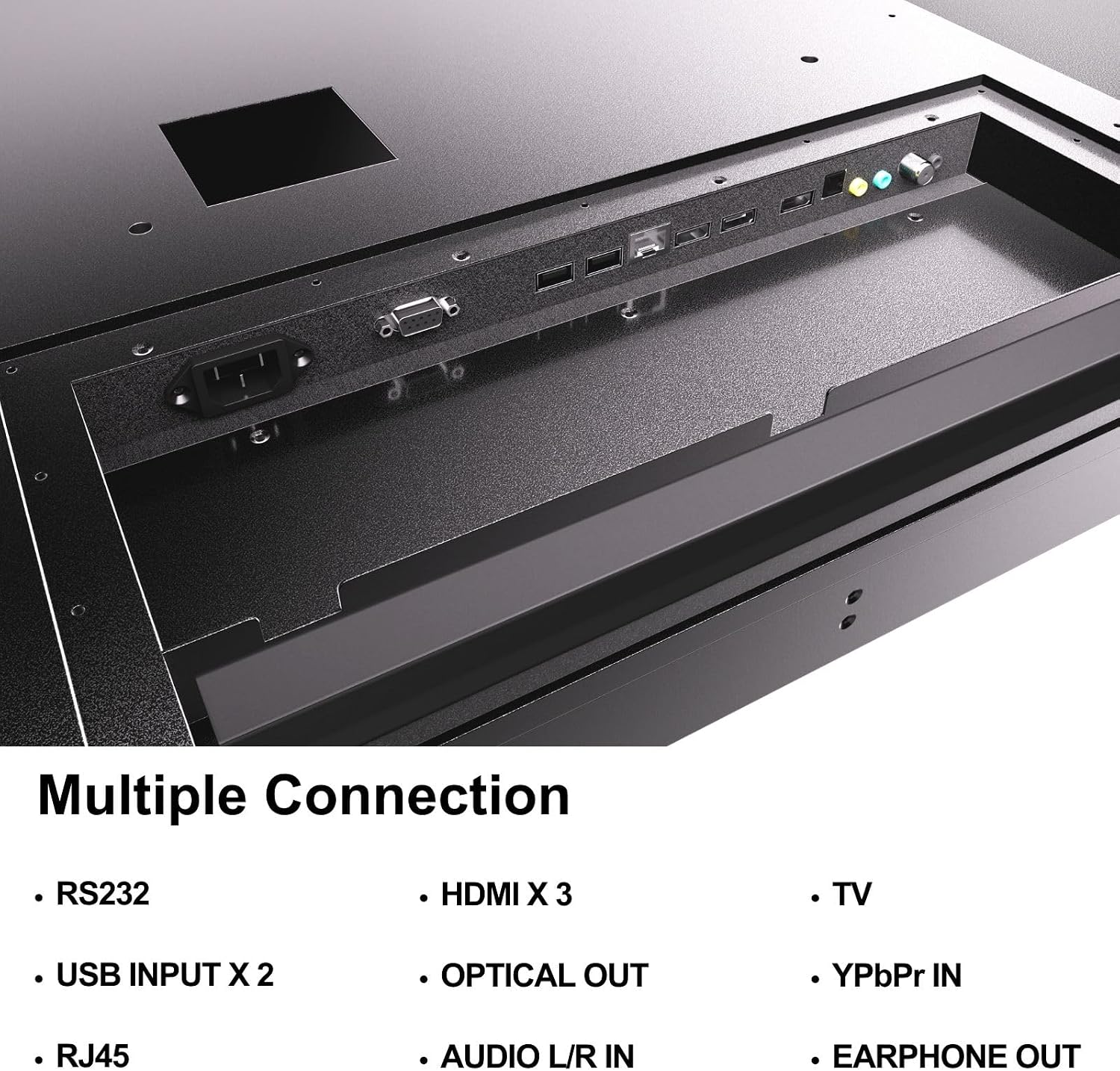
Figure 4.5: Rear panel connections of the SYLVOX Outdoor Signage TV.
5. Suidhich
5.1 Mounting the TV
The SYLVOX Outdoor Signage TV supports wall mounting. Ensure the mounting surface is sturdy enough to support the TV's weight and is suitable for outdoor conditions.
- Tagh àite: Select a location that provides optimal viewing and protection from extreme weather, even with the TV's waterproof rating.
- Stàlaich am balla: Attach a VESA-compatible wall mount (400 x 200 mm) to the desired location according to the mount manufacturer's instructions. Use the provided screws (BM8X14MM for full motion, BM8X28MM with gasket for fixed mount).
- Attach TV to Mount: Carefully lift the TV and secure it to the installed wall mount. Ensure all connections are tight and secure.
5.2 Cumhachd Tòiseachaidh Air adhart
- Ceangal cumhachd: Plug the power cord into the TV's power input and then into a grounded outdoor-rated power outlet.
- Cuir a-steach bataraidhean: Fosgail roinn bataraidh an smachd iomallach agus cuir a-steach an dà bataraidh AAA, a’ cumail sùil air polarachd.
- Cumhachd air: Brùth am putan cumhachd air an smachd iomallach no an telebhisean.
- Draoidh rèiteachaidh tùsail: Follow the on-screen instructions to select language, time zone, and perform initial channel scanning.
5.3 Ceangal lìonra
To access smart TV features and streaming applications, connect the TV to your network.
- Ceangal Wi-Fi: Navigate to the TV's settings menu, select 'Network', then 'Wi-Fi'. Choose your network from the list and enter the password.
- Ceangal Ethernet: Connect an Ethernet cable from your router to the RJ45 port on the TV. The TV will automatically detect the wired connection.
- Bluetooth: For connecting audio devices, go to the Bluetooth settings, enable Bluetooth, and pair with your desired device.
6. Stiùireadh Obrachaidh
6.1 Gnìomhan Bunasach Tbh
- Cumhachd: Brùth an Cumhachd button on the remote to turn the TV on or off.
- Tobar a-steach: Brùth an Cuir a-steach button to cycle through available input sources (HDMI 1/2/3, TV, YPbPr, USB).
- Meud: Cleachd an Leabhar +/- putanan gus an ìre fuaim atharrachadh.
- Seanail: Cleachd an Sianal +/- buttons to change channels when using the built-in tuner.
- Seòladh: Cleachd na saighdean stiùiridh agus OK putan gus seòladh tro na clàran-bìdh.
6.2 Feartan Tbh Smart
The TV runs on a Linux operating system and comes with several pre-installed applications:
- Access the home screen to view and launch applications like Netflix, Pandora, Facebook, YouTube, and Twitter.
- Use the remote control's dedicated app buttons (if available) for quick access.
- Note that the Signage 1.0 series does not support downloading additional applications.
6.3 Screencasting (Android Only)
The TV supports screencasting from Android mobile phones:
- Ensure your Android device and the TV are connected to the same Wi-Fi network.
- On your Android phone, enable the screen mirroring or screencasting feature (names may vary by device, e.g., 'Smart View', 'Cast', 'Wireless Display').
- Select your SYLVOX TV from the list of available devices.
6.4 Vertical/Horizontal Display
The TV can be installed and operated in both horizontal (landscape) and vertical (portrait) orientations. When using the screen vertically, the display direction is adjusted by the input device or content source.
7. Cumail suas
Proper maintenance ensures the longevity and performance of your outdoor TV:
- Glanadh an sgrion: Sguab an sgrion gu socair le clò bog, gun lint. Airson comharran stòlda, sguab beaganampNigh an clò le uisge. Na spraeadh innealan-glanaidh gu dìreach air an sgrion.
- A’ glanadh an Casing: Cleachd bog, damp cloth to clean the metal casing. Seachain innealan-glanaidh sgrìobach no fuasglaidhean.
- Còmhdaichean Puirt: Regularly check that all unused port covers are securely sealed to maintain the IP55 waterproof rating.
- Sgrùdaidhean Àrainneachdail: Periodically inspect the TV and mounting hardware for any signs of wear, corrosion, or damage, especially after severe weather conditions.
- Ùrachaidhean bathar-bog: Check for available software updates through the TV's settings menu to ensure optimal performance and security.
8. A ’dèanamh trioblaid
If you encounter issues with your SYLVOX Outdoor Signage TV, refer to the following common problems and solutions:
| Trioblaid | Adhbhar a dh’fhaodadh a bhith ann | Fuasgladh |
|---|---|---|
| Gun chumhachd | Power cord disconnected; no power from outlet; remote batteries dead. | Check power cord connection; test outlet; replace remote batteries. |
| Gun dealbh, ach tha fuaim ann | Stòr inntrigidh ceàrr air a thaghadh; duilgheadas le inneal taobh a-muigh. | Press 'Input' button to select correct source; check external device connections. |
| Gun fhuaim, ach tha dealbh ann | Tha an fhuaim air a mhùchadh no ro ìosal; duilgheadas le inneal claisneachd taobh a-muigh. | Unmute volume or increase level; check audio cables for external devices. |
| Wi-Fi connection unstable or disconnected | Router issue; TV too far from router; incorrect password. | Restart router; move TV closer or use a Wi-Fi extender; re-enter Wi-Fi password. |
| Chan eil smachd iomallach ag obair | Batteries dead or incorrectly inserted; obstruction between remote and TV. | Replace batteries; ensure clear line of sight to TV's IR receiver. |
If the problem persists after trying these solutions, please contact SYLVOX customer support.
9. Sònrachaidhean
| Ainm Modail | SS43A0KAGD |
| Meud sgrion | 43 òirlich |
| Teicneòlas taisbeanadh | LED |
| Fuasgladh | 4K (3840x2160) |
| Ìre Ath-nuadhachaidh | 60 Hz |
| Maximum Display Brightness | 1000 Nit |
| Co-mheas coimeas | 3000:1 |
| Àm Freagairt | 8 milliseconds |
| Ìre dìon-uisge | IP55 |
| Siostam-obrachaidh | Linux |
| Teicneòlas ceangail | Wireless (Bluetooth, Wi-Fi), Wired (HDMI, USB, RJ45, RS232) |
| Teachd-a-steach claisneachd | HDMI, Optical, USB, Audio L/R In |
| Cruth chomharran | ATSC, NTSC |
| Total Number of HDMI Ports | 3 |
| Gu h-iomlan puirt USB | 2 |
| Meudan toraidh (D x W x H) | 3.4"D x 38.6"W x 22.4"H |
| Inbhe Suidheachaidh VESA | 400 x 200 mm |
| Dètage | 120 Watt-uairean |
| Dèanadair | Kontech Electronics Co., Ltd. |
| UPC | 810079224838 |
10. Barantas agus Taic
10.1 Fiosrachadh Barantais
SYLVOX provides a Barantas an neach-dèanamh 2-bliadhna for this product. This warranty covers defects in materials and workmanship under normal use. Please retain your proof of purchase for warranty claims.
10.2 Taic teachdaiche
If you require assistance with installation, operation, troubleshooting, or warranty service, please contact SYLVOX customer support. We recommend checking the product upon receipt to ensure it is in good condition and functions normally.
For further support, please visit the official SYLVOX website or refer to the contact information provided on your warranty card.