
OQIMAX CP212-Vitt
OQIMAX Bluetooth 5.0/5.3 Transmitter Receiver 2-in-1 Audio Adapter
Model: CP212-Vitt
Ro-ràdh
The OQIMAX Bluetooth 5.0/5.3 Transmitter Receiver is a versatile 2-in-1 audio adapter designed to enhance your audio experience. It allows you to wirelessly transmit audio from non-Bluetooth devices or receive audio on non-Bluetooth devices, offering flexibility for various home and car audio setups. Featuring Bluetooth 5.3 technology and CVC noise reduction, it ensures stable connections and clear sound quality.
This adapter supports both Transmitter (TX) and Receiver (RX) modes, making it compatible with a wide range of devices such as TVs, PCs, MP3/MP4 players, car audio systems, speakers, and headphones. Its compact design and long battery life provide convenience for both stationary and portable use.
Bathar seachadview
Familiarize yourself with the components and controls of your OQIMAX Bluetooth Audio Adapter.

Ìomhaigh: Detailed diagram of the OQIMAX Bluetooth adapter, highlighting its key features: the 3.5mm Audio Port, Type-C Charging Port, RX/TX mode switch, Multi-function Button, and the Connection Indicator Light with its different states (Pairing State - Red/Blue flash, Low Battery Warning - Red flash, Connected - Blue/Red solid).
- Port claisneachd 3.5mm: For connecting to audio sources or output devices using the included AUX cable.
- Port cosgais Type-C: For charging the device using the provided Micro USB cable.
- Suidse RX/TX: Bidh seo ag atharrachadh eadar modhan an ghlacadair (RX) agus an tar-chuir (TX).
- Putan ioma-ghnìomh: Used for powering on/off, pairing, answering/ending calls, and playing/pausing music.
- Connection Indicator Light: Displays the device's status:
- Blue Light (fast flashing): Ready for pairing in RX mode.
- Red Light (fast flashing): Ready for pairing in TX mode.
- Blue Light (solid): Connected in RX mode.
- Red Light (solid): Connected in TX mode.
- Red Light (flashing slowly): Rabhadh bataraidh ìosal.

Ìomhaigh: The OQIMAX Bluetooth adapter package contents, showing the white adapter unit, a 3.5mm audio cable, and a USB charging cable.
Susbaint a’ phacaid:
- OQIMAX Bluetooth 5.0/5.3 Transmitter Receiver
- Càball claisneachd 3.5mm
- Càball cosgais meanbh-USB
- Leabhar-làimhe cleachdaiche
Suidheachadh agus cosgais
Cìs tòiseachaidh
Mus cleachd thu an inneal an toiseach, cuir làn-chosgais air.
- Connect the provided Micro USB charging cable to the Type-C Charging Port on the adapter.
- Ceangail ceann eile a’ chàball USB ri inneal-atharrachaidh cumhachd USB àbhaisteach (nach eil air a ghabhail a-steach) no ri port USB coimpiutair.
- The indicator light will show charging status (specific color/behavior not detailed in source, assume it indicates charging).
- Mar as trice bheir làn chosgais timcheall air 2 uairean a thìde.

Ìomhaigh: The OQIMAX Bluetooth adapter next to a battery icon, illustrating its battery life: up to 8 hours for music playback and 2 hours for a full charge.
Thoir an aire: It is not recommended to use the device while charging, as this may introduce current noise.
Stiùireadh Obrachaidh
Modhan tionndaidh
The device features a physical switch to select between Receiver (RX) and Transmitter (TX) modes. Always shut down the device before switching modes.

Ìomhaigh: An illustration demonstrating the ease of operation, showing the RX/TX switch on the OQIMAX Bluetooth adapter. The top panel shows TX mode used with a TV and headphones, while the bottom panel shows RX mode used with a smartphone and wired headphones.
Modh Glacadair (RX)
In RX mode, the adapter receives Bluetooth audio from your smartphone or other Bluetooth-enabled devices and outputs it to non-Bluetooth audio equipment like wired headphones, car audio systems, or home speakers.
- Dèan cinnteach gu bheil cosgais air an inneal.
- Connect the OQIMAX adapter (B-10S) to your non-Bluetooth audio device (e.g., headphones, car AUX input, speaker) using the 3.5mm audio cable.
- Slide the mode switch to the RX suidheachadh.
- Press and hold the Multi-function Button to power on the device. The blue indicator light will flash rapidly, indicating it is in pairing mode.
- On your Bluetooth-enabled device (e.g., smartphone), search for Bluetooth devices and select "B-10S" to pair.
- Once connected, the blue indicator light will become solid. You can now stream audio wirelessly to your connected non-Bluetooth device.
- To answer/end calls or play/pause music, press the Multi-function Button.

Ìomhaigh: The OQIMAX Bluetooth adapter in Receiver (RX) mode, wirelessly connected to a smartphone and outputting audio to a speaker, demonstrating its use in a home setting.
Modh Transmitter (TX)
In TX mode, the adapter transmits audio from non-Bluetooth devices (like TVs or PCs) to Bluetooth-enabled headphones or speakers.
- Dèan cinnteach gu bheil cosgais air an inneal.
- Connect the OQIMAX adapter (B-10S) to your non-Bluetooth audio source (e.g., TV, PC, CD player) using the 3.5mm audio cable.
- Slide the mode switch to the TX suidheachadh.
- Press and hold the Multi-function Button to power on the device. The red indicator light will flash rapidly, indicating it is in pairing mode.
- Place your Bluetooth headphones or speaker into pairing mode.
- The OQIMAX adapter will automatically search for and connect to nearby Bluetooth receiving devices.
- Once connected, the red indicator light will become solid. Audio from your non-Bluetooth source will now be transmitted wirelessly to your Bluetooth headphones/speaker.
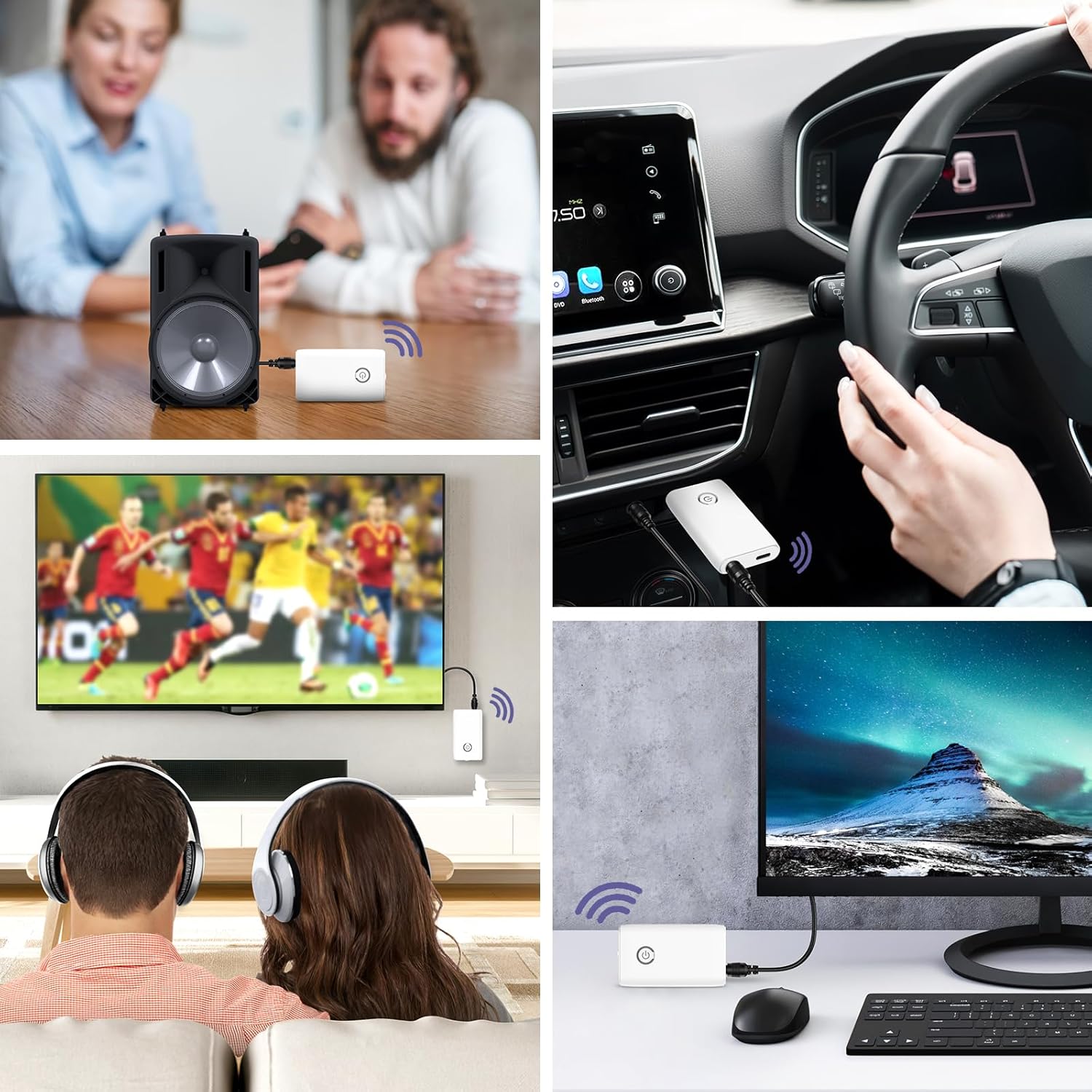
Ìomhaigh: A collage of usage scenarios for the OQIMAX Bluetooth adapter. It shows the adapter transmitting audio from a TV to headphones, from a PC to headphones, and receiving audio from a phone to a car audio system or a portable speaker.
Cumail suas
- Cùm an inneal tioram. Faodaidh taiseachd cron a dhèanamh air cuairtean dealain.
- Do not expose the device to extreme temperatures. High temperatures can shorten the life of electronic devices, damage batteries, and warp or melt certain plastics.
- Na cleachd ceimigean cruaidh, fuasglaidhean glanaidh, no innealan-glanaidh làidir gus an inneal a ghlanadh. Sguab e le clò bog, beagan tioram.amp aodach.
- Avoid dropping, knocking, or shaking the device. Rough handling can break internal circuit boards and fine mechanics.
Fuasgladh thrioblaidean
| Trioblaid | Adhbhar a dh’fhaodadh a bhith ann | Fuasgladh |
|---|---|---|
| Chan eil cumhachd aig an inneal. | Bataraidh ìosal. | Luchdaich a-nuas an t-inneal gu h-iomlan. |
| Cannot pair with another device. | Modh ceàrr air a thaghadh (TX/RX). Chan eil an inneal ann am modh càraid. Other device not in pairing mode. Too far from the other device. | Ensure the correct mode is selected and the device is powered off before switching. Press and hold the Multi-function Button until the indicator light flashes rapidly. Ensure the target Bluetooth device is also in pairing mode. Move devices closer (within 10 meters). |
| Gun fhuaim no droch chàileachd fuaime. | Ceangal càball ceàrr. Meud ro ìosal. Eadar-theachd. Using while charging. | Check that the 3.5mm audio cable is securely connected to both the adapter and the audio device. Adjust volume on both the adapter and the connected audio device. Gluais air falbh bho innealan gun uèir eile no stòran bacadh. Avoid using the device while it is charging to prevent current noise. |
| Bidh an ceangal a’ tuiteam gu tric. | Astar ro mhòr. Bacaidhean. Bataraidh ìosal. | Lùghdaich an astar eadar an adapter agus an inneal ceangailte. Ensure there are no major obstructions (walls, large metal objects) between devices. Cuir cosgais air an inneal. |
Sònrachaidhean
| Brand | OQIMAX |
| Modail Àireamh | CP212-Vitt |
| Tionndadh Bluetooth | 5.3 |
| Teicneòlas ceangail | Bluetooth, AUX (3.5mm), USB (for charging) |
| Feartan sònraichte | Hands-free calling, CVC Noise Reduction, Low Latency, 2-in-1 Transmitter/Receiver |
| Innealan co-fhreagarrach | Headphones, Speakers, Computers, Radios, Car Stereo Systems, Televisions |
| Stòr cumhachd | Bataraidh le cumhachd (ath-phàigheadh) |
| Comas Bataraidh | 250 mAh |
| Play Time (Receiver Mode) | Suas ri 8 uairean a thìde |
| Play Time (Transmitter Mode) | Suas ri 6 uairean a thìde |
| Ùine cosgais | Mu 2 uair a thìde |
| Raon Bluetooth | Suas gu 10 meatairean (33 troighean) |
| Meudan toraidh | 6.4L x 3.7W x 1.2H ceudameatairean |
| Cuideam nì | 11 gram |
| Dath | Geal |
Rabhaidhean Sàbhailteachd
Please adhere to the following safety guidelines for battery use:
- Do not expose the battery to high heat or open flames.
- Na cuir air falbh am bataraidh ann an teine.
- Recycle or dispose of the battery according to local regulations.
- Cùm a-mach à ruigsinn chloinne.
Barantas agus Taic
For warranty information and technical support, please refer to the contact details provided with your purchase or visit the official OQIMAX weblàrach.
Seirbheis teachdaiche: Please contact your retailer or OQIMAX customer support for assistance.
Ask a question about this manual
Ask about setup, troubleshooting, compatibility, parts, safety, or missing instructions. Manuals+ will review the question and use this page’s manual context to help answer it.